You update a price list, yet a client contacts you saying, "The old prices are still showing up." On your own computer, the new content displays properly, making the issue impossible to reproduce.
In website operations, this type of phenomenon—where different people see different things—is the hardest to explain. When we investigate these inquiries, we often find that the root cause is not how the site was built, but rather invisible headers returned by the server.
What makes this tricky is that even after identifying the cause, you might not be able to fix it. Discussions often grind to a halt when you are told, "The application side needs to be modified." If an untouchable legacy system is to blame, you are left with no moves.
"Changes not reflecting" and "always slow" stem from the same place
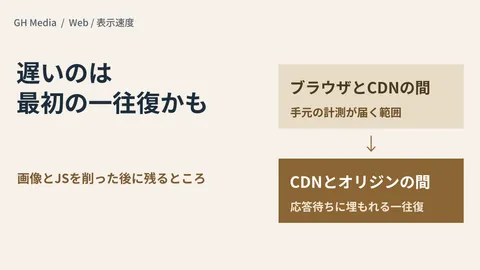
Before a web page reaches a user, its content is cached in multiple locations. Broadly speaking, there are three layers: the visitor's browser, the CDN sitting in front of it, and the server actually generating the page (the origin).
Old content continues to appear because a previous copy lingers in one of these layers. Conversely, if every request travels all the way to the origin server, pages load slowly because caching cannot do its job. While "changes not reflecting" and "always slow" appear to be polar opposites, both stem from the exact same cause: caching is not functioning as intended.
Which way things swing is determined by the headers returned by the origin alongside the response. Three typical ones are:
- Cache-Control — Instructions specifying how long and where this content may be stored
- Set-Cookie — Delivers user-specific values. When present, systems frequently decide that a shared cache copy cannot be created
- ETag / Last-Modified — Markers used to determine whether content has changed
The problem is that these headers are frequently attached automatically deep inside the application. It is not uncommon to see older CMS platforms uniformly appending Set-Cookie to every page, or themes and plugins independently rewriting Cache-Control directives.
Getting stuck when the culprit is an untouchable system
This structure becomes a brick wall for sites whose development agency has changed, or pages running on internal business systems built a decade ago.
Pinpointing the cause is doable. But attempting a fix requires modification estimates, and the source code might not even be on hand. In actual consultations we have handled, as discussed in Taking Over and Maintaining Legacy Sites, assuming that changes must be made to an active system causes both costs and delivery timelines to skyrocket. Even if you propose improvements to display speed, clients often conclude, "If it takes that much effort, we might as well rebuild it from scratch," leaving neither path moving forward.
While image delivery optimization is easy to handle entirely on the outside, as seen in Image Optimization with CDNs, caching the HTML itself has remained tightly bound to instructions from the origin. This is the area that has long remained unfixable from the outside.
Adjustments are now possible after receiving the response
Cache Response Rules, released by Cloudflare in July 2026, address this very constraint.
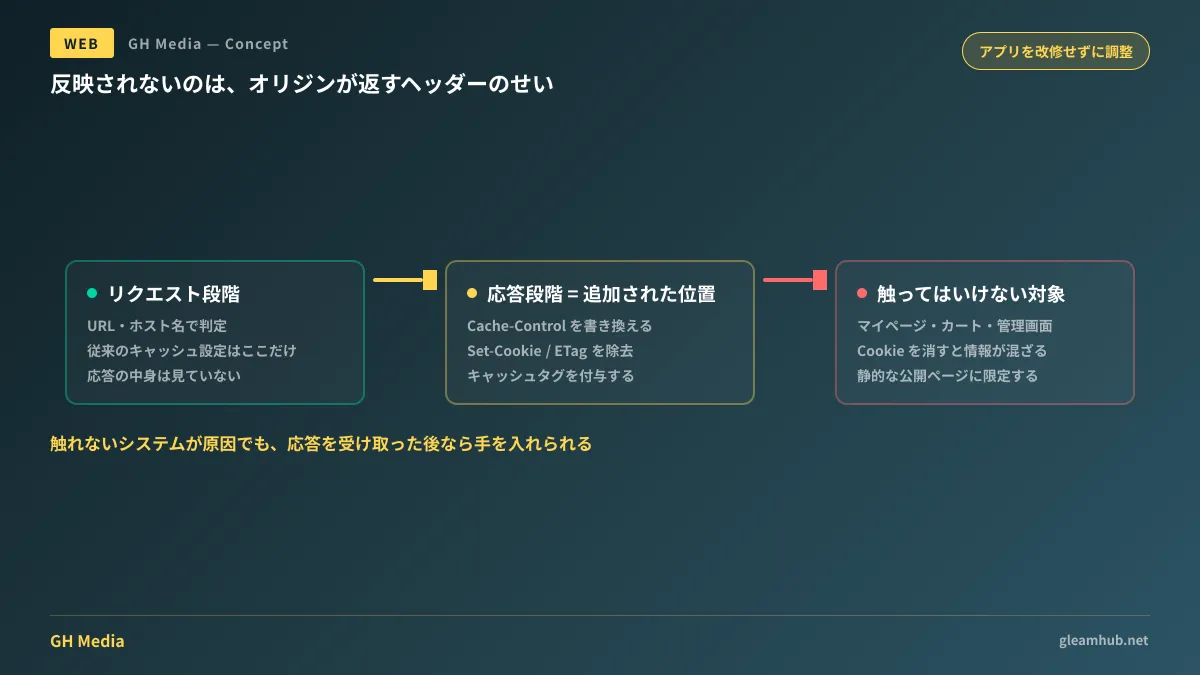
Traditional cache configurations operated based on incoming request details (such as URLs and hostnames). What has now been added is an evaluation phase that occurs after the origin returns a response, but before its content is written to cache. By intercepting processing at this point, you can make adjustments like the following without altering the origin application:
- Rewriting Cache-Control directives
- Adding cache tags so content can be purged in bulk later
- Stripping headers such as Set-Cookie, ETag, and Last-Modified
A classic example cited by Cloudflare itself is a scenario where "content that should be safely cacheable gets routed back to the origin due to extraneous Set-Cookie headers or improper Cache-Control directives." Furthermore, modifying these on the origin side is often difficult or impossible. The feature is positioned as one premised on the cause residing in a place you cannot touch.
As a secondary benefit, switching CDNs also becomes easier. Tasks that previously required aligning header configurations on the origin server during each migration can now be absorbed on the outside.
What changes from the client perspective
While technically this is just an added CDN configuration feature, its implications look quite different from the perspective of the client commissioning the work.
It means that some issues previously answered with "an application overhaul is required" now have the potential to be solved via configuration without code modifications. Consequently, the way you describe symptoms should change as well. Simply saying "the site is slow" or "updates aren't showing up" will usually trigger talks of a full rebuild. However, breaking down the facts as follows will speed up troubleshooting considerably:
- Which pages it occurs on (all pages, or only specific pages)
- Whose environments it occurs in (internal network only, or external visitors as well)
- When it started (immediately following update work, or ongoing for some time)
- Whether the page requires authentication/login
With these four points assembled, an initial triage can determine whether the issue lies on the browser side, can be handled via CDN settings, or truly requires application modifications. Whether you start with the assumption that there are things to check before committing to paid development makes all the difference in practice.
Drawing boundaries to prevent mishaps when fixing from the outside
On the other hand, rewriting cache settings from the outside can have severe side effects if mishandled.
Configuring rules to strip Set-Cookie requires particular caution. Login sessions, cart contents, and in-progress form inputs are frequently stored in cookies; stripping them unconditionally leads to critical incidents where content meant for an individual user is displayed to other visitors.
Therefore, outside adjustments should strictly be limited to "pages that display the exact same content regardless of who views them." This covers static assets such as company profiles, service overviews, articles, images, and stylesheets. Conversely, account dashboards, carts, inquiry confirmation screens, and admin panels must be excluded. Documenting these explicit boundaries before touching any settings serves as your primary risk management.
Verifying the changes solely within the administrator's own browser is also insufficient. Include steps to check the site with caches cleared, across different network connections, and on separate physical devices.
What to do next
Try listing past instances where someone reported that updates to your website were not appearing. Which page, reported by whom, and when? Having just those three details gives you actionable information to hand over to your maintenance provider. While identifying the cause is their job, whether you can supply proper diagnostic clues directly impacts the precision of their answer.
If you have projects put on hold in the past after being told that application modifications were required, the underlying assumptions may have changed. It is well worth verifying whether alternatives to code changes now exist.
GleamHub provides support for diagnosing website loading speed issues, resolving update display problems, and managing the maintenance or renewal of existing websites through our website production and renewal consultation. Available solutions vary depending on your current architecture and contract terms, so please contact us individually. Get in touch via Contact Us.