To speed up page loading, the domain's nameservers were migrated to another service. The operation took only minutes, and the site rendered without issues. However, days later, someone reviewing browser developer tools reached out: "An unrecognized script is being loaded."
No one touched the HTML. Not the development agency, not the internal team, nor the CMS admin panel. Yet the number of loaded files increased.
In August 2026, an operator of a static website containing no JavaScript reported that a tracking script was automatically injected immediately after switching nameservers to Cloudflare, sparking discussion. Far from a freak accident, this is an expected behavior under this architecture.
Why files increase without touching HTML
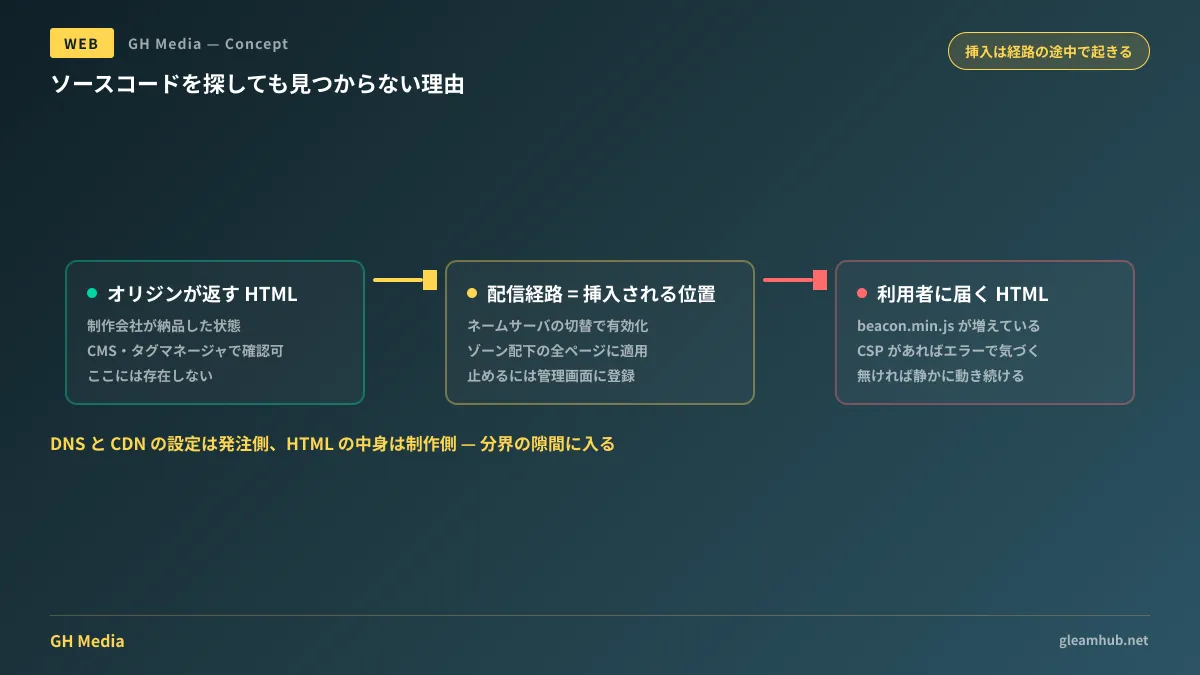
Before a web page reaches a user, the HTML generated by the origin server traverses intermediate delivery paths. Changing nameservers means entrusting that entire path to another provider.
The party managing that path sits in a position where they can modify the passing HTML. In fact, many CDN features operate right at this layer: converting images, swapping caches, and applying compression. Inserting tracking tags is simply another feature within that scope.
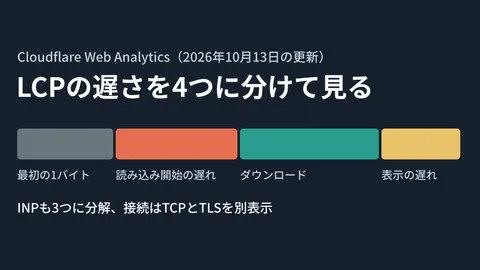
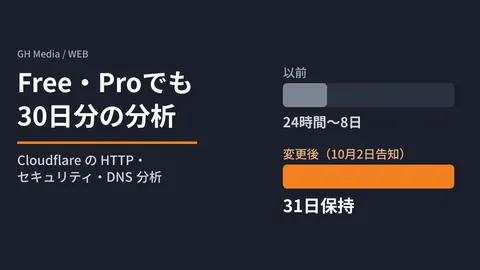
The subject of recent attention was the behavior where Cloudflare Web Analytics automatically injects beacon.min.js into pages under the zone. According to Cloudflare's documentation, enabling this feature automatically injects the script into all pages and subdomains across the zone, requiring separate rules to restrict its scope. Because it is injected as traffic passes through rather than embedded into the site source code, you will not find it anywhere in your codebase.
Similar reports have surfaced for Cloudflare Pages, with shared cases noting that scripts were injected even when operators believed Web Analytics was disabled, with no setting found in the dashboard to turn it off.
Why it is hard to notice: looking in the wrong place
The tricky part of this type of addition is that the troubleshooting process differs from standard workflows.
When investigating what runs on a website, most site managers first look at CMS plugin lists or tag manager dashboards. However, items injected along the delivery path appear in neither. You will not realize it exists until you inspect the actual list of files loaded in the browser.
Once discovered, progress often stalls on the question of "who added this?" The agency denies adding it, and internal staff have no recollection. If DNS changes were executed by a different team member or hosting provider, others might not even know a migration occurred.
Client vs. maintenance: who is responsible?
Because responsibility easily blurs here, drawing clear boundaries in advance is the pragmatic approach.
| Scope | Operator | Handling of this script |
|---|---|---|
| HTML, CMS, Tag Manager | Development / maintenance contractor | Does not exist here |
| DNS, nameserver, and CDN settings | Client or infrastructure team | Injected at this layer |
Under many contracts, DNS management remains with the client. Because the domain is a corporate asset, this division is natural, but it creates a structural issue where delivery path configuration changes occur without being shared with the web development agency. The party responsible for the site's content is left unable to track what is running on the site.
This is not unique to tracking scripts. Outdated pages appearing despite updates is another classic issue where root causes reside on the delivery layer, leading to prolonged troubleshooting.
Three areas where real damage occurs
There are three reasons why this cannot be dismissed as "just an extra lightweight tracking tag."
Discrepancies with delivery specifications. On sites built without JavaScript or architected to restrict loaded external domains, this addition constitutes a direct violation of specifications. For a site marketed on page speed, adding unexpected external requests will alter benchmark measurements.
Undisclosed external data transmissions. Where a website sends visitor data directly ties into its privacy policy and cookie consent design. While Cloudflare explains that Web Analytics does not use cookies, the mere presence of an external transmission destination unknown to site owners undermines the foundation established in External Data Transmission Regulations and Cookie Consent Design. Having undeclared behavior active on a site becomes a compliance liability later.
CSP violations and duplicated analytics. On sites with Content Security Policy enabled, scripts from unauthorized domains are blocked from executing, throwing console errors. Conversely, sites without CSP run the script silently. This creates the ironic situation where sites throwing errors detect the problem faster. Furthermore, running alongside existing analytics tools duplicates pageview tracking. Tracking down discrepancies when metrics diverge becomes just as difficult as Measurement Gaps Caused by Ad Blockers.
Steps to verify and disable
First, verify what is actually being loaded on your website.
- Open the site in a browser and inspect the Network tab in developer tools
- Reload the page to display the complete list of loaded resources
- Identify any resources fetched from domains other than your own
- Cross-reference those domains against your internal list of approved analytics tools and advertising tags
Any unmatched domain represents an unmanaged transmission destination. This verification takes an operator only five minutes once a month. Periodic manual checks are far easier to establish as a routine than building automated change-detection systems.
The method to disable it depends on the injection source. In Cloudflare's case, reported workarounds require adding the site to the Web Analytics dashboard first, then toggling measurement off. The counterintuitive requirement to register a site for management just to disable a feature you never opted into often trips people up. If injected as a hosting platform feature, review that specific service's configuration.
What to do next
Confirm where your site's nameservers point and whether those configurations changed in the past year. Even without a memory of recent changes, clarifying who holds domain ownership and administrative access is well worth the effort. Unnoticed settings often slip in during domain transfers or renewals.
Next, inspect external domains via developer tools to confirm no unapproved endpoints exist. If you discover even a single unexplained domain, it could represent an undisclosed destination missing from your privacy policy.
GleamHub offers website creation and redesign consultations to help audit site delivery architectures, delineate DNS and CDN maintenance responsibilities, and inventory external data transmissions on existing sites. Because options depend on your current architecture and contractual relationships, reach out for an individual consultation via our Contact Us page.