On a corporate site whose maintenance is handled by a web agency, the footer of the admin dashboard shows a prompt to update to "7.1.2." Your own version is still on the 7.0 branch. You heard that WordPress released two security fixes in September and that Cloudflare urgently added WAF rules for WordPress. Is this site patched, or has it been left behind?
In short, even if you are not on the latest 7.1.2, the September fixes are included as long as you are on the fixed version of the branch you use. Conversely, depending on settings and configuration, core automatic updates may not run. Our editorial team read the tags and code in WordPress's public core repository (wordpress-develop) directly, and here we lay out the fixed versions, what was fixed, the conditions under which automatic updates stop, and the steps to check.
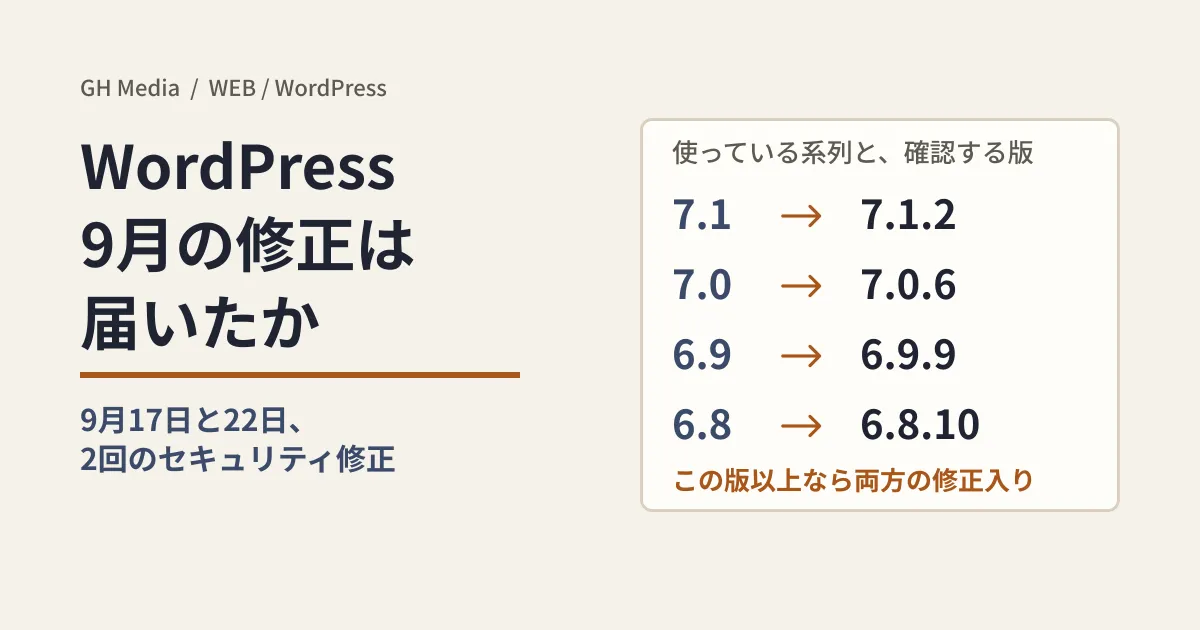
The two September fixes and the "fixed version" for each branch
Going by the tag dates (UTC) in wordpress-develop, the fixes were released in two stages.
- September 17, 2026: 7.1.1. This included 11 fixes to permission checks and output handling. On the same day, the 7.1.1 fixes were also ported to older branches as "security fixes," in commits such as "Security: Backport the WordPress 7.1.1 security fixes to the 7.0 branch."
- September 22, 2026: 7.1.2. This version contains only one fix: "Themes: Restrict path traversal in
locate_template()." The same fix landed in older branches on the same day.
Automatic updates generally move you up within the same branch (see below). So the question to check is not "Am I on the latest version?" but "Am I on the September 22 version or later for my branch?"
| Branch in use | September 17 fixed version | September 22 fixed version (at or above this, both sets of fixes are included) |
|---|---|---|
| 7.1 | 7.1.1 | 7.1.2 |
| 7.0 | 7.0.5 | 7.0.6 |
| 6.9 | 6.9.8 | 6.9.9 |
| 6.8 | 6.8.9 | 6.8.10 |
| 6.7 | 6.7.8 | 6.7.9 |
| 6.6 | 6.6.8 | 6.6.9 |
| 6.5 | 6.5.11 | 6.5.12 |
Each branch from 6.4 down to 4.7 also has tags dated September 17 and 22, with both sets of fixes ported (for example, 6.4.12, 6.0.16, 5.9.18 and 4.7.37). Backports to older branches can be partial; the backport commit for the 4.7 branch lists 6 of the 11 fixes. Branches 4.6 and earlier have no September 2026 tags. The release announcements on WordPress.org could not be opened from our editorial team's environment, so we do not cover their wording.
What was fixed (at the level site owners need)
September 22: the template lookup function no longer reads outside the theme
locate_template() is the function that looks up template files within a theme. In 7.1.2, when the name contains .., a check (_wp_is_template_path_allowed()) was added so the file is loaded only if its actual location is inside the theme or inside core's theme-compat directory. get_page_template(), which determines the template for static pages, also gained a change that inspects the URL-decoded page name with validate_file().
In our test environment (Linux, PHP 8.3.6), we loaded template.php from 7.1.1 and 7.1.2 together with minimal stub functions and called locate_template(). Files inside the theme were found in both versions, while a name pointing to a harmless dummy file outside the theme returned a path in 7.1.1 and an empty string (treated as not found) in 7.1.2. We only confirmed the difference in the function; we did not verify the impact on live sites.
September 17: permission checks and output handling
Grouping the 11 fixes in 7.1.1 by commit title and diff gives the following.
- Permission checks. These include the Ajax handler that generates permalinks, display of the parent post of an attachment on the media edit screen, changing what a note (comment) is attached to via the REST API, writing to internal post types via XML-RPC, and activating network-only plugins via Ajax.
- Output and input handling.
wpautop()and blockquote attributes, comments in the HTML API, URL-derived values on the theme install screen, and header image values in the Customizer. - Restricting block theme template file resolution to the template directory
GitHub's Advisory Database contains an unreviewed record originating from NVD, CVE-2026-93485 (cross-site scripting in WordPress core), with affected versions listed as "7.1 before 7.1.1; 7.0 through 7.0.4; …; 4.7 through 4.7.35," covering everything up to just before the September 17 fixed versions. We could not identify which commit it corresponds to.
Why "it should be on automatic updates" is not reliable
In the 7.1.2 code (should_update_to_version() in class-core-upgrader.php), core automatic updates are decided as follows.
- Updates within the same branch (7.1.1→7.1.2, 6.8.9→6.8.10) are allowed by default unless a setting has been saved
- Updates across branches (7.0.6→7.1.2) are not allowed by default
When our test environment ran this function with stub functions, the three pairs above came out as "update," "update" and "do not update," and setting WP_AUTO_UPDATE_CORE to false made 6.8.9→6.8.10 "do not update" as well (with no setting saved). On sites that chose automatic updates for all versions on the Updates screen (Enable automatic updates for all new versions of WordPress.), or where WP_AUTO_UPDATE_CORE is true, updates across branches are also allowed.
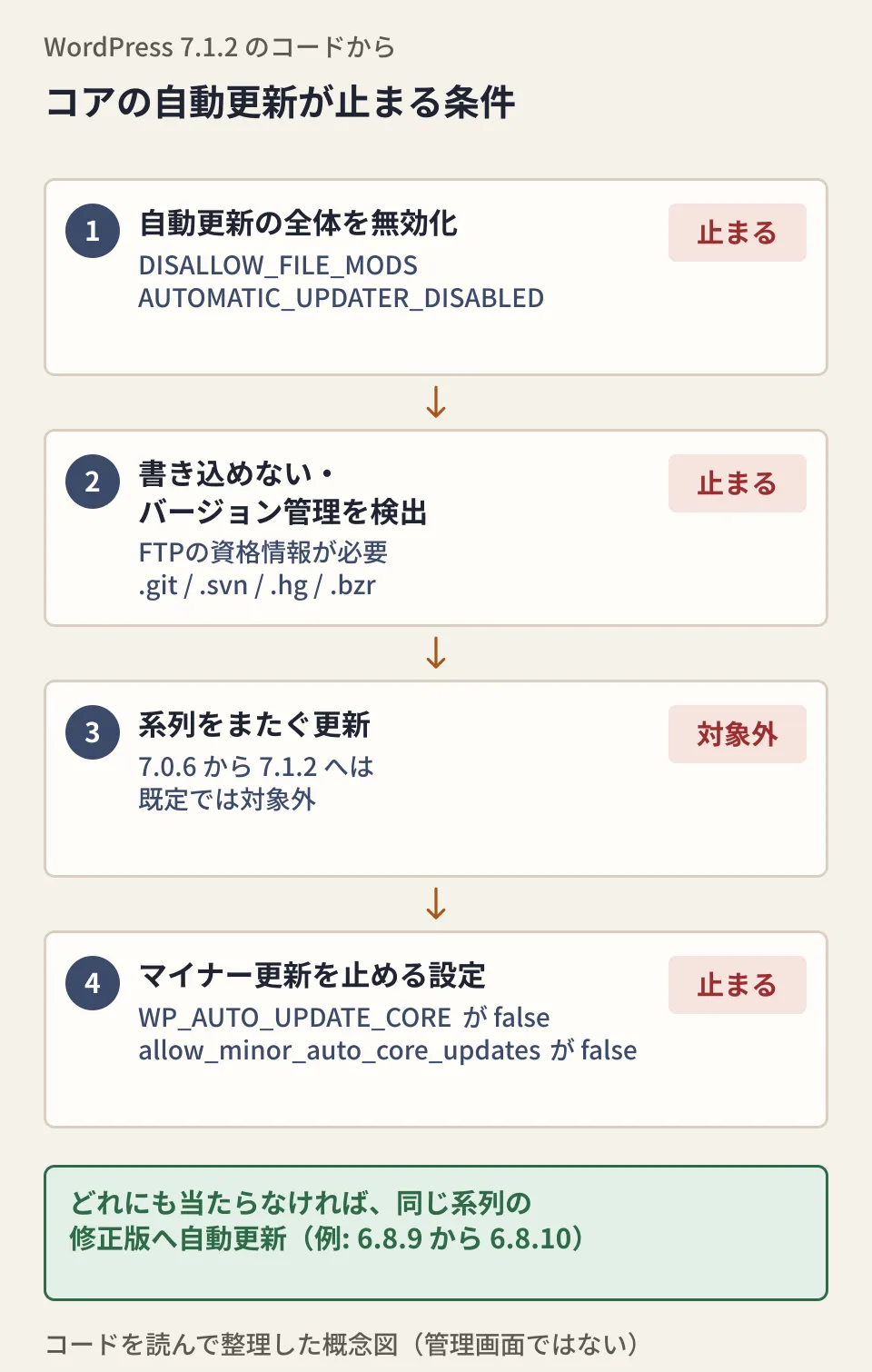
The diagram is our editorial team's summary from reading the 7.1.2 code, not a screen from the admin dashboard. Working from the top, if any one condition applies, core automatic updates do not run.
| Condition (relevant part of the code) | Result |
|---|---|
DISALLOW_FILE_MODS or AUTOMATIC_UPDATER_DISABLED is true, or the automatic_updater_disabled filter | All automatic updates stop |
Files cannot be written (FTP credentials are requested), or .git .svn .hg .bzr exists in the core location or a directory above it | Core is not updated; the administrator is emailed if the update server specifies it |
WP_AUTO_UPDATE_CORE is false, or the allow_minor_auto_core_updates filter returns false | Even fixed versions within the same branch are not installed |
| There is a record of a previous automatic update ending in a critical failure | No further automatic updates are attempted |
Automatic updates are triggered by an update check that runs twice a day via WP-Cron. Based on the code, our editorial team reads it this way: if DISABLE_WP_CRON is true, cron is not triggered by page views, so unless cron is run on the server side, the update check does not run either (unverified on a live server).
If your web agency manages the site with Git, automatic updates stop because version control is detected. As a comment in the code says, the premise is that "if you use version control, updates are handled by that workflow," so this is not a bug.
How to check, and what to ask your web agency
Using an administrator account, check the following in order (screen text is shown in the original English; the wording in the Japanese version has not been confirmed).
- Check your current version. The "Updates" screen in the left menu (
/wp-admin/update-core.php) shows your current version as "Current version: ...". When an update is available, the right side of the footer shows a prompt such as "Get Version 7.1.2" instead of the current version - Compare against the table above. If you are at or above the "September 22 fixed version" for your branch, both September fixes are included
- Check the automatic update status. The same screen shows the automatic update status in one sentence. If it says "This site appears to be under version control.", updates are stopped because version control was detected
- Check Site Health. The "Background updates" test in "Site Health" (
/wp-admin/site-health.php) under "Tools" checks the constants and filters in the table above, version control, write permissions and past failures all at once
If maintenance is outsourced, asking your web agency the following will get you consistent answers (an editorial proposal).
- The current core version, and the date the September 22 fixed version (for your branch) was applied
- Whether core automatic updates are enabled. If they are turned off, the reason (Git workflow, constants or plugins), and the procedure and frequency for applying updates manually
- Whether any custom theme or plugin passes URL or form values to template loading such as
locate_template()orget_template_part(). The core fix protectslocate_template()itself, but it does not cover file loading that themes or plugins implement on their own
We covered why core updates tend to be neglected and how to set up a team in our article on the critical WordPress core vulnerability "wp2shell", and what to look for when assessing your operations in how to answer when asked "Is WordPress safe?".
Treat Cloudflare's WAF rules as a stopgap
In an emergency release on September 25, 2026, Cloudflare added two new rules to the Cloudflare Managed Ruleset: "Wordpress - Path Traversal, Local File Inclusion - CVE:CVE-2026-87902" and "Wordpress - XSS - Comment" (action: Block). The announcement describes CVE-2026-87902 as a high-severity vulnerability that could let unauthenticated attackers read arbitrary files on the server, and strongly recommends applying the latest patches.
Whether CVE-2026-87902 is the same issue as the September 22 fix to locate_template() is unverified. The announcement does not specify affected versions or commits, the wordpress-develop commits carry no CVE number, and we found no record in the GitHub Advisory Database. We do not treat them as the same just because they are similar in type. The relationship between "Wordpress - XSS - Comment" and CVE-2026-93485 is likewise unverified.
A WAF blocks known attack patterns at the entry point and is not a substitute for the core fix. Even sites using the Managed Ruleset should check their version and update separately (availability by plan has not been confirmed).
On October 1, 2026, we directly read the tags, commits and diffs for 7.1.1, 7.1.2 and the 4.7 through 7.0 branches, as well as the 7.1.2 automatic update code, in WordPress's public core repository (wordpress-develop). We checked Cloudflare's WAF announcement (September 25, 2026) in its documentation source repository and the CVE-2026-93485 record in the GitHub Advisory Database. The WordPress.org announcements were not read because access was blocked. The PHP check ran core functions with minimal stub functions; we did not verify a WordPress installation, updates on a live site, or WAF behavior.
To check the update status of your WordPress site or review your maintenance setup, contact us via Website development and maintenance inquiries.
Sources
- Themes: Restrict path traversal in
locate_template()(7.1 branch) — WordPress/wordpress-develop - Tag 7.1.2 — WordPress/wordpress-develop
- Tag 7.1.1 — WordPress/wordpress-develop
- Security: Backport the WordPress 7.1.1 security fixes to the 7.0 branch — WordPress/wordpress-develop
- Security: Backport the WordPress 7.1.1 security fixes to the 4.7 branch — WordPress/wordpress-develop
- class-core-upgrader.php(7.1.2) — WordPress/wordpress-develop
- class-wp-automatic-updater.php(7.1.2) — WordPress/wordpress-develop
- WAF Release - 2026-09-25 - Emergency — Cloudflare Changelog
- GHSA-2pgq-4jch-68j8(CVE-2026-93485) — GitHub Advisory Database