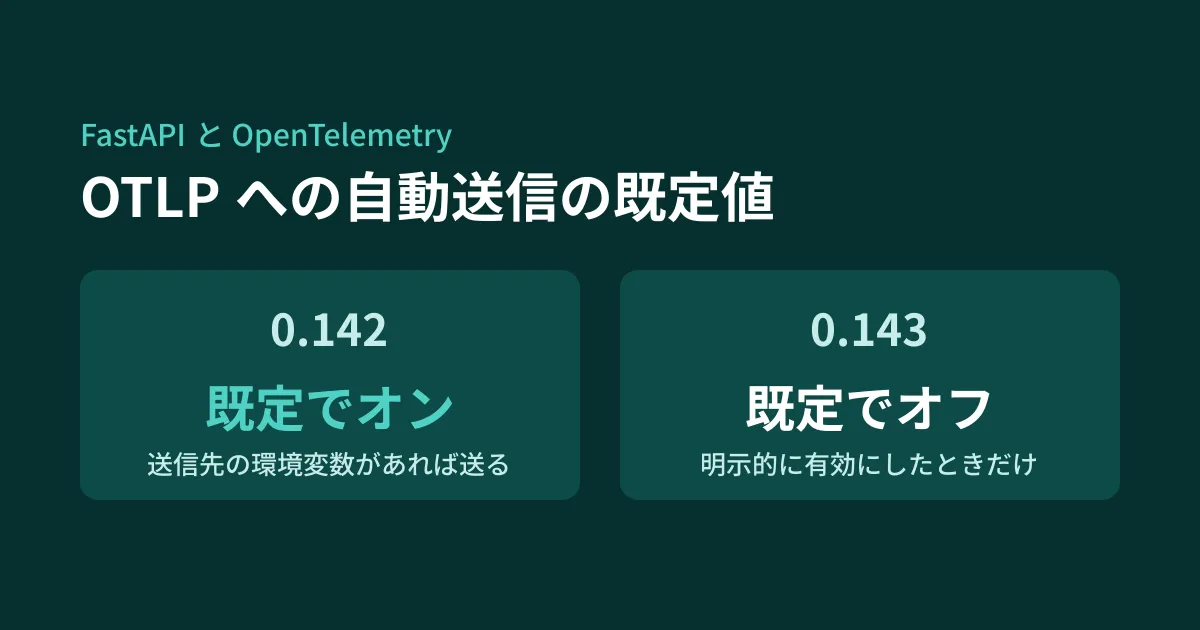
If you maintain internal systems or AI API servers built with FastAPI, you may receive dependency update PRs that bump the version of fastapi. Judging by the version number alone, the update from 0.142 to 0.143 also looks like a small change.
However, between these two versions, the default for whether app runtime data is automatically sent to an external monitoring service changed. OpenTelemetry was built in as standard in 0.142.0 (released September 29, 2026), and in 0.143.0 (released October 8) automatic export configuration changed to "only when explicitly enabled." The later 0.143.1 (October 14) and 0.143.2 (October 15) fixed other bugs, and this default did not change.
Depending on which version you use, monitoring data may stop arriving, or unintended sending may occur. We ran 0.141.1, 0.142.4, and 0.143.0 locally with the destination pointed at a local receiving server, and summarize the results here.
What changed
The official release notes say "Add native OpenTelemetry support" for 0.142.0, and give the following description for 0.143.0.
Automatic OpenTelemetry exporter setup is now opt-in. If you rely on FastAPI to configure exporters from
OTEL_*environment variables, setFASTAPI_OTEL_AUTO_CONFIGURE=trueor useFastAPI(telemetry={"auto_configure": True})to retain the previous behavior.
They also state that apps that configure their own provider and destination (exporter) need no changes, and that automatic configuration is enabled on FastAPI Cloud.
According to the OpenTelemetry page of the official documentation, FastAPI records HTTP request traces, metrics, and logs as standard. When the destination (OTLP endpoint) is specified with the environment variable OTEL_EXPORTER_OTLP_ENDPOINT and automatic configuration is enabled, traces are sent to /v1/traces, metrics to /v1/metrics, and logs to /v1/logs.
When installed with pip install "fastapi[standard]", 0.142 and later also install opentelemetry-sdk and opentelemetry-exporter-otlp-proto-http, which are needed for sending (confirmed in the editorial team's environment; they were not installed with 0.141.1).
Comparing whether data is sent across three versions
We pointed OTEL_EXPORTER_OTLP_ENDPOINT at a local receiving server and sent one normal request and one request that raises an exception. The receiving server was set up to record the destination path of each incoming submission.
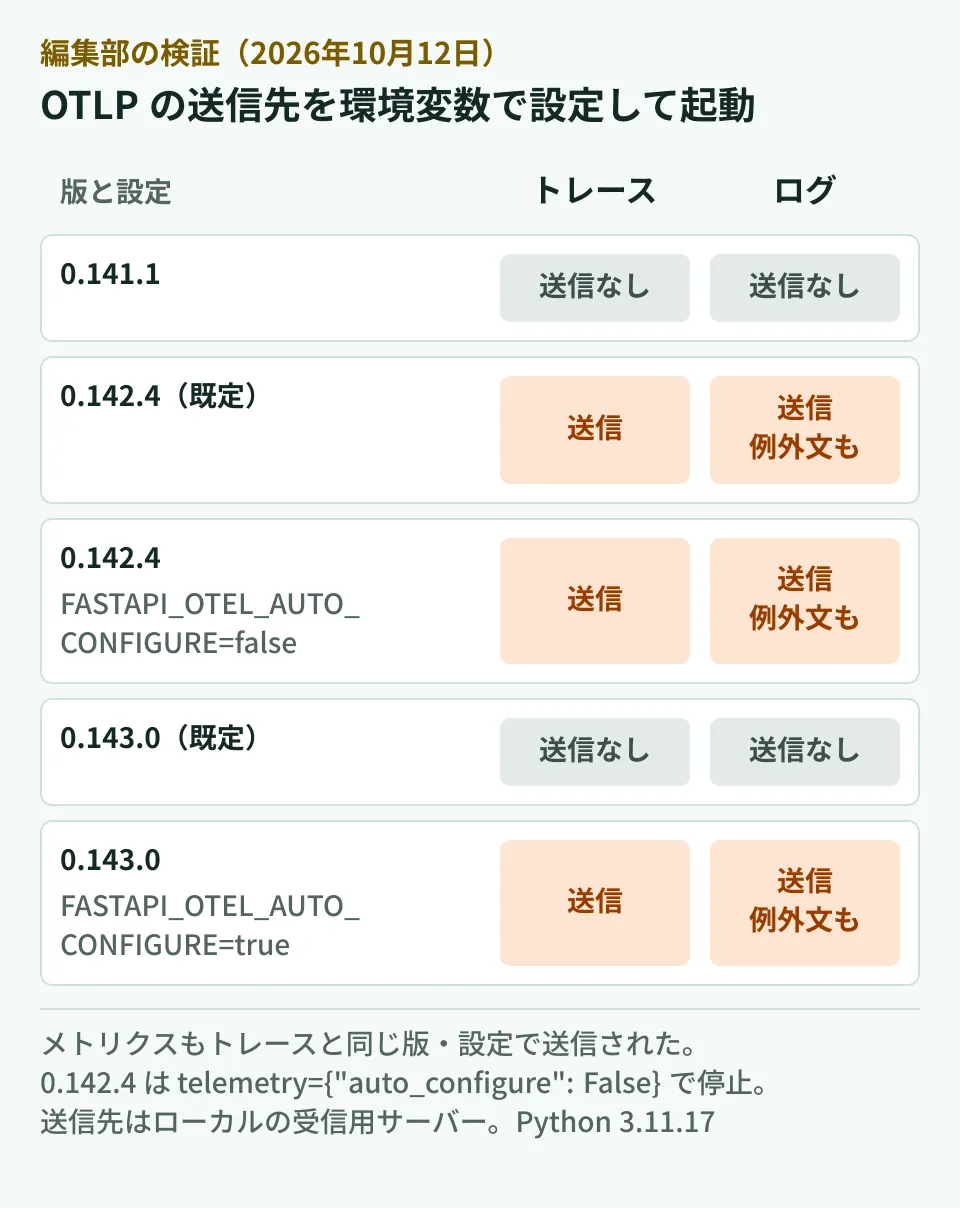
Here is the log output as is.
0.141.1                                   → 送信なし
0.142.4                                   → /v1/traces 1件、/v1/logs 1件、/v1/metrics 3件
0.142.4 + FASTAPI_OTEL_AUTO_CONFIGURE=false → /v1/traces 1件、/v1/logs 1件、/v1/metrics 3件
0.142.4 + telemetry={"auto_configure": False} → 送信なし
0.143.0                                   → 送信なし
0.143.0 + FASTAPI_OTEL_AUTO_CONFIGURE=true  → /v1/traces 1件、/v1/logs 1件、/v1/metrics 3件
0.143.0 + telemetry={"auto_configure": True}  → /v1/traces 1件、/v1/logs 1件、/v1/metrics 4件
(The difference in the number of metrics comes from the sending interval and the timing of process shutdown, not from version differences.)
Two things can be read from this.
- In 0.142.x, automatic sending starts as soon as the endpoint environment variable exists. If
OTEL_EXPORTER_OTLP_ENDPOINTis left in the environment from another library's configuration or from previous monitoring, data is sent to that destination as soon as you upgrade FastAPI to 0.142 - The environment variable
FASTAPI_OTEL_AUTO_CONFIGUREwas added in 0.143.0. Settingfalsein 0.142.4 did not stop sending (the 0.142.4 source has no mention of this environment variable; it was added in 0.143.0). To stop it in 0.142.x, passtelemetry={"auto_configure": False}in code
Exception messages are also sent as logs
The other thing we checked was the content of the logs. In an endpoint that raises an exception, we included a string imitating a password (db password=SECRET-TOKEN-123) in the message.
Both with the 0.142.4 default and with automatic configuration enabled in 0.143.0, the data received at /v1/logs contained this string. The official documentation also says "Exception logs include the exception’s type, message, and stack trace. Messages and stack traces can contain sensitive information." so this is the documented behavior.
When telemetry={"logs": False} was passed, traces and metrics were sent, logs were no longer sent, and the string did not arrive.
Exception messages can contain SQL fragments, responses from external APIs, values entered by users, and so on. Before enabling sending, you should check whether the destination is a monitoring platform managed in-house or an external SaaS, and where and for how long the data is stored. The documentation suggests removing such data with a process that modifies or deletes logs (a log processor), or setting logs to False.
Note that for warning logs about request validation errors (422), the documentation says "These logs do not include the invalid input," so the input values themselves are not included.
What to check for each version
The following is the editorial team's summary based on the results above.
Upgrading from 0.141 or earlier to 0.143 Nothing is sent by default, so behavior does not change. If you want to newly send data to monitoring through FastAPI, set FASTAPI_OTEL_AUTO_CONFIGURE=true or telemetry={"auto_configure": True}.
If you are using 0.142.x Check whether the production environment variables include OTEL_EXPORTER_OTLP_ENDPOINT (or an endpoint setting starting with OTEL_). If they do, data is already being sent. If the sending is intended, upgrading to 0.143 will stop the sending, so add FASTAPI_OTEL_AUTO_CONFIGURE=true to the environment before upgrading. If it is not intended, upgrade to 0.143 or pass telemetry={"auto_configure": False}.
If you already configure OpenTelemetry yourself According to the documentation, FastAPI uses the already configured provider and adds exporters only when automatic configuration is enabled. If another library is sending to the same destination, the documentation advises not enabling automatic configuration to avoid duplicates.
Here is an example procedure for checking the settings.
# 使っている版と、送信先の環境変数の有無
pip show fastapi | grep -i '^version'
env | grep -E '^(OTEL_|FASTAPI_OTEL_)'
Other settings
telemetry also has the following options (from the table in the official documentation).
tracing/metrics/logs: whether each type is recorded (all default toTrue)operation_spans: whether to add spans for each dependency resolution and function executionexclude: a function that specifies requests not to record, such as health checks
On servers that receive health checks every few seconds, excluding them with exclude keeps down data volume and costs on the monitoring service side. How to approach migrating an observability platform is covered in OpenTelemetry migration lessons from Airbnb, how to safely update Python dependencies in Pip 26.1 Dependency Cooldowns, and the option of running Python apps serverless in Cloudflare Python Workers.
Scope of verification
On October 12, 2026, we checked docs/en/docs/release-notes.md in fastapi/fastapi (0.142.0 to 0.143.0; rechecked up to 0.143.2 on October 16, 2026), docs/en/docs/advanced/opentelemetry.md, the publication dates on PyPI, and the source of each installed version (document research). We also installed 0.141.1, 0.142.4, and 0.143.0 of
fastapi[standard]into separate virtual environments with Python 3.11.17 on Linux, started each with uvicorn, pointedOTEL_EXPORTER_OTLP_ENDPOINTat a local HTTP server, and recorded the destination and content of what was received (hands-on testing). We did not test sending to real monitoring services, WebSocket, sending over gRPC, or FastAPI Cloud.
For the design and maintenance of API servers built with FastAPI and of monitoring, please contact us through consultation on development, AI, and automation.