Your company's website or business system runs on Ubuntu 24.04 servers, and your maintenance staff have asked, "Shall we upgrade to 26.04?" Or notifications prompting an upgrade to the new release have started appearing on Ubuntu desktops in the office. This article assumes you want to decide, using only official sources, whether to upgrade, when to upgrade, and what might break if you do.
On September 29, 2026, upgrades from 24.04 LTS to 26.04.1 LTS were enabled. We cross-checked the announcement, the 26.04 release notes and the official support lifecycle page on October 4, 2026, and lay out the information server operators need to decide.
What started on September 29
The announcement is "Upgrades from Ubuntu 24.04 LTS to Ubuntu 26.04.1 LTS now enabled" on Ubuntu's official forum (Ubuntu Discourse). It was posted by Utkarsh Gupta of Canonical and closes with "On behalf of the Ubuntu Release Team." The key points are as follows.
- On desktops, Update Manager offers the upgrade to 26.04.1. The announcement says it will be "rolled out progressively over the coming days," so it is distributed gradually over several days
- Ubuntu Server does not wait for a notification; administrators can start at any time by running
do-release-upgrade. Desktops that do not want to wait for the notification can start with the same command - The upgrade is free, and the announcement recommends reading the release notes' caveats and known issues beforehand
As stated in the official Ubuntu Server documentation, upgrades between LTS releases do not open until the first point release (here, 26.04.1). 26.04 was released on April 23, 2026, and 26.04.1 on August 27, and the upgrade path opened about a month after that.
As of October 4, the public file listing where the upgrade tool is distributed (changelogs.ubuntu.com/meta-release-lts) contained an entry with "Version: 26.04.1 LTS" and "Supported: 1," last updated at 11:03 (UTC) on September 29, about an hour and a half before the announcement.
Is there a need to rush? A look at support deadlines
You can still stay on 24.04 for a long time. We checked the deadlines on the release cycle page at ubuntu.com.
| Release | Public | End of standard support | End of ESM (Ubuntu Pro) |
|---|---|---|---|
| 22.04 LTS | April 2022 | May 2027 | May 2032 |
| 24.04 LTS | April 2024 | May 2029 | May 2034 |
| 26.04 LTS | April 2026 | May 2031 (note) | May 2036 |
(Note) The 26.04 release notes say "supported until April 2031," which differs by one month from the release cycle page (May 2031). This article does not commit to either; read it as "spring 2031." The 24.04 release notes say "until 31 May 2029," which matches the release cycle page.
ESM is extended security maintenance available through an Ubuntu Pro subscription. The Ubuntu Server documentation states that Ubuntu Pro is free for up to five machines.
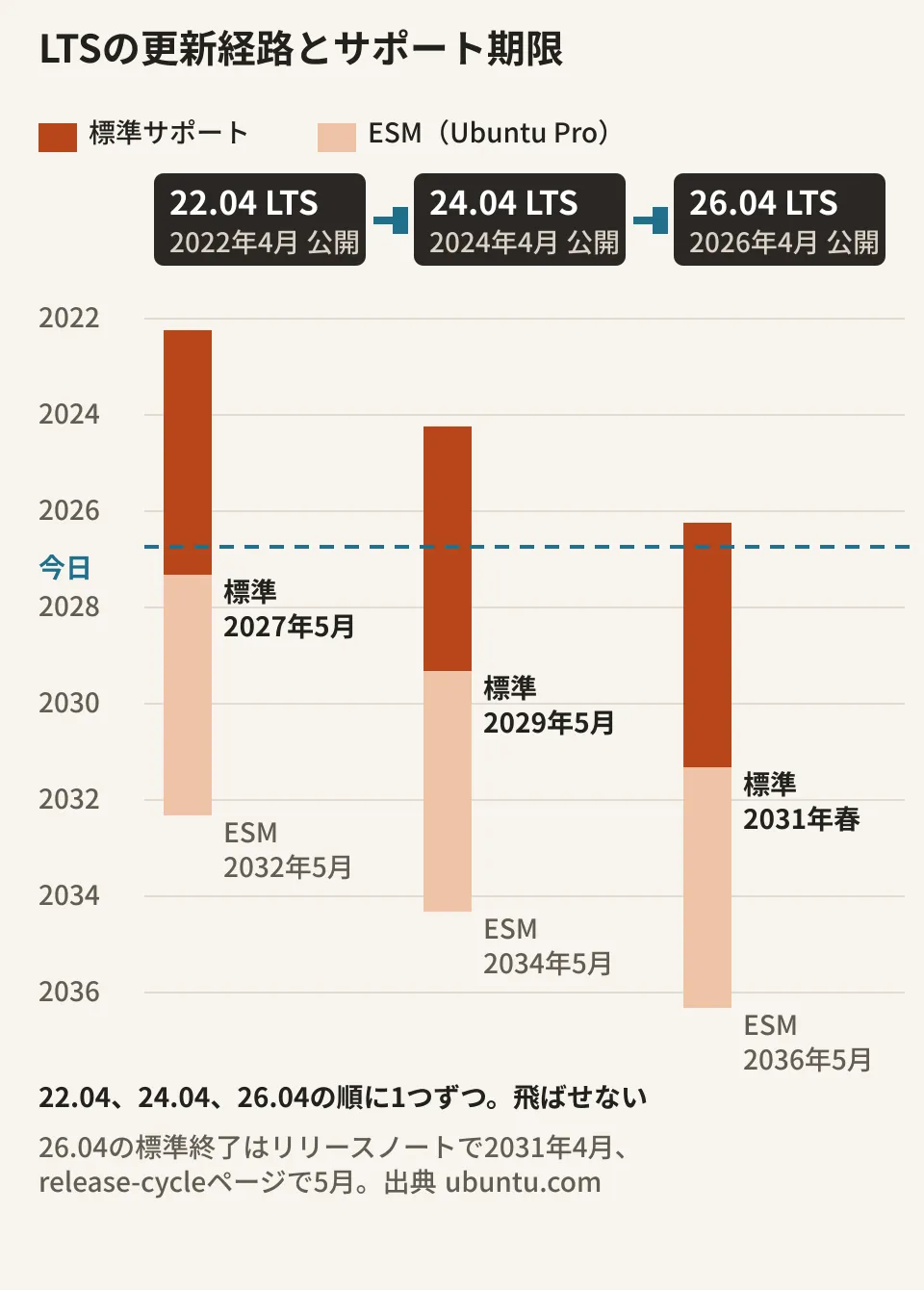
There are two things to note in the diagram. First, standard support for 24.04 runs until May 2029, more than two and a half years away. The September 29 enablement is a signal that you can now upgrade, not a notice that 24.04 is ending. Second, you cannot upgrade directly from 22.04 to 26.04. The Ubuntu Server documentation says, "You can only upgrade from one LTS release directly to the next sequential LTS release," and the 26.04 release notes also require upgrading from 22.04 or 25.04 to 24.04 or 25.10 first. Standard support for 22.04 ends in May 2027, so if you still have 22.04 servers, put the upgrade to 24.04 on your plan first.
From here on, this is the editorial team's proposal. For production servers running on 24.04, it is enough to plan the order of upgrades with May 2029 as the deadline, verifying 26.04 in a test environment before upgrading. For projects that need new 26.04 features or newer versions of PHP or PostgreSQL, and for newly built servers, the reasons to choose 26.04 are clear.
Key changes from 24.04
The 26.04 release notes include a summary for users coming from 24.04 (Summary for LTS users). We picked out the changes most likely to affect servers for websites and business systems.
| Target | Change from 24.04 to 26.04 (per the release notes) |
|---|---|
| MySQL | From 8.0 to 8.4 LTS. Accounts that authenticate with mysql_native_password are locked out by default |
| PHP | To 8.5. Refers readers to the upstream release notes for breaking changes in 8.4 and 8.5 |
| PostgreSQL | To 18 |
| OpenSSH | From 9.6p1 to 10.2p1. Support for weak DSA signatures removed |
| Kernel | GA kernel from 6.8 to 7.0 |
| sudo・coreutils | sudo-rs becomes the default sudo. Basic commands default to rust-coreutils (cp, mv and rm remain the GNU versions) |
For business systems, MySQL is the first thing to check. The release notes give two options: switch accounts using the old authentication method to caching_sha2_password, or explicitly set mysql_native_password=ON in the configuration. The former means re-entering passwords, and for the latter the notes say it "will no longer work in future Ubuntu releases, which will provide MySQL 9.7+." Before upgrading, list which method each application's connecting user uses. Behavior differences caused by MySQL version changes are also covered in our article on the DATE behavior change in MySQL 9.7.
SSH connections using DSA keys no longer work on 26.04. For sudo-rs and rust-coreutils, the release notes describe how to switch back to the original implementations (sudo.ws, coreutils-from-gnu). Run your scheduled shell-script jobs through once in a test environment.
"Known issues" in the release notes
The 26.04 release notes have a Known issues section. Four items affect server operations.
- PHP JIT fails with Apache2's
mod-php. Apache2's systemd unit now defaults toMemoryDenyWriteExecute=yes, and withlibapache2-mod-phpPCRE cannot allocate JIT memory, producing warnings. The release notes recommend switching tophp-fpm, and show how to override the setting withsudo systemctl edit apache2if you keep usingmod-php - Lower PostgreSQL throughput and higher latency. Changes in Linux 7.0 can cause significant performance drops; the notes say configurations using huge pages are not affected and ask you to set
huge_pagestoon - Known vulnerabilities in
rust-coreutils. Twenty CVEs are listed, with instructions to check their impact and apply mitigations or updates - Slow first boot on Google Cloud. Due to issues in cloud-init and systemd, the first boot of 26.04 images can be delayed by up to 30 seconds
The 26.04.1 change list from August 27 (Point-Release Changes) includes five fixes to the upgrade process (ubuntu-release-upgrader), but we found no mention that items 1 to 3 above have been resolved. Servers running WordPress or similar with mod-php, and PostgreSQL servers, are top candidates for upgrading to 26.04.1 in a test environment first.
Steps before upgrading (official procedure and editorial team's proposal)
We reordered the pre-upgrade checks from the Ubuntu Server guide "How to upgrade your Ubuntu release" to follow the flow of server operations.
- Read the release notes. Check whether the changes and known issues listed above apply to your setup
- Bring 24.04 fully up to date. The guide gives the following commands and notes that packages in phased updates can block the upgrade. If
/run/reboot-requiredexists, reboot first
sudo apt update
sudo apt dist-upgrade -o APT::Get::Always-Include-Phased-Updates=true
ls /run/reboot-required   # あれば再起動してから進める
sudo do-release-upgrade- Free up disk space. The guide says the download can be several GB
- Inventory external repositories and PPAs. They are disabled during the upgrade, and the guide calls them "the most common cause of upgrade issues." They are not removed, so re-enable them after the upgrade or find versions for 26.04
- Take a backup. The guide also calls this "extremely important." The editorial team suggests that, for virtual machines or cloud servers, taking a disk snapshot before starting makes rollback easier
- Set aside time to be present. The process is interactive and asks questions along the way. For configuration files you have modified, a screen appears where you review the diff between old and new versions and choose; the default keeps your current configuration. The confirmation screen before the upgrade also says it cannot be canceled once the download is complete
The upgrade is complete after a reboot. The guide says, "The system is not considered upgraded until this reboot occurs." Estimate the production cutover window to include the reboot and application checks.
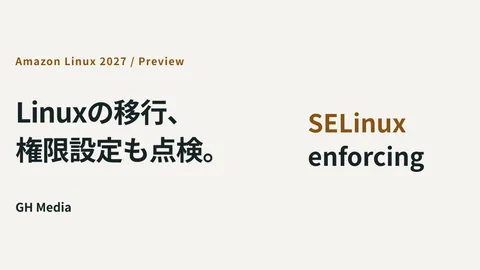
If you run in containers, the editorial team suggests switching the base image to 26.04 and rebuilding (not tested). For how to identify what may break when an update changes OS defaults, our article on the SELinux default change in Amazon Linux 2027 is also a useful reference.
On October 4, 2026, we directly opened and cross-checked the text and authors of the Ubuntu Discourse announcement (topic 88502) and the 26.04.1 change list (topic 86789), the 26.04 release notes (ubuntu/ubuntu-release-notes commit 513ac76), the release cycle page, the Ubuntu Server and Desktop upgrade guides, and meta-release-lts (document research). In the editorial team's test environment (Ubuntu 24.04.4 LTS), we only checked versions;
do-release-upgradewas not installed, and we did not perform the upgrade. The behavior of Apache, PHP, MySQL and PostgreSQL on 26.04 and the time required have not been verified.
GleamHub handles OS upgrade planning for business systems and websites running on Ubuntu, along with modifications made alongside upgrades, as part of our development, AI and automation consulting. Because the order of checks depends on your server setup and middleware, please reach out via our contact form.
Sources
- Upgrades from Ubuntu 24.04 LTS to Ubuntu 26.04.1 LTS now enabled — Ubuntu Discourse
- Resolute Raccoon Point-Release Changes — Ubuntu Discourse
- Resolute Raccoon Release Notes — Ubuntu Discourse
- Ubuntu 26.04 LTS release notes — Ubuntu release notes
- Ubuntu 26.04 LTS summary (for LTS users) — ubuntu/ubuntu-release-notes
- Ubuntu 26.04 changes since 25.10 / Known issues — ubuntu/ubuntu-release-notes
- Changes in Ubuntu 26.04.1 — ubuntu/ubuntu-release-notes
- Ubuntu 26.04 release schedule — ubuntu/ubuntu-release-notes
- Ubuntu 24.04 LTS release notes — ubuntu/ubuntu-release-notes
- Ubuntu release cycle — ubuntu.com
- How to upgrade your Ubuntu release — Ubuntu Server documentation
- Upgrade Ubuntu Desktop — Ubuntu Desktop documentation
- meta-release-lts — changelogs.ubuntu.com