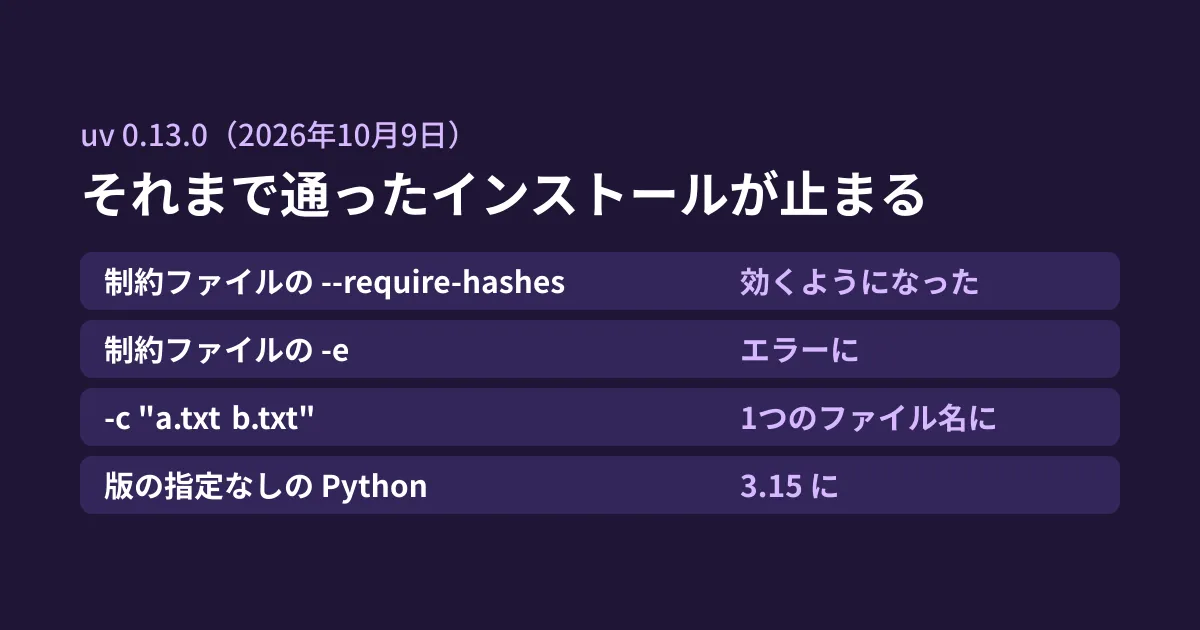
Suppose you use uv instead of pip for Python development and also run uv pip install or uv sync in CI and Dockerfiles. If your setup installs the latest uv without pinning its version, your builds may start failing from one day to the next, or you may end up running on a different Python without realizing it.
uv 0.13.0, released on October 9, 2026, lists eight "Breaking changes" in its changelog. It opens with "We expect most users to be able to upgrade without making changes.", indicating that most users should be able to upgrade without changes. However, depending on how your requirements and constraint files are written, installs that used to work stop with an error. We summarize the results of running 0.12.24 and 0.13.0 locally. The changelog for 0.13.1, released on October 14, contains no item that reverts the constraint file and default Python behavior covered in this article.
The default Python changes from 3.14 to 3.15
The first change is that the "default stable version" used when no Python version is specified has changed from 3.14 to 3.15. The changelog says the following.
uv continues to use compatible Python installations that are already present. … If no suitable interpreter is installed and automatic downloads are enabled, commands such as
uv venvanduvx pythoncan now download Python 3.15.
We emptied the installation directory, ran uv python install without a version, and compared the verbose logs.
# uv 0.12.24
DEBUG Found download `cpython-3.14.8-linux-x86_64-gnu` for request `default (cpython-any-linux-x86_64-gnu)`
# uv 0.13.0
DEBUG Found download `cpython-3.15.0-linux-x86_64-gnu` for request `default (cpython-any-linux-x86_64-gnu)`
If you run in a fresh environment every time, as in CI, and do not specify the Python version anywhere, you will switch to 3.15 as soon as you upgrade uv. Until you have confirmed that the libraries you use support 3.15, it is safer to record the version in .python-version with uv python pin 3.14 in the project, as the changelog suggests, and to specify it explicitly in CI as well.
Three ways of writing that stop previously working installs
The handling of constraint files (constraints, passed with -c, which specify "if this is installed, keep it within this version range") changed in three places. The diagram summarizes the results of trying both versions with the same files.
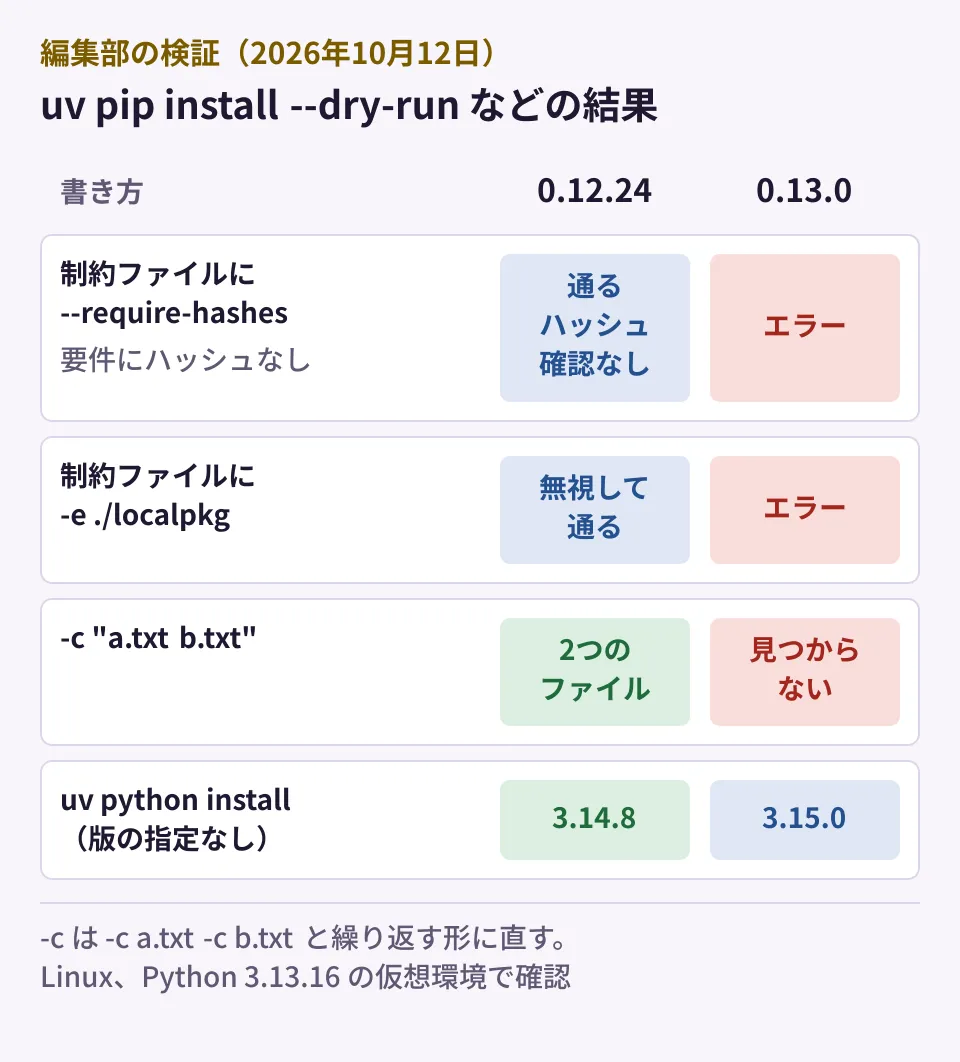
--require-hashes in constraint files now takes effect
This is the case where a requirements file (requirements.txt) loads a constraint file with -c cons.txt, and that constraint file contains --require-hashes.
# 0.12.24
 + idna==3.10
# 0.13.0
error: In `--require-hashes` mode, all requirements must have a hash, but none were provided for: idna==3.10
Up to 0.12, this option was silently ignored. In other words, you thought hashes were being checked, but they actually were not. In 0.13, hashes are required for all requirements, as specified. The changelog advises adding hashes, or removing the option if it was not intended. If you added hash checking as a defense against supply chain attacks, the proper approach is to add hashes on the requirements file side as well.
-e (editable entries) in constraint files now cause an error
When a constraint file contained an editable entry such as -e ./localpkg, 0.12.24 ignored it and continued installing, while 0.13.0 stopped with the following error.
error: Editable requirements are not allowed as constraints in `cons-e.txt`The changelog describes this as "matching pip’s behavior," so it is now handled the same way as in pip. Move editable entries to the requirements file (-r), or pass them directly with --editable.
-c "a.txt b.txt" is treated as a single file name
This is the style of passing two file names separated by a space to -c. 0.12.24 read them as two files, while 0.13.0 looked for a single file named "a.txt b.txt" and stopped.
error: File not found: a.txt b.txtRewrite it to repeat the option, as in -c a.txt -c b.txt. According to the changelog, space separation in environment variables such as UV_CONSTRAINT still works. Places in shell scripts or Makefiles that expand variables and pass them need checking, because the result changes depending on how quotes are used.
Files that disappear from virtual environments
Comparing site-packages in a virtual environment (Python 3.13) created with uv venv, 0.12.24 created _virtualenv.pth and _virtualenv.py, while 0.13.0 did not. This is the changelog item "Omit the distutils startup patch on Python 3.10 and later." The mechanism is no longer needed on Python 3.10 and later, and existing virtual environments are not changed. Unless you have scripts that assume these files exist, there is no impact.
Other changes
These are the remaining items listed in the changelog.
- On Windows ARM64, native Python is now preferred. To keep using the x86_64 build, set
UV_PYTHON_ARCH=x86_64 - A different component (tar-codec) is now used to extract tar files, and validation is stricter. Archives containing hard links, for example, may be rejected; you can restore the previous behavior with
UV_LEGACY_TAR_BACKEND=1. In 0.13.1 on October 14, support for source distributions containing hard links and similar cases was restored ("Restore support for source distributions containing hard links …") - If the output directory of
uv build --clearcontains the source, it is rejected (previously this could delete the project) - Because the cache format changed, dependencies may be re-downloaded and rebuilt right after upgrading. CI cache size and run time may temporarily increase
- If you set an upper bound on the build backend
uv_build, update it as inuv_build>=0.13.0,<0.14
How to proceed with the upgrade
The following is the editorial team's proposal.
- Pin the uv version in CI and Dockerfiles. Pin it with
pip install uv==0.12.24, the version option of the official installer, orversioninastral-sh/setup-uv, and decide yourself when to upgrade - Specify the Python version explicitly. Write 3.14 or similar in
.python-versionand in the CI configuration - Search your constraint files. Look for uses of
--require-hashes,-e, and-c "… …", and fix any that match the three cases above - Get a build to pass once on 0.13.x, then remove or update the version pin. If you try it, use 0.13.1 or later, which includes the tar extraction fix
Auditing Python dependencies is also covered in Continuously checking Python dependency vulnerabilities with uv audit, settings to avoid just-released versions in Pip 26.1 Dependency Cooldowns, and the option of running Python apps serverless in Cloudflare Python Workers.
Scope of verification
On October 12, 2026, we checked CHANGELOG.md in astral-sh/uv (0.13.0, Released on 2026-10-09) and the publication dates on PyPI (document research). We also installed uv 0.12.24 and 0.13.0 into separate virtual environments on Linux, compared the three ways of writing constraint files using
uv pip install --dry-runagainst a Python 3.13.16 virtual environment, and checked the files in an environment created withuv venvand the log ofuv python install -vwithout a version specified (hands-on testing). We did not test behavior on Python 3.15, Windows (including ARM64), differences in tar extraction, the impact on projects usinguv syncoruv lock, or behavior in 0.13.1. On October 16, 2026, we checked 0.13.1 (Released on 2026-10-14) in CHANGELOG.md.
For setting up development environments and CI for business systems built with Python, please contact us through consultation on development, AI, and automation.