If you deploy a Cloudflare Workers site or app with Wrangler and GitHub Actions, every new CLI release forces you to decide whether to switch your production pipeline. If you migrate and something breaks, publishing stops; if you keep waiting, you miss out on coding agents and new commands. There is also the risk of accidentally running the new CLI in an existing project and having it rewrite your configuration.
Based on the official documentation and testing with a sample project on our own machine, this article covers the Cloudflare CLI "cf", which entered beta on September 28, 2026: its relationship to Wrangler, the migration steps and pitfalls, and how to use it in CI and with agents. It closes with the editorial team's proposal on where to start trying it today.
What cf replaces, and what it does not
The stage in April 2026, when Cloudflare announced it was developing a unified CLI able to operate all of its services, was covered in our article on Cloudflare's unified CLI and choosing a cloud. This time the actual product has been released in beta, and its usage and constraints can now be checked in the documentation.
According to the changelog, cf handles the public Cloudflare API and Workers projects in a single CLI. More than 2,900 commands cover the API, and most output results as JSON. Installation is npm install -g cf and sign-in is cf auth login. The npm package cf is described as "The Cloudflare CLI", and 1.0.0-beta.5 was published on September 28, 2026.
Extracting the rows that matter for decision-making from the official "cf for Wrangler users" comparison table, the differences from Wrangler are as follows.
| Item | Wrangler | cf |
|---|---|---|
| Target | Workers and some products | The entire public API (over 2,900 commands) |
| Sign-in | wrangler login | cf auth login (separate credentials) |
| Configuration file | wrangler.jsonc / wrangler.toml | cloudflare.config.ts(TypeScript) |
| Switching environments | env blocks and --env | Modes and --mode |
| Output | Mostly tables, with --json in some cases | JSON for most API commands |
| Specifying resources | Mostly by name | IDs required by the API |
| Local vs. remote | Some default to local | Remote by default |
cf does not include its own bundler; cf dev and cf build hand off processing to the framework's commands, the Cloudflare Vite plugin (2.0 beta), or Wrangler 4.136.0 or later. In other words, it does not make Wrangler completely unnecessary. Live logs via wrangler tail and wrangler secret put for setting a single secret are not yet available in cf, and the official guidance is to run them with npx wrangler.
The changelog and the overview, CI and migration pages note that "cf is in beta, and commands, configuration and Build Output may change before the stable release"; no date is given for the stable release.
What you can use without migrating: resource commands and command search
You can start using cf without migrating. Resource and account commands such as cf d1 list and cf r2 buckets list work even inside an unmigrated Wrangler project. However, because cf does not read the Wrangler configuration file, any account_id written there is not used. Set CLOUDFLARE_ACCOUNT_ID, or choose an account when prompted. cf also does not reuse Wrangler's login, so you need to run cf auth login once.
On our machine (Linux, Node.js 22.22.2), we installed cf@1.0.0-beta.5 and tested it without logging in, and it behaved as documented.
cf cli search "create D1 database"
# → JSON配列で5件。先頭は "cf d1 create"、2件目は "cf d1 update"

cf dns records create --zone <ZONE_ID> --body '{"type":"A","name":"test","content":"192.0.2.1","proxied":true}' --dry-run
# → 送信するmethod・URL・bodyをJSONで表示し、何も送らずに終了

cf auth whoami
# → {"authenticated": false, "error": "Not logged in"}
cf cli search runs locally and needs no credentials. Enclose search terms in quotes; running cf cli search create D1 database without quotes exited with code 1 and Unknown commands: D1, database. --dry-run also works without credentials, so you can check a command's shape before logging in.
Deletion deserves attention in operations. In non-interactive runs (CI or scripts), running a delete command without --force prints Aborted., changes nothing and exits with code 0. A successful exit does not necessarily mean anything was deleted. Also, in some commands --force doubles as an API parameter, and cf workers delete --force deletes Workers even if other Workers reference them.
Do not run cf deploy first in a Wrangler project
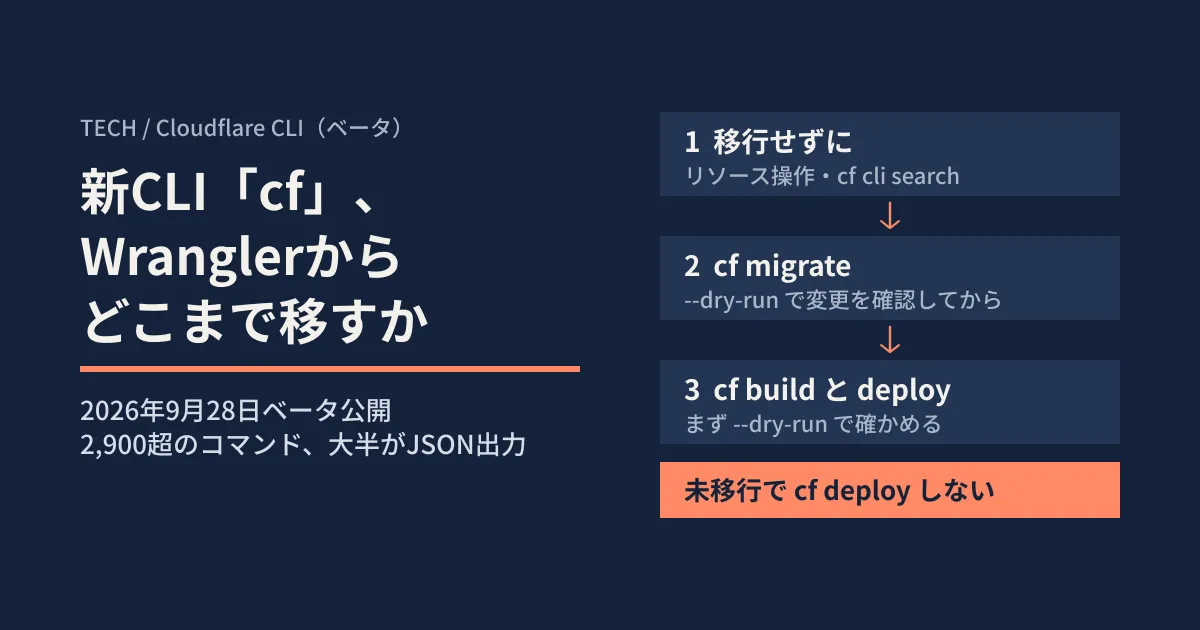
The official documentation repeatedly warns against running cf dev, cf build or cf deploy (including cf init .) in a Wrangler project before migrating. These read only cloudflare.config.ts and not wrangler.jsonc. Without cloudflare.config.ts, automatic configuration runs, and the result depends on the type of project.
- A Worker with no framework and no static assets: fails with
cloudflare.config.ts is required when --experimental-new-config is enabled. - A Worker using the Cloudflare Vite plugin: a new SPA configuration is written with no entry point and no bindings
- A Worker with static assets that include
index.html: the build succeeds, but it becomes a static-asset Worker with no Worker code and no bindings
Automatic configuration also rewrites the deploy scripts in package.json, lock files and .gitignore, and in CI it applies the changes without confirmation. On our machine, running cf build in a framework-less Wrangler sample exited with code 1 at the first error (no files were changed).
If you have already run it, the official guidance is to review and revert the changes with git status, delete the generated cloudflare.config.ts, wrangler.config.ts and .cloudflare/, and then run cf migrate.
What changes with cf migrate
Migration is done with cf migrate. It reads the Wrangler configuration, writes cloudflare.config.ts alongside it, converts bindings, routes, triggers and environments, and adds cf as a dev dependency. It does not change the Wrangler configuration file itself, the package.json scripts or the source code. It refuses to write if the Git working tree has uncommitted changes, and it does not overwrite existing files.
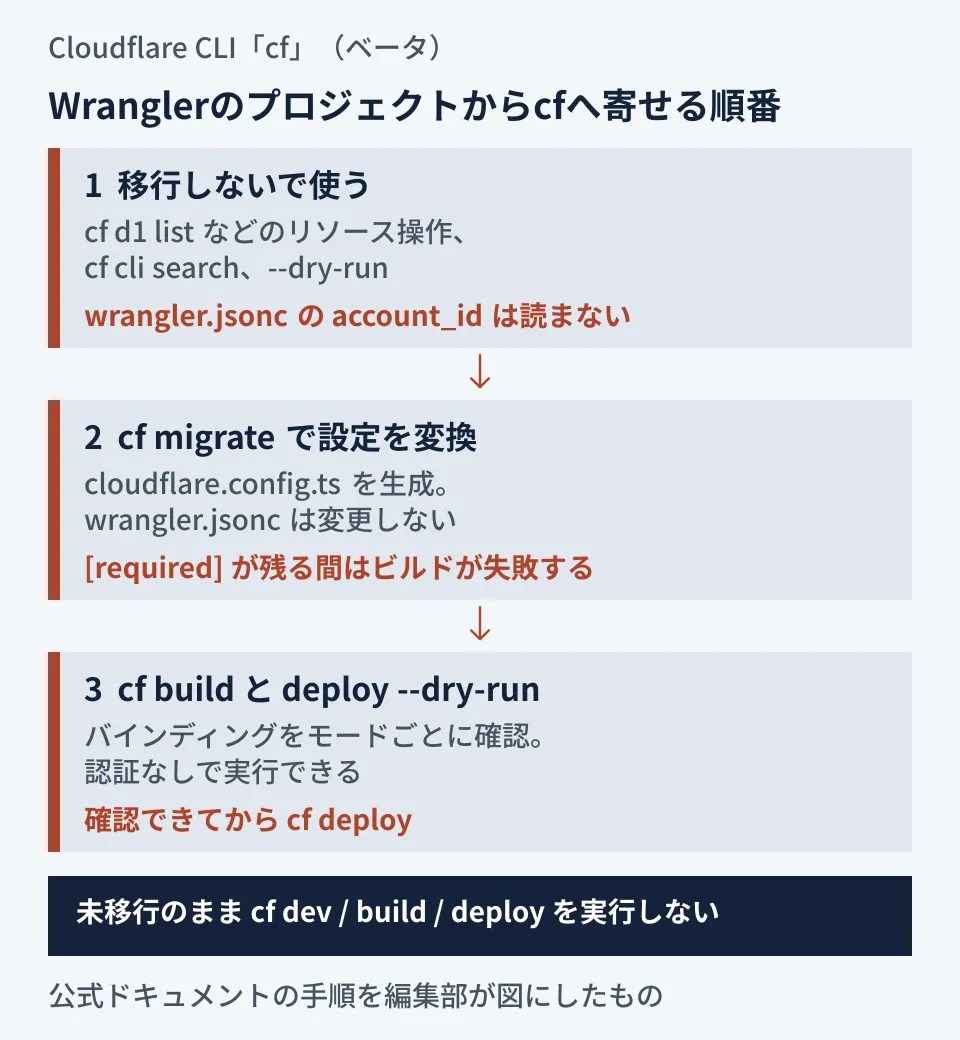
As the diagram shows, the official procedure is to proceed in separate stages. On our machine, we ran it on a wrangler.jsonc sample with a KV binding, a cron trigger and a staging environment, after installing Wrangler 4.144.0.
cf migrate --dry-run: reported that it chose Wrangler's bundler because there was no Vite plugin, and listed four files to be changed:cloudflare.config.ts,wrangler.config.ts,package.jsonandpackage-lock.jsoncf migrate: changed the same four files.wrangler.jsoncwas unchanged, and it displayed a[info]saying the environment had been converted toswitch (ctx.mode)cf buildandcf deploy --prebuilt --dry-run: the build succeeded, and it listedenv.CACHE(KV) andenv.ENVIRONMENTas to be deployed, then exited without uploading anything
We confirmed two caveats. The first is environment conversion. The generated staging configuration did not include the KV binding, and a dry run with --mode staging showed only env.ENVIRONMENT. As the official documentation explains, this is because, following Wrangler's inheritance rules, top-level bindings and vars are not copied into environments. Always check the bindings for each mode. The second is that if package.json lacks "type": "module", a MODULE_TYPELESS_PACKAGE_JSON warning appears on every build; the official "Finish the project" section explains how to address it.
Although not included in our sample, according to the official documentation, Durable Objects migrations, Workflows and Containers are not converted automatically and become [required] items. While required items remain, throw is inserted at the top of cloudflare.config.ts, and both builds and deployments fail until they are resolved. Workers Sites (site) is not supported and requires migrating to Workers Static Assets. Even when keeping Wrangler's bundler, Wrangler 4.136.0 or later is required. The documentation also states that Astro 6 and later cannot be built with cf during the beta.
Settings for adding it to CI and agents
CI: tokens, version pinning and matching modes
Because cf auth login cannot be used in CI, put CLOUDFLARE_API_TOKEN and CLOUDFLARE_ACCOUNT_ID in secrets. A token takes precedence over a saved login, and if multiple accounts are visible but none is specified, the command fails without asking for confirmation. Install cf as a dev dependency rather than globally, and use npx cf to run the project's version. Node.js 22.18 or later is required, and Bun is not supported. Telemetry can be turned off with CF_SEND_TELEMETRY=false or DO_NOT_TRACK=1.
The official GitHub Actions example runs cf build only once, runs cf deploy --prebuilt --mode production --dry-run on PRs, and deploys the same build to production only on pushes to main. Because a dry run needs no credentials, it also works for PRs from forks.
The mode is what tripped us up in our own testing. This example assumes a Vite setup created with cf init. Vite builds always record the mode, but projects migrated with the Wrangler bundler record it only when --mode is passed to cf build. In fact, when we built without --mode and then ran cf deploy --prebuilt --mode production --dry-run, it stopped with an error saying the mode was not recorded in the Build Output. When copying the official example into a migrated project, make the build and the deploy consistent about whether --mode is used.
Agents: a one-line instruction and operations to keep off limits
The official docs recommend adding an instruction to the user-level AGENTS.md or CLAUDE.md: "Use cf when working with Cloudflare, except in projects that have a Wrangler configuration file." You can check which of these files Claude Code reads in our article on when AGENTS.md is not read.
At the top of cf --help, a note prompts the agent to start with cf cli search. In our beta.5 environment, it also displayed an instruction not to include names, email addresses, domains, account or resource IDs, or tokens in search terms. The official docs warn against agents running cf dev, cf build or cf deploy in Wrangler projects that have not been migrated. Agents in unattended environments authenticate with CLOUDFLARE_API_TOKEN, and to keep credentials separate per project locally, use named profiles (cf auth create, cf auth activate).
Migrate now or wait?
From here on, these are the editorial team's recommendations based on the official specifications above and our own testing.
| Status | Proposal |
|---|---|
| Production deployments are stable on Wrangler | Do not switch deployments. Try resource checks and cf cli search locally and with agents |
| You use Durable Objects, Workflows, Containers or Workers Sites | Postpone migration. Manual conversion is required. Creating, deleting or renaming Durable Objects classes cannot be rolled back to the previous version |
You use wrangler tail or wrangler secret put routinely | Plan on using both side by side while keeping your Wrangler configuration |
| You can create a new small Worker or a branch for testing | Start with cf migrate --dry-run and run cf build and cf deploy --dry-run on PRs in CI |
In either case, these are the two things to do first.
- Use CI settings and agent instructions to prevent
cf dev,cf buildandcf deployfrom running against Wrangler projects - Run
cf migrate --dry-runon a branch for trying the migration, and check the[required]entries and the per-mode bindings
Commands, configuration and Build Output may change during the beta, so there is no rush to switch production deployments; it is fine to wait until you have run dry runs in CI for a while and have seen the stable release announcement. If you are also considering per-PR preview environments, check the scope of sharing with production data covered in our article on Worker Previews as well.
On September 30, 2026, we cross-checked the Cloudflare changelog (the September 28, 2026 entry) and the cf documentation (Overview, Coding agents, CI, Environment variables, Get started, Workers projects, Coming from Wrangler) by reading them directly in the official documentation source repository (commit of September 29, 2026). We checked the published versions and dates of the
cfpackage on npm in the registry. In hands-on testing on Linux with Node.js 22.22.2, we usedcf@1.0.0-beta.5and Wrangler 4.144.0 and verified help output, command search, dry runs, andcf migrate,cf buildandcf deploy --dry-runon a sample project. We did not log in to a Cloudflare account, perform an actual deployment, run it in GitHub Actions, or migrate Durable Objects or Vite setups.
For Workers operations, CI, and development and automation with coding agents, contact GleamHub.
Sources
- Cloudflare CLI is now in beta — Cloudflare Changelog
- Cloudflare CLI — Cloudflare Docs
- cf for Wrangler users — Cloudflare Docs
- Migrate a Wrangler project — Cloudflare Docs
- Wrangler to cf reference — Cloudflare Docs
- Use cf in CI — Cloudflare Docs
- Use cf with coding agents — Cloudflare Docs
- Get started — Cloudflare Docs
- Deploy your first Worker — Cloudflare Docs
- Develop, build, and deploy — Cloudflare Docs
- Environment variables — Cloudflare Docs
- cf — npm registry