Suppose your company subscribes to the Claude Team plan and wants to try automating internal inquiry handling or document checks with the Claude API. But the API is a separate contract with separate billing, and you are stuck at getting a budget approved to try it. For such companies, the change in the October 7, 2026 release notes could be a reason to start prototyping.
Max and Team plans now come with monthly credits that can be used on the Claude Platform (API). According to the release notes, availability is being rolled out gradually over several days. Based on the official help center, we summarize the amounts, how to receive them, what they can be used for, and what happens when they run out, and suggest what to decide before starting to use them in your company. Pricing and conditions may change, so check the latest information in the official help center before signing up.
Amounts by plan
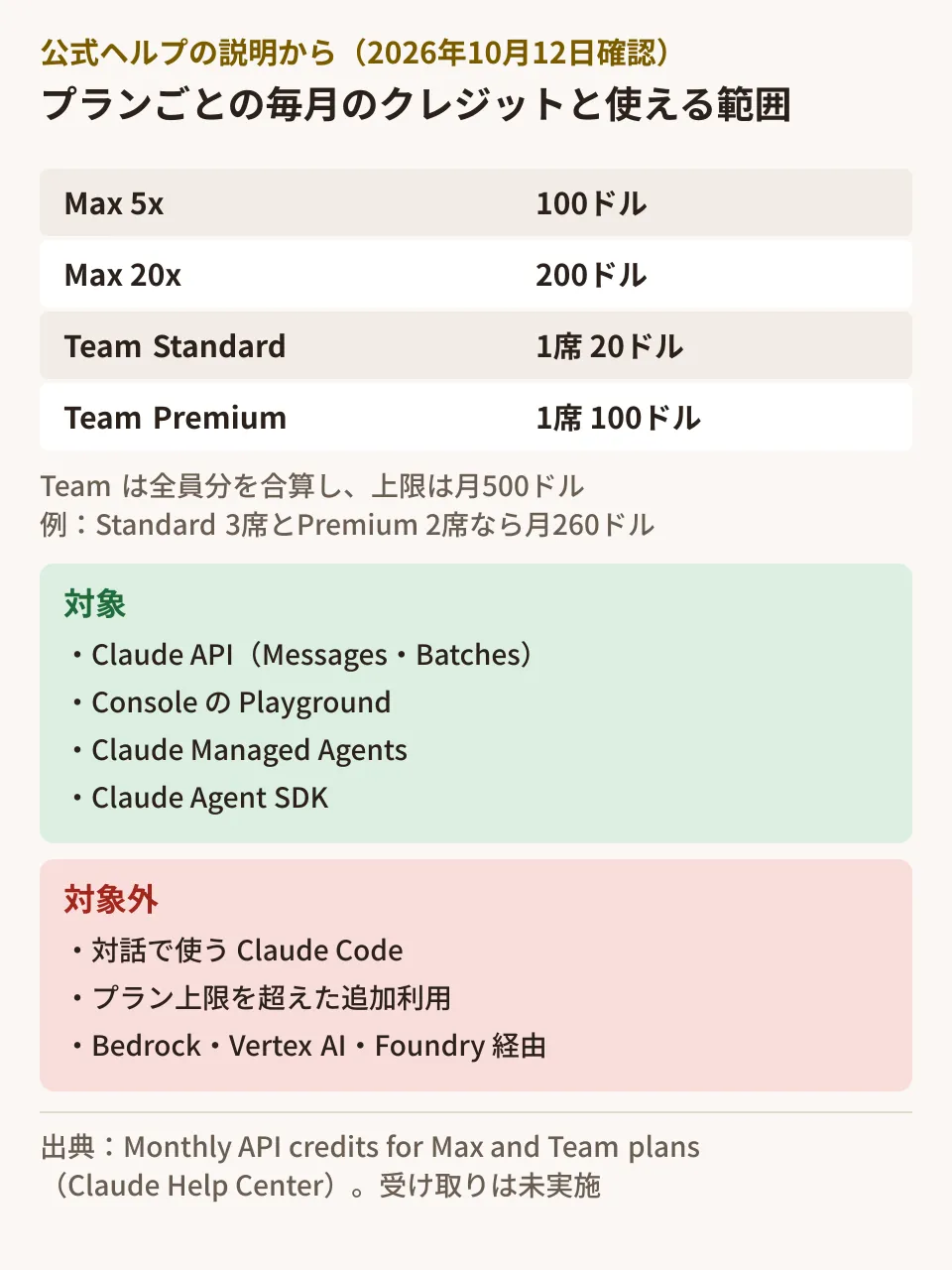
The table in the official help article "Monthly API credits for Max and Team plans" is as follows.
| Plan | Monthly credits |
|---|---|
| Max 5x | $100 |
| Max 20x | $200 |
| Team (Standard seats) | $20 per seat |
| Team (Premium seats) | $100 per seat |
On the Team plan, everyone's credits are combined into a single balance, with a maximum of $500 a month. In the help center's example, a team with 3 Standard seats and 2 Premium seats gets $260 a month (20×3 + 100×2). Adding one Premium seat raises this to $360 from the next billing period. The number of seats is calculated based on the subscription at the time the credits are granted.
Free, Pro, and Enterprise are not eligible. Team plans with discounts, such as for nonprofits, are eligible.
Link one Console organization to receive the credits
The credits are added each month to an organization in the Claude Console (platform.claude.com). The steps to receive them are as follows.
- Open "Organization settings > Billing" in claude.ai (for Team; for Max, "Settings > Billing")
- In the "API credits" section, select "Link organization"
- Choose the Console organization that will receive the credits (you can also create a new one)
- Review the additional terms (Supplemental Credit Terms) and link the organization
On Team, the Primary Owner or an Owner completes the process. On the Console organization side, you need Owner, Admin, or Billing permissions. The credits become available 7 days after subscribing, and you do not need to register a card in the Console.
The point to watch most closely here is the following sentence.
You can link only one Console organization, and each Console organization can receive credits from only one plan. You can’t change the linked organization yourself, so choose the one you plan to build in.
Only one organization can be linked, and you cannot change it yourself later (changes require contacting support). If your company already has multiple Console organizations, or uses an organization managed by a development agency, decide which organization should receive the credits before you start.
What the credits can and cannot be used for
The help center lists the following as covered.
- Claude API (Messages API and Message Batches API)
- Console Playground
- Claude Managed Agents
- Claude Agent SDK
On the other hand, the following are not covered.
- Claude Code used interactively in the terminal, IDE, desktop, or web
- Additional usage beyond plan limits for Claude, Claude Code, and Claude Cowork (Extra usage)
- Claude via Amazon Bedrock, Google Cloud Vertex AI, or Microsoft Foundry
Claude Code's non-interactive mode (claude -p) and the Agent SDK are covered by the credits only when run with an API key from the linked organization. When used while logged in with a plan account, usage is drawn from the plan's usage limits as before. Claude Code in GitHub Actions, IDE extensions, and anything launched from the desktop app are treated as Claude Code usage even with -p, and are not covered.
Note that these are different from the Agent SDK credits announced in June. The help center FAQ says "Is this the same as the Agent SDK credits announced in June? No. That credit isn’t available."
When credits run out, and carryover
Here is a summary of the help center's explanation.
- Granted monthly, with no carryover. Unused credits expire at the end of the billing period. They are granted monthly even on annual billing
- Used before purchased credits
- Shared by everyone in the organization. Anyone with an API key in the linked organization draws from the same balance
- When they run out, the API stops unless there are other credits. If there are purchased credits or auto-reload, usage continues from those, and nothing is charged to the plan. For organizations billed by invoice through Anthropic's sales team, usage beyond the credits is billed as usual
- Separate from plan usage limits. The usage limits for Claude and Claude Code do not change
- You can check the balance in the Console. The amount and expiration date are shown under "Settings > Billing" in the Console
- Canceling or switching to an ineligible plan stops new grants. Credits already received can be used until they expire
The fact that usage "stops" can be an advantage or a disadvantage depending on how you use it. At the prototyping stage, if you do not set up auto-reload, it works as a budget cap that prevents costs beyond the monthly credits. Conversely, if you run systems used daily in your operations on it, they may stop in the middle of the month.
What to decide before starting to use them in your company
From here on are the editorial team's suggestions.
- Decide which organization receives the credits. If you want to separate prototyping from production, link a prototyping organization. You cannot change it yourself, so decide this first
- Decide who gets API keys. The balance is shared by everyone in the organization. The help center advises setting usage limits (spend limits) on Console workspaces to restrict how much each project or person can use
- Decide on use cases and estimate monthly consumption. The credits expire every month, so receiving them without a use for them leaves nothing behind. Start with small use cases where you can measure the effect, such as drafting replies to inquiries or summarizing documents. Check the per-model prices on the official pricing page
- For production systems, plan what happens when the credits run out. Either set up auto-reload or make sure work can fall back to people when it stops
What to check when switching models is summarized in What to check before switching to Claude Sonnet 5.5, and how to reflect model price cuts in operating costs in Even when cheaper new models come out, your bill does not go down automatically. The monthly credits for programmatic use reported in May were paused on June 15 and are not available. Their eligibility and conditions differ from these credits, and the differences are explained in Anthropic's monthly credits and Claude API budget governance for client development 2026.
Scope of verification
On October 12, 2026, we checked the Claude Help Center release notes (October 7, 2026, "Monthly API credits for Max and Team plans") and the help article "Monthly API credits for Max and Team plans" (support.claude.com/en/articles/17154008), and on October 16, 2026, we confirmed on the same two pages that the amounts and conditions had not changed (document research). We did not try receiving the credits, viewing them in the Console, or calling the API. We have not checked the billed amount in Japanese yen or any differences in conditions for Japan.
For automating business tasks with the Claude API, or designing the move from prototype to production, please contact us through consultation on development, AI, and automation.