In an internal AI chat, the wait for a long answer to finish displaying is bothersome. In a tool that suggests code fixes, developers sit idle waiting for generation. Claude has fast mode as a way to shorten this kind of "waiting for output."
On October 15, 2026, the Claude Platform release notes announced that fast mode for Claude Opus 5.5 has left research preview. The access application and beta header (fast-mode-2026-02-01) that were previously required are no longer needed, and the Start, Build and Scale usage tiers come with default rate limits.
However, pricing is twice the standard rate, and only part of the processing gets faster. In this article, we lay out what to decide before using it, based on the official documentation (Fast mode, Pricing, Rate limits).
What has changed
The release notes can be summarized as follows.
- Fast mode for Opus 5.5 requires neither an application nor a beta header. It still works if you keep sending the header
- Opus 5.5 has default fast mode rate limits for each of the Start, Build and Scale tiers
- Fast mode for Opus 5 and Opus 4.8 remains in research preview (an application and the header are required)
- On the same day, fast mode for Opus 5.5 also became available on Azure-hosted deployments in Microsoft Foundry
To use it, just add speed: "fast" to the request.
response = client.messages.create(
    model="claude-opus-5-5",
    max_tokens=4096,
    speed="fast",
    messages=[{"role": "user", "content": "..."}],
)
print(response.usage.speed)  # "fast" または "standard"
In Claude Managed Agents, specify the agent's model as an object and set {"id": "claude-opus-5-5", "speed": "fast"}.
Only "output speed" gets faster
The documentation describes fast mode as "running the same model with a faster inference configuration," and states that intelligence and capabilities do not change. It then limits the scope of the effect as follows.
- Output tokens per second (OTPS) are up to 2.5 times higher
- The effect is on output speed, not on the time until the first token is returned (TTFT)
- The effect is most visible with streaming
In other words, the difference shows up in use cases that generate long answers or large amounts of code, rather than those that return short answers quickly. The editorial team's view is that for processes whose output is a few dozen tokens, such as classification or short summaries, most of the wait is the time to the first response, so a reduction worth twice the price is hard to expect (we have not measured the effect).
Pricing is twice the standard rate for both input and output
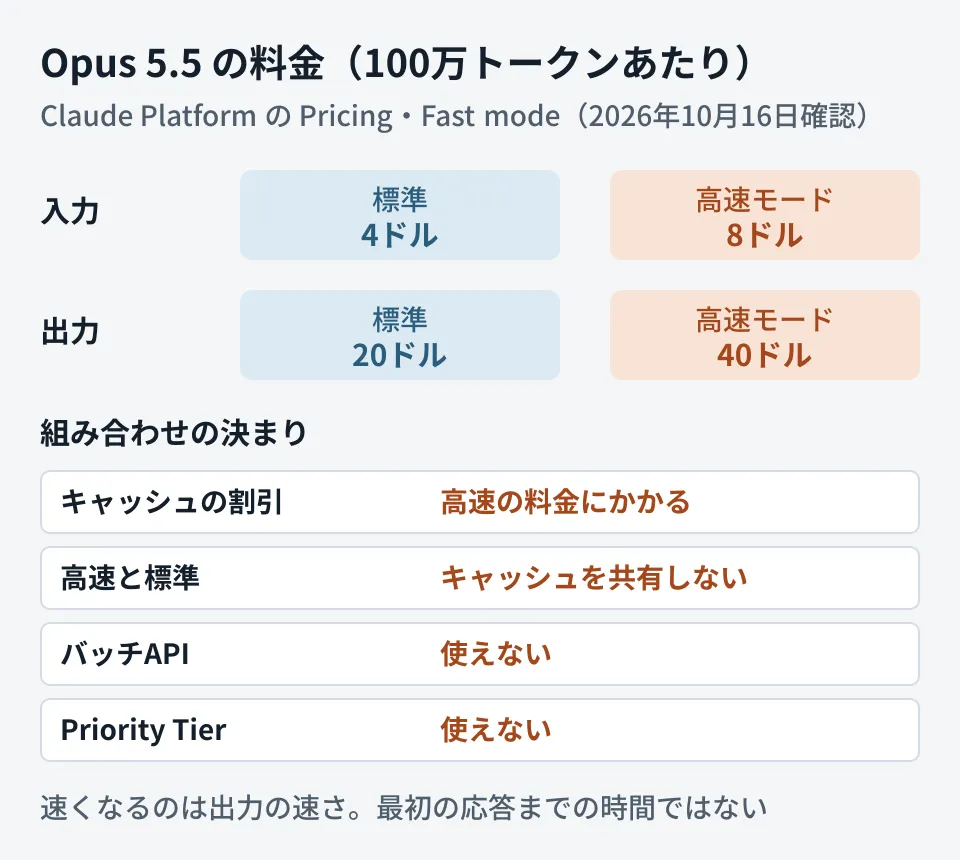
According to the pricing page, the standard price for Opus 5.5 is 4 dollars per million input tokens and 20 dollars for output. Fast mode is 8 dollars for input and 40 dollars for output, exactly double in both cases. This pricing applies across the full context range (including inputs over 200,000 tokens).
Its relationship to other discounts and surcharges is as follows.
- Prompt caching multipliers apply on top of the fast mode price
- Data residency multipliers also apply on top of the fast mode price
- It cannot be used with the Batch API (it cannot be combined with half-price batches)
By the editorial team's estimate, sending one request with 20,000 input tokens and 2,000 output tokens costs 0.08 dollars + 0.04 dollars = 0.12 dollars at standard pricing and 0.24 dollars in fast mode (without caching). At 1,000 requests a day, the difference is 120 dollars per day. Unless you narrow down which processes use it, your bill simply doubles.
Decision 1: which processes to use it for
Given the characteristics above, the editorial team suggests narrowing the targets with the following conditions.
- The output is long (several hundred tokens or more)
- A person is waiting in front of the screen (chat, editor completions, review generation, etc.)
- The output is displayed via streaming
For overnight batch processing or processes whose results are read later, the Batch API (which cannot use fast mode in the first place) or standard speed is sufficient. Also, for processes that do not need Opus 5.5, consider whether you can switch to a cheaper model (Sonnet 5.5 or Haiku 5.5) before turning to fast mode. We cover how to choose models in Choosing a model with Claude Opus 5, and how to reflect price cuts and price differences in your bill in A cheaper new model does not automatically lower your bill.
Decision 2: what to do when the rate limit is exceeded
Fast mode has rate limits separate from standard Opus. When they are exceeded, a 429 error and a retry-after header are returned. You can check the remaining quota in response headers such as anthropic-fast-input-tokens-remaining, and see the limits on the Rate limits page in the Claude Console.
There are two options when the limit is exceeded.
- Wait and retry: by default, the SDK automatically retries up to two times. The documentation says that because fast mode capacity is replenished continuously, the wait is usually short
- Switch to standard speed: set retries to 0, and when you receive the error, remove
speedand resend
As a caution when switching, the documentation states that "fast and standard do not share the prompt cache." If a process that caches a long system prompt switches back and forth between speeds, a cache write occurs each time. For processes that benefit greatly from caching, sticking to one or the other may be cheaper.
Note that fast mode for Opus 5.5 is not available in the Evaluation tier (a tier where new organizations or organizations with little usage history may be placed at first). It becomes available once you move up to Start, Build or Scale.
Decision 3: whether it is available on your access route
Fast mode is not available no matter where you call Claude from. The documentation states the following.
| Channel | Opus 5.5 fast mode |
|---|---|
| Claude API (including Managed Agents) | Available |
| Microsoft Foundry (hosted on Azure) | Available |
| Microsoft Foundry (hosted by Anthropic) | Unavailable |
| Claude Platform on AWS | Unavailable |
| Priority Tier contracts | Unavailable |
The pricing page says it is not available on Claude Platform on AWS or "partner-operated cloud platforms," and Amazon Bedrock and Google Cloud (Vertex AI) are not listed in the Fast mode availability table either. First check which route your internal systems use to call Claude.
Checks after integration
You can check whether a request was actually processed in fast mode with usage.speed in the response. "fast" means fast mode, and "standard" means standard. Sending speed: "fast" to an unsupported model results in an error (as an exception, the documentation says that sending it to Opus 4.6 with the beta header does not cause an error, is processed at standard speed, and usage.speed becomes "standard").
As the editorial team's suggestion, logging usage.speed and the number of output tokens and reviewing the following two points weekly makes it easier to understand how costs are growing.
- The proportion of fast mode calls with short output (uses with little benefit)
- The number of switches to standard due to 429 (insufficient rate limits)
We cover the design of centrally managing AI calls from internal systems in Whether to put a gateway in front of internal AI.
Scope of verification
On October 16, 2026, we directly retrieved and reviewed the Claude Platform release notes (October 15, 2026) and the documentation for Fast mode, Pricing, Rate limits and Managed Agents Agent setup (document research). We have not verified actual calls in fast mode, measured speed or cost, or confirmed the specific rate limit values. The estimates in the article were calculated by the editorial team from the unit prices on the pricing page.
For designing the speed and cost of systems that integrate the Claude API, or switching models, please contact us via Consulting on development, AI, and automation.