You pull GA4 data through the API and use it for internal dashboards, monthly reports and your site's popular articles section. From a certain month, the numbers suddenly got smaller, but from the returned rows alone you cannot tell whether traffic really decreased or part of the aggregation is simply missing.
On September 14, 2026, the GA4 Data API Changelog announced that dataTruncationReasons, a field signaling that part of an aggregation is missing, had been added to response metadata (v1beta and v1alpha). It returns the type of reason for the missing data and the missing date range. However, even when a field is added to the API, it is not visible to your application if the client library you use is old. In this article, we lay out the original API definitions and the results of testing whether each version of the official Node.js client can receive it.
The field added to responses
In the API definition published by Google for the GA4 Data API (Discovery document, v1beta, revision 20261014) and its reference, the metadata (ResponseMetaData) of responses such as runReport contains the following fields.
dataTruncationReasons: "If set, indicate there is data truncation in the report." (if set, the report has data truncation)
Each reason (DataTruncationReason) contains the following four fields.
dataTruncationType: the type of truncationdataTruncationDate: data before this date has been truncated (YYYY-MM-DD)dataTruncationDateRanges: the truncated period (start date and end date, both inclusive)dataTruncationMessage: a description
In the type definitions of googleapis distributed on npm, this field first appears in 182.0.0, published on September 24, 2026 (UTC), and is not in 181.0.0.
Ten types of reasons
The values of dataTruncationType and the descriptions in the API definition are as follows (excluding unspecified).
| Value | Summary of the API definition's description |
|---|---|
DATA_TRUNCATION_TYPE_PROPERTY | Truncated because the request tried to read event data older than the retention period |
DATA_TRUNCATION_TYPE_DATE_RANGE | The specified period may not be returned in full |
DATA_TRUNCATION_TYPE_GOOGLE_ADS | Truncated because of Google Ads' 36-month retention |
DATA_TRUNCATION_TYPE_DV360 / _CM360 | Truncated because of a policy of not returning data older than two years |
DATA_TRUNCATION_TYPE_ITEM_SCOPED_ECOMMERCE_METRICS / _EVENT_SCOPED_ECOMMERCE_METRICS | New ecommerce metrics only have data from a specific date onward |
DATA_TRUNCATION_TYPE_RULES_BASED_MODELS / _DATA_DRIVEN_ATTRIBUTION | In attribution reports, data before the model's reference date is truncated |
DATA_TRUNCATION_TYPE_CONVERSIONS | Truncated in conversion reports |
The editorial team thinks the top three are the ones most likely to matter for small and medium-sized businesses running websites: aggregations over long periods that include dates before the property's data retention period, aggregations that line up Google Ads costs and site results over long periods, and processes that fetch long-period reports in a single request.
How it differs from existing metadata
ResponseMetaData has long had several fields related to the reliability of aggregations.
subjectToThresholding: whether the report is subject to thresholds (a mechanism that hides data from small numbers of users)samplingMetadatas: if sampled, the proportion of events useddataLossFromOtherRow: whether, in a report with many combinations, some rows were grouped into an "(other)" rowemptyReason: the reason when the report is empty
These indicate that "numbers were rounded or grouped," and there was no field indicating that part of the period is missing entirely. dataTruncationReasons differs in that it returns the missing dates.
The field disappears in older clients
The official client for using the GA4 Data API from Node.js is @google-analytics/data. Examining the definitions (proto) included in each version of the package published on npm shows that data_truncation_reasons was added in 7.2.0, published on September 22, 2026 (UTC), and is not in 7.1.0. The 7.x package.json requires Node.js 22 or later (>=22).
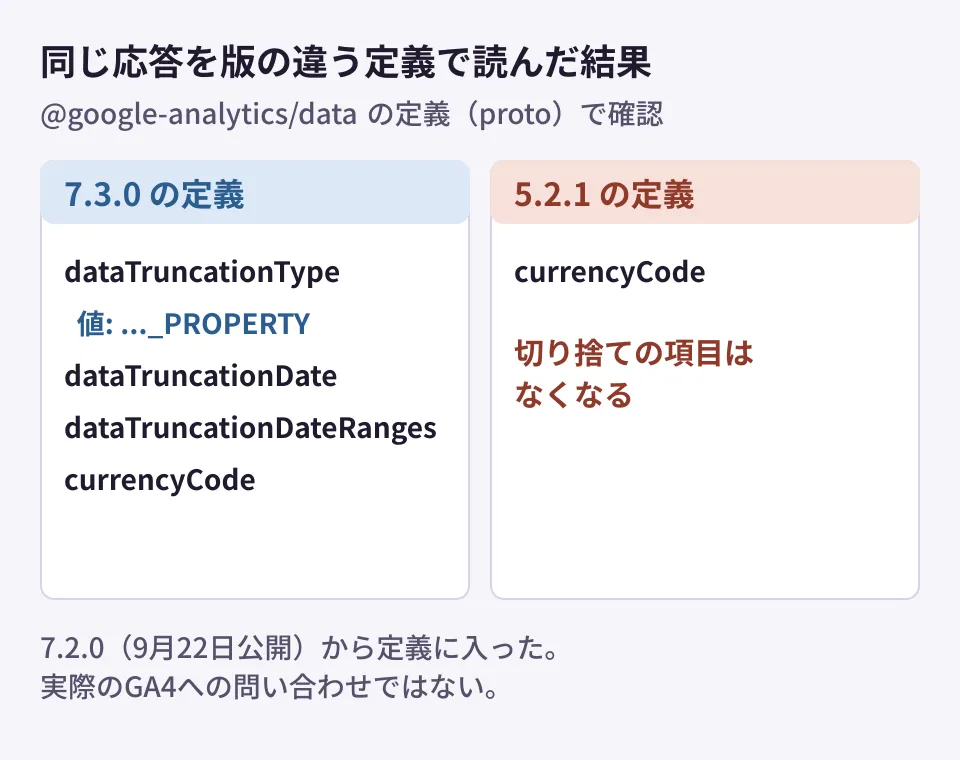
By default, this client communicates with the API using gRPC and protobuf. In protobuf, fields that are not in the receiving side's definition do not appear in the application's objects. In the editorial team's test environment, we used the 7.3.0 definitions to create response data containing dataTruncationReasons, and then read it with the 7.3.0 and 5.2.1 definitions respectively.
- 7.3.0 definitions:
dataTruncationType(DATA_TRUNCATION_TYPE_PROPERTY), the date, the period and the description could all be read - 5.2.1 definitions: only
currencyCodecould be read from the same data, anddataTruncationReasonswas missing
This was a check between definition files, not a truncated response received from an actual GA4 property. Even so, it confirmed that even if the API returns the field, it is not visible to application code while you stay on a 5.x client.
This site also uses @google-analytics/data for its popular articles section (last 30 days) and its daily aggregation script (last 30 and 90 days), and the version pinned in package-lock.json is 5.2.1. To use this field, we need to upgrade to 7.2.0 or later in a Node.js 22 or later environment.
Checks to add to aggregation processes
From here on are the editorial team's suggestions.
- Check the version of the client you use. For Node.js,
npm ls @google-analytics/data. If it is earlier than 7.2.0, plan the upgrade together with the Node.js version. Because the major version goes up by two, also check the other changes before upgrading - Record
metadatafrom the response. Processes that save only the row data should also keepdataTruncationReasons,subjectToThresholding,samplingMetadatasanddataLossFromOtherRow - If there is truncation, display it alongside the numbers. Show "Part of this period is not included in the aggregation (up to ...)" on dashboards and reports, and exclude it from comparisons such as year-over-year
- Split the period for processes that fetch long periods at once. When a missing period is returned, this makes it easier to identify which months' numbers were affected
How to tell whether a change in analytics numbers is a real change or a measurement or aggregation problem is covered in When year-over-year comparisons in web analytics break, how to build a popular articles section with the GA4 Data API in Popular article rankings with Astro SSG and GA4, and the basic GA4 metrics in Five metrics to watch in GA4.
Scope of verification
On October 15, 2026, we directly retrieved the GA4 Data API Discovery document (v1beta, revision 20261013) and examined the type definitions of npm's
googleapis181.0.0 and 182.0.0, and the definitions (proto) andpackage.jsonof@google-analytics/data7.1.0, 7.2.0 and 7.3.0 (document research). We also confirmed reading with the 7.3.0 and 5.2.1 definitions once each in the editorial team's test environment (Linux, Node.js v22.22.0, protobufjs 7) (hands-on testing). On October 16, 2026, before publication, we retrieved the GA4 Data API changelog (the 2026-09-14 entry), the ResponseMetaData reference and the Discovery document (revision 20261014) to cross-check the text, and confirmed that reading with the 7.3.0 and 5.2.1 definitions gives the same results in a different environment (macOS, Node.js v22.19.0). We have not verified actual queries to a GA4 property or the conditions under which each reason is returned.
For building internal aggregation systems using GA4 data or reviewing existing aggregation scripts, please contact us via Consulting on development, AI, and automation.