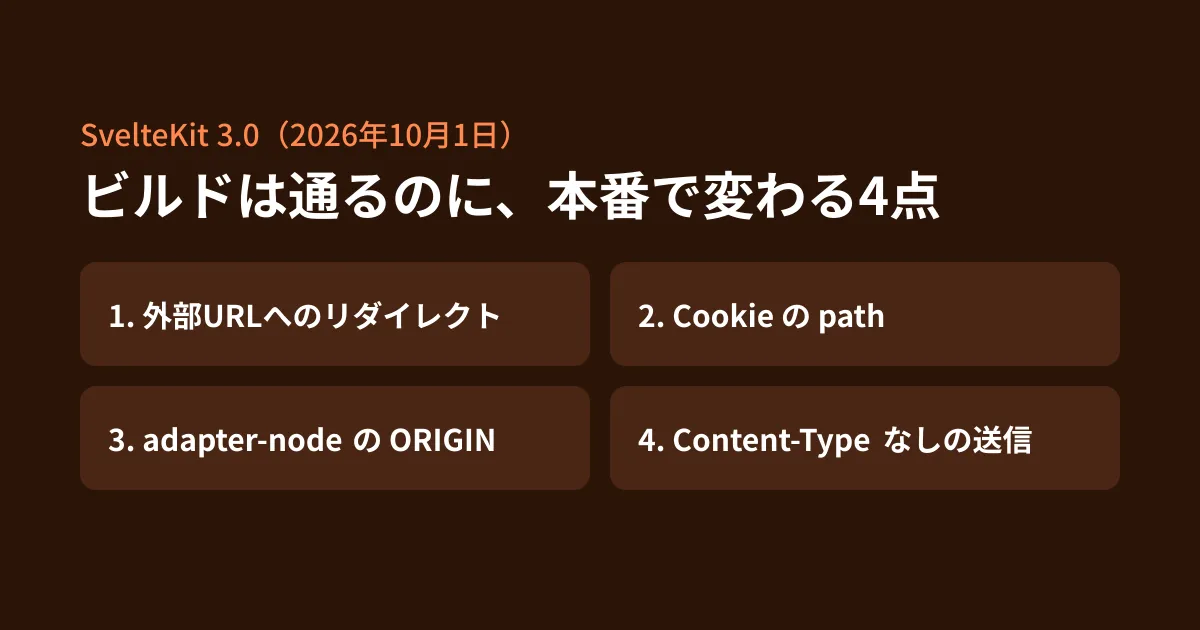
If you maintain a site or web app built with SvelteKit, you may receive a dependency update PR that bumps @sveltejs/kit to 3.x. SvelteKit 3.0.0, published to npm on October 1, 2026 (October 2 Japan time), is a major update with more than 70 items listed under "Major Changes" in the changelog. 3.1.0 was also published on October 14, but as far as the changelog shows, it contains no changes related to the four points covered in this article.
Some items, such as changes to types or import locations, can be caught through TypeScript checks or build errors. The tricky ones are items where the build succeeds, but behavior changes when running in production. The editorial team built the same small app with 2.70.3 and 3.0.1, built it with @sveltejs/adapter-node, sent requests, and compared the results. Of those, we cover four points that affect sites with contact forms or logins.
1. Redirects to external URLs become 500 errors
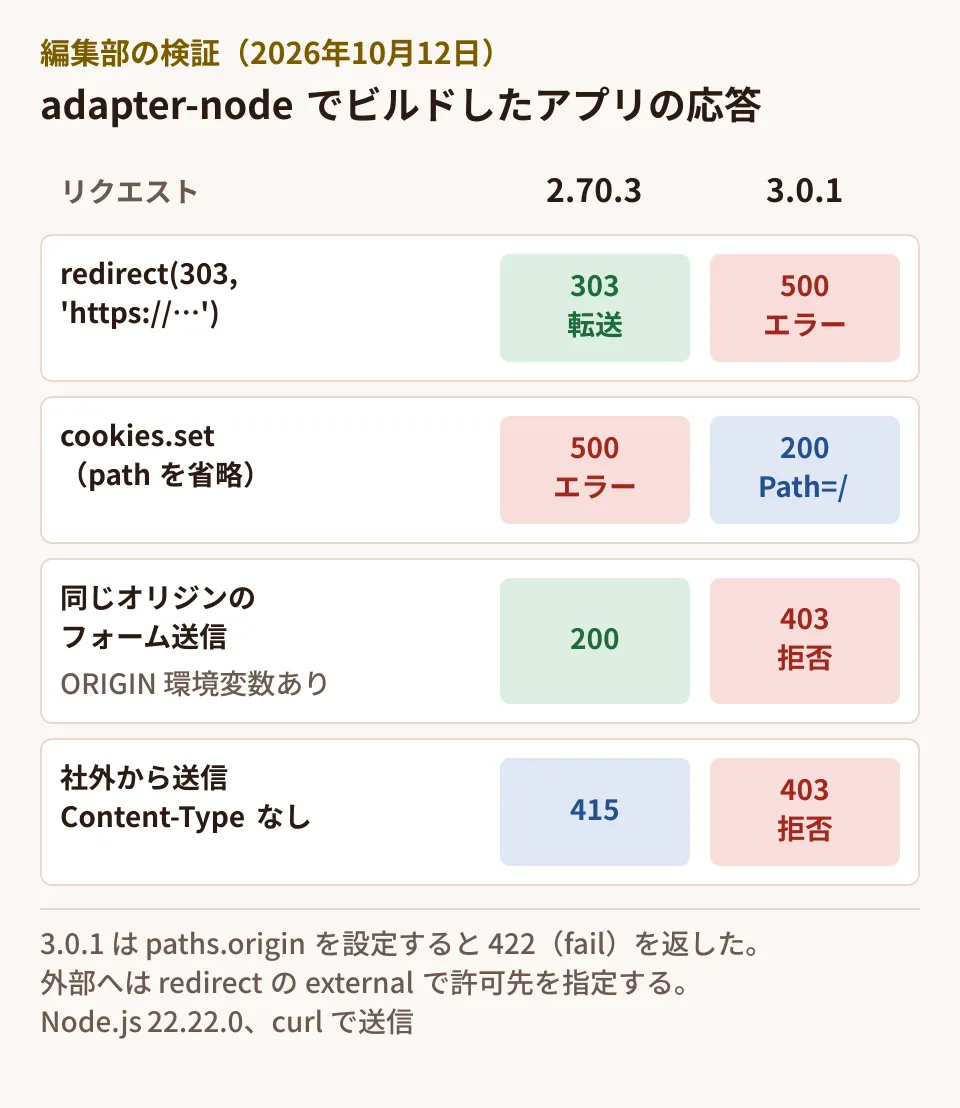
The changelog says "breaking: forbid external redirects by default." Here are the results of running server-side code that redirects to another domain, as in redirect(303, 'https://example.com/'), on both versions.
# 2.70.3
GET /go  → 303  location=https://example.com/
# 3.0.1
GET /go  → 500  (ログ: Error: https://svelte.dev/e/kit/redirect_external_not_allowed)
Redirects within the same site (such as /form) worked with 303 on both versions.
To allow redirects to external sites, pass a third argument. The description of redirect says "you must pass { external: true } to allow any external URL except javascript: URLs, or { external: [...] } with an allowlist of permitted origins." When we set the allowed destination to ['https://example.com'], a redirect to https://example.com/ returned 303, and specifying a different domain returned 500.
Check your code for anything that sends users to an external site, such as payment services, external sign-in screens, or forwarding to an old site. For places that redirect to a URL specified by the user, such as returning to the value of ?next= after login, it is safer to list the allowed destinations rather than allowing everything at once with external: true. Also check whether, in the 2.x version you are upgrading from, such places allowed redirects to external URLs (an open redirect).
2. The cookie path can now be omitted
The behavior when path is not specified in cookies.set() has changed. The changelog entry reads "breaking: default the cookie path option to '/'."
# /cookie/sub で cookies.set('sub', 'abc', { httpOnly: true })
2.70.3 → 500  ERROR: You must specify a `path` when setting, deleting or serializing cookies
3.0.1  → 200  set-cookie: sub=abc; Path=/; HttpOnly; SameSite=Lax
(The 3.0.1 result is with an http URL set in paths.origin. Without that setting, Secure was also added.)
In 2.x, omitting path was an error, so existing code should already specify path and will keep working as is. What needs attention is new code written after upgrading to 3.x. Even for a cookie used only by pages in a lower-level path, omitting path makes it a cookie sent to the entire site. For cookies whose scope you want to restrict, such as for an admin panel, continue to specify path explicitly.
3. The ORIGIN environment variable in adapter-node no longer takes effect
If you run on a Node.js server, this change causes no errors at build or startup, and you only notice it when a form is submitted. The adapter-node 6.0.0 changelog says "add kit.paths.origin config option, remove kit.prerender.origin and the adapter-node ORIGIN environment variable."
When running behind a reverse proxy, the site URL (origin) that SvelteKit infers from the request may not match the URL the user accessed. In the 2.x adapter-node, you could pass the correct URL with the ORIGIN environment variable. This value is used to check where form submissions come from (CSRF protection).
These are the results of testing form submissions (POST from the same origin) in the editorial team's environment.
# 2.70.3 + ORIGIN=http://localhost:6201       → 200
# 3.0.1  + ORIGIN=http://localhost:6302       → 403  Cross-site POST form submissions are forbidden
# 3.0.1  + paths.origin を設定(環境変数なし) → 422(アクションが返した fail(422))
In 3.x, ORIGIN is ignored even if it is still set, and the site's own forms were rejected with 403. The setting moves to the Vite configuration. Version 3.0 also includes the change "require Svelte config options to be passed through the Vite plugin," and the editorial team got it working by writing the following.
// vite.config.js(3.0.1 で確認した形)
import { sveltekit } from '@sveltejs/kit/vite';
import adapter from '@sveltejs/adapter-node';

export default {
  plugins: [
    sveltekit({
      adapter: adapter(),
      paths: { origin: 'https://www.example.co.jp' }
    })
  ]
};
The type definition description says that if paths.origin is not set, "SvelteKit will derive the origin from request.url," and recommends setting it in cases such as when the reverse proxy does not pass the host header. If your deployment runbook or server environment variables include ORIGIN, move the setting at the same time as the upgrade.
Note that in 2.x, even for a form that returned fail(422), the response to a submission without JavaScript was 200. In 3.x, "form action responses now use the HTTP status code returned from fail," so 422 is returned. If you have external monitoring or tests that judge success by the response status code, review them as well.
4. Cross-origin submissions without Content-Type are rejected
There is also the change "disallow cross-origin form submissions without a Content-Type header." Here are the results of a POST from a different origin without Content-Type.
2.70.3 → 415  Unsupported Media Type(送信元のチェックを通り、アクションの処理まで進んだ)
3.0.1  → 403  Cross-site POST form submissions are forbidden
In 2.x the result was also an error, but it stopped in later processing rather than at the origin check. In 3.x it stops at the check at the entrance. This change does not affect normal form use, but if you receive form-style POSTs from external sources such as payment services, check whether you have registered the sender in csrf.trustedOrigins (the type definition description cautions that only trusted origins should be added).
Other things to check before upgrading
There are also many changes that stop the build or startup rather than changing behavior. Here are the main ones.
- Node.js 22.17 or later is required (
enginesis>=22.17). Vite 8.0.12 or later, TypeScript 6 or later, Svelte 5.57.1 or later, and@sveltejs/vite-plugin-svelte7 or later are also required (based on the migration guide and the peerDependencies of 3.0.1. The changelog entry says "Svelte 5.56.4 or newer," but the requirement in the published version is 5.57.1). The maintenance deadlines for each Node.js version are summarized in Node.js 24 enters maintenance on October 20 - Removal of
$app/stores, change from$libto#lib, and removal ofbaseandassetsfrom$app/paths - Removal of
csrf.checkOrigin(replaced bytrustedOrigins) - adapter-node 6.0.0 also records the list of static files at build time, so files added to the output directory after the build are not served, and static files respond only to GET and HEAD
Migrating to Vite 8 is also covered in Vite+ 1.0 stable release: Node requirements to check before migrating, and deciding whether to adopt a major update of another framework for client projects is covered in Remix 3.0 stable release: 5 points to check before adopting it in projects.
How to proceed with the upgrade
The official migration guide (Migrating to SvelteKit 3) recommends first upgrading to the latest 2.x version and checking deprecation warnings, and notes that many changes can be converted automatically with npx sv migrate sveltekit-3. Of the four points in this article, the allowed destinations for external redirects and the value of paths.origin must be decided for each site.
The following is the editorial team's proposal.
- Search the code. Search for
redirect(,cookies.set(,checkOrigin,$app/stores, and$lib, and list the external redirects and cookie scopes - Check the deployment settings. If the server or container environment variables include
ORIGIN, note the value to move topaths.origin - Run it in a staging environment with the same reverse proxy setup as production. Try contact form submission, login, and external redirects (payment and authentication) end to end
- Update the expected values in monitoring and tests. For example, the status code when a form fails (200 to 422)
Scope of verification
On October 12, 2026, we checked packages/kit/CHANGELOG.md (3.0.0 and 3.0.1) and packages/adapter-node/CHANGELOG.md (6.0.0) in sveltejs/kit, the type definitions, the description of
redirect, and package.json of @sveltejs/kit 3.0.1 as published on npm, and the publication dates on registry.npmjs.org (document research). We also built the same small app with @sveltejs/kit 2.70.3 (adapter-node 5.5.7, Vite 7.3.7) and 3.0.1 (adapter-node 6.0.0, Vite 8.3.4) on Node.js 22.22.0 on Linux, sent requests with curl, and compared the results (hands-on testing). We did not test reverse proxies, HTTPS, adapters for various hosting services, client-side behavior (such asuse:enhance), or automatic conversion withnpx sv migrate sveltekit-3. On October 16, 2026, we checked the migration guide "Migrating to SvelteKit 3" on svelte.dev and the changelog up to 3.1.0.
For framework upgrades including SvelteKit, or maintenance of existing sites, please contact us through consultation on development, AI, and automation.