You export GA4 data to BigQuery. Your sales and inventory tables are in BigQuery too. When an analyst asks Claude Code to "calculate last month's CVR by traffic source," the agent does not know the table structure, so the analyst ends up pasting schemas and errors into the chat to fill the gap.
Data Agent Kit, which Google Cloud made generally available (GA) on September 30, 2026, is a tool that fills this gap. Agents can inspect schemas, run queries and read job logs. In exchange, the agent operates BigQuery with your IAM permissions. Based on the official blog, the public repository and the tool list retrieved by the editorial team, we explain what gets connected and where it can be stopped.
Data Agent Kit combines "MCP tools" and "skills"
According to the official blog, Data Agent Kit is a "free set of Model Context Protocol (MCP) tools and agent skills." It consists of two parts.
- MCP tools: connect to more than 15 Google Data Cloud services so agents can inspect schemas, run queries, read job logs and manage resources
- Skills written by Google: procedures such as BigQuery SQL optimization, Bigtable row key design and building dbt pipelines, packaged as instructions for agents. They are published as open source on GitHub
It is available as an extension for VS Code-compatible editors (VS Code, Antigravity IDE, Cursor and others), as a plugin for Antigravity 2.0, Antigravity CLI, Claude Code and Codex, and preinstalled in Cloud Shell and Cloud Workstations. GA added support for BigQuery Graph, Bigtable and Managed Service for Apache Spark.
On pricing, the product page says it is "available at no charge for users with Google Cloud accounts." However, as the official blog notes, the standard charges for the Google Cloud services the agent uses still apply.
According to the README, the plugin also supports clients compliant with Agent Plugins.
What can agents do in BigQuery?
The plugin configuration for Claude Code (.claude-plugin/mcp.json) shows that the BigQuery endpoint is https://bigquery.googleapis.com/mcp. The setup connects to Google's MCP endpoint through a local relay program.
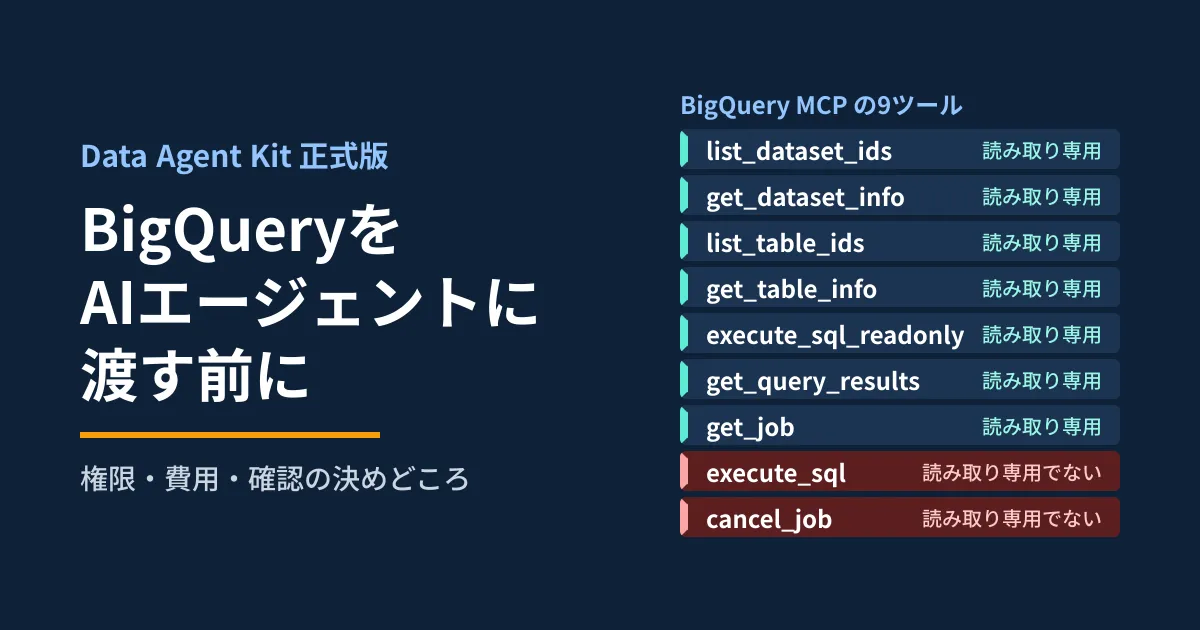
On October 2, 2026, the editorial team sent an MCP tool list request (tools/list) to this URL without authentication. Nine tools were returned. Each tool has an annotation (readOnlyHint) indicating whether it is read-only.
| Tool | Details | Read-only annotation |
|---|---|---|
list_dataset_ids / get_dataset_info | List of datasets and their details | Available |
list_table_ids / get_table_info | List of tables and their details | Available |
execute_sql_readonly | Runs SELECT statements only | Available |
get_query_results / get_job | Fetches results and checks job status | Available |
execute_sql | Arbitrary SQL, including INSERT, DELETE, DROP TABLE and more | None (destructive) |
cancel_job | Cancels running jobs | None (destructive) |
Here is what we confirmed.
- The description of
execute_sqlincludes examples of deleting tables and datasets (DROP TABLE,DROP SCHEMA). Alongside the read tools, there is a tool that can also update and delete, as long as the permissions allow it - Both execution tools have
dryRun(returns the number of bytes to be processed and other information without running the query),jobTimeoutMs(a server-side timeout) andlabels. The list had no argument for capping the amount of data processed - The descriptions say that executed queries are automatically given the job label
goog-mcp-server: trueand are billed to the project specified inprojectId
The official documentation for the BigQuery MCP server (Use the BigQuery MCP server) also lists the following limits.
- By default, the two execution tools limit query processing time to 3 minutes and automatically cancel queries that exceed it. Results are capped at 3,000 rows
- The MCP server itself has no quota and no limit on the number of calls. The quotas of the BigQuery APIs that the tools call (
jobs.Queryfor queries) apply as they are
We did not call the tools that run queries. The list is as of October 2 and may change.
Skills tell agents to "check first," but do not enforce it
Reading the skills in the public repository (GoogleCloudPlatform/data-agent-kit-plugin, v1.0.0, September 29, 2026), you will find many cautious procedures.
bigquery-sql: always apply optimizations such as dropping unnecessary columns and applyingWHEREearly, and confirm before making rewrites that could change results, such as changingUNIONtoUNION ALLbigquery-graph-author: do not create DDL before the plan is approved, and dry-run before execution. For validation queries with large estimated processing volumes, state the scale before running themdbt-bigquery: 「NEVER executedbt runwithout explicit user confirmation」bigtable-basics: get explicit confirmation from the user before changing a production database
The official blog also explains that skills prompt agents to check partition keys and dry-run before execution. However, skills are instructions to the agent. From here on is the editorial team's analysis: skill instructions are no substitute for permissions. If the agent does not follow the instructions, or is steered by text embedded in the data, what ultimately takes effect is IAM and the settings on the BigQuery side.
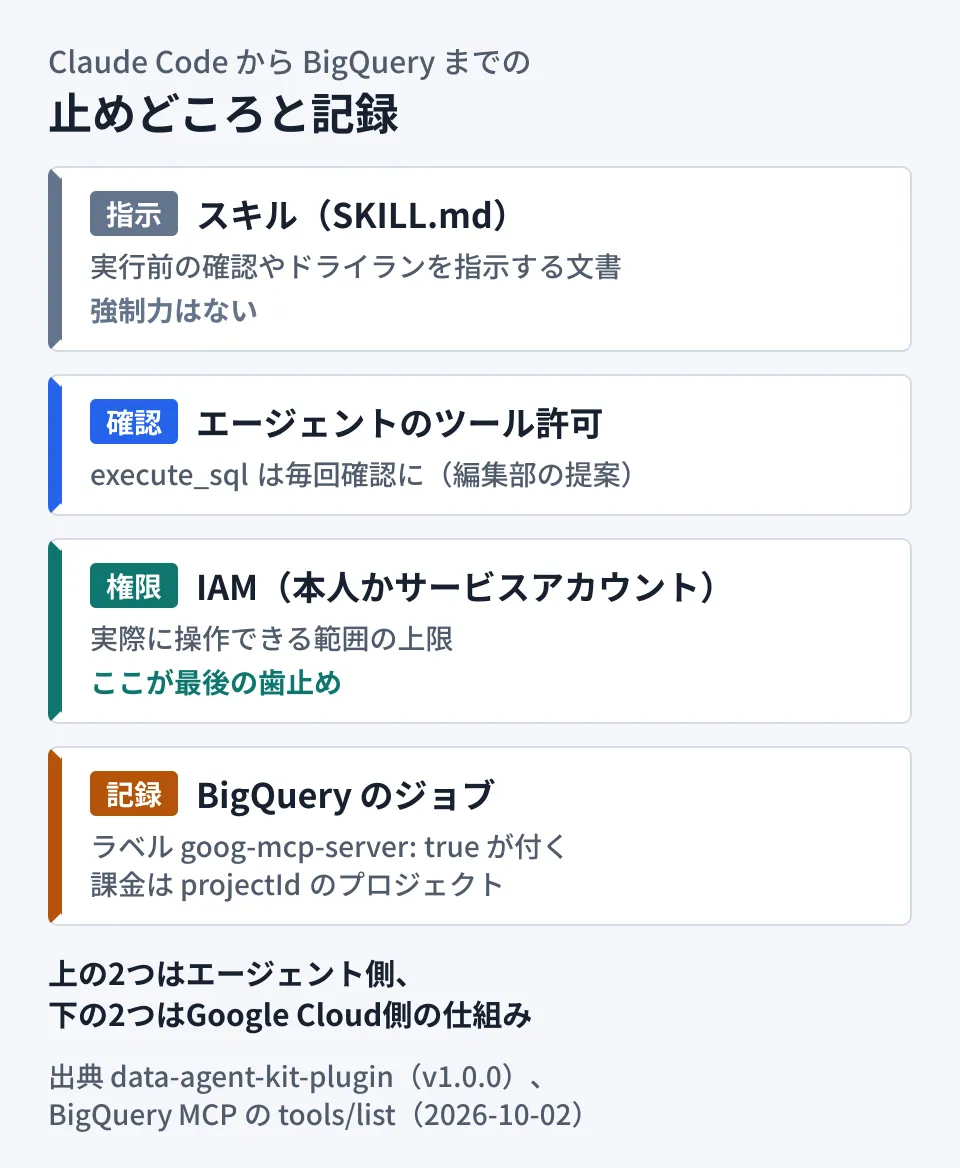
The top two layers in the diagram (skills and tool permissions) are on the agent side, and the bottom two (IAM and job records) are Google Cloud mechanisms. According to the blog, the agent connects either as you or as a service account through impersonation, so row- and column-level security policies apply as they are.
How to install it in Claude Code
The prerequisites and steps in the README are as follows.
- Install Node.js (LTS recommended) and the gcloud CLI, and log in with
gcloud auth loginandgcloud auth application-default login - Install the plugin
claude plugin marketplace add https://github.com/GoogleCloudPlatform/data-agent-kit-plugin
claude plugin install dak@dak-marketplace- Send any prompt or run
/dak:dak-setup, then answer with your project ID, region and the services to use (choose from 11, including BigQuery and Knowledge Catalog) - Restart the agent as instructed
The official blog also lists claude plugin install data-agent-kit-starter-pack@claude-plugins-official as an alternative procedure. This official marketplace entry points to a different repository (gemini-cli-extensions/data-agent-kit-starter-pack), and the README of the registered version said "currently in beta (pre-v1.0)." Standardizing internally on which one you install makes it easier to trace the configuration later.
There are a few other things to know before adopting it.
- In Codex, the procedure involves disabling the sandbox only during setup (
codex -s danger-full-access) - The configuration for Claude Code includes a hook that runs a usage statistics script before every tool call. According to the README, it collects information such as when skills and tools were used, and does not include code or data values. You can stop the collection with the environment variable
DO_NOT_TRACK=1and other means
For overall governance when using Claude Code across an organization, see also our article on company-wide Claude Code adoption.
What to decide before connecting (editorial proposal)
From here on are the editorial team's proposals based on the official information above and the tool list.
1. Use a dedicated service account, not your own account
The Security section of the README recommends using service account impersonation instead of end-user credentials, granting only the roles needed, and using Principal Access Boundary policies to restrict the agent's service account to the intended projects. The BigQuery MCP server documentation lists the roles required in the project you use: MCP Tool User (roles/mcp.toolUser) for calling MCP tools, BigQuery Job User (roles/bigquery.jobUser) for running jobs and BigQuery Data Viewer (roles/bigquery.dataViewer) for querying data. If your goal is analysis, the basic approach is to start from these three and not grant any roles that allow writes.
According to the same documentation, IAM allow and deny policies can use a tool's "read-only" attribute or tool name as conditions. The MCP safety guidance (AI security and safety) also recommends using deny policies to block read-write tools on production resources.
2. Require confirmation for execute_sql every time
In an example in the official blog from September 8, Google explains that the IDE asks for permission before using an MCP tool and lets you choose between "Allow once" and "Always allow." Even if you set execute_sql_readonly to always allow, it is safer to keep execute_sql requiring confirmation every time. In Claude Code, you can deny tools with --disallowedTools (claude --help in v2.1.287). We have not confirmed the names under which the plugin's MCP tools are registered, so check the actual names after installation before configuring this.
3. Set cost limits on the BigQuery side
Since the tool arguments have no cap on the amount of data processed and the MCP server has no quota of its own, cost controls need to be placed on the BigQuery side in addition to dry runs and timeouts. According to the BigQuery documentation (Create custom query quotas), you can cap the amount of data processed per day per project (QueryUsagePerDay) and per user (QueryUsagePerUserPerDay). By default, the per-project limit is 200 TiB per day and the per-user limit is unlimited. The per-user value applies uniformly to service accounts as well, and you cannot give only specific accounts a different value. Running agent queries in a dedicated project and billing that project makes costs easier to separate.
4. Make it traceable afterward
Queries run from MCP are labeled goog-mcp-server: true. By filtering job history by this label, you can later check the queries the agent ran and how much data they processed. If the agent reads external text as data, also review the prompt injection guidance referenced in the README. We covered how to think about permission design via MCP in our article on MCP authorization.
What is still unknown
- We checked the IAM roles and quotas against the official documentation, but did not actually assign the roles and run anything
- We did not run anything with a Google Cloud account. We retrieved the tool list, but did not verify tool calls, dry-run results, or whether labels are actually applied
- The official blog (the starter pack on the official marketplace) and the README (dak-marketplace) give different installation steps for Claude Code, and we could not determine from the materials which one is recommended
On October 2, 2026, we directly opened and cross-checked the Google Cloud official blog posts (the GA announcement of September 30, 2026, and "Agentic analytics with the Data Agent Kit" of September 8), the product page, the README, CHANGELOG, plugin configuration, and each skill's SKILL.md in GoogleCloudPlatform/data-agent-kit-plugin, and the listing on the official Claude Code marketplace. The BigQuery MCP tool list was retrieved the same day by sending
tools/listtohttps://bigquery.googleapis.com/mcpwithout authentication. On October 5, 2026, we opened the BigQuery MCP server documentation, the custom quota documentation, and the MCP safety materials to verify the descriptions of roles and quotas. We did not install the plugin or run queries against real data.
For help building a setup that lets AI agents use your BigQuery data, or designing permissions and costs, contact GleamHub for a consultation on development, AI, and automation.
Sources
- Data Agent Kit is now GA: Bring Google Data Cloud to any coding agent — Google Cloud Blog(2026-09-30)
- Agentic analytics with the Data Agent Kit — Google Cloud Blog(2026-09-08)
- Data Agent Kit — Google Cloud product page
- GoogleCloudPlatform/data-agent-kit-plugin — README
- GoogleCloudPlatform/data-agent-kit-plugin — CHANGELOG
- GoogleCloudPlatform/data-agent-kit-plugin — .claude-plugin/mcp.json
- GoogleCloudPlatform/data-agent-kit-plugin — skills(bigquery-sql / bigquery-graph-author / dbt-bigquery / bigtable-basics / dak-setup)
- anthropics/claude-plugins-official — marketplace.json
- Use the BigQuery MCP server — Google Cloud documentation
- Create custom query quotas — BigQuery documentation
- AI security and safety — Google Cloud MCP servers documentation
- gemini-cli-extensions/data-agent-kit-starter-pack — README