You added reCAPTCHA to your contact form, but automated submissions keep arriving. Their scores are high, and you cannot tell them apart from legitimate users. In such cases, there is not much you can verify on the server side. The main signals are whether the token is valid, which page it was created on, and what the score is.
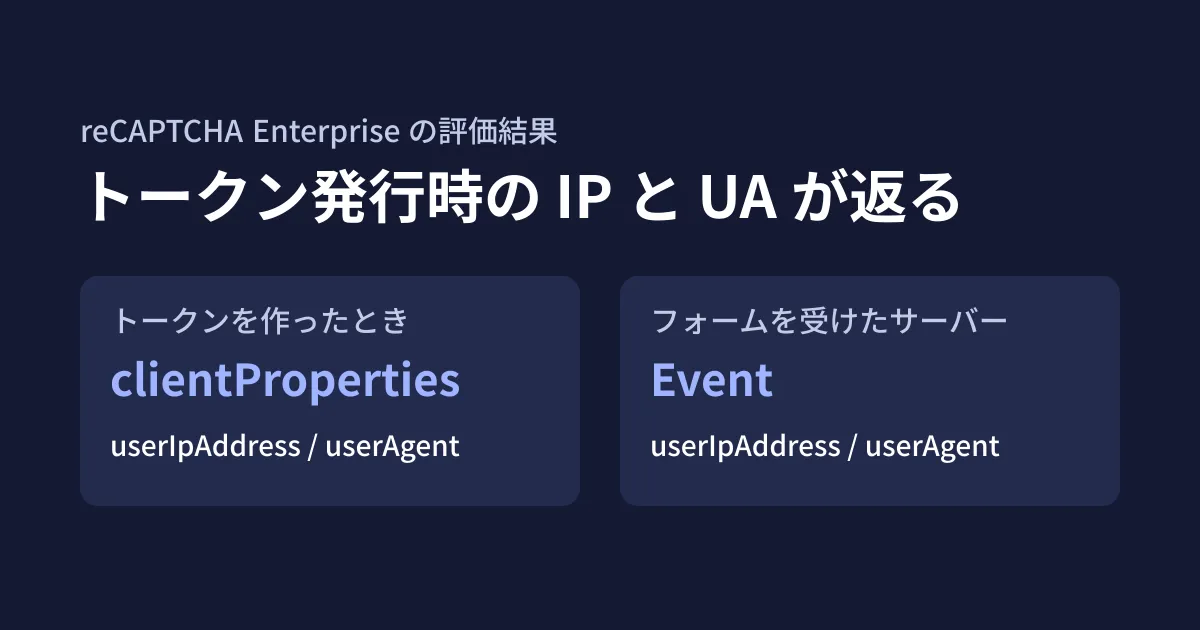
The assessment results of the reCAPTCHA Enterprise API (projects.assessments.create) now include a field, tokenProperties.clientProperties, that returns the user's IP address and User-Agent at the time the token was created. This lets you compare the values from the request that submitted the form with the values at the time the token was created. In this article, we outline how to incorporate this into form screening, based on the reCAPTCHA Enterprise API Discovery document (revision 20261011) and Google's client libraries, which we checked directly on October 18, 2026, and the official API reference and release notes, which we opened directly on October 19. This is desk research plus the editorial team's proposals; because we had no credentials, we did not call the API.
The new field
In the API reference and the Discovery document, clientProperties has been added to TokenProperties, described as "Output only. Information collected by the reCAPTCHA Enterprise client-side integration when the token is generated." It contains two items.
userAgent: "TheUser-Agentheader string observed by reCAPTCHA during token generation." Anything beyond 1,000 characters is truncateduserIpAddress: "The user’s IP address at token generation." It is either IPv4 or IPv6; IPv6 addresses are returned in the canonical form defined by RFC 5952, and IPv4 addresses expressed in IPv6 form are converted back to IPv4
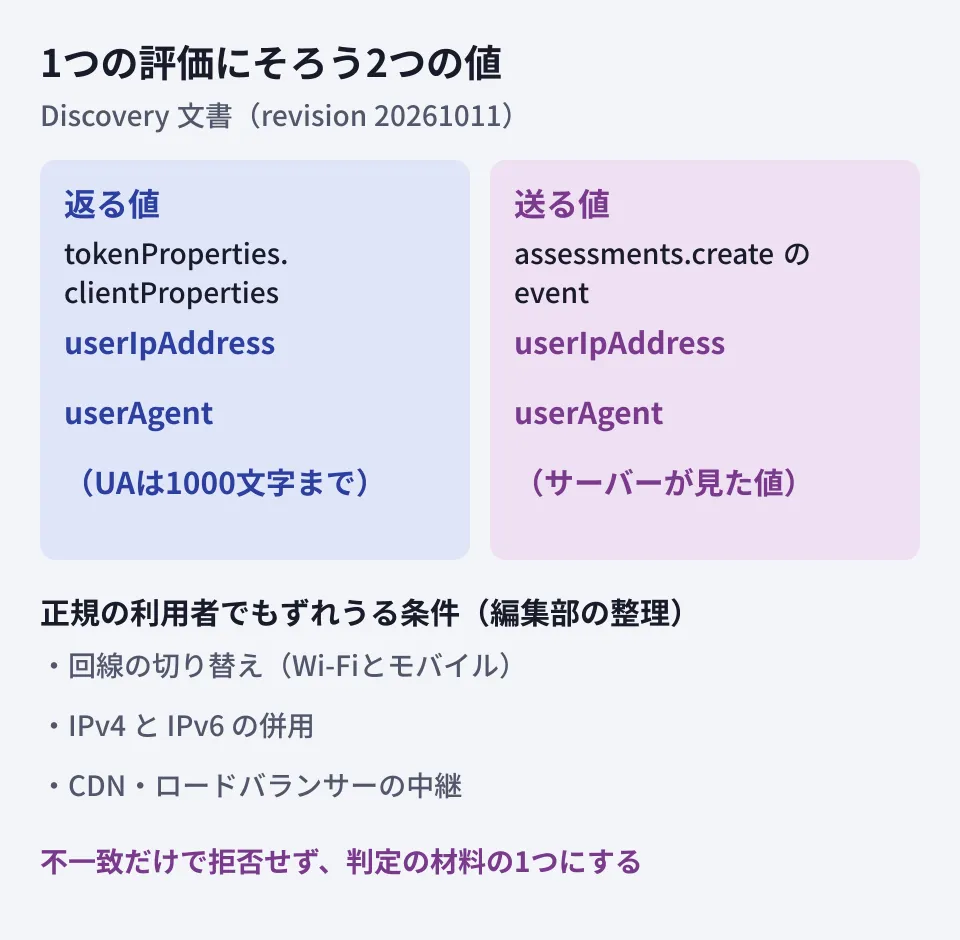
Both are output only and are not values sent by the server. Meanwhile, Event, which the server can send when requesting an assessment, already had userIpAddress ("The IP address in the request from the user’s device related to this event.") and userAgent. These are the values seen by the server that received the form.
In other words, with this change, the values seen by the server (the sending side) and the values seen by reCAPTCHA when the token was created (the returned side) come together in a single assessment.
Since when and where it is available
The official API reference (the projects.assessments page, last updated September 30, 2026 UTC) lists clientProperties in TokenProperties, along with userIpAddress and userAgent inside it, with the same descriptions as above. However, the reCAPTCHA release notes (last updated October 13, 2026 UTC) contain no announcement of this field. As a result, there is no official date for when it was added.
One clue is google-api-python-client, the Python library published by Google. Version 2.201.0 (released September 30, 2026, with reCAPTCHA definitions at revision 20260825) does not include clientProperties, while the unreleased definitions on the GitHub main branch (revision 20261003) and the current Discovery document (revision 20261011) do. It appears to have been added sometime between late August and early October.
One thing to watch is support in the client libraries. As of October 19, we could not find clientProperties in the files bundled with the latest version of the Node.js library @google-cloud/recaptcha-enterprise, 7.3.0 (released October 12), nor in recaptchaenterprise.proto in googleapis/googleapis on GitHub. Until the gRPC libraries can handle it as a type, assume you will read it from the JSON of the REST API response. We have not confirmed whether this field actually appears in responses or for which key types (score-based, checkbox, and so on) it appears.
Comparing with the values at submission (the editorial team's proposal)
The following example shows a flow in which the server that receives the form requests an assessment and compares the returned values. The editorial team built it based on the definitions in the Discovery document; we have not actually sent requests and checked the responses.
// フォームの送信を受けたサーバー側の処理(REST APIを直接呼ぶ例)
const res = await fetch(
  `https://recaptchaenterprise.googleapis.com/v1/projects/${projectId}/assessments`,
  {
    method: 'POST',
    headers: { Authorization: `Bearer ${accessToken}`, 'Content-Type': 'application/json' },
    body: JSON.stringify({
      event: {
        token,                 // フォームから受け取ったトークン
        siteKey,
        expectedAction: 'contact_submit',
        userIpAddress: clientIp,   // サーバーが見た送信元のIP
        userAgent: request.headers.get('user-agent') ?? '',
      },
    }),
  },
);
const assessment = await res.json();
const issued = assessment.tokenProperties?.clientProperties;
// reCAPTCHAはIPv4射影アドレス(::ffff:192.0.2.1)をIPv4に直して返すため、こちらもそろえる
const normalizedIp = clientIp.replace(/^::ffff:(\d{1,3}(?:\.\d{1,3}){3})$/i, '$1');
const ipMismatch = issued?.userIpAddress && issued.userIpAddress !== normalizedIp;
const uaMismatch = issued?.userAgent && issued.userAgent !== (request.headers.get('user-agent') ?? '').slice(0, 1000);
How you handle mismatches is the core of the design. The editorial team recommends not rejecting a submission based on a mismatch alone, because there are conditions under which the values differ even for legitimate users.
- Network switching: When a smartphone moves between Wi-Fi and a mobile network, the IP address may change between when the page was opened and when the button was pressed
- Mixed IPv4 and IPv6: Even on the same device, the addresses will not match if the connection that creates the token and the connection that submits the form use different address types
- Differences in address notation: On a Node.js server listening on both IPv4 and IPv6, an IPv4 client may appear in a form like
::ffff:192.0.2.1. Because the value returned by reCAPTCHA is converted to IPv4 form, comparing them as is produces a mismatch even for the same client. IPv6 notation also varies, so normalize addresses to the RFC 5952 form before comparing - Proxies and intermediaries: On a server behind a CDN or load balancer, the client IP received belongs to the intermediary device. First verify that the logic that extracts the user's IP from
X-Forwarded-Foror similar is correct - Token regeneration: In implementations that regenerate the token when input takes a long time, the values change depending on which token is used
A reasonable approach is to treat it not as grounds for rejection but as one signal alongside the score, tokenProperties.invalidReason, and clientSignalsFailed, and to route a submission to a verification step (such as identity confirmation by email or holding the submission) only when "the score is near the threshold and neither the IP nor the User-Agent matches."
Cautions when logging
IP addresses and User-Agents are information that can identify a submitter. Before you start keeping comparison results, decide on the following points.
- What to keep: One option is to keep only the comparison result (match or mismatch) and not the values themselves. If you need the values for investigations, set a retention period
- Privacy policy disclosure: Check whether your site's privacy policy states that the form uses reCAPTCHA and that information at submission is used for fraud prevention
- Who can see it: If you display the values in your inquiry management screen, limit who can view them
How to handle the sales emails arriving through your form is covered in our article on contact forms flooded with sales emails, and the decision to migrate away from reCAPTCHA is covered in our article on Google Cloud Fraud Defense. Do not rely on a single measure to stop automated submissions; consider it together with how you design your intake process.
Start by checking whether your form's server correctly extracts users' IP addresses. If that is off, comparisons with the new field will produce nothing but mismatches, and it will be useless as a screening signal.
On October 19, 2026, we directly opened the official API reference (
projects.assessments, last updated September 30, 2026 UTC) and the release notes (last updated October 13, 2026 UTC), and confirmed that the field descriptions match the text of this article and that the release notes contain no announcement. On October 18, 2026, we directly retrieved and checked the reCAPTCHA Enterprise API Discovery document (recaptchaenterprise v1, revision 20261011), the definitions bundled with google-api-python-client 2.200.0 and 2.201.0 along with their PyPI release timestamps, npm's@google-cloud/recaptcha-enterprise7.2.1 and 7.3.0, andrecaptchaenterprise.protoin googleapis/googleapis on GitHub (desk research). The code example and the handling of comparisons are the editorial team's proposals. Because we had no credentials, we did not call the API, and the actual responses, the key types for which the field is returned, and how often the values fail to match remain unverified.
GleamHub's development and web production consultations can help with preventing fraudulent contact form submissions and reviewing the server-side implementation around your forms. The right measures depend on your form's setup and the submissions you are receiving, so please reach out via Contact Us.
References
- REST Resource: projects.assessments (reCAPTCHA API reference)
- reCAPTCHA release notes
- reCAPTCHA Enterprise API Discovery document(recaptchaenterprise v1)
- PyPI — google-api-python-client
- npm registry — @google-cloud/recaptcha-enterprise
- googleapis/googleapis — google/cloud/recaptchaenterprise/v1/recaptchaenterprise.proto