If you maintain a corporate website or a members-only web app built with Nuxt, a dependency update PR will arrive that bumps nuxt to 4.6. Take, for example, a site that receives contact form submissions through server/api/contact.post.ts and keeps member login state in an h3 session cookie (a hypothetical scenario). Two questions matter: "Will anything break if we upgrade to 4.6?" and "When and how should we rewrite our server-side code in preparation for Nuxt 5?"
Nuxt 4.6.0 was published to npm on October 5, 2026 (UTC; October 6 in Japan time), and 4.6.1 on October 9 (October 10 in Japan time). Version 4.6 adds a new import source, nuxt/server, for writing server-side code without depending on the versions of h3 or Nitro. The editorial team built the same small app with 4.5.2 and 4.6.1 and checked its behavior by sending requests with curl.
Simply upgrading to 4.6 keeps existing server code working
Upgrading to 4.6 alone does not require rewriting existing server code. In the editorial team's environment, routes using the auto-imported defineEventHandler, useSession, sendRedirect and getRouterParam (all from h3 v1) worked on 4.6.1 without changes.
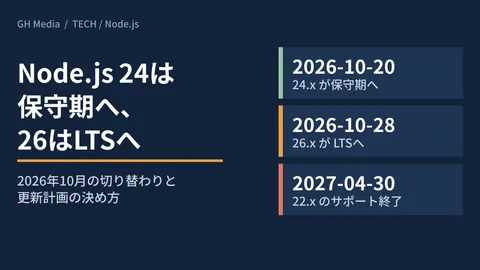
What you should check is the Node.js version. The engines field in the package.json of nuxt went from ^22.19.0 || ^24.11.0 || >=26.0.0 in 4.5.2 to ^22.22.3 || ^24.15.0 || >=26.0.0 in 4.6.0. By default, npm only treats engines as a warning and does not stop the installation, so check the Node.js versions on your build server, production server and CI. Maintenance deadlines for each version are summarized in Node.js 24 enters maintenance on October 20.
nuxt/server is the way to write code for Nuxt 5
The description of nuxt/server (Server Imports in the docs) says the following.
nuxt/serverships from Nuxt 4.6, so one file can serve Nuxt 4.6 runningnitropackv2, Nuxt 5 running Nitro v3, and anything a future builder brings.
According to the upgrade guide, the server side of Nuxt 4 runs on Nitro v2 and h3 v1, while Nuxt 5, still in development, runs on Nitro v3 and h3 v2. Code written with imports from nuxt/server is positioned so that Nuxt absorbs that difference and the code keeps working on Nuxt 5 without changes.
Besides getQuery, readBody, getCookie, sendRedirect and getRequestIP, it includes readValidatedBody, which accepts schemas such as Zod, and session functions that seal data into a cookie (such as useSession). It does not include readMultipartFormData for reading file uploads, or Nitro's useStorage and defineCachedEventHandler; routes that use them keep importing from h3 or nitropack/runtime and remain to be revisited for Nuxt 5.
Common stumbling points when rewriting
What follows is what happened in the editorial team's environment when we rewrote code to use nuxt/server.
Import defineEventHandler from nuxt/server as well
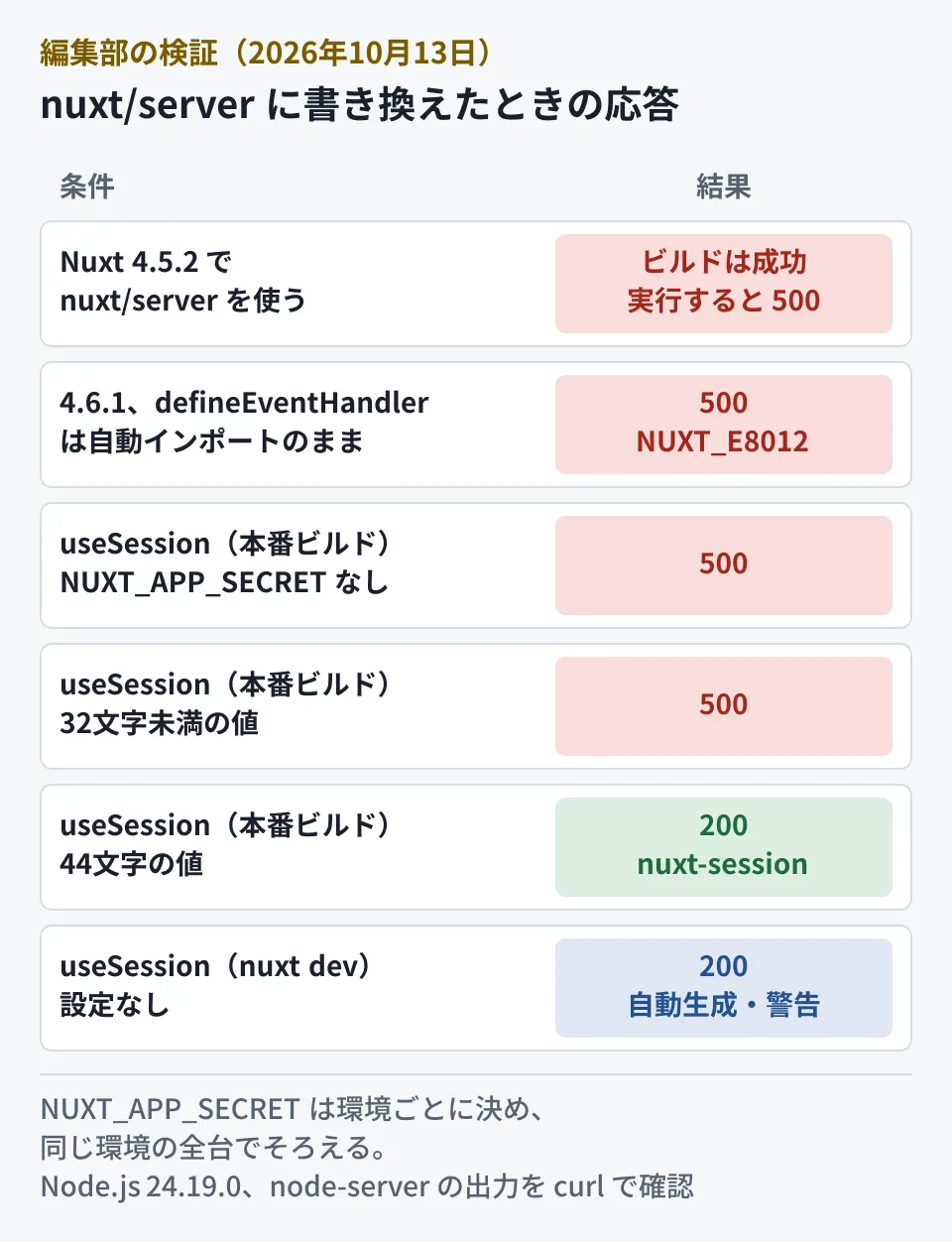
The functions in nuxt/server are not auto-imported in Nuxt 4.6. The auto-imported functions with the same names are from h3 v1. When we imported only the helpers from nuxt/server and left defineEventHandler as an auto-import, requests returned a 500 error.
// server/api/mixed.post.ts(失敗する例)
import { readValidatedBody } from 'nuxt/server'

export default defineEventHandler(async (event) => {   // ← h3 のもの
  const body = await readValidatedBody(event, (b: any) => typeof b?.email === 'string')
  return { ok: true, body }
})
POST /api/mixed → 500
[NUXT_E8012] `readValidatedBody` from `nuxt/server` was called with an h3 event.
The handler was defined with h3's `defineEventHandler` (auto-imported), which passes a different event.When we imported it together with import { defineEventHandler, readValidatedBody } from 'nuxt/server', valid input returned 200, and input where email did not contain @ returned 400 (Validation failed). The build succeeds, and the failure only appears when a request reaches that route.
On a 4.5.x environment, it builds but does not work
When we built the same nuxt/server code with Nuxt 4.5.2, the build completed without errors. The output still contained import ... from 'nuxt/server' as is, and starting the app and sending a request returned a 500 error.
# Nuxt 4.5.2
GET /api/portable → 500
Error [ERR_PACKAGE_PATH_NOT_EXPORTED]: Package subpath './server' is not defined by "exports" in .../node_modules/nuxt/package.json
The top page still returns 200, so uptime monitoring will not catch it. Before rewriting, confirm that nuxt in the lockfile is 4.6 or later.
Return sendRedirect
The "Differences From h3 v1" table in the upgrade guide says that sendRedirect in nuxt/server does not send the response but returns a body, so you write return sendRedirect(event, '/login'). In the editorial team's environment, writing it without return returned 302 and location: /login, but the body became the {"reached":true} written afterward. Adding return returned the same meta refresh body as the auto-imported h3 sendRedirect. Because the browser follows the redirect, this is easy to miss, but the handler's return value is sent as the body as is. Search for sendRedirect( and rewrite it with return.
Japanese characters in URLs are not decoded automatically
getRouterParam returns the value exactly as it appears in the URL in nuxt/server. On sites with Japanese slugs or search terms in the path, the value changes here.
GET /api/item/%E6%97%A5%E6%9C%AC%20a
h3(自動インポート)         → "日本 a"
nuxt/server                  → "%E6%97%A5%E6%9C%AC%20a"
nuxt/server { decode: true } → "日本 a"
Add { decode: true } to code that matches against the decoded value. The guide's table also lists other differences, such as the argument of createError becoming { status, statusText }, and using serverFetch instead of $fetch.
Do not trust X-Forwarded-For for IP addresses
By default, getRequestIP(event) returns the address of the connecting client. Sending a request with X-Forwarded-For: 203.0.113.9 still returned 127.0.0.1, and passing { xForwardedFor: true } returned 203.0.113.9. The description says, "No forwarded header is trusted by default, because a client can send any value in one." If you rate-limit repeated submissions by source IP behind a load balancer, you need the option. However, it also says "Only do this when the proxy overwrites the header," so this applies only when the proxy overwrites the header sent by the user.
If you use sessions, set NUXT_APP_SECRET in production
Version 4.6 adds an app-wide secret value, runtimeConfig.appSecret (environment variable NUXT_APP_SECRET). Unless you pass password, useSession in nuxt/server seals the cookie with a key derived from this value. The runtime config description says the value is generated automatically only during development.
In development, Nuxt generates a random secret and stores it in
.nuxt/app-secretonly whenappSecretis unset, so features that depend on it work without any setup. … Builds never generate one: setNUXT_APP_SECRETin every environment you deploy to.
Here are the results in the editorial team's environment.
- With
nuxt dev, it returned{"visits":1}without any configuration, and a[NUXT_B5028] A generated development appSecret is being used.warning appeared in the log - When a production build was started without
NUXT_APP_SECRET,/api/sessionreturned 500 (`appSecret` is not set. Set `NUXT_APP_SECRET` to at least 32 characters, or pass a secret explicitly.). A value shorter than 32 characters returned the same 500 - Setting a 44-character value generated with
openssl rand -base64 32returned 200.set-cookie: nuxt-session=...; Path=/; HttpOnly; Secure; SameSite=Laxwas returned
Because it works in development but fails only in production, forgetting to add it to the deployment environment's variables will make login and member pages return 500 right after release.
The description also says, "Use a different value for each environment, but keep it stable across deployments and server instances within that environment." In the editorial team's environment as well, another server started with the same value could read previously issued cookies, while a server with a different value started a new session (visits went back to 1). With multiple servers, use the same value on all of them, and note in your operating procedures that changing the value ends sessions.
One more point: useSession in h3's useSession and in nuxt/server are separate implementations. The cookie names also differ, h3 and nuxt-session, and the description says "a session one of them issues will not unseal with the other." If that is accurate, all users will be logged out as soon as you switch the login session (the editorial team did not test cross-reading). Choose the release time carefully and announce it if necessary.
How to proceed with the rewrite
The following is the editorial team's suggestion. Handle the upgrade to 4.6 and the rewrite to nuxt/server separately.
- Ship the upgrade to 4.6 on its own first. Check the Node.js version (22.22.3 or later, or 24.15.0 or later) and leave existing server code as is
- List the routes to rewrite. Separate out routes that cannot be migrated, such as those using
readMultipartFormDataoruseStorage - Rewrite one file at a time. Import
defineEventHandlerfromnuxt/serveras well, and reviewsendRedirect,getRouterParamandgetRequestIP - Switch sessions last, with an announcement. Set
NUXT_APP_SECRETin both production and staging before releasing - Verify by sending requests to every rewritten route. A successful build is not verification
We also cover the decision to adopt a major update of another framework for client projects in Remix 3.0 stable: five things to check before adopting it for projects.
Scope of verification
On October 13, 2026, we checked the docs at the v4.6.0 tag of nuxt/nuxt (Server Imports, Upgrade Guide, Runtime Config), packages/nuxt/package.json, the commit history, and the publication timestamps on registry.npmjs.org (desk research). We also built and started the same app with Nuxt 4.5.2 and 4.6.1 (both with Nitro 2.13.4 and h3 1.15.11) using
nuxt buildon Node.js 24.19.0 on Linux, and sent requests with curl (hands-on testing). We did not test reverse proxies or HTTPS, deployment targets other than node-server, Nuxt 5, orhandleCorsandserverFetch. On October 16, 2026, we also checked the Nuxt 4.6 announcement on nuxt.com and the GitHub release notes (v4.6.0), and confirmed that they do not contradict this article.
For updates to sites built with Nuxt or maintenance of server-side code, please contact us via Consulting on development, AI, and automation.
References
- Nuxt Blog — Nuxt 4.6
- nuxt/nuxt — Release v4.6.0
- nuxt/nuxt — docs/3.guide/6.going-further/5.server-imports.md(v4.6.0)
- nuxt/nuxt — docs/1.getting-started/18.upgrade.md(v4.6.0、Moving to nuxt/server)
- nuxt/nuxt — docs/3.guide/6.going-further/10.runtime-config.md(v4.6.0、Application Secret)
- nuxt/nuxt — packages/nuxt/package.json(v4.6.0、engines)
- npm registry — nuxt (publication timestamps)