We have seen multiple instances where companies judged that "the website is working" solely by looking at inquiry volume, only to turn pale upon opening each submission. What arrived were not business inquiries, but SEO pitches, custom development solicitations, and sponsored article proposals.
This is not someone else's problem. When we categorized 90 days of inquiries on our own media site, sales pitches accounted for nearly all submissions. Tracking the traffic sources of 33 form submission events in another month showed two from outbound sales agency domains, two from web development agency domains, one from search, and the remainder were direct visits without referrers. The form is working. It is simply functioning as a prospecting list entry point on the sales side.
The troublesome part is that this situation distorts inquiry volume as a metric. The more inquiry volume increases, the less visible actual website performance becomes.
Is the sender a machine or a human?
Discussions about countermeasures fail to align because people assume senders belong to a single category. In reality, two fundamentally different types are mixed together.
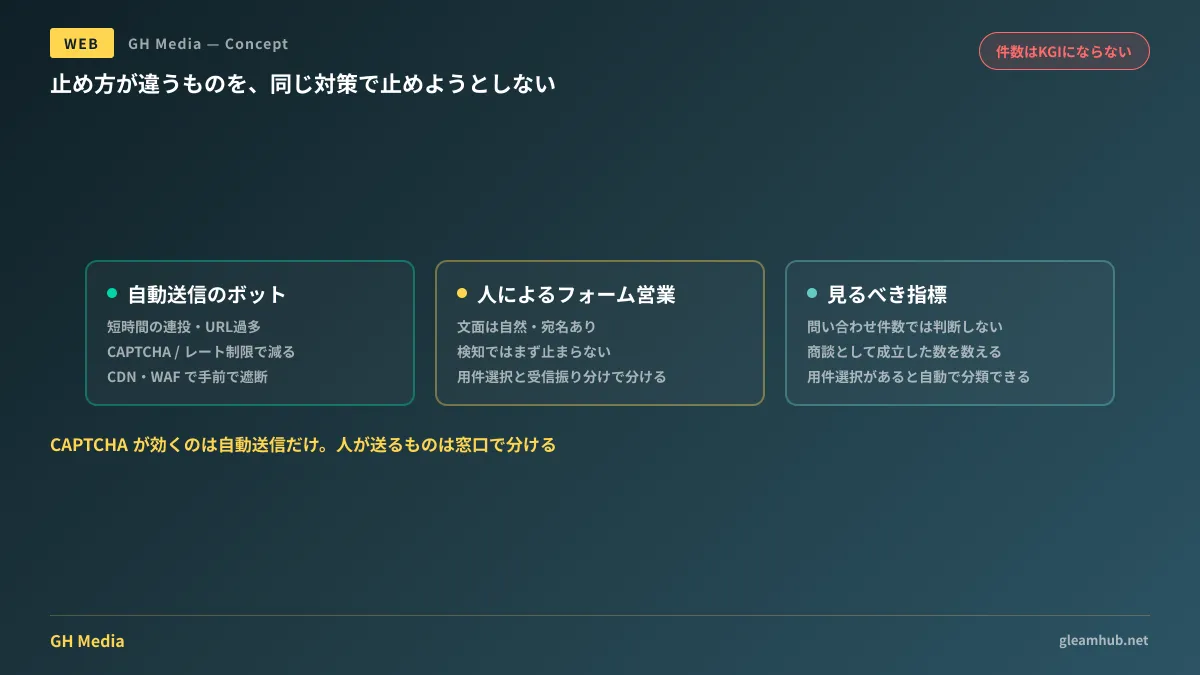
Submissions sent by machines are automatically dispatched by mechanically reading the form's structure. Characteristics include broken Japanese, numerous URLs in the body, or identical content arriving repeatedly within a short window.
Submissions sent by humans represent a technique known as form outreach. An outsourced sales agency opens the form, reads the content, and submits it. Alternatively, specialized services send them semi-automatically. The wording is natural, includes recipient names, and almost never triggers automation detection.
| Sender | Identification criteria | Effective remedies |
|---|---|---|
| Automated bots | Rapid bursts, excessive body URLs, broken Japanese | CAPTCHA, submission rate limiting, CDN/WAF blocking |
| Form outreach (human / semi-automated) | Natural copy, personalized addressee, sent from standard browsers | Cannot be stopped by detection; separated by contact point and inbox routing design |
The first measure many companies implement is CAPTCHA. This works for the first row. It almost never works for the second row because actual humans are doing the submitting. If you ramp up detection without understanding this, what gets blocked is not sales outreach, but genuine prospects. In fact, increasing bounce rates among real visitors as a result of stricter bot checks is a common failure.
On the question: Is contact form sales illegal?
Because this topic always arises during consultations, here is the current general interpretation.
The Act on the Regulation of Transmission of Specified Electronic Mail establishes an opt-in framework requiring prior consent to send commercial advertising or promotional emails. One exception applies to transmissions sent to businesses that publicly disclose their email addresses on the internet.
Contact forms do not satisfy the requirements for this exception because email addresses are not publicly displayed. From this standpoint, some argue that "form outreach falls outside the exception and carries high illegality." Conversely, others argue that form submissions do not constitute sending electronic mail in the first place, placing them outside the Act's scope, leading to divided practical treatments.
In short, you cannot expect this practice to stop based on the law anytime soon. Senders will continue based on their own interpretation. What the website side can do is design how submissions are handled after arrival.
Remedies to preserve only qualified inquiries
These are effective in sequence. Please start from the top.
1. Require an inquiry category selection. Forms with only freeform text fields allow anything to be submitted. Making options like "Service inquiries / Recruitment / Media and press requests / Other" mandatory forces sales senders to choose "Other." Adding even one classification criterion on the receiving end alters morning triage time.
2. State on the form that sales solicitations are rejected. While deterrent effects are limited, having it stated serves as grounds for subsequent actions. Place the notice near the submit button, provided that it does not misleadingly simulate consent.
3. Avoid consolidating inbound submissions into a single inbox. Changing the recipient address or subject prefix according to the selected inquiry category enables inbox filtering and quarantine rules to function. Trying to manage routing solely in the inbox without separating at the form leaves body copy as the only sorting criterion.
4. Address automated submissions only after that. CAPTCHA and CDN-level blocking are countermeasures for the first row. While effective, adding them will not reduce sales emails. Implement them only after aligning expectations.
Note that increasing form fields also reduces genuine inquiries. Adding fields is a matter decided within the trade-off between input friction and completion rates; making 10 fields mandatory as a sales countermeasure defeats the purpose. A single inquiry category selection is sufficient.
Moving away from "inquiry count" as a metric
This takes effect even before technical remedies.
As long as inquiry volume serves as your success metric, more sales emails make the numbers look better. What you should track is the number of actual qualified business inquiries. Introducing form category selection eliminates manual labor from this classification.
When a site reporting "50 inquiries" in a monthly review actually received two qualified opportunities and 48 sales pitches, the required actions differ entirely. Measures to increase the former and measures to decrease the latter are completely different. Leaving them aggregated as a total count blends the two, misallocating budget toward revisions that help neither.
What to do next
Open inquiries received over the past month and divide them into those that could lead to business opportunities and those that cannot. Once the ratio is visible, what to do next is practically decided.
If sales outreach exceeds 90%, what to undertake is adding inquiry category selection fields and inbox routing—not tightening CAPTCHA.
At GleamHub, we assist with website redesigns including rebuilding contact forms, designing user flows by inquiry type, and post-submission routing through our website production and redesign consultations. Because the approach depends on your current form setup and inbox operations, please reach out via Contact Us.
Sources
- Is Sending Sales Emails via Contact Forms Legal? — Digital Aid
- Is Form Outreach Illegal? Laws, Risks, and Safe Operational Practices — FormReach
- Top 5 Form Spam Countermeasures for 2026 — Tayori Blog
- Act on the Regulation of Transmission of Specified Electronic Mail — Ministry of Internal Affairs and Communications