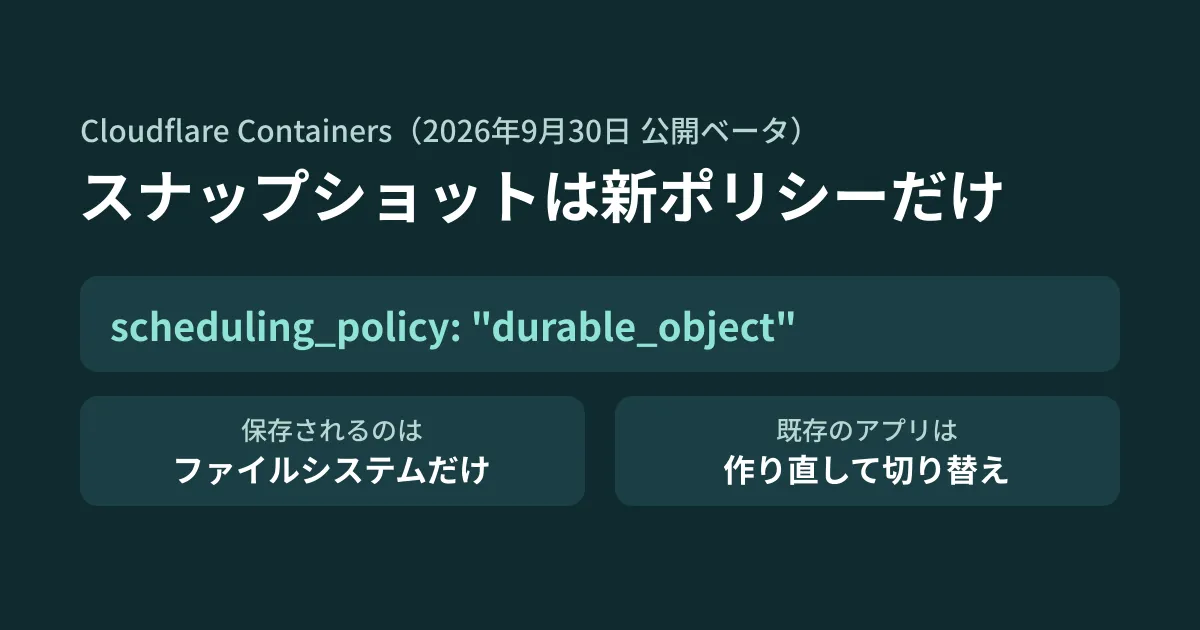
When you run workspaces where AI agents write and test code, or per-customer build environments, on Cloudflare Containers, a container that has gone to sleep starts from the image state on its next launch (in the documentation's words, "All disk is ephemeral by default"). You end up reinstalling dependencies every time. If you could stop a container with its work-in-progress files intact and later resume from the same state, you could cut both waiting time and wasted execution time. As a means to do that, Cloudflare's changelog dated September 30, 2026 announced a public beta of a snapshot API that saves and restores a container's filesystem.
However, these snapshots are not a feature you can use by adding one line of configuration to an existing Containers app. They only work in apps using the durable_object scheduling policy (the method that determines where a container's image and size are decided), which entered public beta on the same day, and that policy cannot be changed on existing apps.
In this article, we reviewed the official documentation and the changelog source, and checked the configuration and types of the new policy with wrangler 4.151.2. For development leads deciding whether to migrate existing apps, we lay out the conditions, limits and migration effort.
Snapshots are only for apps on the new policy
The snapshot guide includes the following note.
Snapshots are only supported by Container applications that use the
durable_objectscheduling policy. Applications that use thedefaultscheduling policy cannot create or restore snapshots.
All existing Containers apps that do not specify scheduling_policy use the default policy. Extracting from the scheduling policy documentation, the differences between the two policies are as follows.
| Item | default | durable_object (public beta) |
|---|---|---|
| Specifying image and size | One per app, in the Wrangler configuration | Chosen per launch with ctx.container.start() in code |
| Image updates | Applied across the board by Cloudflare through a rollout | Running containers keep the original image. Your code decides whether to stop and relaunch them |
max_instances | Available | Not available (counted toward account limits) |
| Snapshots | Unavailable | Available |
| Intended use (as stated in the documentation) | Services that run with the same image and size | Sandboxes, agent environments and similar |
Exclusively for the durable_object policy, Cloudflare also provides a managed cloudflare/debian-trixie image (Node.js 24.20.0 on Debian Trixie slim) that can be launched without registration.
Use requires the Workers Paid plan (5 US dollars per month), and the pricing documentation lists the Free plan as "N/A". Billing is per 10 milliseconds of active time. We could not find any mention of a charge for storing snapshots themselves in the pricing documentation (as of October 20, 2026). The announcement blog post published the same day states that the new policy makes launches more than 6 times faster. As evidence, it cites a third-party (ComputeSDK) benchmark in which the median time to launch 100 containers simultaneously dropped from 4.049 seconds to 648 milliseconds. The editorial team did not measure launch times.
Only files are saved
What a snapshot restores is described in the Durable Object Container API documentation. snapshotContainer() saves the "writable root filesystem", and does not include memory, running processes or separately mounted filesystems. A container launched from a snapshot runs its entrypoint again from the beginning.
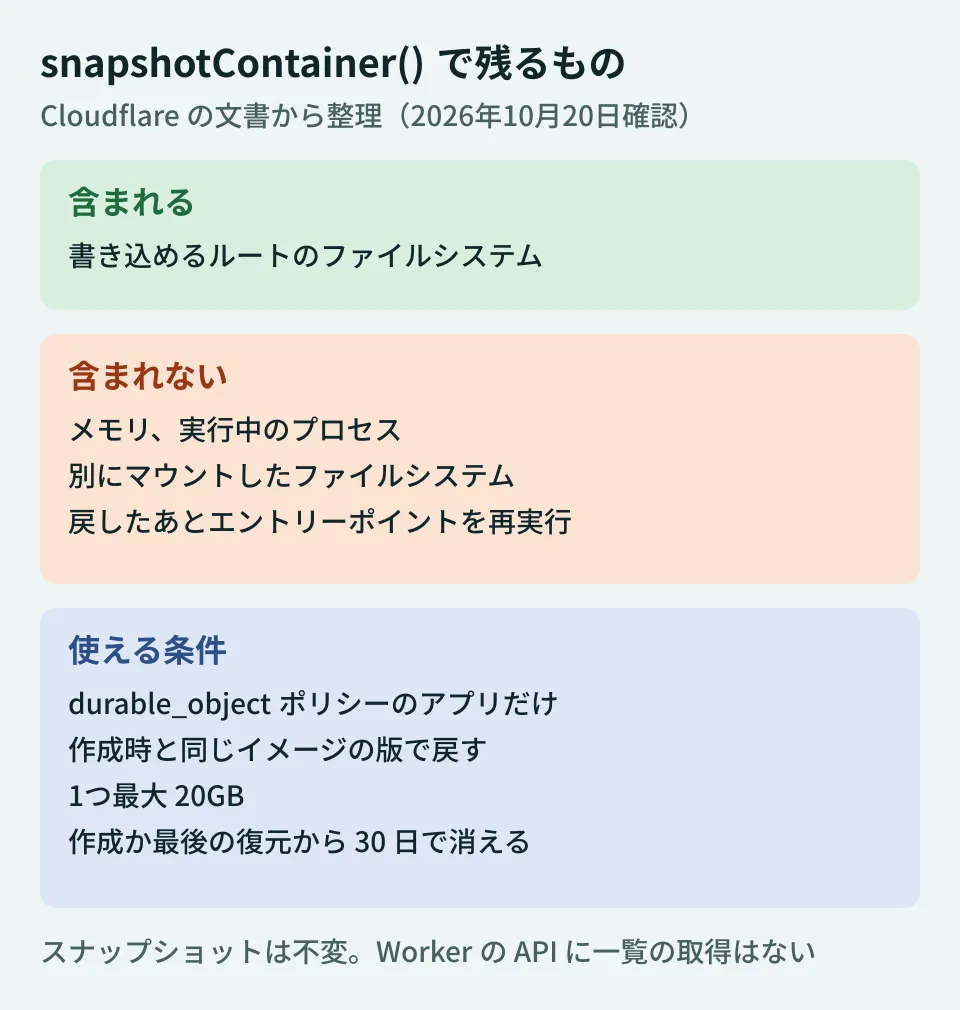
To resume an agent's work, your app needs logic to restart state other than files (such as a development server that was running). Other conditions we confirmed in the documentation are as follows.
- Can only be restored with the same image: A snapshot is tied to the version of the image it was created from and cannot be carried over to a different image. After updating the image, take a new snapshot from a container running the new image
- Limits and retention: Each snapshot can be up to 20GB. It is deleted 30 days after creation or the last restore, and each restore extends it by 30 days. The retention period cannot currently be changed
- No API for listing: The APIs available from a Worker do not include listing. Save the returned
idyourself, for example in Durable Object storage - Cannot be modified: Snapshots are immutable; to keep changes made after a restore, take a new one
- Can only be taken while running: Calling it on a stopped container results in an error
We checked the configuration and types locally
The following are results from the editorial team's test environment (Linux, Node.js v22.22.0, wrangler 4.151.2, @cloudflare/workers-types 5.20261019.1, TypeScript 5.9.3). We did not deploy to a Cloudflare account, so we have not confirmed the behavior of actually taking and restoring a snapshot.
First, running wrangler deploy --dry-run with a configuration that defines just one container on the durable_object policy displayed "AgentComputer (durable_object)" and completed normally. Adding a field used with the default policy to it stopped at configuration validation.
✘ [ERROR] Processing b.jsonc configuration:
    - Unsupported fields for Durable Object-managed Containers in containers: "max_instances". Only "name", "class_name", "scheduling_policy", "images", "observability", "ssh", "authorized_keys", and restricted "unsafe" settings are supported.
Adding instance_type produced an error of the same form. When we specified Docker Hub's docker.io/library/node:24-slim as a named image, we were asked to use a digest-pinned reference in Cloudflare's managed registry (registry.cloudflare.com/…@sha256:…).
Next, we type-checked a Durable Object that implements saving and restoring with tsc --strict.
import { DurableObject } from "cloudflare:workers";

export class AgentComputer extends DurableObject {
  // 型の上では ctx.container は省略可能(Container | undefined)
  private get c(): Container {
    const c = this.ctx.container;
    if (!c) throw new Error("no container attached");
    return c;
  }

  async save(): Promise<void> {
    const snap = await this.c.snapshotContainer({ name: "after-install" });
    await this.ctx.storage.put("snap", snap); // 一覧APIがないので id を自分で保存する
  }

  async resume(): Promise<void> {
    const snap = await this.ctx.storage.get<ContainerSnapshot>("snap");
    if (snap) {
      this.c.start({ containerSnapshot: snap, enableInternet: false, instance: "standard-2" });
      return;
    }
    this.c.start({ image: "cloudflare/debian-trixie", instance: "standard-2", enableInternet: false });
  }
}
This code passed type checking. Passing image and containerSnapshot at the same time caused a type error, consistent with the documentation's statement that they cannot be specified together. The official example uses this.ctx.container as is, but under strict type checking it has an optional type, so an extra step to check that it exists was needed.
We also found two discrepancies between the documentation and the type definitions. In the types, the argument to snapshotContainer() is optional, but the documentation says it "throws a TypeError when options is omitted" and instructs you to pass {} even when you do not assign a name. Also, the types allow "basic" for instance, but the scheduling policy documentation says basic is not accepted at runtime. Neither issue is caught by type checking, so it is safer to write your code to match the documentation.
Deciding whether to migrate existing apps (editorial suggestion)
The migration steps are covered in the official migration guide. The two key points are that "the policy cannot be changed after creation" and that you "create a separate app with a new Durable Object class and namespace, then switch traffic over". The guide states explicitly that neither existing containers nor Durable Object storage are carried over. Since snapshots cannot be taken on the default policy, you also cannot move files over using snapshots.
The Container class in @cloudflare/containers does not support the durable_object policy, so apps that inherit from it need to rewrite logic such as waiting for ports and forwarding requests using ctx.container. The guide also warns that if you change only scheduling_policy in the existing configuration and deploy, it will fail after the new Worker has been published.
In addition, the announcement blog post states that the Container class and the legacy Sandbox class will be maintained until December 31, 2026. Existing deployments will keep working after that, but the classes will not be updated. The new policy and snapshots are only available through ctx.container, and the blog recommends migrating to ctx.container.
Based on the above, the editorial team summarizes it as follows.
- Do not migrate always-on services that do not need snapshots for now: APIs that run on the same image can use
defaultrollouts andmax_instances, anddurable_objectis in public beta. If you only need to keep files, there is also the approach described in the documentation of placing them in R2 or similar via FUSE. However, if you inherit from theContainerclass, the maintenance deadline mentioned above applies. The official "Migrate from the Container class to the Durable Object Container API" guide includes steps to rewrite your code toctx.containerwithout changing the Durable Object class name or bindings, so you can plan that separately from the policy migration - If you are building new agent workspaces or per-user environments, build them on
durable_objectfrom the start: Migrating later means moving namespaces and data - If you migrate, switch over per user (sandbox): As in the guide's example, record which namespace each one uses and route accordingly. The guide warns that routing per request could result in two containers running for the same sandbox, splitting its state
How to choose an execution environment for agents is covered in our article on Cloudflare Sandboxes, how to store state in Git-compatible storage in our article on Cloudflare Artifacts, and cautions about rolling back deployments in our article on wrangler rollback.
Summary: what to check first
First, check whether your Containers app's configuration includes scheduling_policy: "durable_object". If it does not, you will need to create a new app to use snapshots. Then, write down whether restoring files alone is enough or whether you also need process state; that will tell you whether migrating is worth it.
On October 20, 2026, we reviewed two changelog source entries (2026-09-30) in cloudflare/cloudflare-docs (production), the Containers documentation (snapshots, scheduling policies, Durable Object Container API, limits, pricing, image management and the migration guide), and the wrangler CHANGELOG, and before publication cross-checked the content against each page on developers.cloudflare.com and the announcement blog post (2026-09-30) (desk research). In the editorial team's test environment (Linux, Node.js v22.22.0), we ran configuration validation with
deploy --dry-runin wrangler 4.151.2 and type checking with @cloudflare/workers-types 5.20261019.1 (hands-on testing). We did not check deployment to Cloudflare, creating or restoring snapshots, launch times, or snapshot storage charges.
GleamHub's development, AI and automation consulting can help you build execution environments for AI agents on Cloudflare and review your existing container setup. The approach depends on how you use it and the scope of migration, so please reach out through our contact form.
References
- Changelog: New scheduling policy for Containers(cloudflare/cloudflare-docs, 2026-09-30)
- Changelog: Snapshot and restore Container filesystem(cloudflare/cloudflare-docs, 2026-09-30)
- Containers: Use snapshots
- Containers: Scheduling Policies
- Containers: Durable Object Container API
- Containers: Limits and Instance Types
- Containers: Pricing
- Containers: Migrate to the Durable Object scheduling policy
- Containers: Migrate from the Container class to the Durable Object Container API
- Cloudflare Blog: Cloudflare Containers, rebuilt to scale agent sandboxes(2026-09-30)
- wrangler CHANGELOG(cloudflare/workers-sdk)