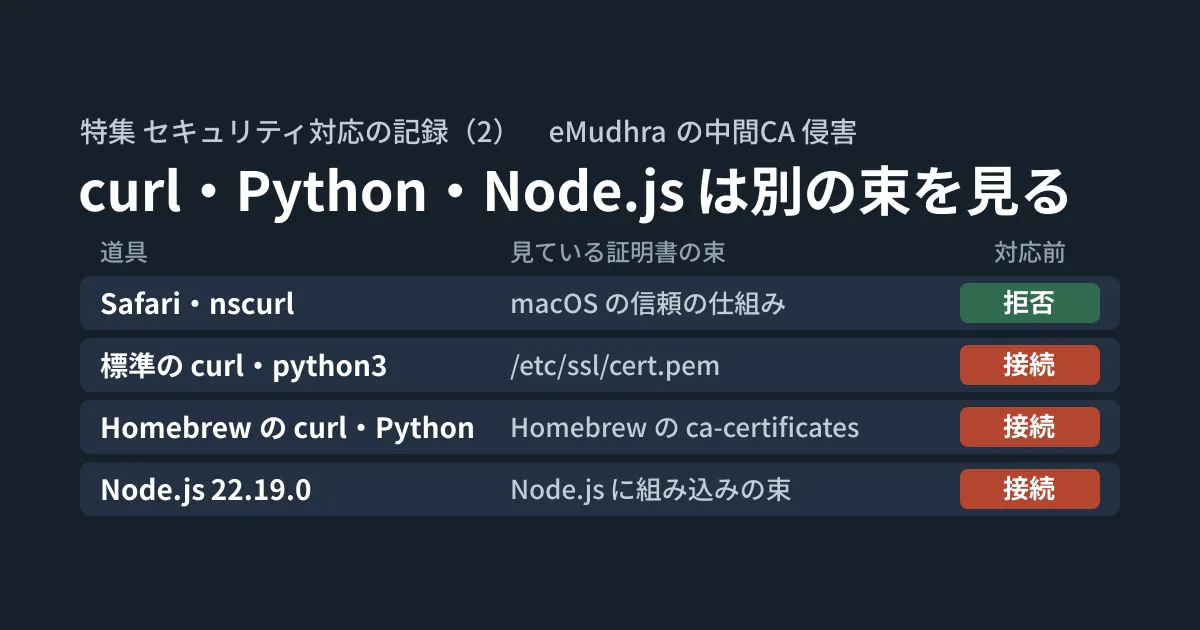
Opening the check page in Safari produces a certificate error, which tells you that you are protected. But when we ran curl in the terminal on the same Mac, it connected with HTTP 200 to a test host using a compromised intermediate CA certificate. Even if the browser is safe, the curl, Python and Node.js used in development each rely on their own certificate bundles.
On the morning of October 22, 2026, we (the GleamHub development team) ran this check on one Mac used for development. This article is the record of that check. Using the actual commands and results, it documents which tool relies on which bundle, how we verified it, and where we stumbled during the update.
This article is Part 2 of a Feature that records, in three parts, the security responses we carried out on October 21–22. Part 1 covers our response to the PHP emergency release, and Part 3 covers the company-wide bulk update to Node.js 22.23.4.
Outside the browser, the risk remains until each bundle is updated
According to the page summarizing the issue (emudhra.we-have-a-problem.com, published October 20), the private keys of eight eMudhra intermediate CAs were compromised. The page states that because the CA generated the keys using a flawed procedure, anyone could recover the keys from the certificates. The issue was reported on October 17, and the certificates were blocked by Firefox and Chrome on the 17th, Apple on the 19th and Microsoft on the 20th.
With these keys, anyone could impersonate any site. Browsers and operating systems blocked them all at once through mechanisms that distribute revocation information (such as Firefox's OneCRL and CRLite, and Chrome's CRLSets). However, the same page notes that many clients do not read revocation information, so software updates are needed. Cloudflare's blog also cautions that “passing a browser test does not prove that the services running behind it are protected” and that “the same applies to a curl test if an app uses a different verification mechanism.”
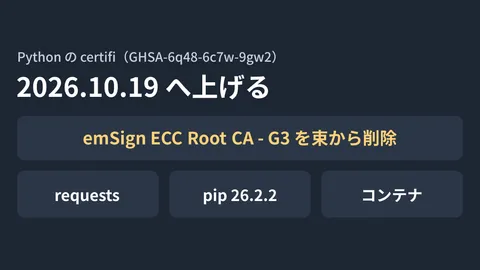
The test hosts use certificates from the compromised intermediate CAs. There were two certificate chains: dv-g3b-emudhra chained to emSign ECC Root CA - G3, and dv-g3b-aaa-emudhra to Sectigo's (formerly Comodo) AAA Certificate Services. When addressing this through a bundle, the basic approach is to remove these two roots. What was removed from Python's certifi bundle is summarized in the article on certifi's removal of emSign.
Connecting to the test hosts with each tool
The test is simple: if you can connect, you are at risk; if you get a certificate error, you are protected. For browsers, you can use “Run check” on the check page. For terminal tools, connect to each of the two hosts.
# curl(パスを指定して、どの curl かをはっきりさせる)
/usr/bin/curl -sS -o /dev/null -w '%{http_code}\n' https://dv-g3b-emudhra.we-have-a-problem.com/
/opt/homebrew/opt/curl/bin/curl -sS -o /dev/null -w '%{http_code}\n' https://dv-g3b-aaa-emudhra.we-have-a-problem.com/

# Python(どの束を読むかも表示する)
python3 -c "import ssl; print(ssl.get_default_verify_paths().openssl_cafile)"
python3 -c "import urllib.request as u; print(u.urlopen('https://dv-g3b-emudhra.we-have-a-problem.com/').status)"

# Node.js
node -e "require('https').get('https://dv-g3b-emudhra.we-have-a-problem.com/', r => console.log(r.statusCode)).on('error', e => console.log(e.code))"
With python3 and node, a different version may run depending on the order of your PATH. We tested everything installed by specifying full paths, such as macOS's built-in /usr/bin/python3, Homebrew's Python and pyenv's Python.
Pitfall 1: nscurl returns exit code 0 even when it fails
You can test macOS's built-in networking stack (URLSession) with nscurl. However, you cannot rely on the exit code. It was 0 both for the certificate error and for a test site that returns an expired certificate (expired.badssl.com). Add -v and read the output.
nscurl -v https://dv-g3b-emudhra.we-have-a-problem.com/ 2>&1 | grep -E 'successfully connected|Code=-1202'When the connection is rejected, NSURLErrorDomain Code=-1202 appears. When it connects, you see the body returned by the test host: “Your client successfully connected to the site. That’s bad!”
One more thing: when we rechecked late that morning, 11 of the 12 test hosts were rejected with -1202, and only one, dv-g3b-emudhra, could still be reached with nscurl. Checking the same certificate chain with security verify-cert showed it as revoked (CSSMERR_TP_CERT_REVOKED). We do not know the cause. We recommend checking against multiple hosts rather than judging from just one.
Results before and after the fix
These are the results before the fix and from the recheck after the fix on October 22. They come from one Mac running macOS 26.x.
| Tool | Certificates referenced | Before | After (recheck on October 22) |
|---|---|---|---|
| Safari | macOS trust mechanism | Rejected | Unchanged |
| macOS built-in networking (nscurl) | macOS trust mechanism | Rejected (-1202) | Rejected on 11 of 12 hosts, connected on 1 |
Default curl (LibreSSL) and /usr/bin/python3 | /etc/ssl/cert.pem | Connected (200) | Still connected (200) |
| Homebrew curl (OpenSSL) | Homebrew ca-certificates | Connected (200) | Rejected |
| Homebrew and pyenv Python | Homebrew OpenSSL's cert.pem (actually ca-certificates) | Connected (200) | Rejected |
| Node.js(Volta) | Node.js built-in bundle | Connected (200) on 22.19.0 | Rejected on 22.23.4 (CERT_REVOKED) |
According to the vendors' announcements, Chrome has blocked these certificates, but we did not verify this on this machine. When rejected, Homebrew's curl showed unable to get local issuer certificate and Python showed CERTIFICATE_VERIFY_FAILED. Both could still connect to an ordinary site (example.com).
Upgrading Homebrew's ca-certificates
Homebrew's curl and Python read the bundle generated by Homebrew's ca-certificates. The version on this machine was 2026-08-13. The check page lists Homebrew's fixed release as “2026-09-25_1”. That version's definition (Formula) states that the AAA Certificate Services and emSign G3 roots are excluded by public key.
brew upgrade ca-certificatesAfter upgrading to the 2026-10-20 version, Homebrew's curl and both Pythons began rejecting the test hosts. Reading the updated bundle with openssl showed that emSign ECC Root CA - G3 and AAA Certificate Services were no longer included.
Pitfall 2: about 78 packages were updated together, and six Python venvs stopped working
This command updated not only ca-certificates but also the packages that depend on it, and about 78 packages were upgraded at once. Among them, python@3.14 was removed and replaced by python@3.15, and /opt/homebrew/bin/python3 moved to 3.15.0.
The trouble was the venvs (Python virtual environments) created with Homebrew's Python 3.14. Six of them would no longer start. A venv's pyvenv.cfg records the location of the Python used to create it.
grep '^home' <venv のフォルダ>/pyvenv.cfg
# home = /opt/homebrew/opt/python@3.14/bin
Because that location was gone, the venvs' Python stopped working. To recover, we first confirmed that only one package would be installed, then reinstalled python@3.14.
brew install --dry-run python@3.14   # 入るのが python@3.14 の1件だけかを確かめる
brew install python@3.14             # 3.14.9 が入った
<venv のフォルダ>/bin/python -V
<venv のフォルダ>/bin/python -m pip check   # uv で作った環境は uv pip check
All six started, and their dependencies were consistent. The 539 temporary folders uv had used for builds also pointed to the same location, but they were leftovers no longer in use, so they caused no actual harm.
The man brew explains why so many packages were upgraded. Unless HOMEBREW_NO_INSTALLED_DEPENDENTS_CHECK is set, brew upgrade also upgrades packages that depend on the upgraded packages and have become outdated (dependents). Setting this environment variable reduces the number of dependents that get upgraded. However, the manual also notes that this may lead to more breakage in brew upgrade.
We could not confirm why python@3.14 disappeared, because no logs were kept. Our guess is that python@3.14 had been installed as a dependency of another package, and when that package switched to python@3.15, python@3.14 was automatically removed as a dependency that was no longer needed. On this machine, zero packages now depend on python@3.14 and one package depends on python@3.15. According to the manual, brew cleanup runs after brew upgrade. Automatic removal of unneeded dependencies can be disabled with HOMEBREW_NO_AUTOREMOVE.
From now on, we will check what will change before upgrading.
brew upgrade --dry-run ca-certificates--dry-run only shows what would be upgraded and does not actually upgrade anything. However, we have not confirmed whether it would warn in advance that python@3.14 is going to be removed, as happened this time. On a machine with many venvs, listing the home of each pyvenv.cfg before upgrading tells you in advance what will be affected.
Upgrading Node.js in Volta to 22.23.4
Node.js uses its own built-in certificate bundle. The release notes for the fixed release 22.23.4 (published October 21) say "update root certificates to NSS 3.131.1." We manage Node.js with Volta, so we upgraded the default version.
volta install node@22.23.4The test host was rejected with CERT_REVOKED. However, the old 22.19.0 can still connect (confirmed with volta run --node 22.19.0). We did not remove the old Node.js versions, so anything that runs on them remains at risk.
Pitfall 3: CLI tools keep running on the Node.js version they were installed with
CLI tools installed with Volta are pinned to the Node.js version that was in use when they were installed. This time, some were pinned to 22.17.0 or 20.19.0. Even after the default version is upgraded, these tools keep running on the old Node.js. You can check which version each tool is pinned to with the following command.
volta list --format plain | grep '^package'
# package <名前>@<版> / <コマンド> / node@22.17.0 npm@built-in (default)
Reinstalling a tool without changing its version re-pins it to the current default (22.23.4). We reinstalled 11 CLI tools installed with Volta this way.
volta install <パッケージ>@<今の版>We also found a case where a command was shadowed by another installation of a command with the same name earlier in PATH (for example, one installed with the official installer). In that case, reinstalling the Volta version does not change the command that actually runs. Use type -a <コマンド名> to check where commands with the same name exist and how many there are.
Note that two packages that provide no commands were not reinstalled and remain pinned to an old Node.js version.
Remaining issues
We have not updated /etc/ssl/cert.pem. The curl and python3 that ship with macOS verify certificates against this file and do not check revocation. According to the checking page, this file has not been updated. The file on this machine also still contained emSign ECC Root CA - G3 and AAA Certificate Services.
The checking page provides steps for removing the two roots from this file with sudo. We have not done this yet, because it means modifying a file managed by the OS. The same page says that the pip3 that ships with macOS, and pip in venvs created from the bundled python3, use yet another old bundle (we have not verified this).
While writing up this article, we also checked git. Not only the git that ships with macOS but also git installed with Homebrew could connect to the test host. The git-remote-https of Homebrew's git uses macOS's /usr/lib/libcurl.4.dylib. Even a tool installed with Homebrew does not necessarily use Homebrew's bundle.
otool -L "$(git --exec-path)/git-remote-https" | grep curl
# /usr/lib/libcurl.4.dylib
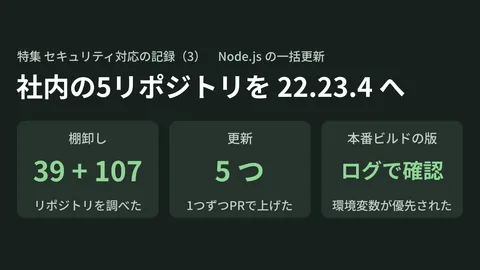
Another remaining issue is the Node.js version pinned in each project, for example in package.json. Even after the default Node.js is upgraded, a project that specifies an older version will run on that version. Our record of upgrading our internal repositories and build environments to 22.23.4 all at once is covered in Part 3. The changes that happen in uv when Python 3.15 becomes the default are summarized in Changes in uv 0.13.
Scope of verification
On the morning of October 22, 2026, on one Mac used by our development team (macOS 26.5.1), we connected to the test hosts, updated Homebrew's ca-certificates, reinstalled python@3.14 and checked that six venvs started and that their dependencies were intact, and upgraded Node.js in Volta and reinstalled 11 CLI tools (based on our own hands-on work on an actual machine). Later that morning, we rechecked connections from nscurl and two kinds of curl to 12 test hosts, connections from four kinds of Python and from Node.js 22.19.0 and 22.23.4,
security verify-cert, two kinds of git, and the roots contained in both bundles. For sources, we reviewed the page summarizing the issue, the Cloudflare blog, Homebrew's public information and Formula for ca-certificates, the release notes for Node.js 22.23.4, andman brew(desk research). We could not open the Mozilla blog. We did not check blocking in Chrome, the steps for modifying/etc/ssl/cert.pem, the pip3 that ships with macOS, Intel Macs, or Windows and Linux machines.
For help with checking and updating development machines and build environments, please contact us through Development, AI and automation inquiries.
References
- eMudhra Intermediate CA Compromise(emudhra.we-have-a-problem.com)
- 8 eMudhra certificates are compromised. Here’s what you need to know(The Cloudflare Blog)
- ca-certificates — Homebrew Formulae
- Homebrew/homebrew-core — Formula/c/ca-certificates.rb (as of 2026-09-25_1)
- CA certificates extracted from Mozilla(curl)
- Node.js v22.23.4 release (nodejs/node)
- Homebrew manual (brew(1))