You have built AI chat and document-writing features into your own service and provide them to multiple customer companies. Your API contract is a single Anthropic organization, and you send every customer's requests with the same API key. This setup has a weakness worth keeping in mind.
Anthropic runs automated safety checks (classifiers) on API traffic. If one of your customers uses the service in a way that violates the usage policy and becomes subject to restriction or suspension, and it cannot be determined which customer the requests came from, that action could apply to the entire contracted organization. On October 20, 2026, Anthropic announced "user profiles" in its release notes, and on the 21st it added a field for checking restriction status. This article uses the official documentation to explain how the mechanism works and summarizes how to use it in AI services built under contract and in internal platforms.
What the mechanism is for
The opening of the documentation explains the purpose as follows.
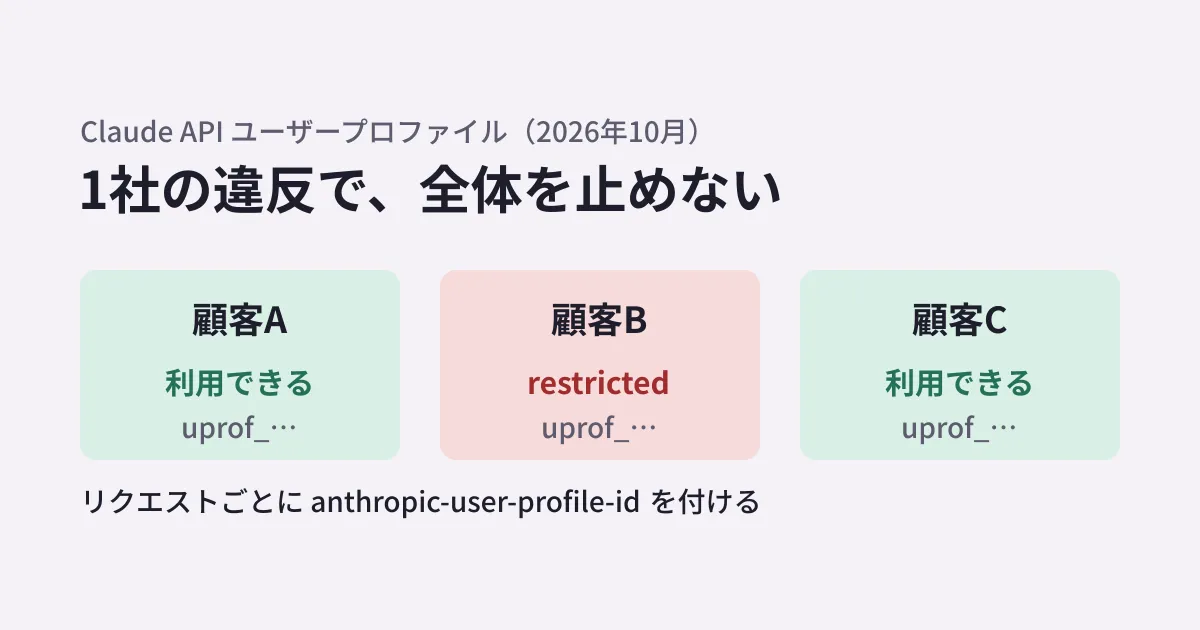
User profiles (“profiles”) tell Anthropic which of your end customers each API request is for. A safety enforcement action, such as a restriction or a ban, can then apply to one end customer instead of your whole organization.
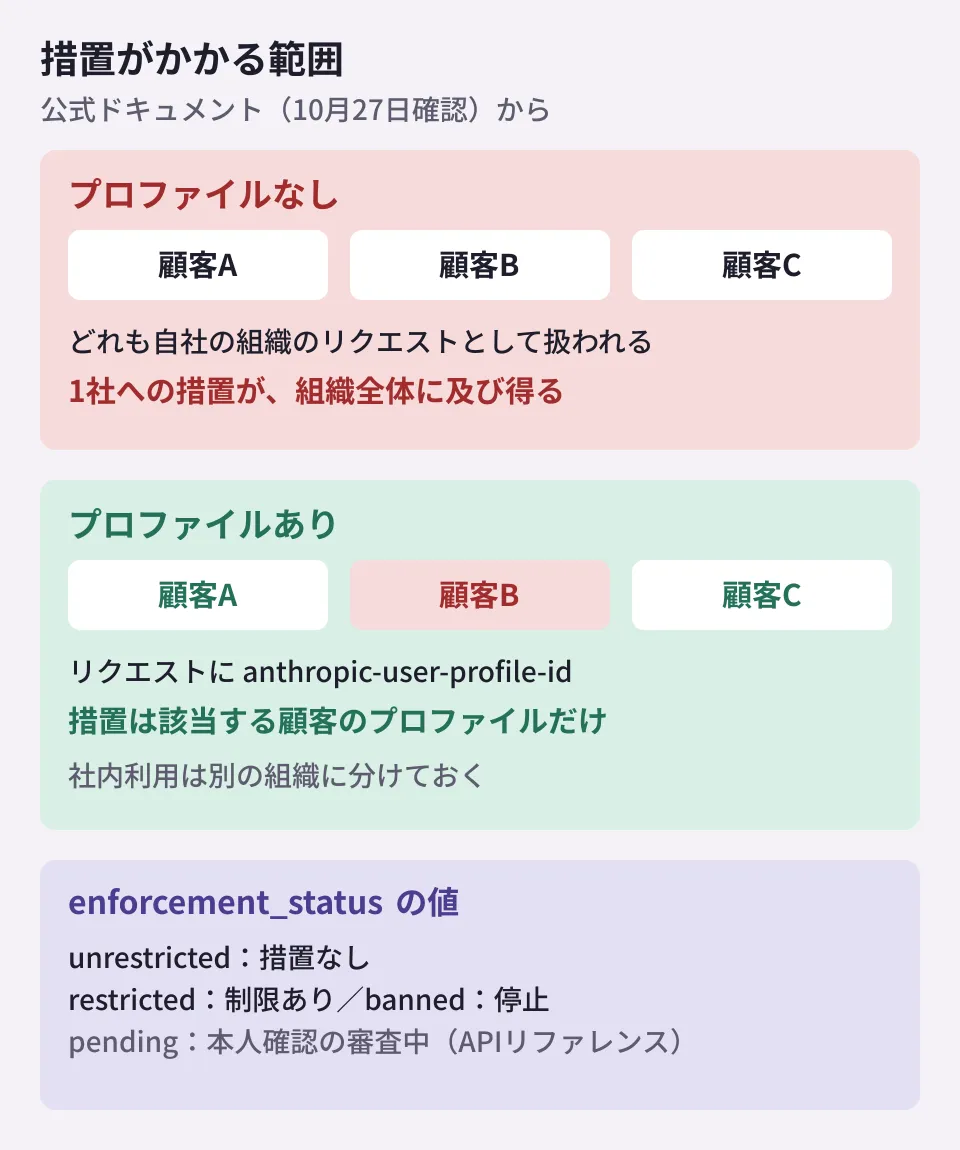
Without a profile on the request, one end customer can trigger an enforcement action that applies to your whole organization.
If you create one profile per customer (end customer) and send its ID with requests, restrictions and suspensions can be applied to that customer alone. Requests from your other customers are not affected. Profiles are free of charge, and the pricing structure does not change.
User profiles used to be a feature that required a beta header (user-profiles-2026-09-04, etc.). In the changelog of the official Python SDK, they are treated as generally available as of 1.16.0 on October 20.
This applies if you operate a platform or gateway, or if you resell API usage. Do not attach profiles to your own internal usage; the documentation asks you to separate customer-facing requests and internal usage into different organizations. Because profiles belong to an organization, simply separating workspaces within the same organization is not enough.
Who gets a profile
How you create profiles depends on how you provide Claude.
| Who the request is for | Profile | access_type |
|---|---|---|
| Individual users registered with your service | One per user (created at registration) | application (default) |
| Customer companies you resell the API to (gateways, etc.) | One per company (not per employee) | passthrough (sent explicitly) |
| Your own internal usage | None (separate into a different organization) | None |
Because a passthrough profile represents a company, the guidance is that for requests that can identify an individual, you should separately put that person's identifier in metadata.user_id of the Messages API.
Profiles are created with POST /v1/user_profiles, and you store the returned ID, which starts with uprof_, together with the customer's information. This call is not idempotent (it does not give the same result when repeated): even if you send the same reference_id, a new profile is created each time. For this reason, the documentation says to create it only once within the customer registration process and to have each server read the stored ID. You are asked to contact your Anthropic representative before registering existing customers in bulk.
Attach the ID to every request
For requests made on behalf of a customer, attach the ID with the anthropic-user-profile-id header every time. The SDK has a parameter that adds this header (user_profile_id in Python).
On October 24, 2026, in the editorial team's test environment (Python 3.11.17), we sent requests with user_profile_id="uprof_011TEST" and metadata={"user_id": "emp-42"} from Python anthropic 1.17.0 and 2.0.0 to a locally hosted receiving server, and both versions sent the anthropic-user-profile-id: uprof_011TEST header and metadata.user_id in the body. Because we did not send them to Anthropic's servers, we have not confirmed the results of ID validation.
When handling profiles with the Python SDK, use client.user_profiles. According to the changelog, the restriction status field described later was added to the SDK's types in 2.1.0 (October 21), and the latest version as of October 27 is 2.3.0. Note that when we checked the SDK source on October 27, even in 2.3.0 the beta-side client.beta.user_profiles automatically adds the old beta header (user-profiles-2026-08-18). When this header is attached, the restriction status field is not included in the response.
According to the documentation, the Claude API checks the ID every time and returns a 400 error if it is malformed or belongs to another organization. Message Batches, on the other hand, only checks the format at creation time; even with an ID from a different organization the batch itself is created, and the individual requests inside it fail.
If you use Bedrock, Google Cloud, or Foundry
If you run inference on Amazon Bedrock, Google Cloud (Google managed), or Microsoft Foundry, the handling is different.
- Profiles are created in a Claude API or Claude Platform on AWS organization, and only the ID is attached to inference requests. On Bedrock, it goes in
user_profile_idin the body rather than in a header - Bedrock and Google managed only check the format of the ID and do not check whether the profile actually exists. Even if a success response is returned, the ID is not necessarily correct
- There is a procedure for linking an AWS account or Google Cloud project to an Anthropic organization through the Verification Portal (
portal.anthropic.com) - It cannot be used with conventional Bedrock calls (
InvokeModel,Converse) - With Microsoft Foundry, for Anthropic-hosted deployments you can create profiles at the Foundry endpoint and send them in a header. Azure-hosted deployments are not covered by the documentation
- How this works with Google Cloud's "Anthropic managed" offering, which launched on October 22, is not described in this documentation as of October 27
Finding out about restrictions
Since October 21, profiles have two fields: enforcement_status and enforcement_actions. enforcement_status is unrestricted if there is no action, restricted if there is a restriction, and banned if there is a suspension. While an action remains in effect, some or all requests with that profile's ID attached are rejected.
In addition, the API reference lists pending as a value, indicating that identity verification is under review. The documentation notes that more values may be added in the future and asks you to treat unknown values as restricted. Also, for requests with an old beta header (user-profiles-2026-09-04 or earlier), these two fields are not included in the response, and filtering returns a 400 error.
When retrieving the list, specifying enforcement_status[]=restricted or similar lets you find only the customers under an action. There is also a webhook that notifies you when an action starts or ends, but it is a beta that requires applying. Moreover, the webhook documentation as of October 27 states that event delivery has not started yet and nothing will arrive at registered endpoints. Until then, the documentation says to compare against the previously retrieved values, because updated_at does not necessarily change. Note that on Claude Platform on AWS, these two fields always indicate no action, and Anthropic does not reject requests on the grounds of an action.
How to roll it out
From here on is the editorial team's own summary. If you provide Claude-based features to multiple customers, consider the following in order.
- Separate organizations: if customer-facing requests and your own development and internal usage are in the same organization, first separate the organizations
- Add profile creation to the customer registration process: create each profile only once and store the ID together with the customer's information. Enter the customer's country in the country field (
country), and leave unknown values blank - Always attach the ID in the shared component that calls the API: consolidating calls in one place prevents you from forgetting to attach it. If you use an internal gateway, you can also design it so the header is attached there
- Build a way to monitor restriction status: because webhook events are not delivered yet, retrieve the list periodically, and when you find a customer with
restrictedorbanned, decide on contacting the customer and suspending their use on your service's side
Recent revisions to the usage policy are summarized in Claude usage policy revisions: what to check for HR AI and chatbots. For gateways that consolidate internal AI calls, see Whether to put a gateway in front of internal AI, and for how to observe API calls, see OpenTelemetry for the Claude API.
Scope of verification
On October 24, 2026, we checked the Claude Platform release notes and the document "User profiles for end-customer attribution" by opening them directly on platform.claude.com (document research). In addition, in the editorial team's test environment (Python 3.11.17), we recorded the headers and body that
anthropic1.17.0 and 2.0.0 send to a local receiving server (hands-on testing). On October 27, before publication, we rechecked the same documents as well as the API reference, the webhook documentation, the Python SDK changelog, and the PyPI distributions. We have not checked profile creation, validation on Anthropic's servers, behavior when an action is applied, webhooks, the Verification Portal, or sending via Bedrock, Google Cloud, or Foundry.
For the design of AI-powered services and how to build per-customer usage management, please contact us through consultation on development, AI, and automation.