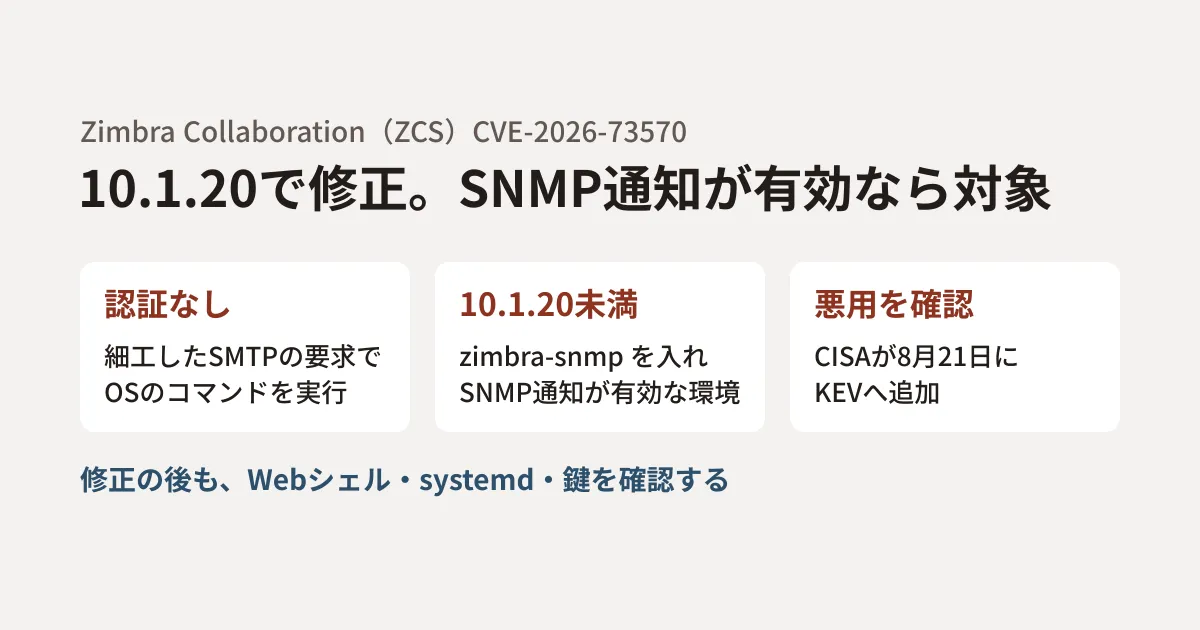
You run mail on your own servers, you have few staff, and updates keep getting postponed. If that server is Zimbra Collaboration (ZCS), first check whether it is running a version earlier than 10.1.20.
CVE-2026-73570 is an OS command injection vulnerability in ZCS's SNMP notification handling. According to the CVE record, when the optional zimbra-snmp package is installed and SNMP notifications are enabled, an unauthenticated attacker can execute arbitrary commands with the privileges of the Zimbra user simply by sending a crafted SMTP request. The U.S. CISA added it to its Known Exploited Vulnerabilities catalog (KEV) on August 21, 2026.
On September 30, 2026, Microsoft published an investigation tracking the exploitation of this vulnerability. It reports that probing began after the fix was released but before the CVE was published, and that in some cases post-intrusion activity went as far as planting web shells, obtaining root, and attempting to exfiltrate mail backups. In this article, based on the investigation, the CVE record, and Zimbra's announcements, we explain how to check whether you are affected and what to investigate after patching.
Are you affected? Two points: version and SNMP
The CVE record covers "Zimbra Collaboration versions earlier than 10.1.20." The severity score (CVSS 3.1, as assessed by MITRE, which created the record; NVD lists the same value) is 8.9. The attack complexity is rated as somewhat high (AC:H), but neither authentication nor user interaction is required.
Check the following two points.
- Version: whether it is 10.1.20 or later. Zimbra's release notes and list of security advisories confirm that the fix for this vulnerability is included in 10.1.20 (released July 20, 2026)
- SNMP: whether the
zimbra-snmppackage is installed and whether SNMP notifications are enabled. The announcement from Poland's CERT Polska says affected environments are those that have SNMP traps enabled in thesnmp_notifyconfiguration and are running swatchdog (a monitoring mechanism that runs by default)
If you are updating, we recommend 10.1.21, released on September 24, 2026 (the latest version as of October 29). 10.1.21 includes many security fixes separate from CVE-2026-73570. Its release notes list fixes for an issue that let an unauthenticated attacker guess a password recovery code and reset a user's password, and for an issue that could lead to remote code execution in the OnlyOffice integration.
The 10.0 series is also affected. According to Zimbra's list of releases, the latest version in the 10.0 series is 10.0.18, and general support ended on June 30, 2025. Because the fix for this vulnerability has been released only for the 10.1 series (10.1.20), you need to migrate to the 10.1 series.
As temporary mitigations if you cannot update right away, the investigation lists removing the zimbra-snmp package, disabling SNMP notifications, and limiting SNMP and SMTP connections to trusted hosts. However, because mail servers need to accept SMTP from the internet, few environments can restrict SMTP. Upgrading to a fixed version is the basic response.
Probing began after the fix was released but before the CVE was published
The investigation describes the sequence of events as follows.
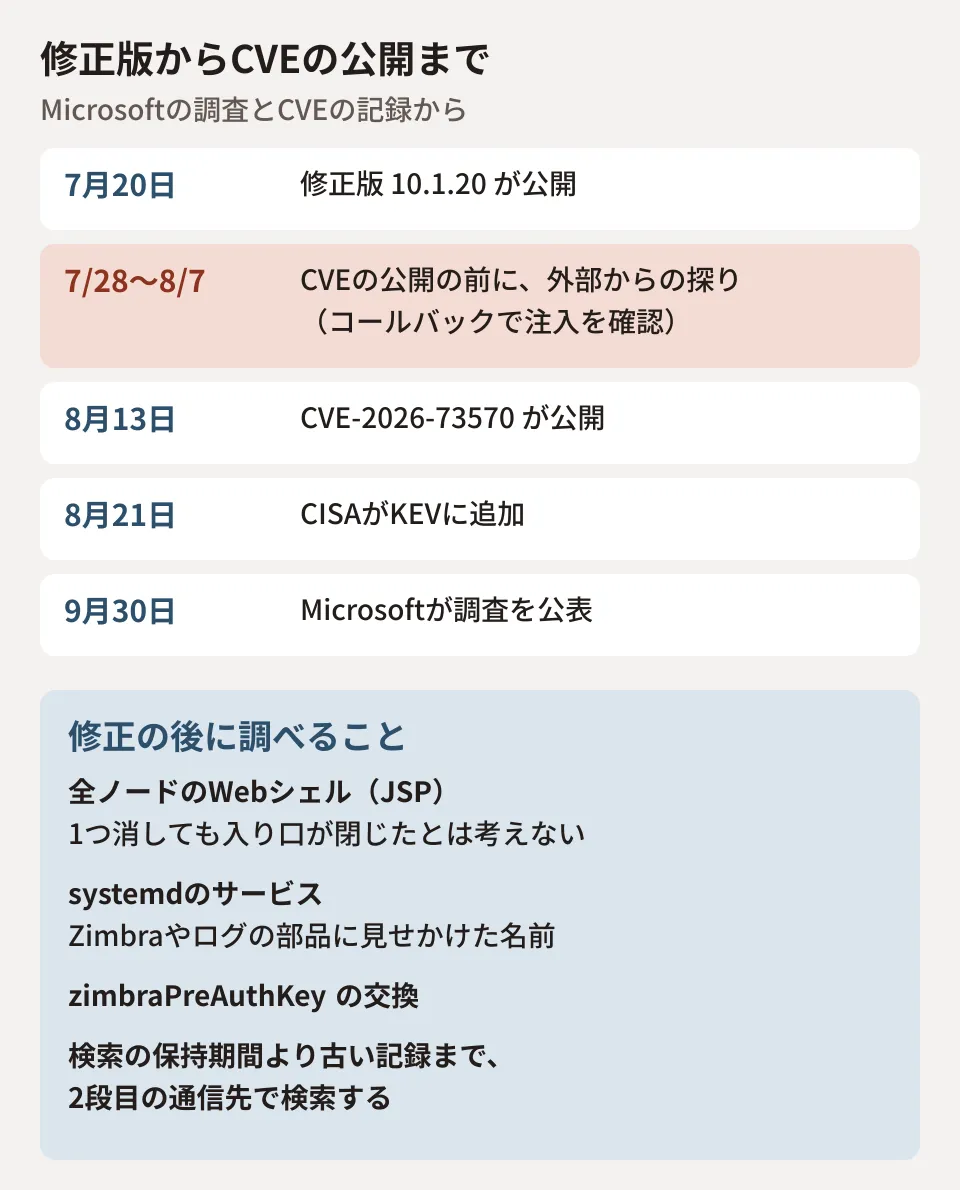
After the fix was released on July 20, and before the CVE was published (August 13), from July 28 to August 7 two scanning tools were verifying the injection point using HTTP, DNS, and ICMP callbacks. The User-Agent of the HTTP requests was ZB73570.
Note that Zimbra's official blog announcement for 10.1.20 states that this SNMP vulnerability had been communicated in Zimbra's security advisory of June 26, and that 10.1.20 is the permanent fix. What Microsoft's investigation refers to as "disclosure" is August 13, when the CVE was published. We could not find the June 26 advisory itself this time, so we have not been able to confirm who it was communicated to or what workarounds were offered at the time.
An approach of "update once a CVE number is issued" will not be in time for this window. Maintenance plans for self-hosted mail servers need to assume that you apply updates as soon as the vendor's security announcement or fixed version is released. We covered how to set monthly update windows in Monthly patch deployments stopped succeeding: Four contract revisions for maintenance agreements.
What happened when servers were compromised
According to the investigation, post-intrusion activity progressed as follows.
- Initial execution: commands executed with the privileges of the zimbra service account. A JSP web shell was planted, reverse shells were opened, and downloaded content was piped directly into a shell
- Privilege escalation: root obtained by abusing helper mechanisms that Zimbra allows through sudo and the PAM configuration
- Persistence: a fake systemd service named
zimlog.service, cron, and web shells on multiple nodes - Credentials: service credentials and authentication keys collected using
zmlocalconfigand LDAP queries - Lateral movement: tools distributed to other nodes in the cluster using Zimbra's SSH keys and rsync
- Exfiltration: recent mailbox backups were bundled and an attempt was made to send them with AzCopy. However, the evidence does not confirm that the transfer completed
The investigation says the affected organizations spanned multiple regions and industries and were not limited to a particular industry or region.
What to investigate after patching
Even after upgrading, if attackers are already inside, web shells and fake services will remain. Of the investigation's recommendations, here are the ones to carry out after patching, in order.
- Search all nodes for web shells: on each mailbox node, look for unfamiliar JSP files or recent permission changes in the working folders of Zimbra's applications and servlets. The investigation says, "Do not assume the entry point is closed just because you deleted one known JSP"
- Review systemd services: look for services with unfamiliar changes to owner, enablement, or timestamps, especially those with names disguised as Zimbra or OS logging components
- Rotate keys: rotate the
zimbraPreAuthKeyvalues for all domains - Look for traces of injection: look for patterns where a legitimate
snmptrapcall is followed by shell characters and a wget or curl call, ending with a#comment - Go back to older records: the investigation cautions that Defender XDR advanced hunting retains raw data for 30 days, which does not include the initial activity. Search older records and your SIEM for the second-stage destinations listed in the investigation
It also recommends treating reverse shell alerts on mail servers as high-priority incidents and not relying solely on detection of named malware (part of the major damage was done through interactive shells, not malware). We organize how to proceed with post-patch checks using the same approach in BeyondTrust Remote Support zero-day: what to check after patching.
Deciding whether to keep running it in-house
This case shows that a self-hosted mail server needs a maintenance setup that covers applying fixes, investigating after an intrusion, and rotating keys. Whether to keep that setup or move to cloud email depends on each company's requirements. We covered the issues involved in moving in To companies stalled on Google Workspace migration over "historical email". A realistic approach is to first finish checking for and updating against this vulnerability, and then consider the question before the next update cycle.
Scope of verification
On October 29, 2026, we checked the CVE Program record for CVE-2026-73570 (
CVEProject/cvelistV5on GitHub, updated August 24, 2026), NVD, CISA's KEV data (JSON), Zimbra's release notes (10.1.20 and 10.1.21) and list of security advisories, Zimbra's official blog announcement for 10.1.20, and CERT Polska's announcement (document research). The post-intrusion activity and recommendations are based on the Microsoft Security Blog investigation "Unauthenticated command injection on internet-facing mail servers: tracking CVE-2026-73570" (September 30, 2026). We did not test in a Zimbra environment or search for traces.
For inspections of self-hosted mail servers or consultations on migrating to Google Workspace, please contact us through Free IT & Google Workspace Consultation.
References
- Unauthenticated command injection on internet-facing mail servers: tracking CVE-2026-73570(Microsoft Security Blog、2026-09-30)
- CVE-2026-73570 (CVE Program record, cvelistV5)
- CVE-2026-73570(NVD)
- Known Exploited Vulnerabilities Catalog(CISA)
- Zimbra Security Advisories(Zimbra)
- Zimbra Releases/10.1.20 (Zimbra release notes)
- Zimbra Releases/10.1.21 (Zimbra release notes)
- Patch Release Update: Zimbra 10.1.20 (Zimbra blog, 2026-07-20)
- CERT Polska announcement 145/2026 (in Polish)