"We have decided to move to Google Workspace, but we are stuck on what to do with historical email" is the most frequent reason migrations stall during consultation. Creating the new environment progresses smoothly, yet faced with a shared server holding over a decade of emails, no one is willing to say, 'let's discard them.'
This hesitation usually stems from missing information: what transfers, what does not, how long it takes, and whether emails will disappear during cutover. Once these points are understood, decisions become clear.
The hard part of migration is cutover sequencing, not copying
To state the conclusion first: copying past emails is the least difficult part of the migration process. It takes time, but can easily be rerun if it fails.
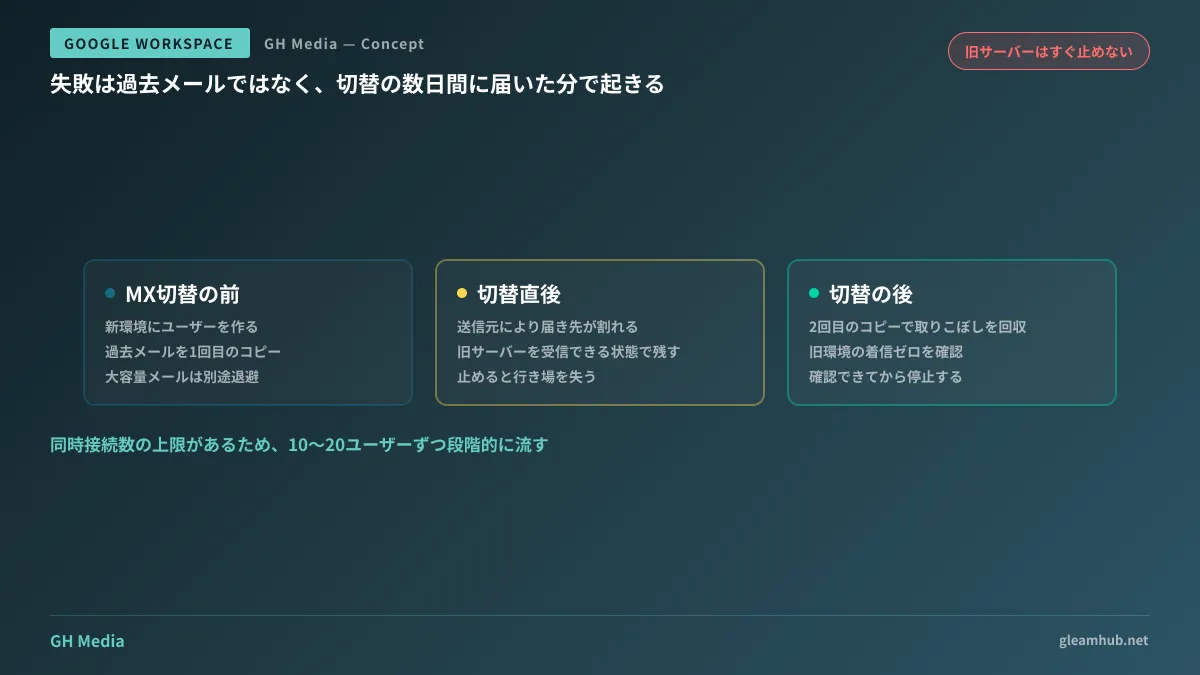
The phase that demands real caution is switching routing destinations. The moment you point your domain's MX records to the new environment, incoming mail begins reaching Google Workspace. However, DNS changes do not propagate worldwide instantaneously. For a window immediately after the cutover, incoming messages may reach either the old server or the new environment depending on the sender.
If you shut down reception on the old server during this window, emails delivered there have nowhere to go. Conversely, leaving the old server unattended means incoming messages accumulate without anyone noticing. Migrations typically fail not because old emails vanish, but because no one checked the mail arriving at the legacy server during cutover days.
The safe sequence is as follows:
- Create user accounts in the new environment and start copying past emails before switching MX records
- Switch MX records
- Leave the old server running so it can continue receiving mail for a set period without immediately decommissioning it
- Run the copy process once more after the switch to retrieve messages that landed on the legacy server during propagation
- Decommission the old environment only after confirming zero incoming mail for several consecutive weeks
Skipping step four in your project plan is what later causes missing emails.
What can be transferred with the Data Migration Service
To copy historical email, use the Data Migration Service in the Google Workspace Admin console. Modernized from earlier versions, it supports various sources (About the new Data Migration Service — Google Workspace Admin Help):
- Another Google Workspace account
- Microsoft Exchange Online accounts
- Email servers accessible via IMAP
- Personal Gmail accounts
For most SME migrations, the third option applies. Standard email features on rental hosting can be accessed via IMAP, routing through this mechanism. IMAP-based providers such as Yahoo!, iCloud Mail, GoDaddy, Zoho, and Titan are handled identically.
At the same time, what will not migrate is clearly defined:
| Item | Handling |
|---|---|
| Messages and attachments exceeding 25 MB in total | Will not migrate |
| Attachments blocked by Gmail (executables, etc.) | Will not migrate |
| Contacts and calendars | Requires a separate migration procedure from email |
| Email routing rules, filters, and signatures | Excluded from migration; must be recreated individually |
The first row always surfaces on the ground. In industries where blueprints or video files are exchanged via attachments, emails over 25 MB often exist by the hundreds. Since these will trigger missing-email complaints after cutover, search for large files on the old server before migrating and store needed files separately.
The fourth row is also frequently underestimated. Sorting rules built over years are an integral part of an employee's workflow. Post-migration complaints about "an unorganized inbox" almost always trace back here. Simply adding a note to your migration guide stating that "sorting rules will not transfer" cuts support tickets drastically.
The stumbling block is the source, not the destination
When migration tasks do not progress as expected, the bottleneck almost always lies on the legacy server side.
The most frequent issue is concurrent connection limits. The Data Migration Service processes multiple user accounts in parallel, but shared hosting servers cap simultaneous active connections. Running 50 accounts simultaneously frequently leads to timeouts. Migrating in batches of 10 to 20 users ultimately finishes faster.
The next most common issue is folder structure. When legacy environments feature deeply nested folders named in Japanese, post-migration display may differ from expectations. Before moving everyone, select the person with the most elaborate folder structure to migrate first and have them verify the appearance. Discovering structural discrepancies after migrating all users requires far more rework.
Finally, administrators often encounter missing legacy credentials. The person who provisioned the server has resigned, admin portal passwords are lost, or even the hosting vendor's name is unclear. In these cases, the primary hurdle is not technical migration complexity, but locating contractual records. Budget several weeks for this step alone.
Decisions to make alongside migration
Since you are migrating anyway, certain legacy operational habits should not be carried over.
Handling shared addresses is the prime example. Many companies have handled addresses like info@ and support@ by sharing a single mailbox password among multiple staff. In Google Workspace, these can be set up as Groups and accessed via individual accounts. This records who replied and revokes access upon an employee's departure with a single click. A shared-password mailbox can only be eliminated during a migration.
If you imported external mailboxes into a central account, that ingestion flow requires rethinking. Gmail's external mail fetch feature is scheduled for deprecation; architecture tailored for this transition is detailed in Deprecation of Gmail external mail fetch. For an overview of domain email hosting options, see Options for custom domain email, or review Migrating from Cybozu and Microsoft 365 for broader groupware migrations.
Start by migrating just one person
Before fine-tuning detailed schedules, performing a test migration for a single representative user is the fastest way to investigate your environment.
Choose the person with the largest email volume in the company: heavy storage, intricate folders, and large attachments. If their migration succeeds without issue, almost no problems will arise for others. Conversely, uncovering 25 MB attachments or folder anomalies gives you the exact checklist required for company-wide planning.
Logging the elapsed time allows you to estimate the total duration required across the entire organization. Migrating one actual user yields far more reliable data than desk research alone.
Whether you want to build a zero-downtime roadmap for Google Workspace migration or need help auditing legacy contracts, GleamHub offers free IT and Google Workspace consultations. Because requirements dictate optimal configurations, we provide customized estimates. Please reach out via our inquiry form.
Sources
- About the new Data Migration Service — Google Workspace Admin Help
- About migrating email with the new Data Migration Service — Google Workspace Admin Help
- Migrate email from IMAP accounts — Google Workspace Admin Help
- Google Workspace migration product matrix — Google Workspace Admin Help
- 3 steps to avoid Google Workspace migration failure (2026 edition) — Komalog