You want to build month-end billing jobs, or processes where an AI agent calls external APIs many times, so that they can resume from where they left off if they fail partway through. But when you use a workflow execution platform (Temporal) for that, you then need to keep workers that fetch tasks running, including during hours with no work. Google Cloud's official blog also says that because workers fetch tasks rather than receive requests, they fit poorly with request-driven serverless, and you tend to end up running them constantly on Kubernetes or VMs and paying for them the whole time.
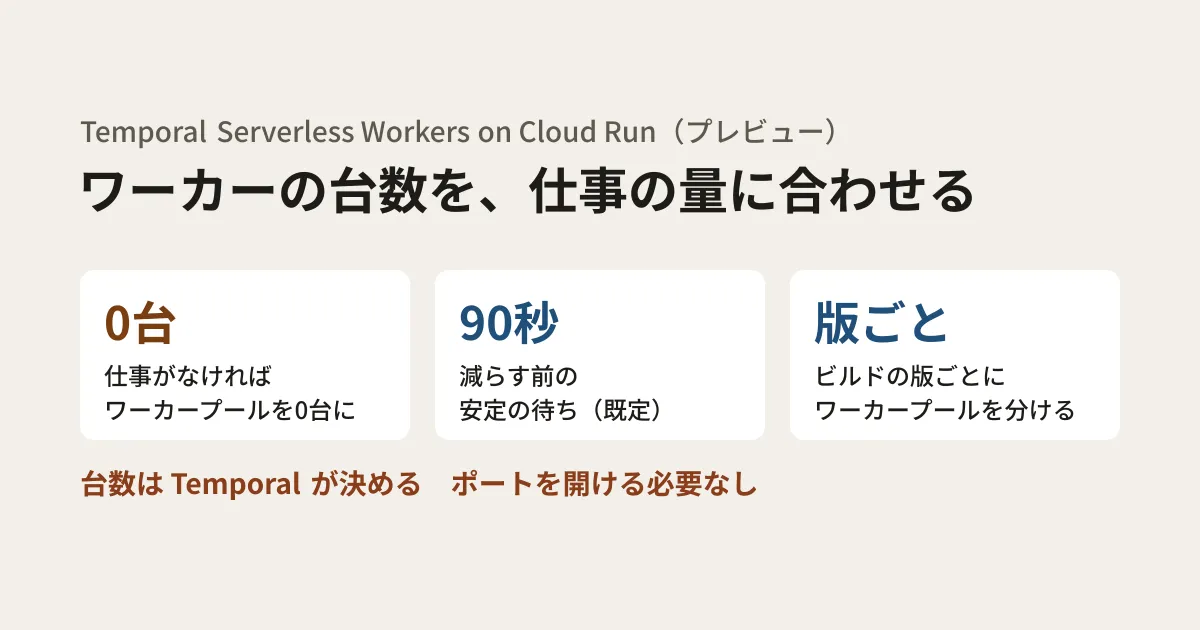
On October 15, 2026 (October 16 Japan time), Google Cloud introduced "Temporal Serverless Workers on Cloud Run" as a preview. According to Temporal's changelog, it entered pre-release on August 6 and public preview on October 5. The managed Temporal Cloud decides the number of instances in a Cloud Run "worker pool" based on the state of the task queue, and reduces it to zero when there is no work. What is in preview is this Temporal feature; worker pools themselves became generally available on April 14, 2026. In this article, we use the blog and Temporal's documentation to lay out how it works and the conditions, and suggest points to check before adopting it.
Who decides the instance count, and what stays on the user's side
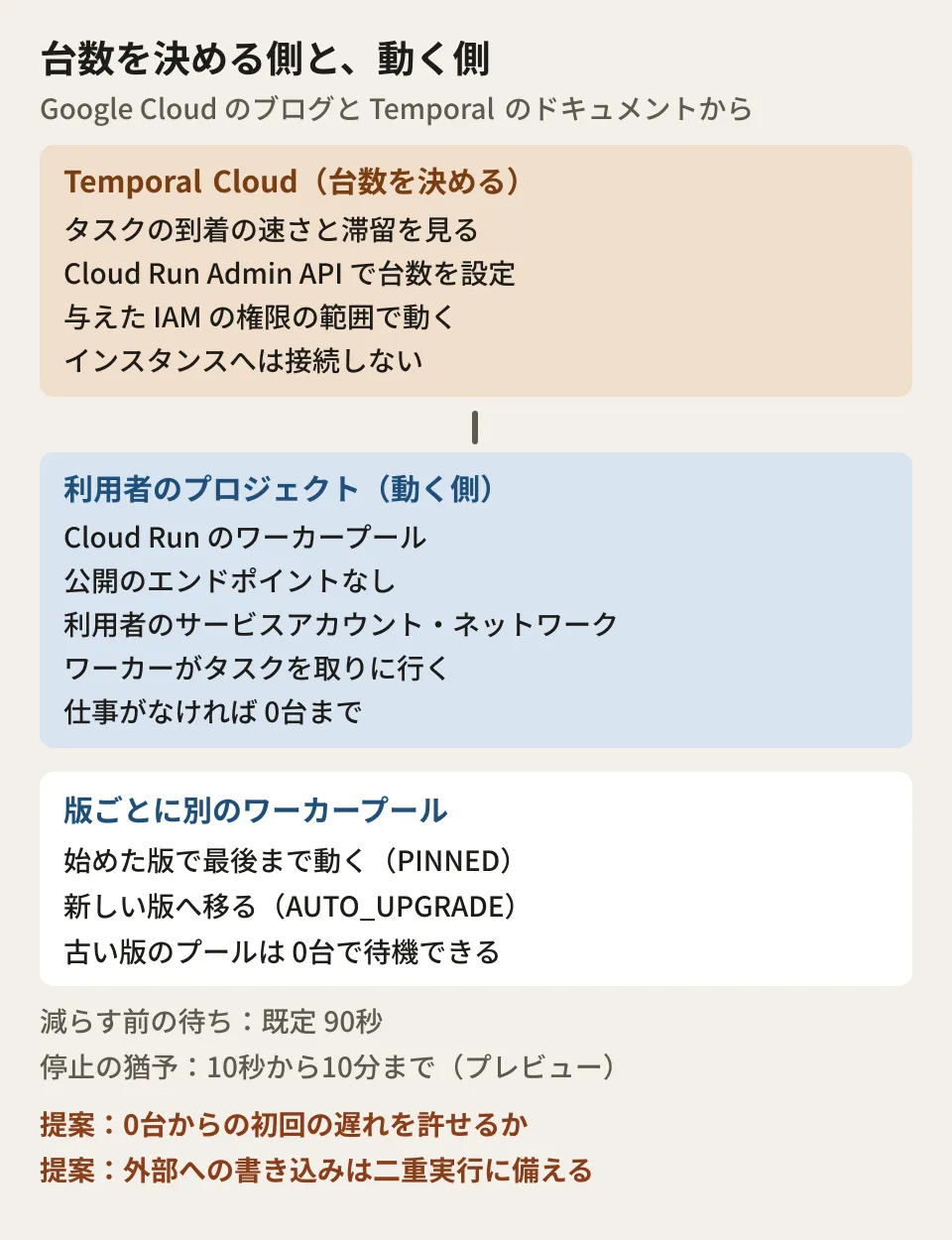
According to the blog, the division of roles is as follows.
- Workers: Run in the user's project as Cloud Run worker pool instances and fetch tasks from Temporal Cloud. They run under the user's service account, on the user's network
- Temporal Cloud: Watches the task queue and sets the number of worker pool instances through the Cloud Run Admin API, using the IAM permissions the user has granted. Temporal does not connect to the instances, so there is no need to open ports or add firewall rules
- Worker pools: A Cloud Run resource for continuous background processing. They have no public endpoint, and each instance is allocated CPU the entire time it is running. As the Cloud Run documentation states, worker pools themselves have no autoscaling, and Temporal takes on that role
The blog says you do not need to change worker code and do not need to run clusters or autoscaling mechanisms yourself. Temporal's documentation also explains that no Cloud Run-specific code is needed and that it works with any Temporal SDK. However, Worker Versioning, covered later, is required, and every workflow needs a declaration of its versioning behavior. Workers not yet using Worker Versioning need changes for that.
How the instance count is decided
The scaling mechanism described in the blog and documentation is as follows. The documentation calls the component that manages the instance count the Worker Controller Instance (WCI).
- Signals to scale up: The blog describes the delay between a task being queued and a worker picking it up as the main signal. The documentation is somewhat more specific, saying it combines two behaviors: scaling up immediately when a task arrives and no worker is free, and periodically recalculating the instance count from the task arrival rate and the processing rate of one instance
- Staying ahead: Because new instances take time to start and connect, Temporal keeps spare capacity and scales up before tasks pile up. According to the documentation, it leaves headroom by deciding the instance count to match a worker utilization target (80% by default)
- Careful scale-down: Temporal waits a stabilization period (90 seconds by default) from the last time a task could not find a free worker, and also leaves intervals between scale-down operations. The wait time can be changed with
--gcp-cloud-run-scale-down-stabilization-duration(Temporal CLI v1.8.3 or later) - Upper and lower limits: The instance count stays between the minimum and maximum set by the user (by default, a minimum of 0 and a maximum of 30). Tasks beyond the maximum are not discarded and wait in the queue
The blog says the grace period at shutdown (graceful shutdown) can be extended from 10 seconds to as much as 10 minutes in Cloud Run settings. This setting is in preview, and the blog includes information on how to apply. The current Cloud Run documentation says the time from the SIGTERM notification to forced termination is 10 seconds.
How it differs from running on Cloud Run services
The blog says that until now, running Temporal workers on Cloud Run "services" required workarounds such as adding code that listens for HTTP, using instance-based billing to keep CPU between requests, and setting minimum instances so the count would not drop to zero.
Worker pools do not need a public URL, load balancer, or health check port. Because changing the instance count does not create a new revision, Temporal can change the count as often as needed to match load. On pricing, the blog says the list price of worker pools is nearly 40% lower per vCPU-hour and GB-hour than Cloud Run services with instance-based billing. Comparing the us-central1 list prices on the pricing page gives $0.000011244 versus $0.000018 per vCPU-second and $0.000001235 versus $0.000002 per GiB-second, both about 38% lower. Actual costs vary with the number of instances, time, and region. The editorial team has not made an estimate.
Worker Versioning is required for switching versions
Temporal workflows are stateful and assume deterministic execution. Replacing the code in the middle of an execution causes a non-determinism error. According to the blog and documentation, using Temporal's Worker Versioning is required for Serverless Workers on Cloud Run.
- Create a separate worker pool for each build version (Worker Deployment Version). Versions are distinguished by
deploymentNameandbuildId - As workflows on an old version finish, its worker pool automatically scales down to zero. While
PINNEDworkflows remain, do not delete the pool; it can stay at zero - Do not put a new image into a pool that points to a running version. The documentation cautions that the new revision would roll out to all instances and the code would change while the version number stays the same, so even
PINNEDworkflows could hit non-determinism errors - The number of versions with compute settings is limited to 100 per Namespace by default. Versions whose workflows have finished are also counted, so delete versions you no longer need
For each workflow type (or as the worker default), choose one of the following.
| Configuration | Behavior | Suited to, according to the blog |
|---|---|---|
PINNED | Runs to the end on the version it started with | Short workflows, order processing, multi-step APIs |
AUTO_UPGRADE | Moves to a new version when one is released | Long-running workflows (recurring billing, processes that take several weeks) |
The blog explains that separating versions means you do not have to modify code with conditional branches. However, the documentation says that because AUTO_UPGRADE workflows are not fixed to one version, you must manually keep them replay-safe with patches or similar means.
What to check before adopting it
The blog gives three steps: containerize the worker and deploy it as a worker pool (including the build ID in the pool name and storing the Temporal API key in Secret Manager), grant Temporal Cloud permission to manage the worker pool, and create a Worker Deployment Version in Temporal that points to the worker pool's project, region, and name. Temporal's guide then also sets the created version as the current version. Without this, tasks do not flow to that version and instances do not start. To these we add the following checks as the editorial team's suggestions.
- Where Temporal runs: The documentation assumes either Temporal Cloud with a Namespace on GCP, or a self-hosted Temporal Service v1.31.0 or later. Because the Namespace's cloud must match the compute provider, with Temporal Cloud you cannot use this with a Namespace that stays on another cloud. Self-hosting requires additional preparation, such as enabling WCI in the server configuration
- Whether you can accept the initial delay from zero instances: Neither the blog nor the documentation gives a figure for the time it takes to start from zero instances. The blog says that for work that cannot wait, you should set the minimum instance count above zero
- The scope of IAM permissions: Temporal Cloud operates the worker pool by impersonating an invoker service account that the user creates. By default, the Terraform module distributed by Temporal gives this account project-level
roles/run.developer. Because that is broader than the permission to change the instance count, if you want to narrow it, specify a role containingrun.workerPools.getandrun.workerPools.updateindeploy_roles. This is separate from the service account the workers themselves run under. "Validate Connection" in the Temporal Cloud UI only checks read access and does not verify the permission to change the instance count - Shutdown grace periods and retries in mid-process: According to the documentation, the decision to reduce the instance count does not consider whether an instance is in the middle of processing. The blog says that even if a worker disappears partway through, the processing (activity) is retried on another worker. Have long-running processes record their progress with heartbeats, and build processes that write externally so that being executed twice causes no problems
- Separate task queues from always-on workers: The documentation says not to share the same task queue between worker pools and always-on workers. Because the instance count is calculated including the work handled by always-on workers, you incur the cost of extra instances. Decide how to split task queues during migration as well
- That it is a preview: The blog and documentation say the APIs and settings may change before the stable release. Multi-cloud Replication is not supported, and the documentation describes this as a temporary restriction during the preview
We laid out the decision on whether to build a workflow execution platform yourself or use a product in When automated jobs pile up: whether to build or buy a workflow platform. For how to think about where to put long batch jobs, Lambda's 90 minutes do not apply to everything — where to put your batch jobs is also a useful reference.
Scope of verification
On November 6, 2026, we opened and checked the Google Cloud official blog post "Temporal Serverless Workers on Cloud Run: Scale workers ahead of demand" (the publication date information says October 15, 2026, and the page displays October 16), Temporal's documentation and changelog, and the Cloud Run release notes, documentation, and pricing page (document research). The Temporal Cloud pricing page lists Serverless Worker support as a feature, but we could not confirm how the instance count management itself is counted toward pricing. We also did not test by creating a worker pool. The pre-adoption checks are the editorial team's suggestions.
For designing a rebuild of nightly processes and multi-step AI agent processes so they can resume after stopping, please contact us through development, AI, and automation consulting.
References
- Temporal Serverless Workers on Cloud Run: Scale workers ahead of demand (Google Cloud Blog, October 15, 2026)
- Serverless Workers on GCP Cloud Run(Temporal Documentation)
- Deploy a Serverless Worker on GCP Cloud Run(Temporal Documentation)
- Serverless Workers(Temporal Documentation)
- Cloud Changelog(Temporal)
- Cloud Run release notes(Google Cloud)
- Cloud Run pricing(Google Cloud)