A process calling the Gemini API in a Google Cloud test project runs in a loop, and you notice only when you see the bill the next morning. Cost management mechanisms until now have mainly notified you as spending approached an amount, without stopping usage itself. Google Cloud's announcement also notes that some companies built their own mechanisms for stopping usage that had a large impact and were hard to reverse, such as unlinking the payment method.
This feature that "stops usage when an amount is reached" is the spend cap. General availability (GA) appears in the October 13, 2026 entry of the Cloud Billing release notes, and it was announced on the official Google Cloud blog on October 30. Drawing on the blog and documentation, this article sorts out what was added at GA, what stops and what does not when a cap is reached, and cautions for use in business systems.
Three features added at GA
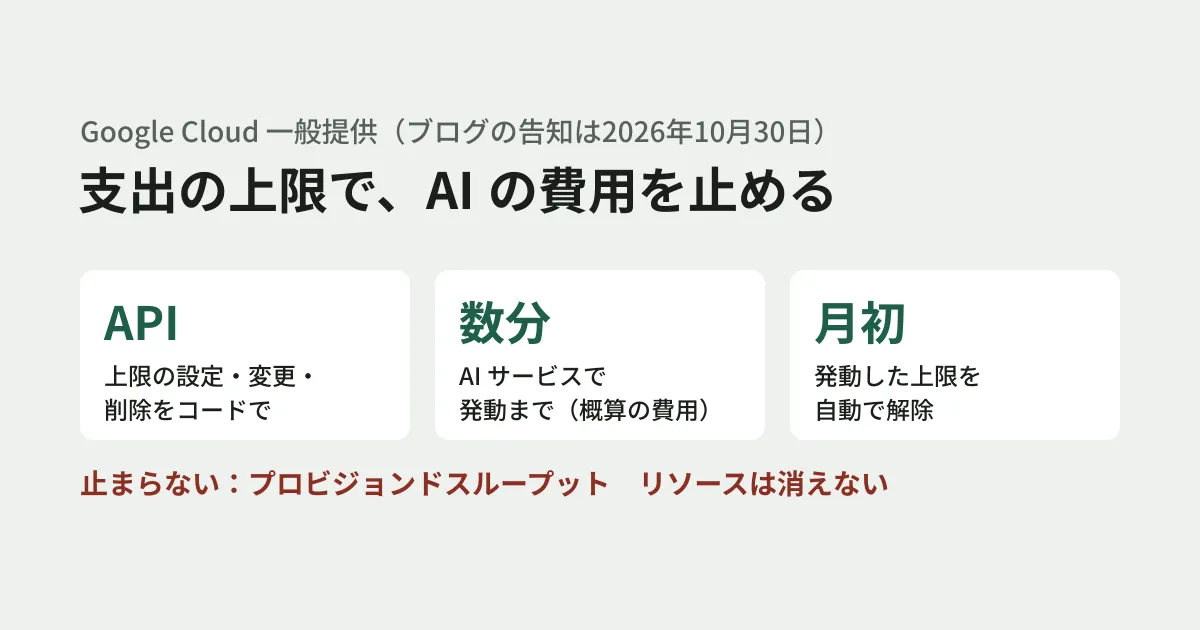
The October 30 blog post lists the following three changes made in response to requests since the preview.
- Configuration via API: The "spend caps API," available through the existing Cloud Billing Budgets API, lets you set, change, and delete caps on covered services per project. Caps can also be attached automatically when a developer creates a new test project. The documentation treats this as the
spendCapfield of a budget - Estimated cost display: Caps for AI services trigger within minutes of usage, based on estimated real-time costs. The estimated cost at the time of triggering can now be viewed on the Cost Reports screen. According to the documentation, you open it through the prebuilt report "Live costs by SKU"
- Automatic reset at the start of the month: Previously, once a cap triggered, usage stayed stopped until it was manually lifted from the console. At GA, a triggered cap is automatically lifted at the start of the next month, and stopped services resume
Regarding the third item, the blog post also says that manual operation remains available as before for organizations that require strict manual checks before resuming. However, the manual lift that can be confirmed in the documentation and API definitions is an operation for resuming stopped services mid-month. The documentation says all caps are automatically lifted at the start of the next month, and no setting to prevent this is listed. If you are relying on a manual check, confirm this difference with Google Cloud.
A cap applies to a single project and a single service. The period is monthly and starts on the 1st of each month. Caps cannot be set on budgets scoped to folders, organizations, or labels, or on budgets that combine multiple projects or services. Billing accounts through resellers are also excluded. When a cap is reached, new usage stops only for that service in that project. Data and resources are not deleted, and out-of-scope services are not affected.
Charges that stop and charges that don't
A cap does not stop all charges. The GA blog post asks readers to understand the difference between "fixed costs" and "usage-based costs," and the documentation gives an explanation to the same effect.
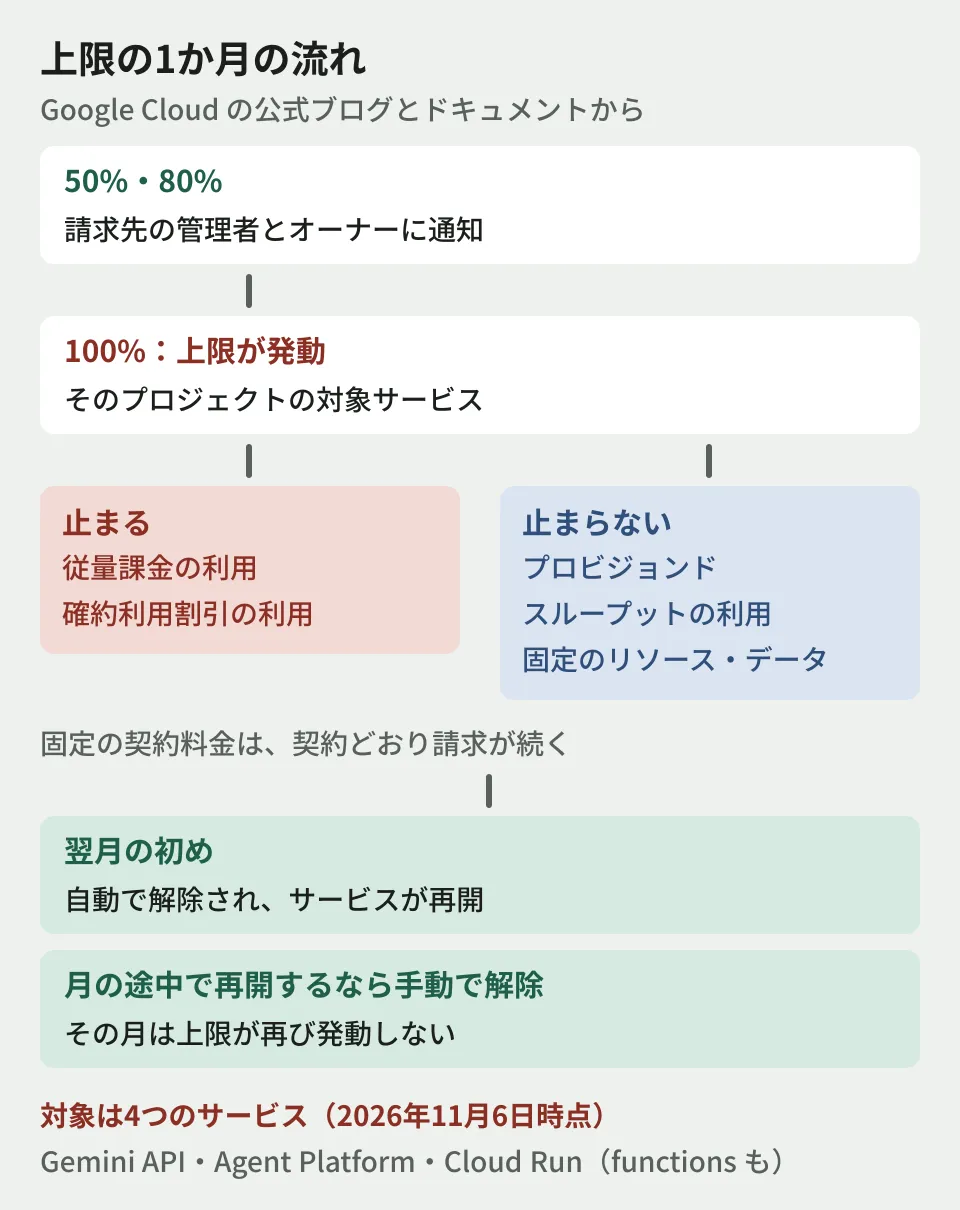
| Classification | When the cap is reached |
|---|---|
| New pay-as-you-go usage | Stops |
| New usage covered by committed use discounts (CUDs) | Stops |
| In-flight requests | Processed to completion, and costs are incurred |
| Provisioned throughput (reserved capacity) usage | Does not stop; processed as usual |
| Fixed usage of running resources (such as compute and storage) | Does not stop, and costs continue to accrue |
| Subscription costs (such as Gemini Enterprise) | Not covered by the cap |
| Data and resources | Not deleted |
The July 28, 2026 preview announcement says that fixed contract charges such as CUDs and provisioned throughput continue to be billed as contracted even after a cap triggers. In other words, what a cap limits is the portion that grows with usage. If you have a reserved capacity contract, budget for those charges as outside the cap.
There are also points to watch in how the amount is evaluated. According to the documentation, caps are evaluated against the estimated total before discounts and credits. As a result, on contracts with discounts or credits, a cap may trigger before the billed amount reaches it. Triggering is also not immediate, and any overage is billed as usual. The documentation recommends setting the cap slightly below the amount you absolutely do not want to exceed.
Notifications are automatically sent to billing account administrators and project owners at 50%, 80%, and 100% of the cap. According to the documentation, these notification percentages and recipients cannot be changed. The GA blog post recommends checking that the right people hold these roles. When managing with custom roles, add the billing.budgets.configureSpendCap permission at the billing account level or the billing.resourcebudgets.configureSpendCap permission at the project level.
Four services are covered
The GA blog post only says "eligible services" and does not include a list. The list in the documentation has four services: Gemini API, Gemini Enterprise Agent Platform (formerly Vertex AI), Cloud Run, and Cloud Run functions, which matches the table in the preview announcement. Maps was also named in the April 2026 Google Cloud Next announcement, but it is not in the documentation's list.
Do not design on the assumption that a cap can stop the costs of services not on this list, such as Compute Engine or BigQuery. The list may change in the future, so check the documentation before configuring. BigQuery AI functions have a separate token limit, covered in Daily token limits for BigQuery AI functions: key configuration points.
The automatic reset at the start of the month is double-edged in production
From here on is the editorial team's analysis. The automatic reset at the start of the month is convenient for test projects. It removes the monthly task of lifting the cap, and developers can use the services again once the month changes.
On the other hand, if you put a cap on a production project for a business system, two points need to be decided in advance.
- Is it acceptable to stay stopped until the end of the month once the cap is reached?: A cap is a mechanism for "stopping." If customer-facing features depend on the Gemini API or Cloud Run, a triggered cap is itself an outage. Prepare what the screen shows when stopped and how users will be informed
- Is it acceptable to resume automatically at the start of the month?: If the month changes without the cause of the cost spike (a processing loop, unexpected calls) being fixed, the same processing resumes. Since the documentation lists no setting to prevent the automatic lift, define your procedure on the premise that you will either fix the cause by the end of the month or stop the calling process
Care is also needed when lifting a cap manually mid-month. According to the documentation, in a month when a cap has been lifted, it does not trigger again unless the amount is increased. It can take up to 1 hour for services to recover after lifting, and a budget whose cap is triggered can be neither edited nor deleted.
Suggested rollout order
The GA blog post recommends first putting small, strict caps on non-production environments. Specifically, it names developers' test projects, test clusters, and environments for trying out AI agents. The editorial team suggests the following order.
- Put small caps on test projects: Setting up a mechanism that automatically attaches a cap via the API when a new project is created prevents forgetting to add one
- Check who receives notifications: Because recipients cannot be changed, confirm that the people who actually watch costs hold the billing account administrator and project owner roles
- When a cap triggers, look at the estimated costs to find the cause: In Cost Reports' "Live costs by SKU," check which SKUs (billing items) or projects drove up costs. The blog post recommends combining this with "Early Anomalies," which gives advance notice of cost spikes through daily signals
- Decide whether to apply caps to production only after agreeing on the impact of a stop with the business side: In production, you may also choose to only notify, without stopping. Existing notification-only budgets cannot be changed to capped ones, so to apply a cap, recreate the budget
The approach of managing AI API costs by department or use is also covered in Anthropic monthly credits and Claude API budget governance.
Scope of verification
On November 6, 2026, we directly opened and checked the official Google Cloud blog posts "Google Cloud spend caps now generally available" (October 30, 2026) and "Detect early and enforce firmly with Google Cloud’s enhanced cost controls for AI spend" (July 28, 2026, the preview announcement), the Google Cloud Next ‘26 FinOps announcement (April 22, 2026), the Cloud Billing release notes, the spend caps documentation, the Cloud Billing Budget API guide and API definitions, and the Live costs documentation (document research). We have neither configured this in the Google Cloud console nor verified a cap triggering. The difference between the "manual operation" the blog describes and the automatic lift in the documentation remains unresolved because we have not actually tried it. The handling of production and the rollout order are the editorial team's suggestions.
For how to build cost caps and notifications for cloud and AI APIs into business system operations, please contact us through consultation on development, AI, and automation.
References
- Innovate on your own business terms: Google Cloud spend caps now generally available (Google Cloud Blog, October 30, 2026)
- Detect early and enforce firmly with Google Cloud’s enhanced cost controls for AI spend (Google Cloud Blog, July 28, 2026)
- Next-gen FinOps for the AI era (Google Cloud Blog, April 22, 2026)
- Cloud Billing release notes(Google Cloud Documentation)
- Manage spend cap budgets(Google Cloud Documentation)
- Using the Cloud Billing Budget API for spend cap budgets(Google Cloud Documentation)
- Billing reports: View your live costs(Google Cloud Documentation)