Importing order data, generating invoices, syncing inventory, sending out monthly reports. Automated jobs usually accumulate one at a time. At first, adding a line to cron is all it takes. Around the fifth, dependencies appear: A waits for B to finish; if B fails, C must not run. By the time you pass ten, you are in a state where only one person knows where to restart from after a failure.
At this stage the question "should we introduce a workflow platform?" comes up. But the answer to this question reverses with scale, so lifting another company's example wholesale gives you nothing to decide on.
In September 2026, Netflix published an account of rebuilding Conductor, its own workflow orchestration platform. The scale is in another league, but looking at what broke that made them rebuild it reveals the same structure as what happens in much smaller operations.
The three places Netflix fixed
Conductor today holds roughly 200,000 workflow definitions spanning 150 applications and executes about 420 million workflows a month. This rebuild raised the number of tasks a single workflow can handle from about 2,500 to 30,000, and cut p99 workflow evaluation latency by about 40%.
Internally they changed three main things. Execution data storage moved from Dynomite to Cassandra, large task inputs and outputs were pushed out to Amazon S3, and the queueing mechanism was replaced, going from DynoQueues to Timestone.
What is worth noting is that all three are rebuilds of "the part that records the processing and manages the order", not of the processing itself. What makes growing numbers of workflows painful is not that individual jobs are heavy. The surrounding parts — where the execution state is held, what gets made to wait, how failures are recorded — give out first. This happens in the same order at 420 million executions a month and at ten jobs a day.
In small operations, the record-keeping breaks first
Here are the situations that actually cause people trouble at a company running ten daily batch jobs.
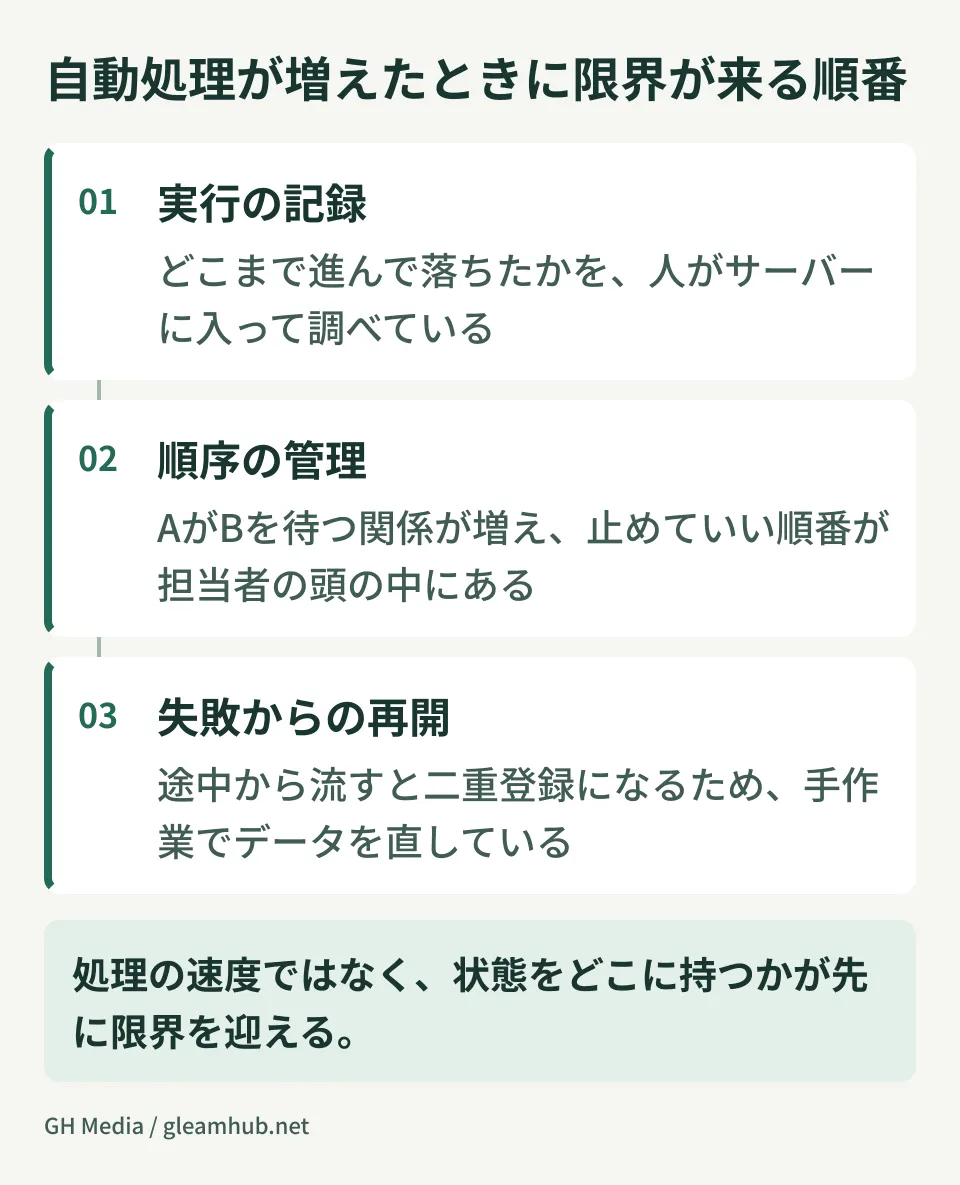
You find out that the overnight processing failed when sales tells you at 10 the next morning that the data is stale. You log into the server and chase the logs to work out how far it got before falling over. Unsure whether it is safe to re-run from partway, or whether starting over would create duplicate entries, you end up fixing the data by hand.
None of this has anything to do with processing speed. The causes are that the execution state is not left behind in a visible form and that the design does not allow resuming partway. The three places Netflix rebuilt and the places that hurt are the same. All that differs with scale is how many jobs it takes before it surfaces.
There are stages to pass through before owning a platform
What often happens here is jumping straight into selecting a workflow engine. Stand up an open-source engine and it becomes something to operate in its own right. Keeping up with versions, isolating faults, managing permissions. You get the trade where a mechanism added for the sake of automation creates new operational work.
Before deciding, it comes first to establish which stage you are currently at.
| Stage | Symptom | Appropriate Action |
|---|---|---|
| A handful of jobs, no dependencies | Occasional failures, fixable by hand | cron plus log notifications is enough |
| Dependencies have appeared | Queueing and re-run decisions depend on one person | Centralize execution logs and document the re-run procedure |
| A dozen or more jobs, several people responsible | No way to tell who stopped what | A managed workflow service |
| Core business runs on it | If it stops, revenue stops | Design it as a platform and staff it for operations |
Most small and medium businesses stop at the second or third stage from the top. Building a platform from scratch here tends to add just one more thing nobody but its author can touch. The range covered by the managed workflow services from the cloud providers, and by the automation features already in your SaaS, is wider than people expect.
Conversely, if you have reached the fourth stage but are still running on second-stage tooling, manual recovery becomes the norm. Measuring this judgement not by how many jobs are running but by how many minutes it takes, and for whom, to notice when something stops gets you closer to reality.
The line between what off-the-shelf products cover and what they do not is treated with the same structure, on different subjects, in What you can and cannot build with kintone and Booking systems: build or rent.
What to settle if you do build one
If you decide to own a platform, there are items that bite later unless they are settled in the design first.
Where to put the unit you can resume from. The larger you build a single workflow, the wider the range you have to redo on failure. Netflix made a single workflow able to handle up to 30,000 tasks so that large ones are possible, not because they should be large. In your own case, splitting tasks at boundaries that mean something to the business lets re-run decisions be made in human language.
Where to put the input and output data. Include the contents of large files or records in the workflow state and the recording side swells immediately. Put the actual data elsewhere and have the workflow point only at the location. It is the same thinking as Netflix moving large task inputs and outputs to S3, and it pays off from the start regardless of scale.
Who gets up in the middle of the night. This is the one most often missed. Introduce a platform and notifications start arriving, but if you have not decided who receives them and responds, nobody looks until morning. Unless the design extends to the operational staffing, all you have done is made things visible. Hidden costs of this kind are also covered in The invisible costs of running your own AI agent platform.
What to do next
Try writing out the automated jobs running in your company as a dependency diagram rather than a count. Once the arrows start crossing, you are past what cron can manage.
Then count how many times in the last three months you "fixed the data by hand". If it is several times a month, reviewing the design of the unit you can resume from comes before adding tooling.
At GleamHub we take enquiries about designing and building platforms for automating business processing. We can help from the point of separating what off-the-shelf services cover from what only building will reach. The best configuration varies with the requirements, so we quote individually. Please get in touch via Contact.