If you run GitHub Actions self-hosted runners on internal servers or Kubernetes, the runner version can become outdated and GitHub may stop assigning jobs to it. If no other runners are available, workflows stay queued and do not progress. This is a failure mode that can occur when you disable automatic updates and pin the runner version in a container image.
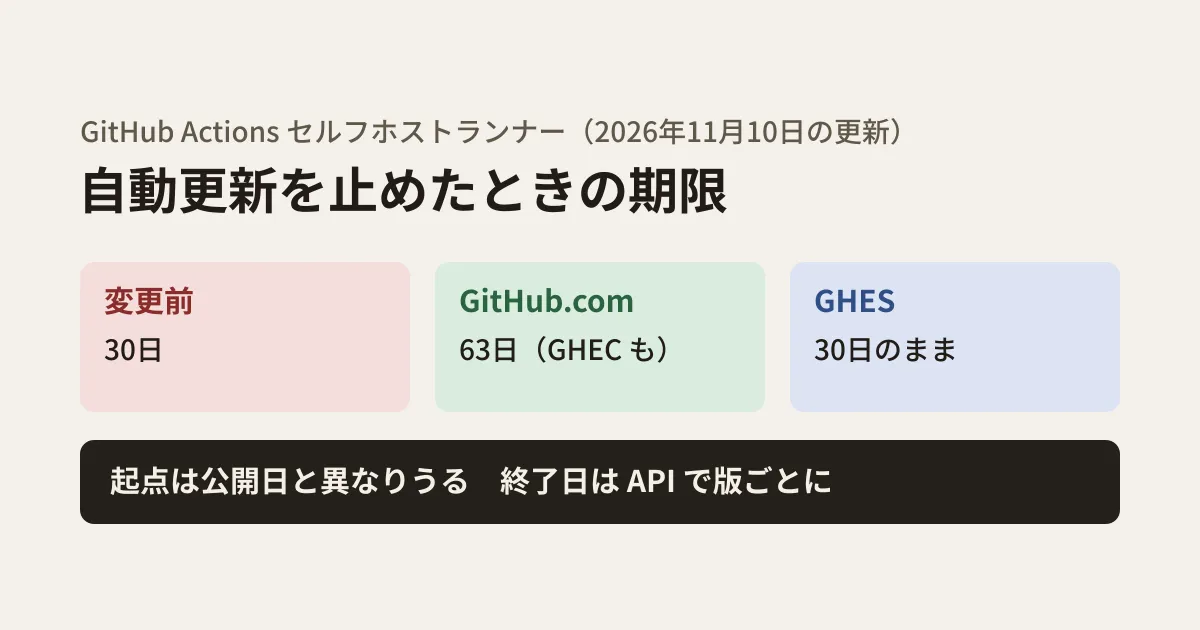
The explanation of "within how many days you need to update" was rewritten in GitHub's documentation source (the github/docs repository) on November 10, 2026, and as of November 11 it is also reflected on the live docs.github.com. For GitHub.com and GitHub Enterprise Cloud, it changed from 30 days to 63 days, and a reference to a REST API that returns the planned end date for each version was added. The GitHub Enterprise Server version of the page still says 30 days. In this article, we summarize the changes following the original text and suggest steps for checking the deadline.
What has changed
The changes are in two places: the page describing self-hosted runners, and a reusable warning snippet used in various places (it also appears on pages such as the Actions Runner Controller troubleshooting page).
| Before | After the change (November 10) | |
|---|---|---|
| GitHub.com・GitHub Enterprise Cloud | Within 30 days of a new version becoming available | Within 63 days of a new version becoming available |
| GitHub Enterprise Server | Within 30 days | Within 30 days (unchanged) |
| Start of the deadline | Not stated | "The date an update becomes available may differ from that version's release date" |
| How to check the deadline | Recommends release notifications for actions/runner | For GitHub.com and GitHub Enterprise Cloud, it additionally references a REST API that returns the planned end date for each version |
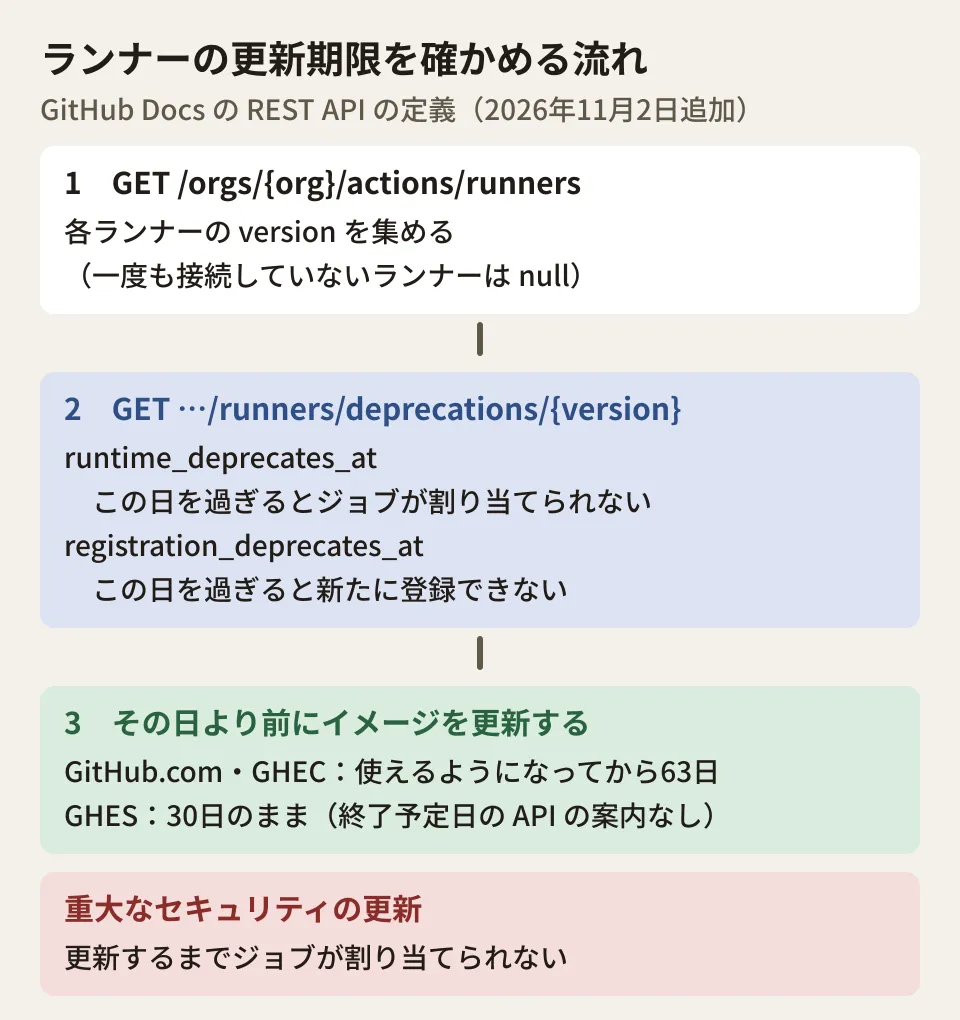
As for what happens after the deadline, the warning snippet says that "if you do not update within the deadline after a new major, minor or patch version becomes available, the GitHub Actions service will not assign jobs to that runner." It also says that "if a critical security update is required, jobs will not be assigned until you update," and no grace period in days is given for this case.
According to the documentation, runners that have not disabled automatic updates update themselves when a job is assigned, or within one week of a release if there are no jobs. The deadline matters mainly when you register with --disableupdate added to config.sh and manage the version through an image.
The deadline does not start from the release date
The key point of this rewrite is where the 63 days start. The documentation sets the start of the deadline as "the date a new version became available" and states explicitly that this date may differ from the release date (this wording appears only on the GitHub.com and GitHub Enterprise Cloud versions of the page).
In other words, adding 63 days to the date on the actions/runner releases page does not necessarily give the correct deadline. The reliable way to check each version's deadline is the following REST API.
An API that returns the planned end date for each version
An endpoint that returns the planned end date for each runner version was added to the REST API definition data in GitHub's documentation on November 2. There are organization and repository versions, and the GitHub Enterprise Cloud version of the page also lists an enterprise version. It does not appear on the REST API pages for GitHub Enterprise Server.
GET /orgs/{org}/actions/runners/deprecations/{version}
GET /repos/{owner}/{repo}/actions/runners/deprecations/{version}
GET /enterprises/{enterprise}/actions/runners/deprecations/{version}   # GitHub Enterprise Cloud
The response contains the following two dates.
runtime_deprecates_at: The date after which jobs will no longer be assigned to runners on this version. If no newer version exists yet, it isnull.registration_deprecates_at: The date after which new runners on this version can no longer be registered. It is set only for versions older than the minimum version required for registration (currently 2.329.0 according to the definition), and isnullotherwise.
The documentation lists the following permissions.
- Organization: Requires organization administrator access. It works with the
admin:orgscope for a personal access token (classic), or with the "Self-hosted runners" organization permission (read) for a fine-grained token. - Repository: Requires repository administrator access. For classic tokens, the
reposcope; for fine-grained tokens, the "Administration" repository permission (read). - Enterprise: Classic tokens require the
manage_runners:enterprisescope; it cannot be used with fine-grained tokens or GitHub App tokens.
Example: listing an organization's runner versions and their deadlines
This is an example script that collects the versions of runners registered to an organization and displays the planned end date for each version. Log in to gh (GitHub CLI) and run it with organization administrator access.
#!/usr/bin/env bash
# 使い方: ORG=your-org ./check-runner-eol.sh
set -euo pipefail
: "${ORG:?ORG を指定してください}"
gh api --paginate "/orgs/$ORG/actions/runners" \
  -q '.runners[] | select(.version != null) | .version' | sort -uV |
while read -r v; do
  gh api "/orgs/$ORG/actions/runners/deprecations/$v" \
    -q '[.runner_version, (.runtime_deprecates_at // "未定"), (.registration_deprecates_at // "なし")] | @tsv'
done | { printf '版\tジョブが割り当てられなくなる日\t登録できなくなる日\n'; cat; }
The definition says version in the runner list "is set only for runners that have connected to the service at least once," so runners that have never connected are excluded. We only checked how this script fits together using a fake gh command and made-up responses; we have not run it against a real organization. Before using it in production, verify its behavior in a test organization.
Operations when automatic updates are disabled (our suggestions)
From here on are the editorial team's suggestions.
1. Find every place where the runner version is pinned. List the places where the runner version is written, such as Dockerfiles, Actions Runner Controller settings and configuration management for internal servers. For building an inventory of CI components, our article on continuous auditing of the GitHub Actions supply chain is also useful.
2. Manage deadlines using the dates from the API. Run the script above regularly and notify the owner about versions whose runtime_deprecates_at is approaching. Rather than seeing 63 days as "more headroom," it is safer to think of it as "the starting point is harder to see, so check it with the API."
3. Prepare for critical security updates. The documentation says there is no grace period in days for critical updates. Make sure you can routinely rebuild the image and replace runners in a short time.
4. GHES is still 30 days. If you also use GitHub Enterprise Server, the deadline differs even with the same image. The GHES version of the documentation does not reference the end-date API, so track new versions through means such as release notifications for actions/runner.
We covered how to include runner operating costs and CI costs in maintenance estimates in our article on metered CI billing and maintenance contracts.
Scope of verification
On November 11, 2026, we reviewed the github/docs source files, the change commit a682515 (November 10, 2026), and the commit 7b168cc that added the REST API definitions (November 2). We also opened the published docs.github.com pages for each of the GitHub.com, GitHub Enterprise Cloud and GitHub Enterprise Server versions and confirmed that the 63-day and 30-day wording and the presence or absence of the end-date API matched the source files (documentation research). We found no announcement of this change in the Actions entries of the GitHub Changelog (October and November). We did not call the API and have not checked the actual planned end date for each version. For the script, we only checked how it fits together using a fake
ghand made-up responses.
GleamHub's development, AI and automation consulting can help with reviewing CI/CD operations, including self-hosted runners, and with building systems that automate runner image updates. The approach depends on your setup, so please reach out via our contact form.
References
- GitHub Docs — Self-hosted runners reference(Runner software updates on self-hosted runners)
- GitHub Docs — REST API endpoints for self-hosted runners
- GitHub Enterprise Cloud Docs — REST API endpoints for self-hosted runners (enterprise)
- GitHub Enterprise Server Docs — Self-hosted runners reference (30 days)
- github/docs — commit a682515(Clarify self-hosted runner deprecation dates)
- github/docs — commit 7b168cc(Update OpenAPI Description)
- actions/runner — Releases