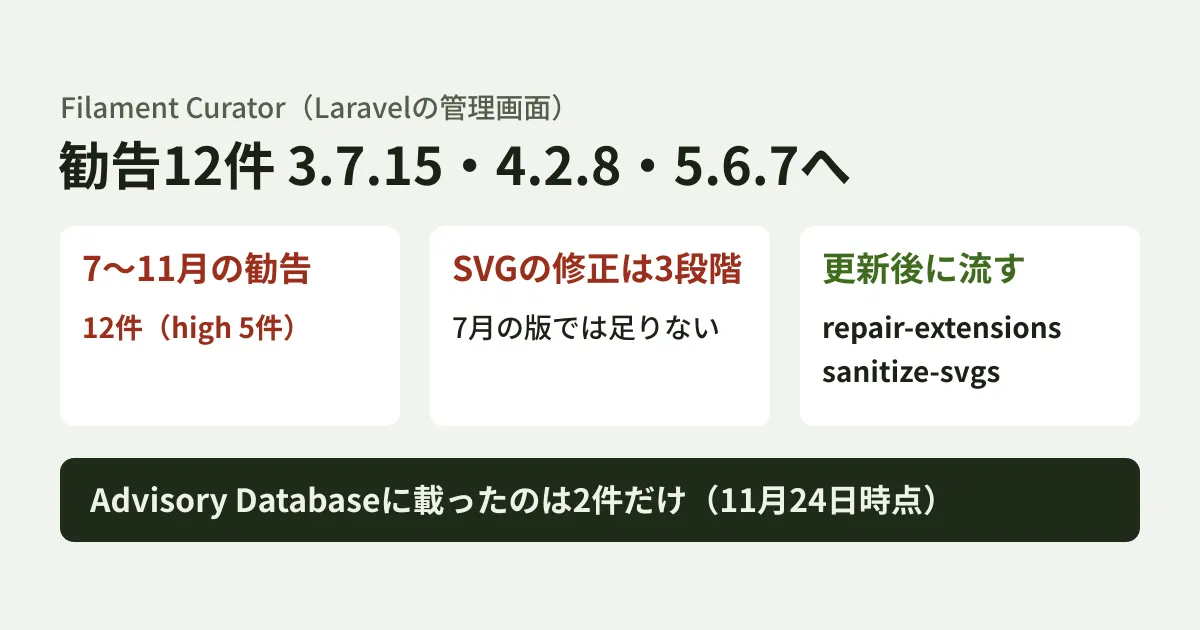
If you use Curator (awcodes/filament-curator), a plugin for managing images and PDFs in Filament, the framework for building Laravel admin panels, you need to upgrade to the latest version in your series: 3.7.15, 4.2.8 or 5.6.7. Between July 6 and November 18, 2026, 12 advisories were published in Curator's repository, 5 of them rated high severity.
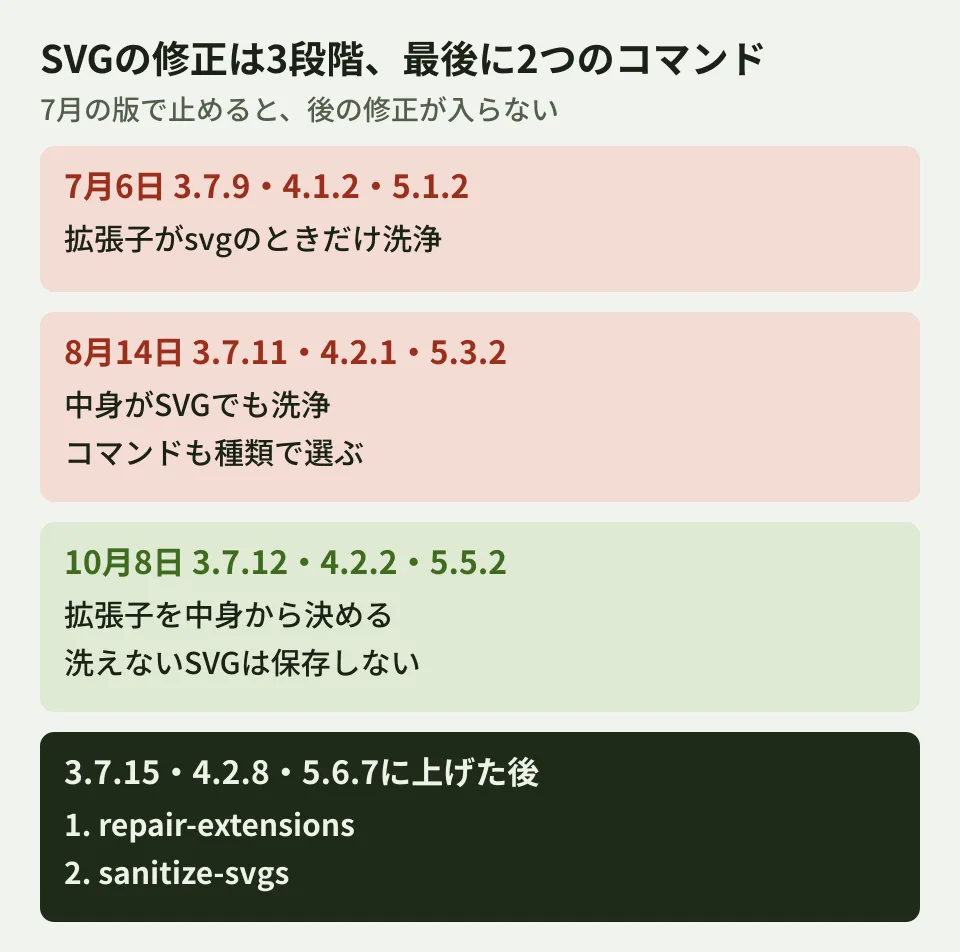
The issue where scripts embedded in uploaded SVGs could run was fixed on July 6, but bypasses of the fix were found on August 14 and October 8, and it was fixed in three stages. If you stopped at the July fixed versions (3.7.9, 4.1.2 and 5.1.2), the fixes for the later advisories are not included. After upgrading, run curator:repair-extensions and curator:sanitize-svgs to repair files already stored.
As of November 24, only 2 of the 12 are listed in the GitHub Advisory Database. The remaining 10 may not show up in composer audit or Dependabot. This article organizes the list of advisories, the fixed versions and the upgrade steps, based on the repository's advisories and code.
12 advisories since July and fixed versions
Counts, severities and fixed versions are based on the advisory list in Curator's repository. Dates are when the advisories were published in the repository (UTC). "Stored XSS" in the table refers to issues where scripts run in other users' browsers through stored files or values. "Picker" refers to the screen for selecting media from a form.
| Published date | Severity | Key features | Fixed versions (3.x, 4.x, 5.x) |
|---|---|---|---|
| July 6 | medium | In multi-tenant admin panels, the picker's search exposes image information from other tenants (GHSA-828w-6qgx-3rcf) | 3.7.8・4.1.1・5.1.1 |
| July 6 | medium | Uploaded SVGs are served without sanitization, so scripts inside them run (GHSA-8vm9-f75m-5h2m) | 3.7.9・4.1.2・5.1.2 |
| July 25 | high | The picker's edit, delete and download actions do not check per-record permissions or tenants (GHSA-3m5g-3j68-ghvp) | 3.7.10・4.1.3・5.1.3 |
| August 5 | medium | HTML is included in the default accepted file types, leading to stored XSS (GHSA-fc8p-659h-3959; 3.x not affected) | 4.1.5・5.1.5 |
| August 14 | medium | Renamed SVGs are not sanitized, and users can specify where cropped images are saved (GHSA-3xm3-q2fj-x8rq) | 3.7.11・4.2.1・5.3.2 |
| October 8 | high | Picker settings (accepted types, storage location, tenant handling and so on) can be altered from the browser (GHSA-fg4g-xmpf-4cxf) | 3.7.12・4.2.2・5.5.1 |
| October 8 | high | The picker's download can retrieve files from any configured disk (GHSA-876q-39w3-8c2r) | 3.7.12・4.2.2・5.5.1 |
| October 8 | high | Files are saved with the extension from the user-supplied file name, leading to stored XSS (GHSA-3vg7-526j-4xj4) | 3.7.12・4.2.2・5.5.2 |
| October 8 | medium | URLs for private media thumbnails and similar have no expiration and can end up in public caches (GHSA-gmg2-xrxr-3fc9; 3.x not affected with default settings) | 4.2.3・5.5.3 |
| October 8 | medium | The picker's listing, search and folder navigation ignore the restrictions set on the field (types, disks, directories, tenants) (GHSA-c684-h96h-x6g9) | 3.7.13・4.2.3・5.5.3 |
| October 8 | medium | No upper limit on crop size, allowing memory and disk to be exhausted (GHSA-g46g-qfg5-5pcm) | 3.7.13・4.2.3・5.5.3 |
| November 18 | high | Tampering with the cropped-image records saved from the edit screen allows reading, deleting or moving files outside the media (GHSA-phvw-wh68-rxmp) | 3.7.15・4.2.8・5.6.6 |
For the 11 advisories other than the private URL issue, the descriptions and ratings assume an account that can log in to the admin panel. The private URL issue is that once a URL leaks, anyone can open the file. The required permissions include uploading or editing media and editing forms with a picker, and many of them are within reach of non-administrators. Checking matters even more for admin panels where accounts have been given to article contributors or outside production agencies.
Two of the 5.x advisories need extra notes. For the November 18 issue, part of the fix went into 5.6.5 and it was completed in 5.6.6. For the October 8 extension issue, the fix in 5.5.1 was incomplete, and the advisory asks users on 5.5.1 to upgrade to 5.5.2 as well.
The SVG fix came in three stages
- July 6 (3.7.9, 4.1.2, 5.1.2) Sanitization of SVGs on upload (removing scripts and external references) was added, along with
curator:sanitize-svgsto re-sanitize stored SVGs. However, whether to sanitize was decided by the extension in the user-supplied file name. - August 14 (3.7.11, 4.2.1, 5.3.2) Uploading SVG content under a name with a different extension bypassed sanitization. Because
curator:sanitize-svgsalso selected targets by extension only, it missed those files. With the fix, files are sanitized if either the extension or the type detected from the contents is SVG, and the command also selects targets by the detected type. In 3.x, 3.7.11 also fixed a bug where this command never finished when there were more than 100 SVGs. - October 8 (3.7.12, 4.2.2, 5.5.2, high severity) A design remained where, even if the content check passed, the file was saved with the extension the user supplied. The advisory states that this issue also bypasses the fixes for the two earlier issues up to August (GHSA-fc8p-659h-3959 and GHSA-3xm3-q2fj-x8rq). With the fix, the extension is determined from the file contents, SVGs are sanitized before being written to disk, and SVGs that cannot be sanitized are rejected.
curator:repair-extensionswas also added to fix the extensions of stored files.
Dates differ between publication in the repository and listing in the database
| Source | Date |
|---|---|
| Publication of advisories in the repository | July 6 (2), July 25, August 5, August 14, October 8 (6), November 18 |
| Listing in the GitHub Advisory Database | November 17 (only 2: GHSA-8vm9-f75m-5h2m and GHSA-828w-6qgx-3rcf) |
The first 2 were published in the repository on July 6, the same day as the fixed versions, and were listed in the GitHub Advisory Database on November 17. As of November 24, the remaining 10 could not be found through the database's API. The July 25 issue has a CVE number (CVE-2026-103920) but is not listed in the database.
Composer's composer audit checks Packagist's advisory list by default. As of November 24, Packagist's advisories for awcodes/filament-curator were also limited to the same 2. GitHub's Dependabot raises alerts when a vulnerability is added to the GitHub Advisory Database, so it may not raise alerts for the 10 that are not listed. Even if these tools show only the 2 from July, that does not mean you are unaffected by the other 10. Decide based on the version number.
Update steps (editorial suggestion)
1. Check your current version
Run composer show awcodes/filament-curator on the server, or check the version of awcodes/filament-curator in composer.lock. Versions before 3.7.15 for 3.x, 4.2.8 for 4.x and 5.6.6 for 5.x are affected by the November 18 advisory. If you are still on the July fixed versions (3.7.9, 4.1.2, 5.1.2), none of the fixes for the advisories from July 25 onward are included.
2. Upgrade to the latest version in the same series
| Release line | Supported Filament | Upgrade to (latest as of November 24) |
|---|---|---|
| 3.x | 3.x | 3.7.15 (November 18) |
| 4.x | 4.x | 4.2.8 (November 18) |
| 5.x | 4.x and 5.x | 5.6.7 (November 21). The advisory fixes go up to 5.6.6; 5.6.7 only tidies up the files included in the package |
Dates are when versions were published on Packagist (UTC). The Filament versions for 4.x and 5.x are based on the composer.json requirements of the latest versions. The 4.x release notes say that because 5.x also supports Filament 4, you can move to Curator 5.x without changing Filament.
Before upgrading, check the following changes in a test environment.
- On 3.x, if you open the media panel (
CuratorPanel) from your own code. From 3.7.12, panel settings are passed in encrypted form, and the advisory asks you to useCuratorPanel::encryptSettings(). - On 5.x, if you render the panel yourself. From 5.5.1, panel settings can no longer be changed from the browser, and the release notes advise passing settings via
settings. - Private media on 4.x and 5.x. From 4.2.3 and 5.5.3, URLs for private media thumbnails and similar have an expiration. Glide (the image transformation mechanism) URLs for private media that are already stored, for example in rich editor content, will no longer open.
3. After upgrading, repair stored files
The fixes apply to files uploaded after the upgrade. Files stored before the upgrade remain as they are. The advisories and documentation advise running the following two commands first with the option that lists targets without changing anything, checking the results, and then running them for real. Before production, run them in a test environment or after taking a backup.
# 1) 拡張子が中身と合わない危ないファイルを直す
php artisan curator:repair-extensions --dry-run   # 一覧するだけ
php artisan curator:repair-extensions

# 2) .svg のまま保存されているSVGを洗い直す
php artisan curator:sanitize-svgs --dry-run       # 一覧するだけ
php artisan curator:sanitize-svgscurator:repair-extensions(3.7.12, 4.2.2, 5.5.1 and later) Detects the type of every media file from its contents. Files whose contents are HTML, XML or JavaScript are renamed to.txt. Files with dangerous extensions (.html,.svg,.xml,.js,.phpand so on) whose contents are something else are given an extension that matches their contents. Files whose contents are SVG are sanitized when renamed. No files are deleted. Renamed files also get new URLs, so links pasted into rich editor content and elsewhere need to be fixed. The paths before and after each change are printed one per line, so keep the output.curator:sanitize-svgsIn the latest version, it targets media whose extension issvgor whose recorded type is SVG. It reads 100 at a time and overwrites only the files whose sanitized result differs from the original. The documentation says thatcurator:repair-extensionsdoes not sanitize files with the.svgextension, so you should run this command for them.
None of the advisories, release notes or documentation specify the order of the two commands. This article proposes running curator:repair-extensions first. Because curator:repair-extensions renames files saved as .svg whose contents are not SVG, the "skipped" list from curator:sanitize-svgs, run afterward, is narrowed down to the files you need to check by hand. This is a judgment based on reading the code; we have not actually run the commands to confirm it.
Both commands leave files unchanged and print "skipped" for cases such as missing files or SVGs that cannot be sanitized. SVGs that could not be sanitized may still contain dangerous content. Check their contents as text without opening them in a browser, or consider deleting them. On 3.x, if curator:sanitize-svgs in an earlier version never finished, the advisory asks you to run it again after upgrading.
4. Other things to redo
- Clear the Glide cache (4.x and 5.x). The advisory for the private URL issue asks you to clear the Glide cache (
storage/app/.cacheby default) and any CDN cache in front of your media after upgrading, because copies of old URLs remain. - If URLs may have leaked, regenerate the signing key (4.x and 5.x). The advisory shows how to regenerate Glide's signing key with
php artisan curator:token. All URLs issued so far, including those for public media, become invalid. - Review the cropped-image records. According to the advisory for the November 18 issue, cropped-image records saved before the upgrade are not rewritten. The advisory shows how to use
php artisan tinkerto list and check records whose paths point outside that media's folder ({directory}/{name}/).
5. Interim measures while you cannot upgrade
The workarounds listed in the advisories are as follows. None of them is a substitute for upgrading.
- If you do not use SVGs, remove
image/svg+xmlfrom the accepted file types (the July 6 and August 14 SVG issues). - Limit the users who can upload and edit media and use the picker to people you trust (the August 14, October 8 and November 18 issues, among others).
- Serve the media disk with
Content-Disposition: attachment, or serve it from a separate origin (the October 8 extension issue). - Disable the image cropping feature (the October 8 crop size issue and the November 18 issue). For 5.x and 4.x, use
CuratorPlugin::make()->curations(false); for 3.x, use'tabs' => ['display_curation' => false]inconfig/curator.php. The advisory for the November 18 issue states that for this 3.x setting, new records are no longer saved, but records already saved continue to be used for display. - In multi-tenant admin panels, register
CuratorPluginin the tenant panel so that Filament's tenant scoping applies toMedia(the October 8 picker settings and restrictions issues).
For the July 25 issue, the advisory states that there is no configuration-only workaround and that upgrading is required. For the July 6 tenant search issue as well, it states that there is no workaround other than upgrading.
Scope of verification
On November 24, 2026, we reviewed the advisory list of the awcodes/filament-curator repository (retrieving all 12 via the GitHub API and checking severity, publication date, affected versions, fixed versions, workarounds and post-upgrade work), the advisory lists of the GitHub Advisory Database and Packagist, the release dates and times of each version on Packagist, the
composer.jsonand the code of the two commands at the 3.7.15, 4.2.8 and 5.6.7 tags, the README and the 5.x documentation, the main release notes, and the Composer and Dependabot documentation (desk research). We did not build the application locally, reproduce the issues or run the commands.
Designs that serve uploaded files as-is can occur outside Curator too. We covered how to review fixes to a CMS admin panel in our article on WordPress 7.1.4, and another case where an advisory was not listed in the database and did not show up in composer audit in our article on baserCMS. For ways to strengthen multi-tenant isolation on the database side, see our article on PostgreSQL RLS.
GleamHub's development, AI and automation consultations cover maintaining Laravel admin panels and how to handle vulnerability response. Please get in touch via our contact form.
References
- awcodes/filament-curator — Security advisories
- GHSA-3vg7-526j-4xj4: Stored XSS via client-supplied file extensions
- GHSA-3xm3-q2fj-x8rq: SVG sanitization bypass via filename extension, and unvalidated curation paths
- GHSA-phvw-wh68-rxmp: Curation entries saved from the media edit form can read, delete and move files outside the media item
- GHSA-8vm9-f75m-5h2m: Stored XSS via unsanitized SVG upload served inline
- GitHub Advisory Database — GHSA-8vm9-f75m-5h2m
- GitHub Advisory Database — GHSA-828w-6qgx-3rcf
- awcodes/filament-curator — File types (5.x documentation)
- awcodes/filament-curator — Release v4.2.2
- awcodes/filament-curator — Release v5.6.6
- Packagist — awcodes/filament-curator
- Composer — Command-line interface(audit)
- GitHub Docs — About Dependabot alerts