Updated October 6, 2026: We corrected this article following the stable release of EmDash 1.0 on September 28, 2026. We now state clearly that plugin isolation may not apply depending on the runtime environment and how a plugin is installed, and we made it clear that the conclusion "it is still a preview, so it is too early to migrate production sites" was our assessment as of April 2026. We have summarized what to check before switching on 1.0 in "EmDash 1.0: what to check before switching from WordPress."
The structural dilemma of WordPress security issues
Powering more than 40% of the web, WordPress has long faced a structural reality where 96% of its security vulnerabilities stem from plugins. An architecture granting plugins full PHP execution permissions to access the database and file system directly makes them prime targets for attackers.
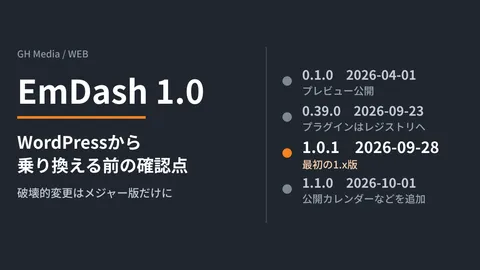
On April 1, 2026, Cloudflare tackled this challenge head-on by publishing an open-source preview release (MIT license) of a new CMS called EmDash. Version 1.0 was then released as stable on September 28, 2026 (the first 1.x release is 1.0.1; the 1.0.0 package on npm was published by mistake and has been deprecated). This article is based on the content as of the April preview release.
EmDash's design philosophy: The three pillars
1. Full-stack TypeScript
While WordPress relies on PHP, EmDash is written entirely in TypeScript. Running as an Astro 6.0 integration, it delivers end-to-end type safety from the frontend to the backend.
2. Sandboxed plugin architecture
EmDash's defining feature is its security model for plugins.
| Item | WordPress | EmDash (isolated plugins) |
|---|---|---|
| Plugin runtime | Same PHP process | V8 isolate (sandboxed) |
| Database access | Direct access allowed | Restricted (API only) |
| Permission management | None (full access) | Explicitly declared in manifest |
| File system | Direct access allowed | Access disallowed |
Isolated plugins run in an environment separated from the main site. Plugins must explicitly declare permissions such as read:content and email:send in their manifest files, and they cannot perform any operation they have not declared.
However, not every plugin is isolated. According to the official 1.0 documentation, isolation applies only in the following configurations.
- On Cloudflare: when Dynamic Workers (the
worker_loadersbinding) are enabled on the Workers Paid plan. This is disabled by default in the Cloudflare template - On Node.js: when the
workerdpackage is installed and plugins run in a separate process
In addition, isolation covers only plugins installed from the registry and plugins designated as sandboxed in the configuration. Native plugins installed from npm and listed in plugins run in the same process as the site and have full access. Which limits, such as execution time, are enforced also differs by runtime environment.
3. AI-native architecture
EmDash is designed from the ground up with the expectation that AI agents will interact with the CMS.
- Built-in MCP server: Every instance includes a Model Context Protocol server, enabling AI agents to create, edit, and publish articles directly.
- Portable Text: Content is stored as structured JSON rather than raw HTML, allowing AI agents to read and write content without parsing.
- Agent Skills: Built-in documentation enabling AI agents to autonomously develop plugins and migrate content from WordPress.
Setup guide
Trying it out locally
npm create emdash@latestRunning this command launches an interactive setup wizard and starts EmDash backed by a local SQLite database.
Deploying to Cloudflare
One-click deployments via the Cloudflare dashboard are fully supported. The setup automatically provisions D1 (a SQLite-compatible database) and R2 (object storage), operating in a serverless architecture that scales down to zero when idle.
Migrating from WordPress
- Supports importing WXR (WordPress eXtended RSS) files
- Supports direct migration via the EmDash Exporter plugin
Technical architecture deep dive
Database layer
Using Kysely (a type-safe SQL query builder), it supports multiple backends:
- Cloudflare D1 — Serverless SQLite
- Turso — Distributed SQLite
- PostgreSQL — Traditional RDBMS
- Local SQLite — Development environments
Storage layer
Standardized around an S3-compatible API, supporting any of the following backends:
- Cloudflare R2
- AWS S3
- Local file system
License
Released under the MIT license, it is more permissive than WordPress's GPL. Plugin and theme developers are free to choose their own licensing terms.
Community reactions
Positive reactions
When Yoast founder Joost de Valk began migrating his personal site to EmDash, it made waves across the WordPress ecosystem. The plugin security model has drawn widespread praise, with many noting that it addresses WordPress's biggest weakness head-on.
Skeptical viewpoints
- "The WordPress ecosystem took decades to build. It will take significant time before tens of thousands of plugins become available."
- "Announcing a real product on April Fools' Day (April 1) is questionable marketing."
- "There are concerns regarding Cloudflare vendor lock-in" (though documentation explicitly clarifies that it also runs on Node.js).
Overall, the consensus leans toward a realistic appraisal: "The direction is spot on, but the ecosystem is currently empty."
Summary: Should you migrate today?
As of publication in April 2026, EmDash was in a v0.1.0 preview release, and we judged it too early to migrate production sites. Version 1.0 has since become a stable release, and the project has stated that breaking changes will be made only in major versions going forward. Before deciding whether to switch on 1.0, check whether your configuration supports plugin isolation, and what you can carry over from WordPress and what you would have to rebuild. We have summarized the points to check in EmDash 1.0: what to check before switching from WordPress.
If you are at the stage of simply trying it out, it is well worth exploring for developers who match these profiles:
- Concerned about WordPress plugin security
- Looking to build full-stack applications with TypeScript
- Interested in integrating CMSs with AI agents
- Looking to optimize operational costs with serverless architecture
Choosing a CMS is a foundational business decision. For a comparison between WordPress and alternative no-code tools, see our detailed guide on how to build websites without code. If you are interested in comparing it with Jamstack architecture, our Jamstack and headless CMS case studies will also serve as a helpful reference.
Try out the playground at emdashcms.com, or set up a local environment with npm create emdash@latest to experience the feel of a next-generation CMS firsthand.