"Our corporate site was renewed two years ago, but lately it has become painfully slow. Every time we add a plugin to publish new pages, the site slows down, and the admin dashboard layout breaks with every update. We cannot tell whether we should rebuild it from scratch or keep patching it as we go." We received this consultation from a PR manager at an SMB. This is not an isolated problem; it is the common destination for WordPress sites assembled with page builders and stacked plugins over time.
The underlying cause is almost always the same: a page builder is installed for design flexibility, plugins are stacked whenever features are needed, and each addition degrades page load speed and compromises update stability. Challenging this status quo is Kirki, an infinite canvas visual builder. However, jumping on new tools simply because they seem promising often leads to regret, so here is a breakdown along with key checkpoints for clients.
Why WordPress Sites Become Slow and Fragile
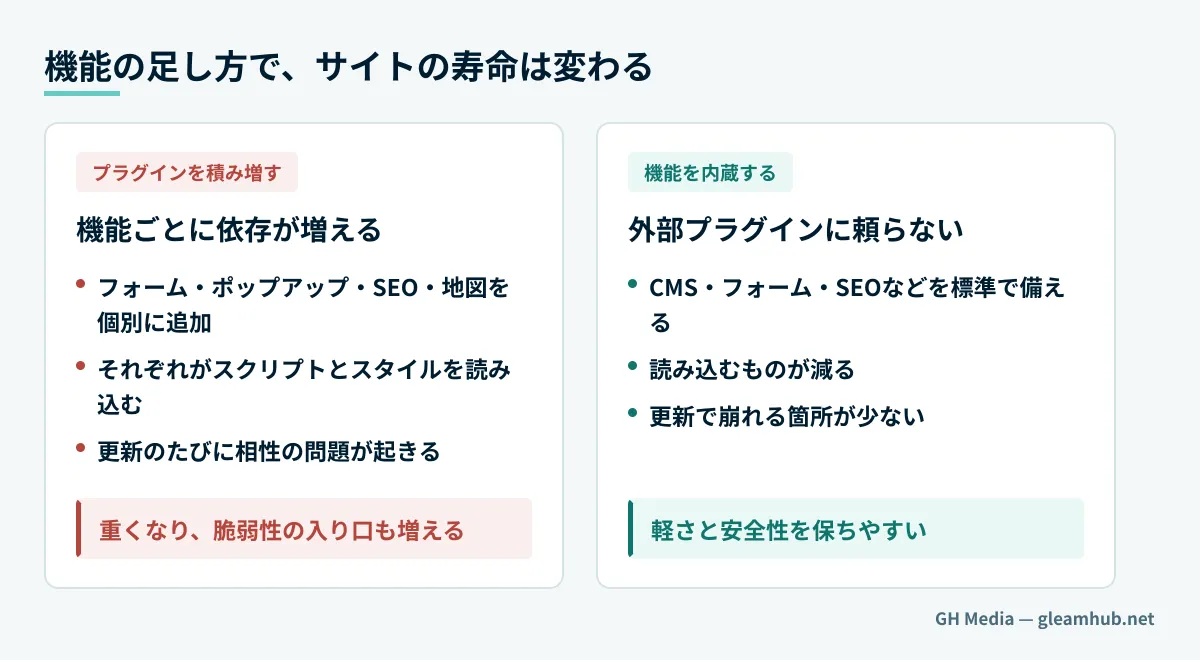
WordPress itself is not inherently flawed. The problem lies in the fact that many sites are built using the combination of "a page builder" + "a massive collection of plugins." Installing separate plugins for design flexibility, forms, popups, SEO, and maps causes their respective scripts and stylesheets to accumulate, bloating page weight. In addition, having more plugins increases both the likelihood of update compatibility conflicts and the surface area for security vulnerabilities.
In other words, the slowness and fragility plaguing many WordPress sites stem from an architecture that worsens with every added feature. Understanding this makes the novelty of Kirki crystal clear. We explore the merits and drawbacks of visual builders—particularly lock-in risks—in our article on visual builders and site lock-in, which offers broader perspective when evaluating options.
What Sets Kirki Apart
Kirki is a visual builder for WordPress that allows you to freely place elements across an infinite canvas without layout constraints. (It unifies and rebrands what was previously offered as Droip alongside the Customizer framework into a single visual builder). Its standout attribute is not just design freedom; it natively incorporates a CMS, forms, popups, maps, SEO, icons, and real-time collaboration without relying on external plugins, and includes built-in integrations for more than 20 applications such as Mailchimp and Google Search Console (Smashing Magazine: Meet Kirki, WordPress.org: Kirki).
This is the core insight: reducing plugin count through built-in functionality. This architectural philosophy keeps sites fast while reducing potential vulnerability entry points, directly addressing the dynamic where more plugins lead to slower, riskier sites. It already powers over 500,000 sites, and the core installation is free. While granting complete placement freedom, it also supports CSS Grid and Flexbox where structured design is required, enabling robust, resilient layouts.
| Key consideration | Conventional page builder + plugins | Kirki's approach |
|---|---|---|
| Page speed | Tends to slow down as plugins accumulate | Built-in features reduce plugins, maintaining lightweight speed |
| Vulnerability attack surface | Expands with every plugin | Minimizes attack surface by reducing dependencies |
| Design flexibility | Easily constrained by template boundaries | Free placement across an infinite canvas |
Points to Verify Before Signing a Contract Based on Good Impressions
When evaluating emerging tools, clients should maintain an objective perspective. While the creative freedom of an infinite canvas is compelling, high design flexibility is inextricably linked with post-launch maintainability. Pay particular attention to the following angles:
- Can internal teams manage updates? — Is the site structured so that in-house staff can update text and swap images smoothly post-launch? Intricate custom designs often leave teams reliant on the agency for every small edit.
- Portability and migration ease — Can content be exported easily if you decide to migrate to a different system later? Deep dependence on a specific proprietary tool introduces platform lock-in.
- Compatibility with existing sites — Will the tool be integrated partially into the current live site, or will it involve a complete rebuild? The scope of migration drastically affects budget and labor.
These considerations represent core best practices for web development procurement, independent of whether a tool is new. Agency selection criteria are covered in our article on choosing a web development agency, and renewal workflows are detailed in our Corporate Website Renewal Guide. Even as novel options like Kirki emerge, the governing rule remains selecting tools based on who will maintain the site and how.
Hire a Partner Capable of Sustaining Lightweight Performance Through Maintenance
The direction Kirki represents—reclaiming performance and security by shedding plugin dependency—speaks directly to the pain points faced by many SMB websites. Yet, even with an outstanding tool, building without a clear operational maintenance plan will lead back down the same troubled road. Start by checking your current site: "Can our team update it internally after launch?" and "How many plugins are installed?" Those answers mirror the true health of your website.
If you need a diagnosis of why your website is slow or difficult to update, or wish to discuss whether to rebuild or patch your existing site, GleamHub is ready to help via our Website Development and Renewal consultations. Because the optimal approach depends on your specific requirements, we provide customized estimates after evaluating your current setup. Contact us via Contact Us.