"Our agency proposed building the site with Wix Studio—that refers to Japan's STUDIO platform, right?" This question came up recently. The answer is no. While their names sound alike, they are distinct products built by completely different companies.
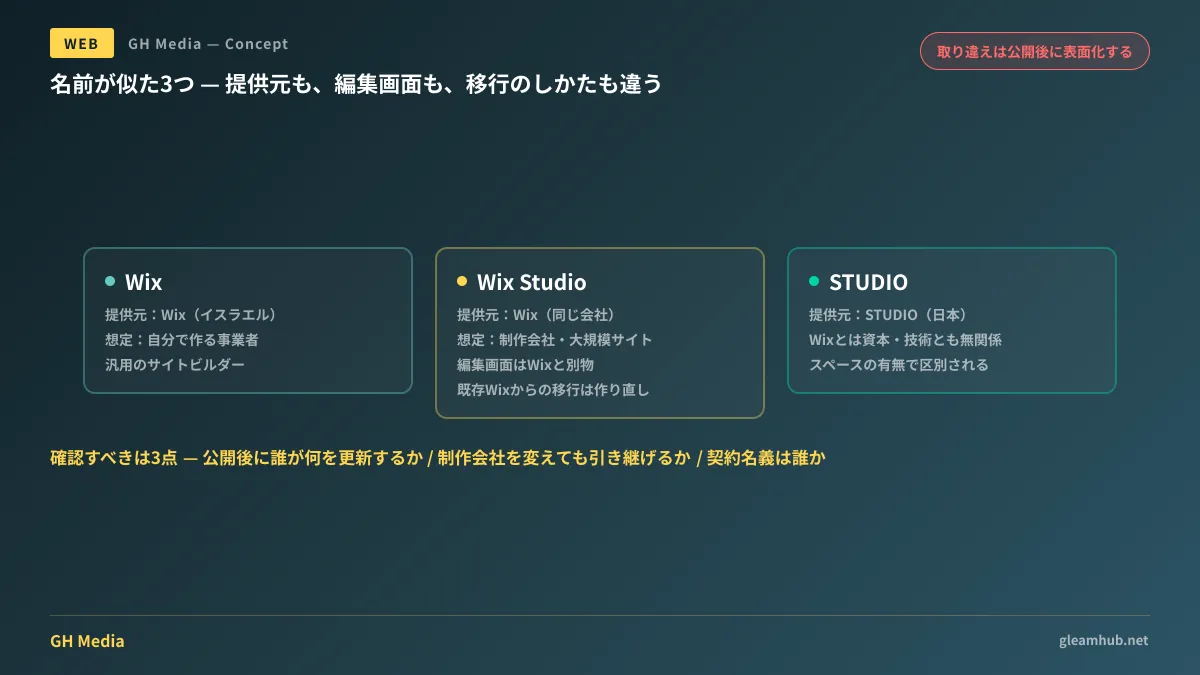
Even more confusing is the relationship between Wix and Wix Studio. Because both are products of Wix, clients often assume moving to Studio is simply upgrading to an advanced tier, but the editor interfaces are completely different products. Proceeding with an order without recognizing this will inevitably cause issues post-launch, leaving teams saying "we can't update it internally" or "another agency cannot take over maintenance."
Comparing and clarifying the three platforms
First, let us summarize the key differences once and for all.
| Provider | Primary Target Users | Positioning | |
|---|---|---|---|
| Wix | Wix (Israel) | Business owners building their own sites | General-purpose website builder. Assembled by users from templates |
| Wix Studio | Wix (Israel) | Agencies, freelancers, and large-scale websites | Professional production platform running on the shared Wix infrastructure |
| STUDIO | STUDIO (Japan) | Designers and creative agencies | No-code design tool originating in Japan. Unrelated to Wix |
STUDIO has no capital or technical ties to Wix. Choosing STUDIO hoping for Japanese customer support and local case studies, only to find Wix Studio written on the contract, is a genuine mix-up that happens in real projects. When reviewing proposals, check the exact spelling. "Wix Studio" and "STUDIO" are distinguished by whether or not there is a space and "Wix" in the name.
Wix and Wix Studio are not just "standard and premium" versions of the same tool
Because they share the same parent company, misunderstandings here run even deeper.
Wix Studio is an environment tailored for design agencies, freelancers, and enterprise web presences. It provides tools built for custom design control, such as pixel-level adjustments, automated responsive scaling, complex animations, custom transitions, and direct design importing from Figma. The underlying hosting infrastructure and e-commerce features are shared with Wix.
The problem is that the editor interfaces are entirely separate. A staff member accustomed to the standard Wix dashboard cannot simply open a site built in Wix Studio and make edits the same way. Applying the promise "anyone can update it because it's Wix" directly to a site built on Wix Studio creates immediate friction.
Furthermore, existing Wix websites cannot be converted to Wix Studio with a single click. Rebuilding the content is a prerequisite. If initial budgets are planned under the assumption that "we'll build on standard Wix now and bump it to Wix Studio later," that future step becomes a full re-development project.
Pricing structures must also be understood separately. Wix's consumer plans feature tiers like Light, Core, Business, and Business Elite alongside its free tier; while custom domain connections are included in paid tiers, a business-tier plan or higher is required to process online payments. The strategy of "starting on a cheaper tier and adding payments later" requires a plan upgrade. On the other hand, Wix Studio features dedicated agency partnership models, meaning the client will not necessarily contract the subscription directly. Determining whose name is on the subscription must be verified at the quoting stage.
Three questions to verify before placing an order
Before comparing tool features, clients must settle key operational requirements. If you ask these after the platform is selected, the answer will often just be "it's already decided."
1. After launch, who will update what?
Whether you want to "just swap text in news announcements," "add an entirely new landing page," or "modify page layouts" dictates the appropriate tool. If the first two represent the bulk of your needs, standard Wix is more than sufficient. If bespoke design execution is paramount, Wix Studio enters the conversation, but the scope of what your internal team can safely touch narrows accordingly.
2. If you change web agencies, can maintenance be handed over?
While critical regardless of platform, this question is especially vital for tools with agency-oriented licensing models like Wix Studio. Who owns the workspace account? How is site ownership transferred? Is that procedure documented? If it is not written in the contract, insist on having it included.
3. Is there a possibility of migrating to another platform like WordPress in the future?
Neither Wix, Wix Studio, nor STUDIO allow you to export built pages for hosting elsewhere. Migration essentially requires a total rebuild. If you envision migrating to an in-house CMS in three years, you must communicate that vision upfront so the platform can be selected accordingly. If left unsaid, vendors will optimize purely for immediate project scope.
For direct feature comparisons across tools, see No-Code Website Builder Comparison: Building Websites with STUDIO, Wix, and WordPress; for criteria on choosing between Wix and WordPress, refer to Wix vs. WordPress: Which Should You Ultimately Choose?. For overall budget benchmarks, consult our Website Development Cost Guide.
Deciding with the post-launch maintenance structure in mind
The real pitfall of confusing these tools is not simply mixing up names; it is that relying on the name causes teams to overlook maintenance workflows and handover plans.
A frequent issue in client web development is signing an agreement after hearing "it's no-code, so you can update it in-house," only to discover post-launch that the editor is far beyond the team's capabilities. While visually editing elements is possible, how much you can safely adjust depends on how the site was built. The more intricate the design implementation, the more fragile the layout becomes when touched.
The easiest way to align expectations is to insist on a hands-on session where the actual staff member handling updates tests the editor before signing the contract. A demo or sandbox environment works fine. If testing reveals that internal maintenance is impractical, you can simply adjust the maintenance quote to let the agency handle updates. This realization is vastly cheaper before signing than discovering it after launch.
For strategies on avoiding sites you cannot update after launch, see our detailed guide: Websites You Can't Update In-House After Launch: Establishing a Sustainable Maintenance Structure Before Ordering.
What to do before signing an agreement
Open the proposal document and inspect the tool's exact naming. Does it say "Wix Studio" or "STUDIO"? If the spelling is inconsistent within the same proposal, clarify it immediately.
Next, designate the specific person who will handle updates internally and schedule an opportunity for them to test the editing environment before contracting. Choosing the right tool can wait until you see their reaction.
If you are planning website creation or a redesign and want to design the post-launch update structure alongside it, GleamHub provides customized proposals based on your requirements. Reach out to us via Contact Us.
Sources
- Thorough Comparison of Wix Studio vs. Wix: Explaining Differences, Pricing, and Features — Official Wix Blog
- Thorough Comparison of STUDIO and Wix [2026 Latest]: Differences in Pricing, Features, and Positioning of Wix Studio — swooo
- Wix Pricing Plan Comparison: All 5 Plans from Free to $159/Month and How to Choose [2026 Edition] — SaaS Kurabe
- STUDIO Official Site