
"We'd like to switch our current site to Wix Studio. Roughly how much would that cost?"
When asked this question, there is something to clarify before talking figures: there is no feature provided to convert a site built with Wix Editor into a Wix Studio site. The estimate will be for a "rebuild," not a "switch." If discussions proceed without aligning on this premise, seeing the quote leads to "why does it cost so much?", draining both parties.
Because they share the Wix name, it is easy to assume it is simply an upgrade to a newer version. In reality, they are two separate products with distinct design philosophies.
Not different versions, but different audiences
Wix Studio is a platform designed for agencies, freelancers, and enterprise web teams. Wix itself positions it this way. Features such as workspaces managing multiple sites, collaborative workflows, and client permission settings are built for teams producing dozens of sites, rather than a business operating a single site.
Wix Editor, on the other hand, is built around choosing templates and placing elements. While you may encounter constraints when trying to fine-tune every detail, the path to publishing is short, making it well-suited for internal staff who handle updates themselves.
| Aspect | Wix Editor | Wix Studio |
|---|---|---|
| Intended user | Business owners, small teams | Agencies, freelancers, web teams |
| Responsive design | Often requires manual adjustments per screen width | Built with responsive automation as the default |
| Management unit | Single site | Workspace spanning multiple sites |
| Handoff to clients | Not intended | Mechanism exists to grant divided permissions |
| Migrating existing sites | — | Editor sites cannot be converted into Studio sites |
The final row of the table has the biggest practical impact. While it is possible to manage or edit an existing Wix site from within the Wix Studio workspace, the site's underlying editor remains unchanged. If you want to rebuild it using the Wix Studio editor, you must create a new site and migrate the content.
What clients must evaluate: "Who will keep updating it?"
Comparing feature comparison charts does not provide actionable decision material for clients. The decision point lies much further upstream.
After launch, who will modify page text and photos?
If internal staff are expected to handle modifications themselves, adding agency-oriented features will not simplify day-to-day operations. Rather, the added UI complexity makes updating a chore every time. In this case, there is little reason to rebuild a site that is currently running on Wix Editor. This applies to scenarios where ongoing improvements suffice instead of a complete renewal.
Conversely, if you plan to keep outsourcing updates to an agency and expect the page count to grow, Wix Studio offers genuine utility for the creators. However, that is a question of creator operational efficiency, not a direct benefit gained by the client. If pitched, ensure they explain this distinction.
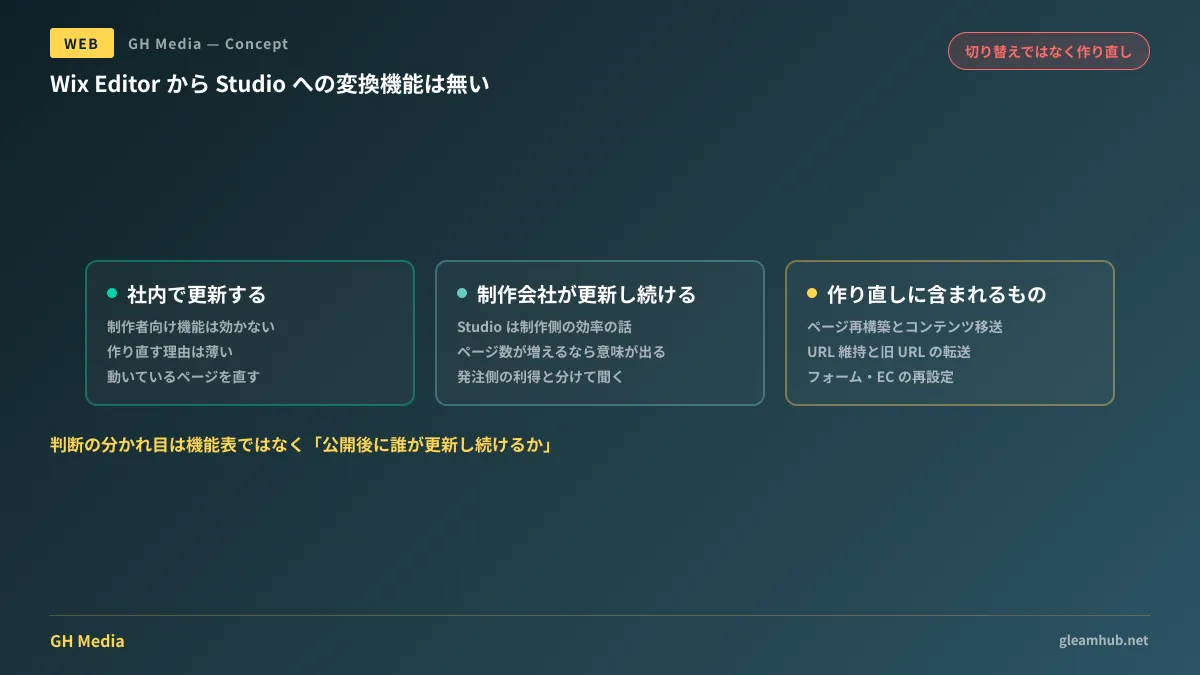
What rebuilding actually entails
Here is a concrete breakdown of the tasks implied by the word "rebuild." This serves as a benchmark when reviewing cost breakdowns.
- Reconstructing pages. Even when carrying over existing designs, elements must be repositioned due to the different editor
- Migrating content. Text and images must be transferred page by page. Page volume directly impacts labor hours
- Preserving URLs. Check whether the same URL structure can be maintained. If it changes, redirects from old URLs to new URLs must be configured. Skipping this will wipe out organic search traffic
- Reconfiguring forms, bookings, and e-commerce. If you use apps or external integrations, each must be reconfigured
- Post-launch QA. Reviewing display glitches and broken links scales with page count
Among these, the item most frequently overlooked by clients is URL preservation. Even if the design is identical, changing the URL makes it an entirely different page to search engines. Verify whether redirect configuration is included in your estimate.
Furthermore, if you are at the stage of comparing Wix with other options altogether, reading Building with Wix vs. WordPress and No-code platform comparison first offers a more natural decision-making sequence.
Three questions to ask when pitched
1. Under whose name will the account be registered? If the site is created under the agency's account, your company will not be able to manage the site once the contract ends. Wix Studio provides mechanisms to hand over partitioned permissions to clients, but whether they are utilized depends on execution. Have the account ownership and transfer procedures written into the contract.
2. Who can update the site after the contract ends? An environment convenient for an agency differs from one convenient for in-house staff. If there is any chance you will handle updates internally in the future, communicate that premise upfront.
3. Will existing URLs be preserved? As noted above, do not settle for a simple "they will be preserved." Verify their redirect policy for pages that cannot be maintained.
All three overlap with points to check in How to choose a web design agency. Regardless of platform, leaving these three items ambiguous will cause difficulties later.
Common pitfalls
Do not take claims that "newer means better for SEO" at face value. Search rankings are not determined by editor differences. Having URLs change or losing existing pages during a rebuild exerts a far greater negative impact on rankings.
Do not compare costs based solely on monthly platform plan fees. Platform fees are only a fraction of total website costs. As outlined in Website development cost benchmarks, you must compare development costs, ongoing maintenance costs, and advertising costs together. Because Wix Studio plans follow agency-oriented pricing, verify current figures on the official pricing page.
What to do next
Count the total pages on your website and determine how many pages have been updated at least once in the past year.
If you only update a handful of pages, spending rebuild costs across the entire website is unnecessary. Focus on refining active pages first. Conversely, if you continuously modify many pages, update usability represents a real operational cost, making migration worthwhile to evaluate.
GleamHub offers consultations on website creation and renewals, covering assessments of whether existing sites need rebuilding, migrations while preserving URLs, and architectural designs enabling in-house updates post-launch. Because the appropriate approach varies by page structure and maintenance setup, please reach out via our contact form.