Ten years' worth of proposals and manuals lie dormant on internal shared drives. Feeding these into an AI to answer questions is currently among the most frequent requests we receive.
Yet upon prototyping, the expected answers fail to materialize. Asking "What was the quote structure for Company A?" yields "No relevant materials found." Inspecting the contents reveals that the source material was ingested. What broke down was the phase where documents were converted into text.
PowerPoint bullet points are flattened into a single line. Merged Excel cells collapse, obscuring which numbers belong to which headers. A .doc created in 2003 turns into garbled text, and multi-column PDFs scramble the sequence of sentences. No matter how capable a model you pass text in this state to, answers will not emerge.
Preprocessing quality directly determines response quality
The mechanism for feeding internal documents to AI generally follows this flow: ingest documents → convert to text → index for search → pass to model. While the latter half is easier to tweak, it is the earlier half that dictates accuracy.
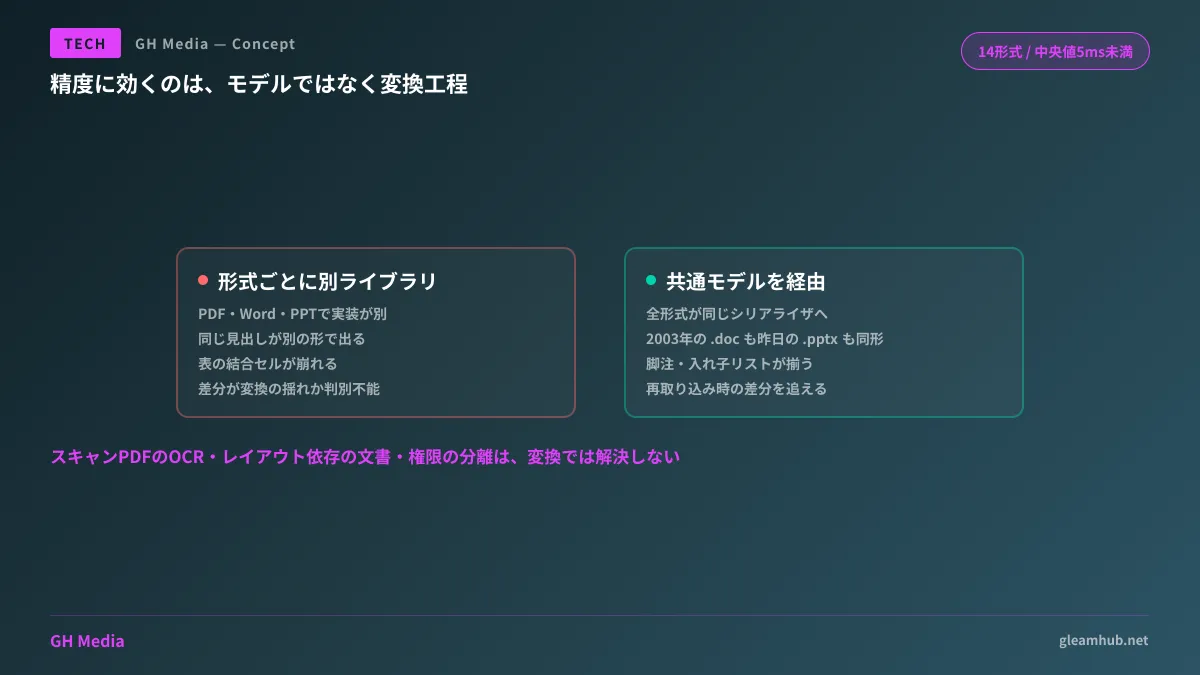
If table structures are lost during conversion, no amount of downstream ingenuity can restore them. Even so, this phase is often brushed aside once "a library was installed and it ran." The reason is straightforward: different libraries are used for each format. As you stack libraries—this for PDF, this for Word, this for PowerPoint—the same headings turn into disparate Markdown depending on format. For search indexing, it is the worst possible state.
What anydoc standardizes is "output consistency," not "quality"
Open-sourced by Firecrawl on August 5, 2026, anydoc is a Rust-based library that consolidates this pipeline into one (article on gihyo.jp). Released under the MIT license, it offers bindings for Node.js and Python.
It supports 14 formats, including Word (.doc / .docx), OpenDocument, RTF, EPUB, PDF, presentations, spreadsheets, and CSV. Its hallmark is less the sheer number of formats and more its architecture: all formats pass through an identical internal document model and output from the same Markdown serializer.
This proves effective in scenarios such as:
- A 2003
.docand a.pptxcreated yesterday yield headings and lists of the exact same structure - Merged table cells and footnotes map to consistent representations across formats
- When reviewing conversion diffs, you can separate document changes from conversion quirks
The third point sounds subtle, but becomes crucial in operations. Building a pipeline for periodic re-ingestion often causes incidents where version differences in conversion libraries create diffs across all documents. Standardizing on one library eliminates the need to second-guess that cause.
Speed is reported at a median under 5 milliseconds across all 14 tested formats. Whether for initial bulk ingestion of thousands of files or daily differential syncs, conversion will not be the primary bottleneck.
Three things anydoc does not solve
Before considering adoption, examining the remaining challenges first saves later disappointment.
First is scanned PDFs. PDFs that are merely scanned paper carry no text information. This falls under OCR and outside the scope of conversion libraries. The higher the ratio of paper-based contracts or invoices a company handles, the larger this factor looms. Key considerations for combining OCR with language models are discussed in Hybrid architectures with OCR and LLMs.
Second is documents where layout conveys meaning. Architectural blueprints conveying information via spatial relationships or spreadsheets indicating status through cell colors lose their meaning once flattened to Markdown. This is not a shortcoming of the tool, but the intrinsic limit of information Markdown can hold.
Third is permissions. Documents on shared drives contain mixes of department-restricted or executive-only files. Converting everything together into a single searchable index easily creates a state where unauthorized users can query sensitive contents. Conversion does not carry over access permissions. This can only be addressed through architectural separation.
The order to investigate when search accuracy falls short
Even with proper preprocessing, answers may still not appear. Establishing an order of investigation helps avoid wasted effort.
- Inspect conversion output visually. Read the converted Markdown directly, even just for one file. What makes no sense to a human will make no sense to a model
- Check whether search retrieves the relevant document. Confirm upfront whether the correct document is even included among candidate passages before generation
- Review how context is passed to the model. When candidates are correct yet answers drift, this is where the issue lies
Tweaking step 3 when stuck on step 1 is the most common detour. The scope improvable through retrieval tuning is summarized in Implementation patterns to boost RAG accuracy, while identifying operations that shouldn't be solved by language models alone is covered in Enterprise AI cannot rely solely on language models.
If you wish to avoid building custom infrastructure, native Google Workspace features may suffice. For decision criteria, refer to Handling internal knowledge with NotebookLM and Workspace Studio.
What to do next
Select 10 past proposals and read the results converted through your current system. Are tables preserved in readable form, and are heading hierarchies intact? If these two are broken, fixing the conversion pipeline before tweaking models or prompts will yield far greater returns on your invested time.
If you want architectural guidance on building an internal document utilization platform, GleamHub is available through our Development, AI, and Automation consultations. Because optimal design depends on document volume, formats, and permission structures, we provide customized estimates. Please reach out via Contact Us.