
"We are on the exact same plan, but some users have the Gemini side panel and others don't. We turned it on for everyone in the Admin console, so I don't think it's an unassigned license issue." We received this inquiry from an IT administrator attempting to expand Gemini adoption across their company.
No matter how many times you review Gemini settings in the Admin console, you will not find the cause there. The discrepancy originates outside the screens administrators typically monitor.
Side panels carry an additional prerequisite
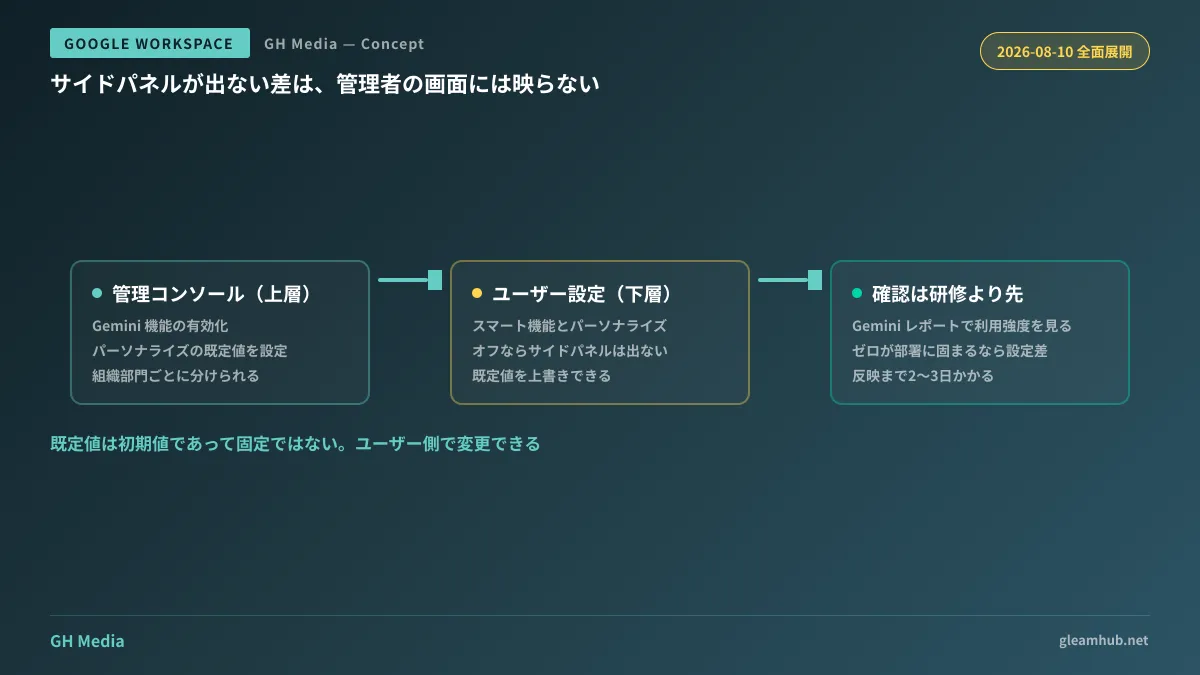
To use Gemini in the side panels of Workspace apps, users must have "Smart features and personalization" enabled on their own accounts. Even if administrators enable Gemini capabilities organization-wide, the panel will not appear for users whose setting is turned off.
This setting was never designed exclusively for Gemini. It serves as an umbrella switch controlling a suite of features that enhance user experience through Workspace data—such as automatically adding flight reservations from Gmail to Calendar, consolidating tickets and loyalty passes from inboxes into Google Wallet, or referencing Drive files directly within Gmail. The Gemini side panel falls under this same umbrella.
The complication is that users rarely remember turning it off themselves. In organizations where the setting was disabled globally following past privacy reviews, or where onboarding guides instructed employees to leave it off, those legacy policies remain in effect. Enabling Gemini clashes directly with those past directives, yet administrators cannot easily identify the issue because the Admin console displays no warning.
Administrators can now set default preferences
In August 2026, Google completed rolling out the ability for administrators to set the default state of user personalization settings to enabled within the Admin console. For Scheduled Release domains, the rollout began gradually on August 5 and reached full availability on August 10.
This resolves scenarios where licenses were provisioned for everyone but only half the workforce could actually use the tool. However, administrators must understand what they are authorizing before turning it on. In addition to enabling Gemini panels, this switch permits Workspace data to be utilized for personalization across Workspace and other Google services.
To organize your decision-making, consider the following breakdown:
| Department profile | Appropriate default setting | Rationale |
|---|---|---|
| Sales, Planning, Back Office | Checked | High immediate value in email summarization and drafting documents |
| Legal, HR, Accounting | Case-by-case evaluation | Handles highly sensitive documents; departmental consensus should be secured first |
| Departments handling client-entrusted data | Review contracts | Customer agreements may contain restrictions on data processing scope |
Because default values can be configured per organizational unit (OU), you do not need to make an all-or-nothing company-wide choice. Enabling features by department and gradually expanding adoption involves far less operational friction than enabling them company-wide and having to roll them back later. Disabling features after teams have already integrated them into daily workflows disrupts operations and invites user pushback.
Furthermore, this admin setting merely establishes an initial default; users retain the ability to change it themselves. Administrator enablement does not permanently lock the setting to on for everyone. Mentioning this nuance during internal announcements prevents employees from feeling that their privacy settings were altered without consent.
Maintaining the correct activation sequence
When attempting to address low Gemini adoption, many organizations follow this sequence:
- Distribute licenses
- Conduct user training
- Investigate why adoption remains low
If you introduce a configuration check, it belongs between steps 1 and 2. When users who cannot see the side panel attend training, their only takeaway is that company-provided Gemini does not work. Having even a handful of attendees whose screens fail to display the interface largely invalidates the entire training session.
Pre-checking configuration is straightforward. The Admin console Gemini reports provide visibility into usage across organizational units alongside user-level engagement tiers (high, medium, low, zero). If zero-usage users are concentrated in specific departments, the issue likely stems from configuration differences rather than lack of interest. Because data takes two to three days to reflect, avoid drawing conclusions immediately following configuration changes.
How to systematically address the broader issue of low adoption after deployment is detailed in Resolving Low Gemini Adoption After Deployment. If usage remains stagnant after verifying settings, the root cause usually lies in undefined practical use cases. For a broader overview of console management, consult Navigating the Google Workspace Admin Console.
What to do next
First, ask standard users in other departments whether the side panel appears on their accounts. Administrator accounts are frequently tweaked during testing and do not represent baseline user configurations. If you identify users who cannot see the panel, inspect their individual settings and determine your department-level defaults.
Once you establish your rollout scope, schedule training sessions and internal announcements afterward. Reversing this order requires double the effort to rekindle interest that has already cooled.
If you need assistance planning Gemini rollout scopes or formulating department-level governance rules, GleamHub offers free consultations for IT and Google Workspace. Because appropriate boundaries depend on the nature of your data and client contracts, reach out for tailored guidance via our contact form.
Sources
- Manage access to Gemini features in Workspace services — Google Workspace Admin Help
- Learn about smart features & controls for Google Workspace & other Google products — Gemini Apps Help
- Updated smart feature settings to give users more choice and control — Google Workspace Blog
- Review Gemini usage in your organization — Google Workspace Admin Help
- Generative AI in Google Workspace Privacy Hub — Google Workspace Help


