A solo IT administrator creates accounts, reassigns permissions with every new hire or transfer, and responds to inquiries like "I can't access this tool." While requests arrive via chat, the work requires opening multiple administrative consoles, causing context switching with every single ticket.
Now, mechanisms have emerged that let administrators complete these tasks directly within the chat where the request arrived. This is undeniably convenient. However, there is a fundamental shift in character compared to previous AI-driven administrative assistance: it is no longer just reading settings, but modifying them.
Moving all the way to executing changes within a conversation
On August 25, 2026, OpenAI released administrator plugins for ChatGPT Work and Codex. According to the announcement, administrators can ask questions, inspect details, execute authorized changes, and verify results—all within a single conversation.
The specific operations highlighted include the following:
- Reviewing usage metrics and credit consumption
- Adding and removing members, updating groups, and managing access permissions
- Checking effective permissions, troubleshooting access issues, and controlling access to features and models by role or group
- Adjusting member and workspace usage limits, and approving or rejecting spending requests
As is readily apparent, the first half consists of read queries, while the second half involves modifications. The core appeal of this feature is that an admin can investigate "why this person cannot use this feature" and seamlessly follow up with "enable access for them" in one uninterrupted flow.
Google Workspace is moving in the same direction, introducing Gemini assistance into the Admin console. However, that currently focuses primarily on queries and summarization; as explained in Admin Assist in the Admin console, its nature leans heavily toward the "reading" side. Whether you step into making modifications fundamentally changes the preparations required.
The step between "reading" and "modifying"
With read queries alone, even if the AI makes an error, the damage stops at "getting an incorrect answer." The administrator can spot it simply by looking at the admin console.
Once modifications enter the picture, errors immediately become persistent system states. Furthermore, by the nature of administrative operations, mistakes usually happen where changes are difficult to reverse. Granting permissions, removing members, raising spending caps—none of these can be easily brushed off with "we'll just fix it later."
In practice, these risks fall into three primary patterns.
First, linguistic ambiguities are executed literally. If an admin asks to "remove Tanaka's permissions" when multiple employees share that surname, what happens? While natural phrasing works in conversation, execution requires uniquely identifying the target. Whether the confirmation screen explicitly identifies the target entity is the first thing to check.
Second, the executor's privileges are overly broad. When an AI executes actions on someone's behalf, whose credentials does it use? If it operates under the administrator's own credentials, it can execute anything that admin is authorized to do. Even if you intend a read-heavy workflow, if the underlying account holds super-admin privileges, the system is operating with super-admin privileges.
Third, the logged executor remains recorded as a human user. If audit logs cannot distinguish whether a modification was performed manually by a human or triggered by an AI through a conversational flow, tracing history after the fact becomes impossible. This consideration aligns with handling write permissions for AI agents, where the central rule is not mixing write operations into read-only operational workflows.
Four points to decide before handing over control
You do not need to halt adoption entirely. It simply requires making clear decisions in advance.
- The permission scope of the execution account. Do not run it with a super-admin account. Provision a dedicated account limited strictly to necessary actions and link it there.
- Differentiate based on whether actions are reversible. Raising a limit can be rolled back; removing a member cannot. Keeping only irreversible actions manual provides the most cost-effective boundary.
- Define operations that require a second person. Separate the requester from the approver for spending approvals and privilege grants. In a company with a solo IT administrator, this "second person" role should reside with executive management.
- Ensure execution paths are visible in audit logs. Verify whose request triggered the change and through what channel it was executed. Before rollout, execute a test change to verify how it appears in the logs.
The fourth point is easily forgotten if left until after rollout. Establishing a rule to deliberately execute the first change specifically to verify the logs is the most reliable approach.
Inserting approval does not guarantee safety
Designing the system to "display a confirmation prompt before executing changes" seems natural, but it carries a known side effect: the more confirmation prompts appear, the closer users get to approving them without reading. In an environment where "Are you sure?" pops up 30 times a day, the 31st click becomes pure muscle memory.
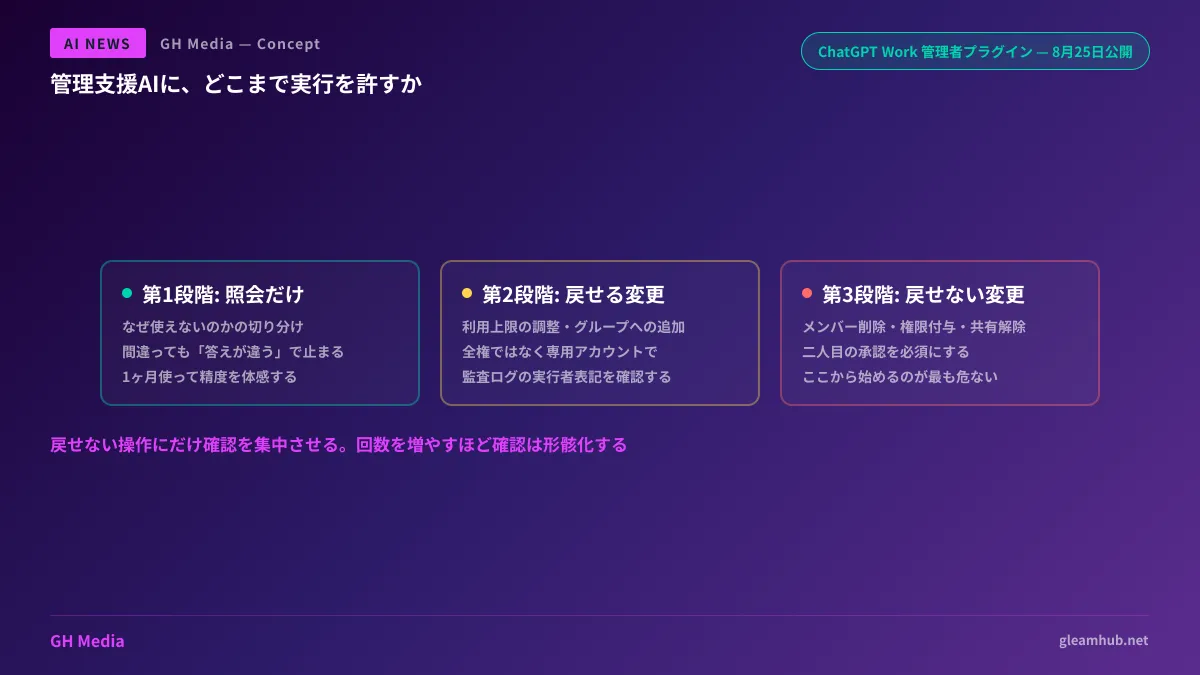
As discussed in Incidents happen at the end of rubber-stamping, what works is not increasing the number of confirmations, but narrowing down which actions require confirmation. Letting reversible operations proceed without prompts while focusing approvals strictly on irreversible actions ensures that confirmations actually serve their purpose.
The sequence for starting small
You do not need to hand everything over at once. There is a proper sequence.
Stage 1 is queries only. Restrict use to troubleshooting questions like "why can't this user access this feature?" Even this alone significantly reduces the time spent checking across multiple admin consoles. Use this mode for about a month to evaluate answer accuracy firsthand before moving forward.
Stage 2 expands to reversible changes. Limit modifications to actions that can be undone immediately if a mistake occurs, such as adjusting usage limits or adding users to groups.
Stage 3 considers irreversible operations. By the time you reach this stage, you will know from firsthand experience which tasks genuinely benefit from AI delegation. Starting directly at Stage 3 without this experience is the most dangerous approach.
What to do next
First, verify what permissions are assigned to the accounts currently performing administration in your company. If super-admin accounts are being used for routine daily tasks, fixing that is your priority before considering whether to hand anything to AI.
Next, list all irreversible operations. This list should include deleting members, wiping data, and revoking external sharing. This catalog defines the exact boundary of what should not be delegated to AI.
GleamHub offers development, AI, and automation consultations to help design internal AI workflows, organize permissions and audit logging, and automate administrative tasks. Because approaches vary based on organizational size and existing operations, please reach out individually via our inquiry form.