Pasting sales meeting notes into an AI to generate summaries is something many sales teams already do. No issues arise because the AI is "merely returning what it read." If the output looks flawed, the sales representative can discard it on the spot.
What is arriving next goes a step further: AI reading deal conditions on its own, judging win probabilities, and updating CRM records directly. The step of discarding output disappears. Entering this stage changes the decisions you need to make.
What is about to happen
On August 26, 2026, Salesforce and Anthropic announced "Claudeforce" as part of an expanded partnership. Its inaugural release, "Salesforce in Claude," is a plugin that brings Salesforce data and workflows into Claude, reportedly arriving with 37 pre-built sales skills.
The announced skills encompass meeting preparation, deal health reviews, and pipeline reviews, extending to drafting emails and updating CRM records. It is currently available to select pilot customers, with an open beta scheduled for September 2026. Additional skills are expected to roll out progressively starting in late 2026.
This is not something you can brush aside by saying, "We don't use Salesforce, so it doesn't apply to us." Structurally, what is happening is the addition of an entirely new operational channel into mission-critical data. The same trend is progressing across other business systems; the direction shown in the MCP roadmap also aligns with making internal systems operable by AI. Similar integration points will be added sequentially to domestic SFA tools, groupware, and accounting SaaS platforms.
The fault line between reading and writing
When discussing AI adoption internally, conversations usually revolve around "which tool to implement." In practical operations, however, that is not what matters most.
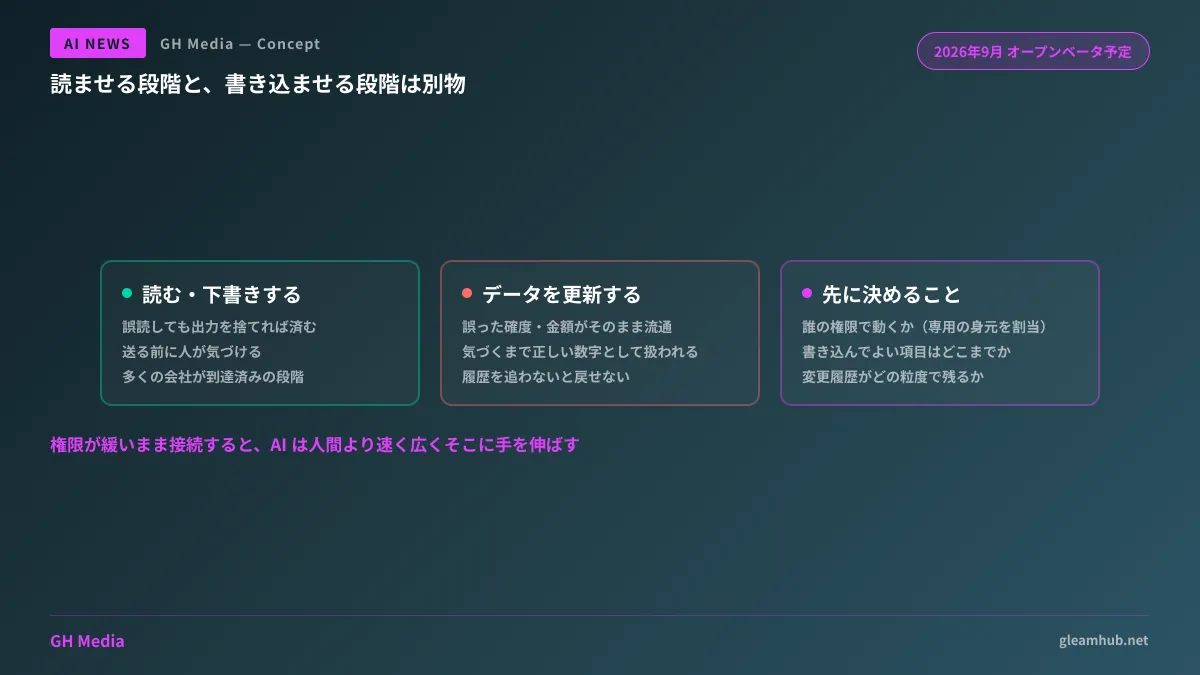
| What AI Can Do | Potential Failure | Can It Be Reverted? |
|---|---|---|
| Read and summarize | Misinterpretation, data exfiltration | Simply discard the output |
| Generate drafts | Text containing factual inaccuracies | Catch before sending |
| Update data | Writing incorrect probabilities, amounts, or dates | Cannot revert without tracking audit history |
The moment you enter row three, the nature of failure fundamentally shifts. Until someone notices, erroneous data circulates as truth. The clearest example is skewed pipeline figures making their way up to executive committee meetings.
Three decisions that are usually left unsettled
In discussions with companies evaluating adoption, feature comparisons between tools are well underway, but the following points are almost always left blank:
First: under whose authority does the AI operate? If configured to operate by borrowing an employee's account, audit logs record actions as that employee's operations. You cannot distinguish later between "was this done by a human, or by the AI?" The rule is to assign agents an identity distinct from humans, which—as outlined in how to design authentication and authorization for AI agents—is the most troublesome part to retrofit.
Second: the scope of write access. Rather than grouping everything under "updating the CRM," specify which fields are eligible for updates. Allowing AI to log activity history or append notes while requiring humans to handle amounts, win probabilities, and expected close dates is a pragmatic boundary. Sales numbers directly drive budgets and headcount planning.
Third: whether changes are structured to be reversible. Change histories must be retained, with a clear view of when, which records, and by what mechanism data was altered. Operating without this means investigating an anomaly will take several days the moment one is spotted.
For SMBs, the pitfalls lie even closer to home
While this might seem like a topic for large enterprises, the risks are actually greater in companies with dozens of employees, because permission designs are inherently loose to begin with.
Sales and accounting sharing the same administrator account, or SaaS permissions running for years on "full access for everyone." Providing AI with an integration point in this environment means the AI will reach further and faster than a human would. Where a human would pause, thinking "this isn't an area I should touch," an AI will not stop.
The required sequence is the reverse: review the permissions currently granted to humans before introducing AI. It is not a bad development in that AI adoption discussions serve as a pretext to clean up neglected access controls. The discussion around how to draw boundaries for administrative plugins shares the exact same starting point.
Starting with read-only to measure impact
If proceeding prudently, the sequence is clear: grant read-only access initially and have humans perform writes. Expand the write scope only after measuring how much time is actually saved.
This approach yields a valuable byproduct: if the AI's interpretations are off the mark, the culprit is usually the underlying data rather than the AI itself. Meeting notes riddled with blanks, updates from six months ago, or a single company split across three records. Running read-only operations for a month surfaces these issues.
Entrusting write operations while data remains unrefined means the AI creates inaccurate updates from inaccurate inputs, which in turn become the next inputs. Following this order is less about being cautious and more a prerequisite for achieving results.
What to do next
Select one business SaaS tool used in your company and list the fields where having records updated via AI would cause problems. It takes five minutes. This list directly becomes the basis for your connection settings.
Next, check how long and at what granularity that SaaS tool retains change history. If history is configured to expire after 90 days, fixing that setting takes precedence over granting write permissions to an AI.
GleamHub provides consultations on integration architecture between business systems and AI, separating agent permissions, and auditing access across existing SaaS platforms through our development, AI, and automation advisory services. Because realistic steps depend on your system architecture, please contact us for individual consultation via Contact Us.