In the Google Workspace Admin Console, changing just one setting can sometimes take 30 minutes. You cannot remember which tier the target item lives in, so you open a help article, find that the menu labels slightly differ from the actual screen, and jump to yet another article. The actual task takes three clicks, but reaching that point takes far too long.
In companies without a dedicated IT team, this "time spent searching" accounts for most of the real operational cost of the Admin Console. That is especially true if someone in general affairs or executive management handles it as a secondary duty. This is where Gemini-powered answer assistance comes into play.
Two New Entry Points
Google is adding two features using Gemini to the Admin Console under the name "Admin Assist."
The first is the side panel. It can be accessed from the One Google Bar at the top of the screen across most pages of the Admin Console. In response to questions about complex procedures or recommended administrative settings, it provides step-by-step guidance in a conversational format.
The second is Search Overviews. When you enter a question into the search bar at the top of the Admin Console, it displays a summary consolidating Help Center articles alongside the next action to take. The difference from before is that instead of displaying a list of potentially relevant article links, it restructures the information into a direct answer to your question.
Both serve as entry points designed to help you get answers without leaving the Admin Console.
A Double Dividing Line Across Editions and Privileges
This is the most critical part in practice: Admin Assist is not available to everyone.
It is restricted to customers on Google Workspace Business editions. Furthermore, if you are subscribed to an eligible edition, it is provided enabled by default for super admins. On the other hand, delegated admins are excluded.
This double dividing line takes on an entirely different meaning depending on how your organization is structured.
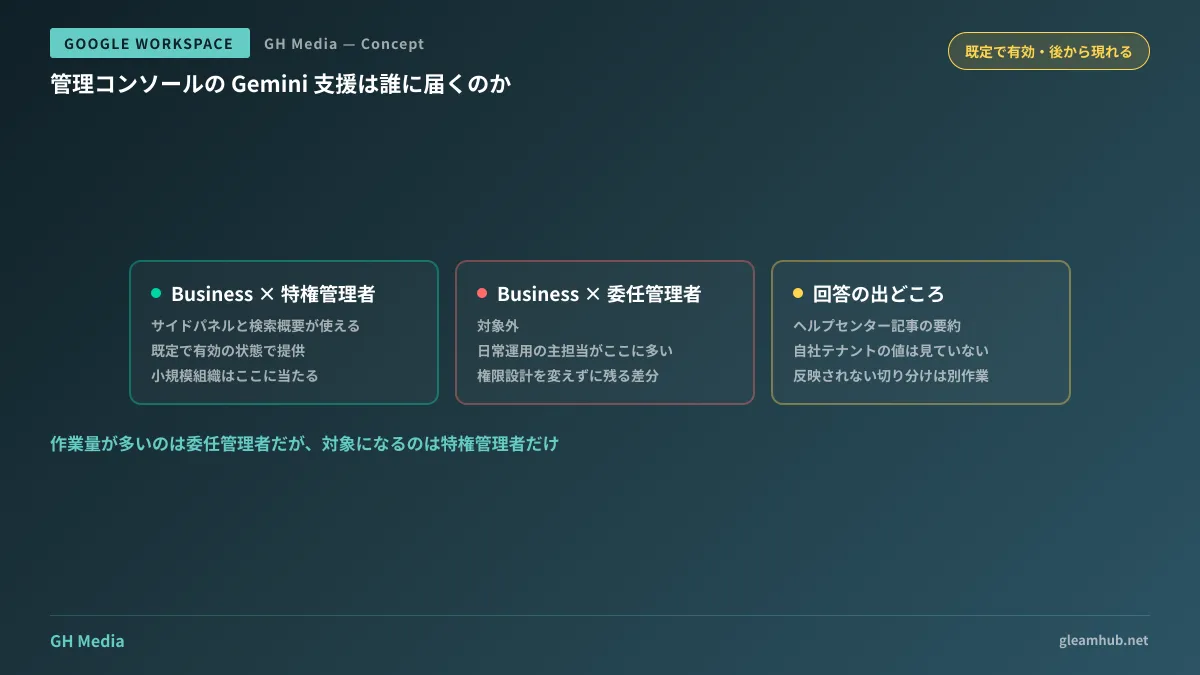
In small organizations where super admins also handle day-to-day administrative tasks, the benefits arrive directly. This applies to cases where a business owner or general affairs staff member holds super admin privileges and manages settings themselves.
The problem arises in organizations where super admins and actual operators are separated. Out of security considerations, it is quite common to delegate routine user additions and group management to delegated admins while restricting super admin privileges to a select few. Under this structure, the people who interact with the Admin Console most frequently and do the most research will not have access to Admin Assist. Because separating privileges is sound architecture, this should be treated not as an operational flaw, but as a limitation in feature scope.
The same applies when administration is outsourced to external partners. If delegated admin privileges are issued to a vendor, that vendor cannot use this feature.
Answers Come from Help Articles, Not Your Tenant
There is another point where expectations need to be calibrated: Search Overviews consolidates Help Center articles. It does not read and answer based on your tenant's current configuration settings.
In practical work, this has subtle but real repercussions. What administrators truly want to know is rarely "how to configure this in general," but rather "why is this setting not taking effect as intended in our environment?" Organizational unit (OU) inheritance, group-level overrides, edition differences, pending rollouts—summaries of help articles inherently cannot answer questions whose solutions depend on tenant-specific states.
Consequently, the division of use cases becomes clear. It is effective for lookups when you want to know steps, locate configuration items, or confirm general best practices. Conversely, when troubleshooting why a setting has not taken effect, you still need to check the actual values and audit logs in the Admin Console as before.
Note that governing the extent of AI access to Workspace data is an entirely separate layer. That falls under the scope managed by the AI Control Center.
How to Handle It Being Enabled by Default
For super admins on eligible editions, the feature arrives enabled by default. Because the rollout sequence is not "evaluate whether to use it before enabling," it is introduced in a way where it simply appears on the screen one day.
In itself, this causes virtually no operational harm, as it provides guidance rather than executing Admin Console actions on your behalf. However, organizations that maintain internal operational manuals for the Admin Console should anticipate that screenshots in their manuals will diverge from the actual screen to minimize confusion. Because of the new entry point in the One Google Bar, the appearance of the top of the screen changes.
When it appears on your screen also depends on your tenant's release settings (Rapid Release vs. Scheduled Release). We outline what this difference determines in How to Choose Release Tracks.
What to do next
First, check which edition your company is subscribed to. If it is in the Business tier, you are eligible; otherwise, you are currently excluded.
Next, verify whether the people interacting with the Admin Console on a daily basis are super admins or delegated admins. If they are delegated admins, this feature will leave the gap where "the person who can ask is not the person doing the work." In that case, what is worth considering is not altering your privilege design, but documenting frequently researched topics in advance as runbooks. Differences that cannot be bridged by product features must still be resolved through operations.
GleamHub offers free IT and Google Workspace consultations covering privilege design reviews for the Admin Console, reorganization of organizational units and groups, and separation of IT team responsibilities. Because available approaches depend on your subscribed edition and organizational structure, please consult us individually via our contact page.