When consulting on a project, people sometimes say, "It's just a screen for a few internal staff to view, so it should be simple to build, right?" and are surprised by the resulting estimate. Even if the screen itself takes just a few days, accounting for logins, password resets, granting and revoking permissions, and offboarding departing employees takes up a substantial portion of the implementation hours.
What is even trickier is what happens after completion. Every time someone leaves the company, an administrator must remember the tool and go in to delete the account. Forgotten accounts often linger for years.
If your company already uses Google Workspace organization-wide, you can avoid building this part altogether.
The option of "apps without authentication features"
The concept is straightforward: place an authentication checkpoint in front of the application, and let only those who pass through reach the app. The application itself has no login screen and no password storage.
With Google Cloud, Identity-Aware Proxy (IAP) can be integrated directly with Cloud Run, allowing internal-only publishing without setting up load balancers, static IPs, or SSL certificates. By specifying your company's Google Workspace domain or groups as authorized access targets, only active employees will be able to enter.
Implementation code is not the only thing eliminated by this architecture.
- Password storage, hashing, and reset flows do not exist (there is nothing to leak)
- Two-factor authentication settings from Workspace apply directly
- Suspending a Workspace account during offboarding instantly locks the user out of all tools
- The answer to "who can access this tool" is consolidated into a list of Google Groups
The last point has the greatest operational impact. Having user tables scattered across individual tools versus knowing everything by looking at groups makes an order-of-magnitude difference in audit time. It applies the same concept as centralizing SaaS login management onto the Google Workspace identity platform to internally built tools.
Where things get stuck: non-human access
This is where implementation inevitably runs into a wall. The moment you put up an authentication checkpoint, all non-human access gets blocked.
Specifically, things like the following stop working:
- Post-deployment connectivity checks triggered from CI
- Health checks from monitoring services
- API calls from other internal systems
- This has increased recently — APIs intended for AI agents to operate
Consultations brought to us with the symptom "I can open it in a browser, but curl gets rejected" almost always fit this pattern. Because the checkpoint demands a Google account login, callers incapable of interactive login cannot pass through.
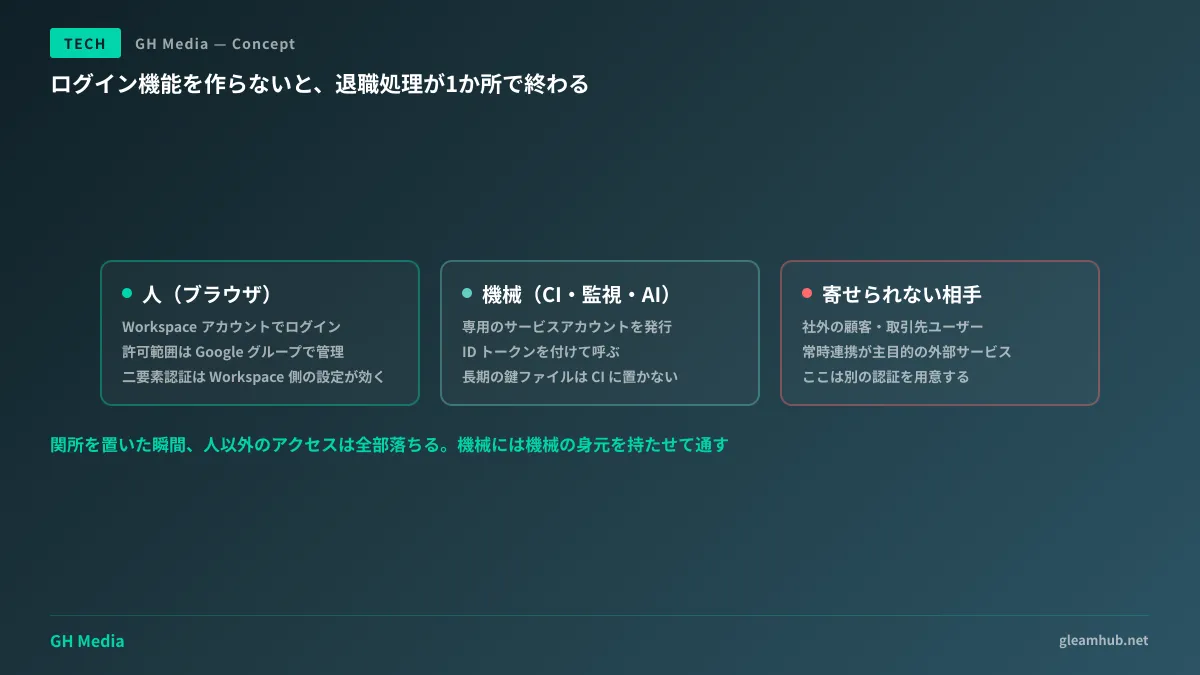
How you let them through depends on who or what the caller is.
| Access Source | Routing Method |
|---|---|
| Employees (browser) | Log in with Workspace account. Manage access scope via groups |
| CI, monitoring, other systems | Issue a dedicated service account and call with an ID token attached |
| AI agents | Narrow the scope by assigning a dedicated identifier instead of borrowing human permissions |
The key principle to remember is never to turn the machine interface into an unauthenticated loophole. It is not uncommon to see cases where someone dealt with "we want CI to pass, so let's remove auth from this single URL," only to leave that URL exposed and callable from the open internet. Give machines their own machine identity, and let them through. That is the only rule.
Placing service account key files in CI works, but if a key leaks, the damage is done, and key rotation is easily forgotten. For deployments from GitHub Actions, configuring Workload Identity Federation to authenticate without long-lived keys makes subsequent operations much easier.
Audit logs look different, too
Companies with dedicated security staff appreciate this aspect. When each application maintains its own login history, investigating "who accessed this tool last month" requires checking as many places as there are tools.
Under the checkpoint model, access records are consolidated on Google Cloud. Which account accessed which app, and when—all of this is logged in a uniform format, reducing the audit process to a single procedure. "Keeping systems in an auditable state" may show no apparent value during normal operations, but it proves invaluable the day an incident occurs.
The smaller an in-house tool is, the more likely this aspect is omitted. A tool without login history cannot answer "who was viewing it" after the fact.
Isolate cases that cannot be consolidated first
There are cases where this architecture is not suitable. Clarifying them before starting design prevents rework down the line.
The first is when external parties use the tool. For tools viewed by business partners or clients, the other party might not have a Google account. While inviting them as guests is an option, it may not be permitted depending on the partner's corporate policies. In such cases, the straightforward decision is to provide a separate authentication mechanism.
The checkpoint model also fits poorly when continuous integration from mobile apps or external services is the primary objective. Because the mechanism assumes a browser, forcing everything into it results in a pile of workarounds.
Conversely, if it is a tool "viewed exclusively by internal personnel from a browser," it can almost certainly be consolidated. Internal dashboards, pages sharing aggregated results, simple administrative interfaces—there are far more of these tools lying dormant inside companies than one might imagine.
A single line for clients to verify
When commissioning external development, simply including the following line in the specification sheet changes both the estimate and the architecture:
Consolidate authentication onto Google Workspace accounts and do not implement login features within the application. For access from CI, monitoring, and agents, use dedicated service accounts.
During acceptance testing, add one check assuming an offboarded employee. Actually verify that "suspending the account on the Workspace side prevents access to this tool." Passing this test proves that account management is not duplicated. It is also safer to check points to verify during acceptance testing when having social logins implemented.
What to do next
Pick one in-house tool used internally and count how many people have a dedicated password for that tool. If there are three or more, it is worth consolidating. If accounts of former employees remain, the priority is even higher.
At GleamHub, we accept consultations on internal tool authentication architecture, consolidating permissions around Google Workspace, and routing machine access from CI and AI agents through our development, AI, and automation advisory services. Because viable approaches vary depending on existing tool architectures, please contact us for individual consultation via Contact Us.
Sources
- Quickly Building Authentication for Internal Services with Google Workspace — Zenn
- Building Internal Services with Cloud Run and Identity-Aware Proxy — Google Cloud Japan
- Simplifying Cloud Run Security with Identity-Aware Proxy (IAP) — Google Cloud Official Blog
- Cloud Run Service Became Inaccessible from Browsers After Setting to "Require Authentication" — G-gen Tech Blog