Whenever a fix is ready for review, the same exchange happens. "Which URL should I look at?" "The same one I sent earlier. Please reload it." With only one review environment, two fixes cannot be reviewed in parallel, and they have to wait their turn.
This waiting time never shows up on the project schedule. It stays off the schedule while the back-and-forth over reviews keeps growing.
One review environment per branch
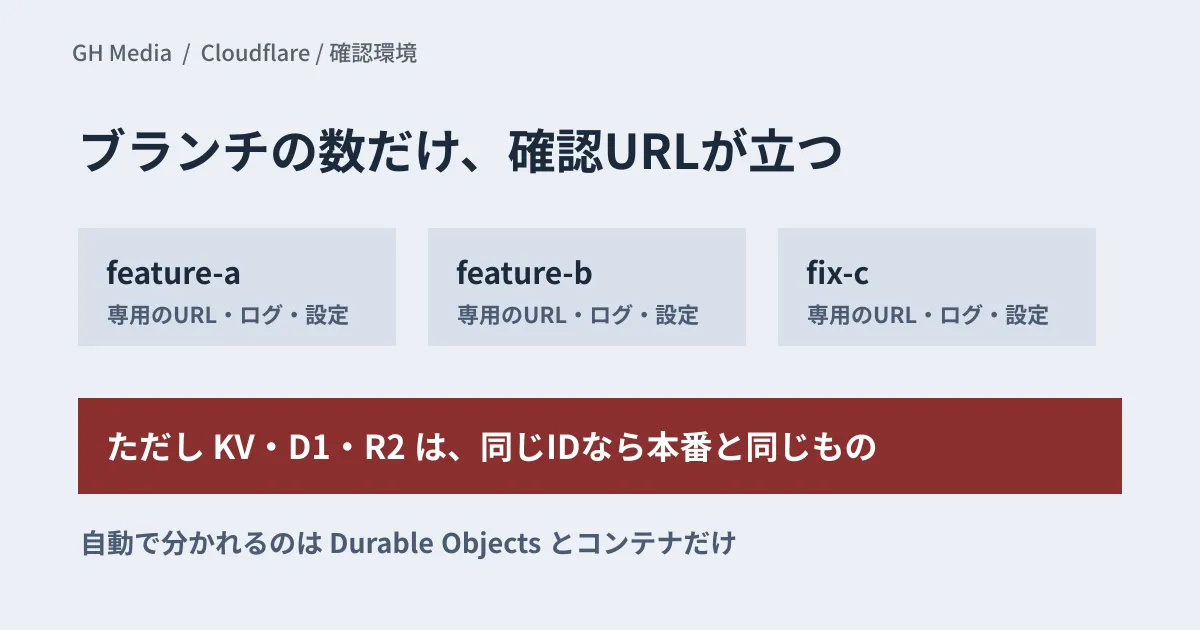
On September 22, 2026, Cloudflare launched Worker Previews. It gives each Git branch its own separate Worker environment, configured close to production.
Each preview is assigned a URL based on the branch name. The URL does not change when you push, and it always points to the latest version of that branch. If you connect the repository to Workers Builds and enable preview builds, the preview is updated on every push and the URL is posted to the pull request as a comment. Whoever requests the review no longer has to paste the URL again.
Logs, errors, metrics and traces are also available for each preview. If you assign a custom domain, you can also check behavior that depends on the production domain setup, such as authentication and redirects. This helps on projects where reviewers need to check screens behind a login.
What is separated automatically, and what is not
Behind the convenience, this is where the most care is needed.
What is isolated automatically for each preview is the namespace of Durable Objects defined in the same Worker and the Containers application. Account-level resources such as KV, D1, R2, Queues and Workflows, on the other hand, are shared with production as long as you specify the same ID or name.
Previews do not inherit production settings; they start from what you write in the previews block of the configuration file. If you write nothing there, no resources are bound to the preview, and Wrangler warns you about the missing bindings. If at this point you copy in the same IDs as production, deletes and updates you try in the preview environment run against production data. The dashboard also lets you import production settings for previews, and the same happens if you use the imported values unchanged. It is easy to picture the accident: you ask someone to try operations on the assumption that "it's a review environment, so breaking things is fine," and production records disappear.
Service bindings that call another Worker currently connect to that Worker's production deployment, even from a preview.
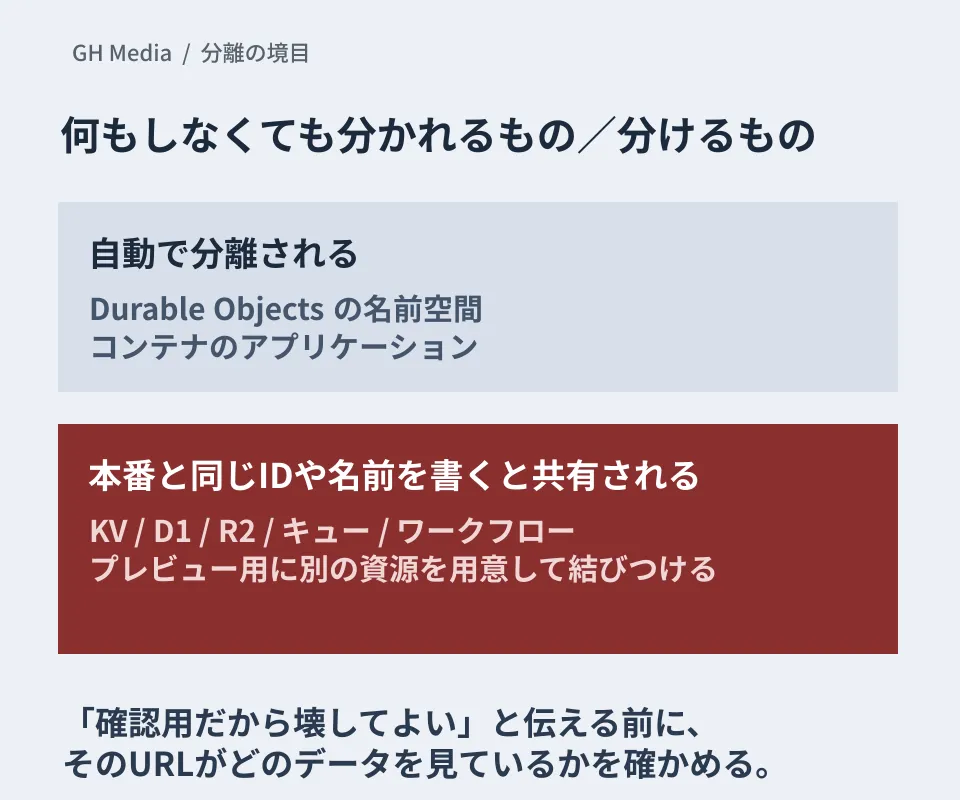
For resources you want to separate, prepare separate resources for previews and bind them explicitly. If you write the previews block on the branch you branch from, each branch inherits it, and you can override it per branch. This lets you change only the previews without touching the production settings.
What requesters and reviewers should decide in advance
Once you can hand out review environments, the way you work changes. Here is what to decide in advance.
- Whether the data the preview is looking at is production data or review data. State this clearly when you share the URL
- If it is review data, how freely reviewers may operate on it. Whether that includes confirming orders or executing payments
- Who the preview URL may be shared with. Whether it may reach other departments at the client, or the client's own business partners
The third point is easy to overlook. By default, anyone can open a preview URL; to require sign-in, you protect it with Cloudflare Access. URLs that can be guessed from branch names may be reached from outside without anyone intending it. We covered how review environments get discovered in discovering domains from certificate logs and protecting staging environments. Basic safeguards such as requiring authentication and limiting how long an environment stays public are needed for review environments too.
Before adding environments, decide what to review
When environments are easy to spin up, people send more "just take a look" requests. That does not reduce the back-and-forth.
Are you telling reviewers what to look at and in what order? Along with the preview URL, are you including what changed this time and which operations you want checked? We cover how to put this together in how to share verification artifacts in pull requests. Even with more environments, the quality of a review depends on the information you provide with it.
What to check before adoption
If your site already runs on Cloudflare Workers, first list which resources your current configuration uses. If you use KV, D1 or R2, the first task is deciding whether to prepare separate resources for previews. If you don't, what is isolated automatically may be all you need. If you call another Worker through a service binding, the fact that the call goes to production is also something to check.
Also review the URLs you have been handing out for reviews. Workers that were already connected to Workers Builds keep the previous preview model until you make a one-time switch. The previous model uses production settings and resources, so the URLs you have shared so far may have been connected to production data. The switch cannot be undone.
If you skip this sorting and simply add environments, the room for accidents grows as much as the convenience does.
We checked Cloudflare's blog post and changelog (both dated September 22, 2026) and the Workers documentation (the Previews overview, configuration, resource isolation and custom domains, and the Workers Builds branch settings) on September 25, 2026. We have not actually tried creating a preview environment, binding resources, or posting URLs to pull requests. Pricing and per-plan limits are not covered in this article, so check the current specifications and pricing in the official documentation before adopting it. This article organizes the scope of isolation and the operating rules.
For setting up review environments or reworking how fixes are reviewed, please consult GleamHub.