
"We know Coder can be self-hosted. But can we run the model locally and actually fix code with it?" Following up on the architectural breakdown in part one, this time we put it to the test on a Mac.
In this setup, Coder Agents created a Docker Workspace, modified a Python function, and passed all four tests. The model used was qwen3.5:4b running via Ollama on this Mac. There was also an instance where an initial file editing tool call failed, but it recovered by fixing the arguments and continued processing.
Testing was conducted on September 17, 2026. Setup and verification steps were performed using Codex, launching the target products themselves to capture screens, logs, and file diffs. The following code modifications were executed by Coder Agents and the local Qwen model. No actual project code or customer data was used.
What we ran
We ran the Coder server and Ollama on a Mac, and created PostgreSQL along with a test Workspace inside Docker Desktop. No external LLM API keys were registered.
| Item | Test environment and settings |
|---|---|
| PC | Apple M3 Pro, 18 GiB memory |
| OS | macOS 26.5.2、arm64 |
| Coder | v2.37.1+22f4284, official macOS binary |
| Docker | 25.0.3 for both client and server, Linux arm64 |
| Docker VM | 8 CPUs, approx. 3.83 GiB memory |
| Databases | PostgreSQL postgres:17 image |
| Inference server | Ollama 0.34.1, running on Mac |
| Model | qwen3.5:4b, Q4_K_M, download size approx. 3.39 GB |
| Context | 16,384 tokens for both Ollama and Coder |
| Workspace | Python 3.12.14, git, curl. 1 GiB memory limit |
| Coder-side model configuration | OpenAI Compatible, max output 4,096, temperature 0.2 |
No license keys were added and no paid trials were activated. This table records the operational conditions tested and is not an assessment of minimum specifications or recommended configurations.
Connection endpoints are as follows:
ブラウザ → Coder(Macの127.0.0.1:3017)
              ├─ モデル要求 → Ollama(127.0.0.1:11437/v1)
              └─ ファイル操作・コマンド → DockerのWorkspace
Coder processing and LLM inference run as separate processes. In this setup, both resided on the same Mac. Python execution within the Workspace occurs inside the Docker Desktop Linux environment.
Verifying actual responses, not just registering endpoints
On Mac, we used the official standalone binary. Coder's Docker installation guide targets Linux hosts, recommending standalone binaries for macOS. Downloaded archives for Coder and Ollama were verified against official release checksums.
In Ollama, we fetched qwen3.5:4b and first verified responses on its own. Afterward, under Coder's Admin settings → AI → Providers, we registered an OpenAI-compatible provider and set Endpoint to http://127.0.0.1:11437/v1.
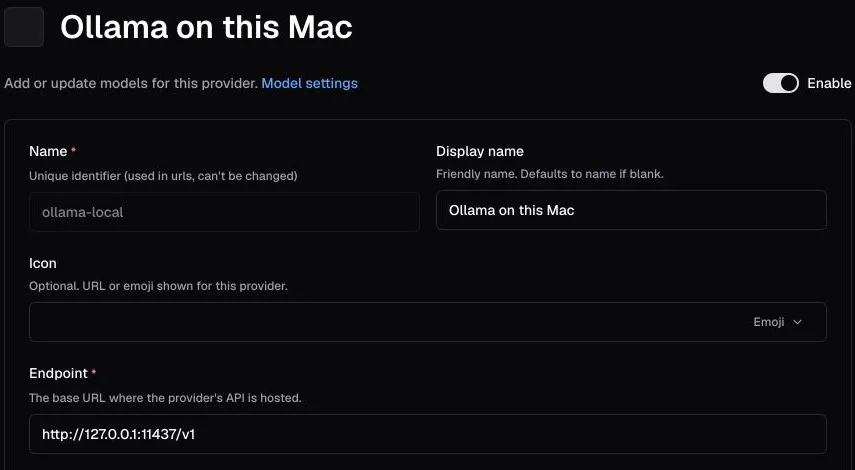
Actual screen captured in the test environment on September 17, 2026. The key area to check is Endpoint. The settings for selecting connection destinations and model names are separated.
On the model side, we specified qwen3.5:4b as the default model. Because this Ollama instance is a local API without authentication, a dummy value was used in Coder's key field for connection. This is not an external service API key, nor is it a configuration intended to be reused as-is in environments accessible by others. Please review both Ollama's OpenAI-compatible API and Coder's model settings.
Preparing tests beforehand and preventing AI modifications
Our subject is a small function that aggregates job execution results. Rather than actual logs, it takes strings like the following:
["success", " SUCCESS ", "Failed", "", " ", "pending"]We narrowed specifications down to four requirements:
- Count occurrences of
successandfailed. - Normalize leading/trailing whitespace and alphabetical casing.
- Ignore empty strings and strings consisting only of whitespace.
- Raise a
ValueErrorfor unknown non-empty strings such aspending.
The initial code directly used strings as dictionary keys, meaning it only passed basic aggregation.
def summarize_statuses(statuses):
    counts = {"success": 0, "failed": 0}
    for status in statuses:
        counts[status] += 1
    return counts
We pre-positioned tests corresponding to the four specifications. The instructions given to Coder included: "run the tests first," "modify only summary.py," "do not rewrite tests," and "rerun tests at the end and provide a git diff." The prompts were provided in English for this test; whether Japanese prompts yield the same outcome was not verified.
Download the Workspace template and reproduction steps used in this test
The ZIP archive includes the Dockerfile, Terraform template, test generation scripts, actual prompt instructions, code modification diffs, and execution results. It does not include model weights, credentials, or customer data. Setup requires an internet connection and downloading several gigabytes.
Execution results: Going from 3 errors to 4 out of 4 passes
When prompted from the Coder Agents interface, it located the gh-media-python-lab template and created a Workspace. It then read the README, source code, and tests, followed by executing python -m unittest -v.
| Tests | Before modification | After modification |
|---|---|---|
| Basic count aggregation | Passed | Passed |
| Whitespace and case normalization | KeyError | Passed |
| Ignoring empty strings | KeyError | Passed |
| Raising ValueError on unknown status | KeyError | Passed |
However, success did not come in a single straight line. During the initial call to edit_files, it passed a string where an array for file edits was required, resulting in the following error:
invalid parameters: json: cannot unmarshal string into Go struct field
EditFilesArgs.files of type []workspacesdk.FileEdits
Coder's agent received the error, corrected the arguments to array format, and retried execution. No manual human intervention was involved in this fix. When verifying model and tool integration, it is essential to look not only at the final answer but also at intermediate failures like this.
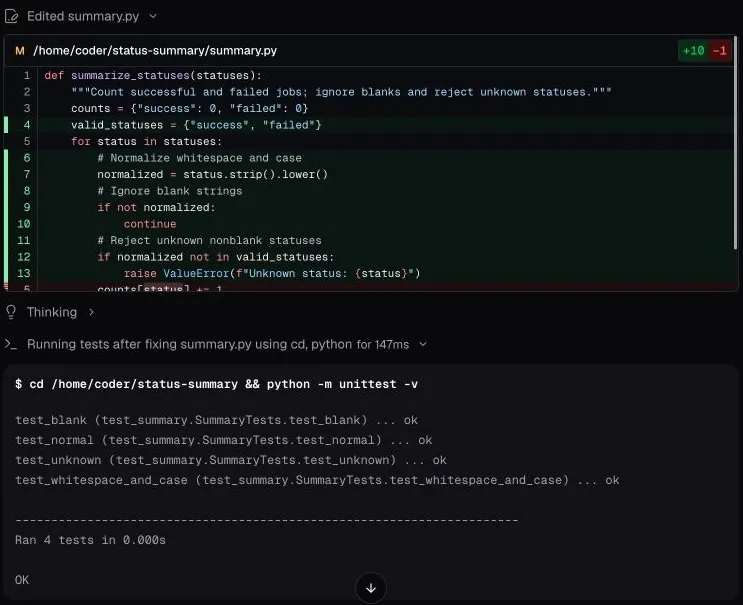
Captured directly from actual screens on September 17, 2026. The upper section displays the code diff, while the lower section shows test output executed within the Workspace. Smaller text can be reviewed by enlarging the image.
test_blank ... ok
test_normal ... ok
test_unknown ... ok
test_whitespace_and_case ... ok

Ran 4 tests in 0.000s
OK
The output above is presented with class qualification omitted from test names. 0.000s indicates the time taken for that small unit test snippet, not the duration of AI inference or code modifications.
Upon completion, we executed the same tests independently inside the container and confirmed exit code 0. Test files matched the initial commit identically, with SHA-256 hashes verifying consistency. The only modified tracked file was summary.py. The __pycache__ directory generated during Python execution was produced separately.
What was confirmed here represents a single modification against known specifications and four test cases. These results do not demonstrate development capabilities across large repositories, extended autonomous operations, or performance comparisons against other models.
What happens to Coder when the LLM stops?
After code modifications finished, we stopped only Ollama. Keeping the Coder server running, we sent a connection-check request in a separate conversation asking it to "return only READY."
The interface displayed Request timed out, indicated temporary provider unavailability, and showed seconds remaining until retry. Coder's server logs recorded the actual connection target and underlying cause.
Post "http://127.0.0.1:11437/v1/chat/completions":
dial tcp 127.0.0.1:11437: connect: connection refused
Once Ollama was restarted, READY was returned via automatic retry without resending the prompt.
Based on these findings, we recommend that operational monitoring separately check whether Coder's web UI opens and whether the model can be reached and return responses. Error headers in the UI alone were insufficient to distinguish between a timeout and a connection refusal.
Distinguishing "running locally" from a "completely isolated environment"
During code modification, active OS connection listings confirmed TCP connections from the coder process to Ollama at 127.0.0.1:11437. The logs above also trace that requests to the same destination failed once the model was stopped.
The Workspace ran under the non-root coder user, with mounts restricted to a single Docker volume for the test home directory. Neither host source code nor the Docker socket was mounted into the Workspace. LLM provider keys were likewise not exposed to the Workspace container's environment variables.
On the other hand, we did not conduct tests logging or blocking all outbound network traffic. Setup required fetching models, Docker images, Terraform providers, and more from the internet. While standard Coder telemetry, update checks, and Ollama cloud features were disabled, that alone does not guarantee the absence of other network traffic.
Furthermore, Coder's official documentation on Agents licensing and usage describes separate network traffic for usage reporting. Directing inference to a local target cannot be equated with complete network isolation or satisfaction of audit requirements.
Next steps to test internally
Through this testing, we confirmed that Coder Agents coupled with a local LLM can handle small localized tasks. When proceeding toward adoption, consider adding the following tests tailored to your organization's requirements:
| Upcoming question | Test scope |
|---|---|
| Will it be effective on internal codebases? | Prepare multiple representative tasks safe for internal sharing, evaluating them with existing tests and human reviews |
| Does it avoid touching sensitive or restricted information? | Conduct access denial tests against other users, separate repositories, and confidential secrets |
| Does it refrain from communicating outside allowed endpoints? | Log traffic destinations on both the control plane and Workspaces to validate allowlists |
| Can required audit records be maintained? | Review access permissions and retention, deletion, and restoration capabilities for conversations, tool executions, and auth operations |
| Is it sustainable for ongoing use? | Verify concurrent usage, long context conversations, model downtime handling, and execution stability after server upgrades |
These five areas represent future evaluation items and were not all validated during this trial. When selecting a model, evaluating whether it can recover from failures and allow changes to be reviewed—in addition to passing small tests—will provide clearer decision-making criteria.
If you need to organize validation scopes, network communication boundaries, or permission requirements, please get in touch via our contact form, specifying your target development environment and any information restrictions.
