When a small team runs Google Cloud projects, it is tempting to hand tasks such as checking logs or VM status to AI agents like Claude Code or Gemini Enterprise. If you install gcloud in the agent's environment and log in for this purpose, the agent runs with that environment's gcloud authentication state. What it can do depends on the permissions of whoever logged in.
On September 30, 2026, the official Google Cloud blog announced the preview of the "Google Cloud CLI remote MCP server," which lets you use gcloud and bq as a remote MCP server. We explain how it differs from installing gcloud locally and what you should decide before connecting, separating the official explanation from what the editorial team found by checking the endpoint.
How it differs from local gcloud
The blog (by Prosper Nwankpa and Adam Hwang of Google Cloud) says that until now, letting agents operate the cloud required installing and maintaining gcloud in the runtime environment. With the remote MCP server, commands run in an isolated sandbox on Google Cloud infrastructure.
| Dimension | Installing gcloud in the agent's environment (editorial summary) | Cloud CLI remote MCP (per Google) |
|---|---|---|
| Where commands run | The machine or container where the agent runs | An isolated sandbox on Google Cloud infrastructure |
| Credentials | Credentials already logged in on that environment | No ambient credentials. Authentication and authorization via Agent Identity, OAuth 2.0 and IAM |
| CLI updates | Versions and dependencies maintained per environment | No local installation or maintenance required |
| Web-based agents | Not usable in environments where users cannot install packages | Also usable from hosted platforms such as Gemini Enterprise |
| Execution recording | Depends on each environment's settings | Tool calls recorded in audit logs when configured |
According to the blog, commands run with the permissions of the authenticated caller, and IAM permissions and organization policy constraints are applied to the target resources. Authentication uses keyless Agent Identity on Google Cloud's hosted platforms and OAuth 2.0 on external runtimes. Google says there is no additional charge for the MCP server itself; you pay only for the resources you create and for data transfer.
To get started, enable the Cloud CLI Execution API (cloudcli.googleapis.com) in your project, grant the "MCP Tool User" (roles/mcp.toolUser) role to the agent's or user's identity, and point your MCP client at cloudcli.googleapis.com/mcp.
What we learned by querying the endpoint without authentication
On October 2, 2026, without using a Google Cloud account, the editorial team sent unauthenticated requests to https://cloudcli.googleapis.com/mcp.
- GET returned 405 (Method Not Allowed)
- MCP's
initializeandtools/list, which returns the tool list, responded without authentication - There were two tools,
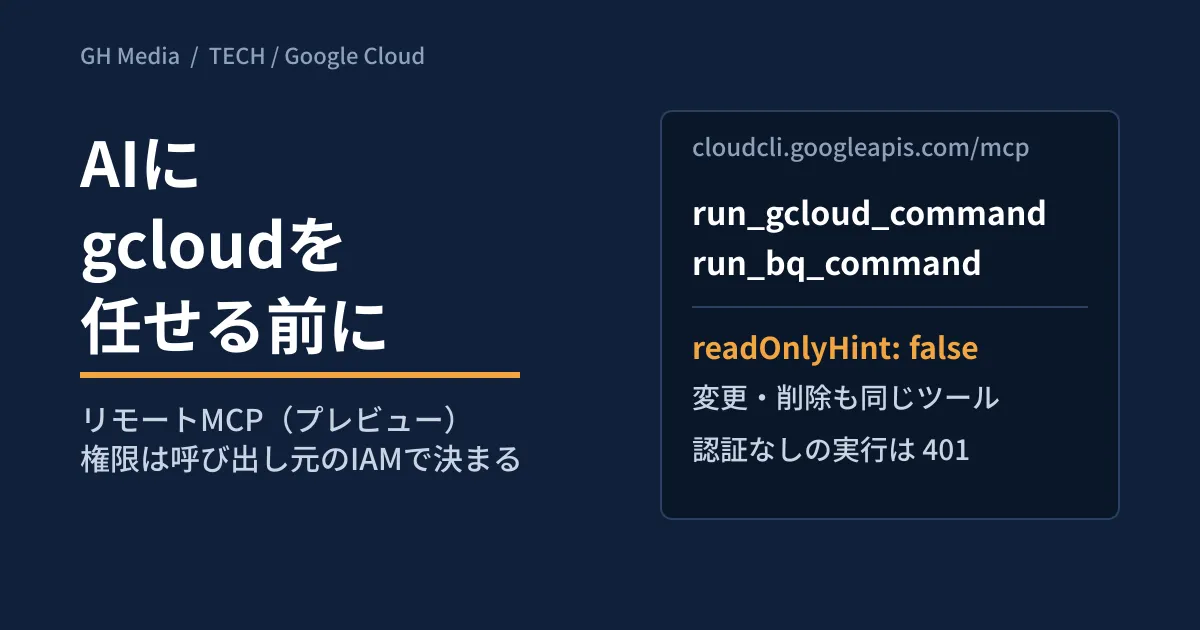
run_gcloud_commandandrun_bq_command, and both werereadOnlyHint: falseanddestructiveHint: true - Attempting to run a command with
tools/callreturned 401, along with the location of the OAuth protected resource metadata
The protected resource metadata is as follows.
{"authorization_servers":["https://accounts.google.com/"],"bearer_methods_supported":["header"],"resource":"https://cloudcli.googleapis.com/mcp","scopes_supported":["https://www.googleapis.com/auth/cloud-platform"]}The tool descriptions say "It is NOT restricted to read-only commands." and state explicitly that creating, updating and deleting are also possible. The description of run_gcloud_command lists auth, billing, config and others as commands the agent must not run. However, these are written as instructions to the agent. Meanwhile, the documentation "Use the Google Cloud CLI remote MCP server" says some commands are not supported for security and other reasons. The examples given are gcloud auth, gcloud config, gcloud iam service-accounts, gcloud init and gcloud survey, and the list is described as non-exhaustive and subject to change without notice. For bq, init, pyshell and shell are not supported. Because we did not test with authentication, we have not confirmed how these are actually rejected.
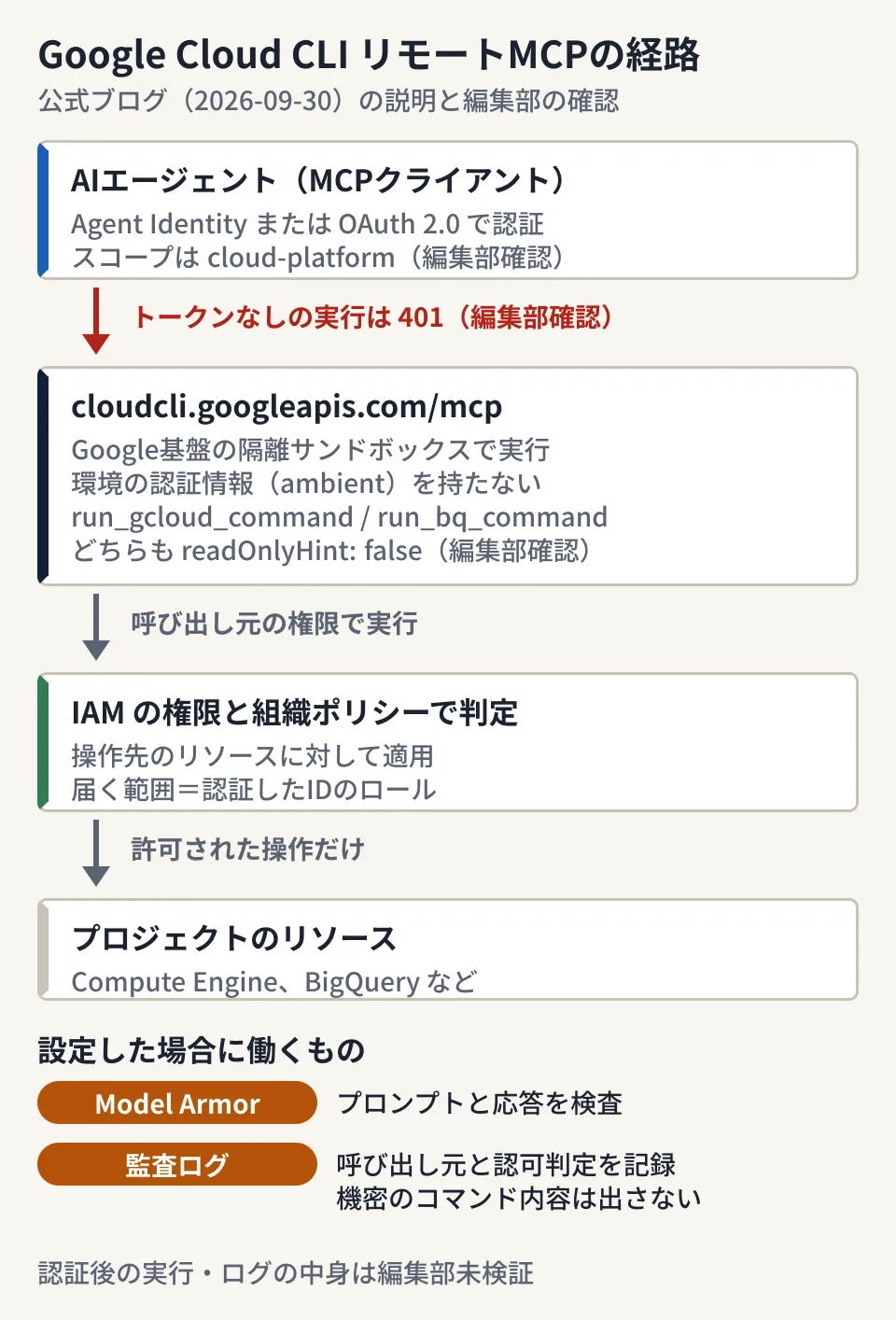
The three points marked "verified by the editorial team" in the diagram (scope, 401 and readOnlyHint) are what the editorial team confirmed by connecting; everything else is from Google's blog.
Scope is narrowed by IAM, not OAuth scopes
From here on is the editorial team's analysis. The protected resource metadata listed only one OAuth scope, cloud-platform. Because the design does not use scopes to restrict access to "read only," what the agent can do is determined by the IAM roles of the authenticated identity and by organization policies.
Another point to watch is that the project is specified in two places. The tool's project argument is used to check that the API is enabled and for billing and quota, and the tool description says "This is NOT the same as the —project flag." The target can be specified separately with the command's --project. Even if you enable the API in only one project, that does not mean operations are limited to that project.
Whether you use local gcloud or the remote MCP server, it still runs with the permissions of whoever logged in. The differences are that credentials are not stored in the environment and that management mechanisms such as audit logs and Model Armor can be standardized on Google's side. If you connect with an account that has owner permissions, the agent also runs with those permissions.
What to decide before connecting (editorial proposal)
1. Prepare an identity dedicated to the agent
From external runtimes, you authenticate with OAuth 2.0. Whichever account grants consent directly becomes the agent's permissions. Rather than using an administrator's personal account, set up a separate identity for the agent and grant only the roles it needs. Start with read-only roles, and consider adding more when tasks that require changes come up.
2. Decide which project to test in and how far access reaches
As mentioned above, the agent can operate on anything its IAM permissions reach. Prepare a test project, and start by not granting the agent's identity any roles on production projects. Also check whether roles have been granted at the folder or organization level.
3. Enable audit logs first
The blog says you "can configure" tool calls to be recorded in audit logs (Data Access logs for cloudcli.googleapis.com/mcp). It says the records show the caller's identity, the OAuth client and the IAM authorization decision (mcp.googleapis.com/tools.call), without exposing sensitive command payloads or personal information. Enable them before the first connection and check that you can trace which identity made each call. We have not confirmed how much of each command is kept in the audit logs, so if you want to trace exactly which commands were run, keep execution records on the agent side as well.
4. Consider Model Armor if the agent reads external text
Logs and table contents can include text that came from outside. The blog says integration with Model Armor can inspect prompts and responses and help prevent prompt injection and similar attacks. We have not confirmed the setup or costs this time, so check the documentation before deciding.
5. Have a human approve changes and deletions
Both tools are used for reading and deleting alike. Their annotations are also readOnlyHint: false, so if you auto-approve based only on the MCP client's annotations, commands that make changes may go through unchecked. Configure this server so that a human approves every call. We also discussed how to think about the boundary between reads and writes in When to let AI agents make updates.
Google Workspace MCP servers follow the same pattern: permissions do not increase, but what can be reached changes. See also What to decide for Google Chat MCP. We explain how MCP itself works in The complete guide to MCP.
What is still unknown
- Timing of general availability (GA). The blog only says it is in preview
- Quotas and the regions where the sandbox runs. We found no mention in the blog or in the documentation we checked on October 5
- The minimal set of roles to combine with
roles/mcp.toolUser. According to the documentation, the permission this role requires is for tool calls (mcp.tools.call). Because permissions on the resources a command targets are determined by the caller's IAM, we have not checked combinations for each use case - How unsupported commands are actually rejected. We have not tested with authentication
- Costs of Model Armor and audit logs. The MCP server itself has no additional charge, but we have not checked the costs of the surrounding features
On October 2, 2026, we opened and reviewed the Google Cloud official blog post "Empower your agents with the Google Cloud CLI remote MCP server" (dated September 30, 2026). We also sent one each of GET,
initialize,tools/listandtools/calltohttps://cloudcli.googleapis.com/mcpwithout authentication and recorded the responses and tool descriptions. We did not test authentication with a Google Cloud account, actual command execution, or audit log and Model Armor configuration. On October 5, before publication, we opened the documentation "Use the Google Cloud CLI remote MCP server" (updated September 30) to check unsupported commands and required roles, and retrievedtools/listand the protected resource metadata from the same endpoint again to confirm that the tool annotations had not changed.
For permission design and automation when bringing AI agents into Google Cloud operations, reach out through our development, AI and automation consultation.
Sources
- Empower your agents with the Google Cloud CLI remote MCP server — Google Cloud Blog (September 30, 2026)
- Use the Google Cloud CLI remote MCP server — Google Cloud documentation
- Google Cloud CLI remote MCP server endpoint
https://cloudcli.googleapis.com/mcp:tools/listresponse andhttps://cloudcli.googleapis.com/.well-known/oauth-protected-resource/run_gcloud_command(retrieved by the editorial team on October 2, 2026)