You reinstall the dependencies of a site built with Astro and run the build. It passes locally, but only CI fails. The cause is not your code but the version of Node.js running in CI. With Astro 7.4.0, released on October 15, 2026, this kind of failure can happen.
Because 7.4.0 is a minor release, sites that specify it in package.json with ^, as in "astro": "^7.2.2", will pick it up automatically when the lockfile is regenerated. In this article, we combine the changelog and the official documentation with the results of actually running it in the editorial team's test environment, and organize what to check before upgrading and the two newly available features.
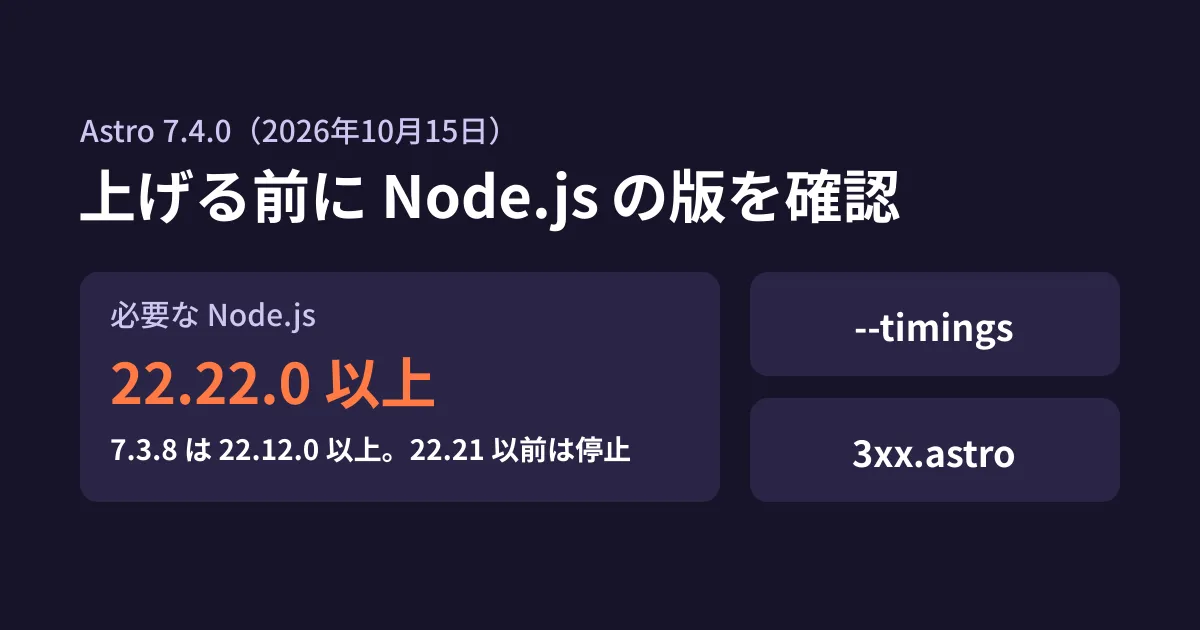
Required Node.js is now 22.22.0 or later
The 7.4.0 entry in Astro's changelog includes the following line.
Increases the minimum Node.js version to 22.22.0
The engines of the package published on npm had also changed from node: ">=22.12.0" in 7.3.8 to node: ">=22.22.0" in 7.4.0.
Installation passes, and the build stops
In the editorial team's test environment, we installed astro@7.4.0 using Node.js 22.21.1 (the official distribution) and ran the build.
npm installshows anEBADENGINE(unsupported Node.js version) warning, but the exit code is 0 and installation succeeds- Running
astro buildstops with the following message
Node.js v22.21.1 is not supported by Astro!
Please upgrade Node.js to a supported version: ">=22.22.0"
By default, npm treats a engines mismatch only as a warning, so the problem is hard to notice at the installation stage. If you skim past warnings in your CI logs, you will only notice when the build fails. In the same environment, switching to Node.js 22.22.0 let the build pass.
Where to check
Check the Node.js version in every place where the build runs.
- CI: for GitHub Actions,
node-versioninactions/setup-node; for other CI services, the version in the runner image - Hosting builds: the build settings on Cloudflare, Netlify, Vercel and similar services. Whether the version is specified by placing
.nvmrcor.node-versionin the project - Developer machines: whether the team uses the same version
If you specify the version loosely, as in 22, the version actually installed changes depending on the service's default and its cache. Decide whether to explicitly require 22.22.0 or later, or to move up to the 24 line.
Note that the official Node.js blog has announced security releases for 26.x, 24.x and 22.x around October 21, 2026 (highest severity: "HIGH"). You will need to upgrade to these releases on every release line, not just for Astro, so reviewing how you pin versions now will save rework later. We cover the support periods of each Node.js release line in Node.js 24 entering maintenance and 26 becoming LTS.
--timings: list the slow parts of a build
As articles and pages increase, build times gradually grow longer. However, the normal logs do not tell you whether the slow part is image conversion, Markdown plugins or code highlighting. --timings, added in 7.4.0, shows a breakdown at the end of the build.
npx astro build --timingsFor testing, we built and ran a small site with three Markdown articles (containing code blocks), one image and two redirects. The sections shown were as follows.
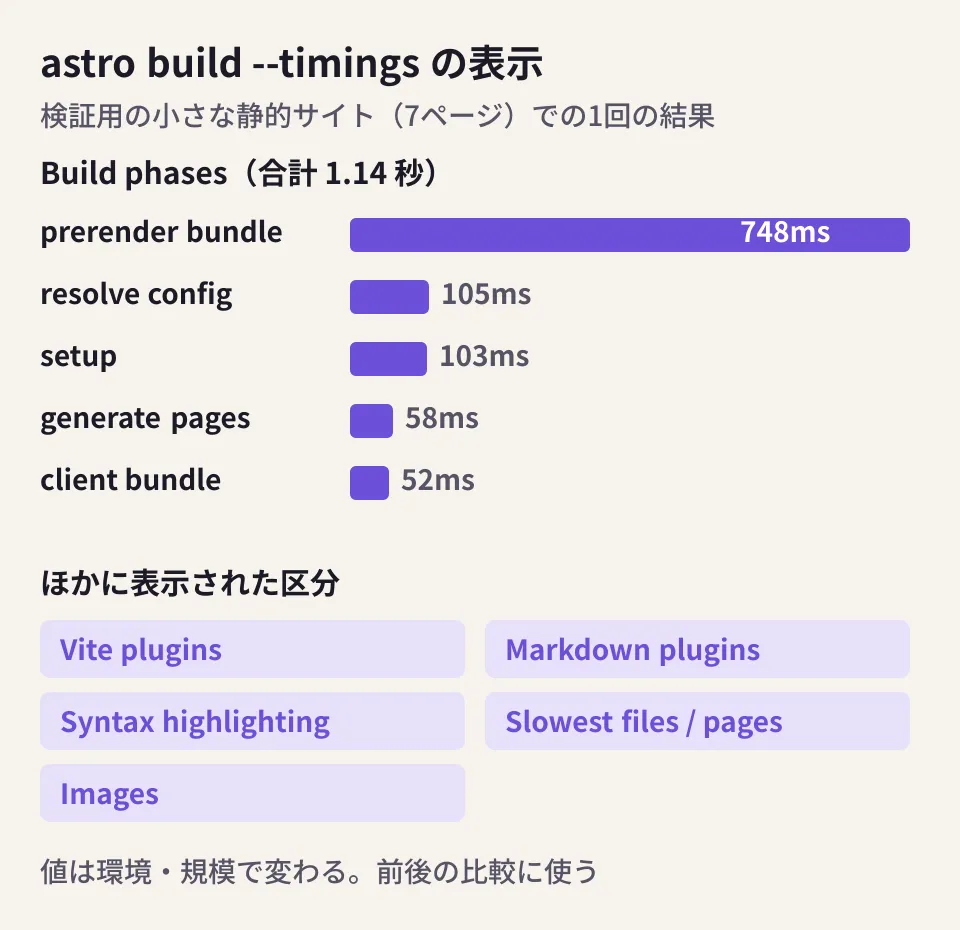
- Build phases: time and share for each phase, such as loading the config, bundling and generating pages
- Vite plugins: time and number of calls for each plugin
- Markdown plugins / Syntax highlighting: time spent on Markdown processing and code highlighting (by language)
- Slowest files to bundle / Slowest pages: the files and pages that took the most time
- Images: time for each image conversion
Even on this small site, the bundle for prerendering (748 ms) took up most of the time, far more than page generation (58 ms). Each of the three Markdown files took about 190 ms, and the Syntax highlighting section of the breakdown showed a total of 112 ms for the three code blocks. These figures are from a single run in this test environment and will vary greatly with the size and structure of the site.
The best use is to run the same command before and after an optimization and compare the results. For example, you can confirm whether changes such as limiting the highlighted languages or shrinking images in advance actually made a difference. We also cover ways to speed up builds for media sites with many articles in incremental builds in Astro 7.2 and our article on switching Markdown processors.
Create your own redirect pages for static sites (experimental)
A static site has no server to return redirects with an HTTP Location header. For this reason, Astro generates a small HTML file containing <meta http-equiv="refresh"> for each redirects setting. Until now, you could not change the wording or appearance of this page.
In 7.4.0, when you enable experimental.redirectPage, you can create this page yourself by adding src/pages/3xx.astro.
// astro.config.mjs
export default defineConfig({
  experimental: { redirectPage: true },
});
The page receives the source (from), the destination (to), the status (status) and the delay (delay). According to the documentation, delay is 2 seconds for 302 and 0 seconds otherwise. In our test as well, the 301 setting produced content="0;url=..." and the 302 setting produced content="2;url=...".
Three things to watch out for
These are the points to watch out for when migrating, based on what we saw in testing.
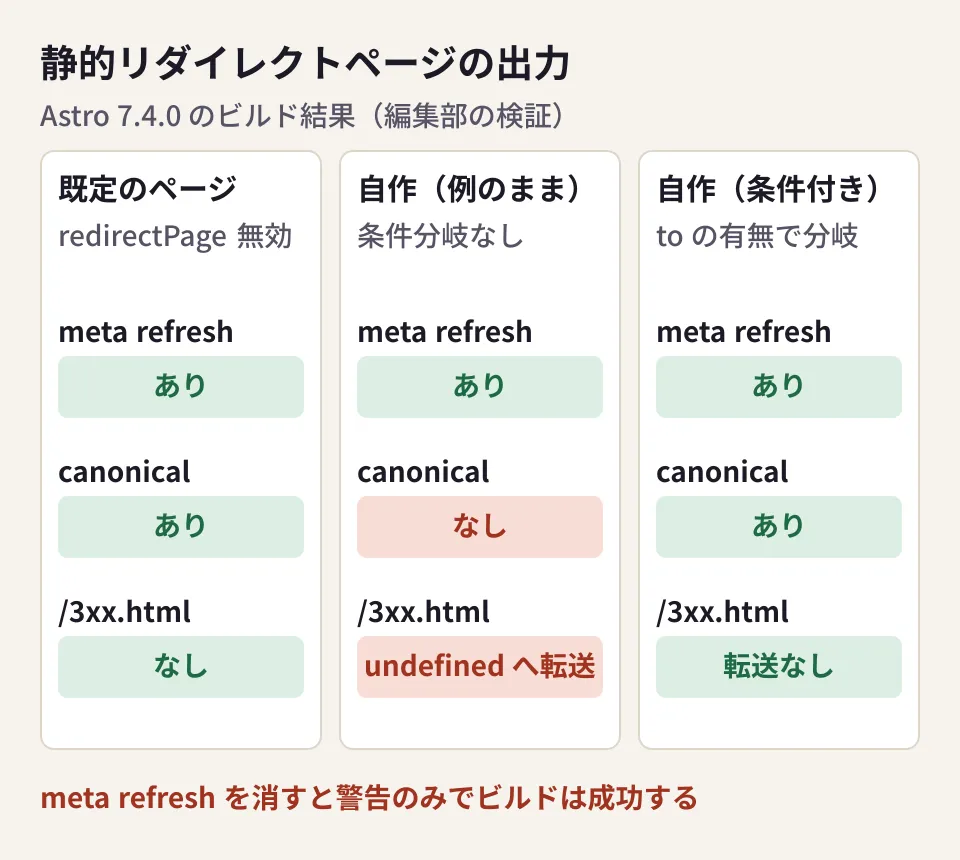
1. If you remove meta refresh, the page no longer redirects. When we tried removing <meta http-equiv="refresh"> from 3xx.astro, the build still succeeded and showed the warning [WARN] [redirects] ... visitors will not be redirected.. Because the build does not stop, if you miss the warning, pages that do not redirect will be published.
2. A page called /3xx.html is also published. The documentation also states, "Astro also builds 3xx.astro as the ordinary /3xx route, written to 3xx.html." In this case, no redirect information is passed. When we used the documentation's example as is, 3xx.html became a page with a broken destination, content="undefined;url=undefined". You can avoid this by adding a condition so that meta refresh is not output when to is missing, as follows.
---
import type { RedirectPageProps as Props } from 'astro';
const { to, delay } = Astro.props;
const canonical = to ? new URL(to, Astro.site).href : undefined;
---
<html lang="ja">
  <head>
    {to && <meta http-equiv="refresh" content={`${delay};url=${to}`} />}
    <meta name="robots" content="noindex" />
    {canonical && <link rel="canonical" href={canonical} />}
    <title>ページを移動しました</title>
  </head>
  <body>
    {to ? <p>このページは移動しました。<a href={to}>移動先へ進む</a></p>
        : <p>ページが見つかりません。</p>}
  </body>
</html>
3. The canonical tag from the default page disappears. The default redirect page in 7.4.0 included <link rel="canonical"> pointing to the destination and noindex. Your own page will not include them unless you write them yourself. As in the example above, build an absolute URL from the site setting and include it.
Because this is an experimental feature, its behavior may change in future versions. If you are changing URLs significantly in a site renewal, it is safer to first consider whether the hosting side (Cloudflare's _redirects, Netlify's settings and so on) can return HTTP redirects, rather than relying on static redirect pages. Make this decision at the migration planning stage, including the impact on search engines.
Checklist before upgrading
As the editorial team's summary, here are the points to check before upgrading to Astro 7.4.
- Whether Node.js is 22.22.0 or later in every place where the build runs (plan the upgrade to include the security release scheduled for October 21)
- Whether the range specified in
package.jsoncould pull in 7.4.0 unintentionally. If you adopt it, pair the lockfile update with a build check - If your build is slow, capture
--timingsbefore and after the upgrade and compare the breakdowns - If you use
experimental.redirectPage, check the contents of/3xx.html,meta refreshand canonical in the build output
For an overview of the Astro 7 line, see Building the foundation for a corporate site with Astro 7.
Scope of verification
On October 16, 2026, we directly retrieved and checked Astro's changelog (7.4.0 in
packages/astro/CHANGELOG.md), the official documentation page "Experimental static redirect page" (the source in the withastro/docs repository), theenginesofastro7.3.8 and 7.4.0 published on npm, and the security release announcement on the official Node.js blog (document research). We also built a small static test site in the editorial team's test environment (Linux, Node.js v22.22.0 and v22.21.1,astro7.4.0) and tried installation, the build,--timingsandexperimental.redirectPage(hands-on testing). The figures are from a single run in this environment. We have not checked SSR (on-demand rendering) sites, the build environments of individual hosting services, or other changes in 7.4.0 (such as the separation of the image service and font settings).
For version upgrades of sites built with Astro, reviews of build environments, or planning URL migrations during a renewal, please contact us through Website development and renewal consultation.