Updated October 6, 2026: Because the "Status" section of the README was changed from "beta preview" to "stable" on October 5, 2026 (UTC), we revised the relevant statements.
Your company site runs on WordPress, and you are kept busy with plugin updates and vulnerability notices. A web agency or engineer has suggested, "EmDash has reached 1.0, so why not switch at your next redesign?" But when it made headlines in April, it was labeled a "preview," and you are not sure where it stands now.
We introduced an overview of EmDash and its design at the time of the April preview release in our article "What is EmDash?". This article covers what was promised in the subsequent 1.0 release. Using the original text of the official repository and a local build, we check under what conditions plugin isolation works, whether it runs outside Cloudflare, and what can be carried over from WordPress.
What 1.0 promises: "only major versions break compatibility"
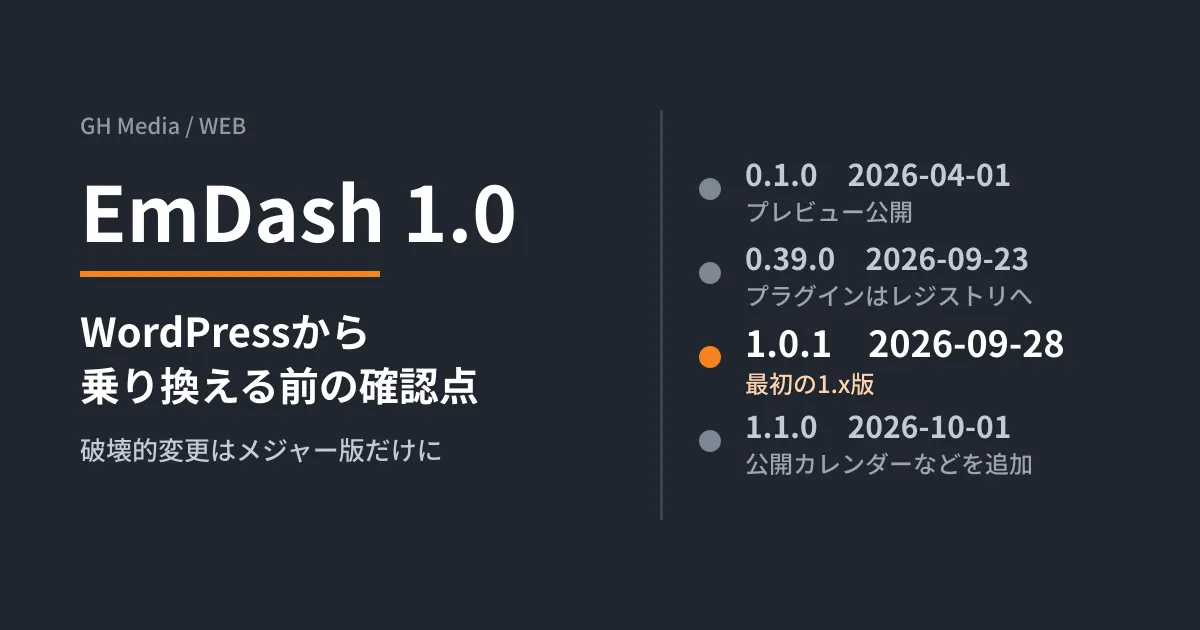
According to the changelog in the official repository (emdash-cms/emdash), the first 1.x release is 1.0.1. npm's publication records show it was published on September 28, 2026 (UTC), and the official blog announced EmDash 1.0 as "stable" on the same date. The changelog says the following.
From this release, breaking changes ship only in a new major version.
In the 0.x series, even an update such as 0.35 to 0.36 could include breaking changes. What 1.0 means is that, within the 1.x series, you can operate on the assumption that updates such as 1.1.0 will not break existing sites. Version 1.1.0 was released on October 1, adding a calendar that lists scheduled publications and the ability to sign in to the admin screen with a Microsoft Entra ID account.
There are two caveats. npm also has a version called emdash@1.0.0, but the changelog describes it as "published by mistake from code dating to around 0.7" and asks users not to install it. It is also marked as deprecated on npm. The other caveat is that some features were removed in the update to 1.0. The official migration guide (upgrade-to-v1) lists removals including the emdash dev command, cloudflareCache() for purging Cloudflare's cache, and the experimental.registry setting. If you are upgrading a site built on 0.x to 1.0, you need to check it against this list.
Note that the "Status" section of the README was changed to "stable and ready for production" in an update on October 5, 2026 (UTC). However, as of October 6, the documentation on update procedures still contains version-numbering rules from before 1.0. Give priority to what the changelog and migration guide say.
How well plugin isolation works depends on where you run it
EmDash's selling point is that it runs plugins in an isolated environment and lets them use only the permissions they declare (content:read, email:send and so on). However, the official documentation shows that isolation only works under certain conditions.
First, not all plugins are isolated. "Native" plugins installed from npm and listed in plugins: [] run in the same process as the site, and the documentation explains that they have "full access" to the runtime. Only plugins installed from the registry and those listed in sandboxed: [] are isolated.
Second, the component that runs the isolation (the sandbox runner) differs depending on where you run it.
| Where it runs | Isolation mechanism | Prerequisites | Enforced limits |
|---|---|---|---|
| Cloudflare Workers | Dynamic Worker(Worker Loader) | Workers Paid plan, LOADER binding | 50 ms of CPU time, 10 outbound requests, 30 seconds of execution time |
| Node.js server | Launches workerd as a child process | @emdash-cms/sandbox-workerd and workerd | 30 seconds of execution time only |
Cloudflare's template ships with this binding commented out. If you stay on the free plan, isolated plugins will not run. On Node.js, isolation works, but CPU time and the number of outbound requests are not limited. The documentation states that the 128 MB memory limit is not enforced per plugin in either environment.
Where plugins come from has also changed. Since 0.39.0 (September 23, 2026), the admin screen only lets you browse the registry (registry.emdashcms.com by default), and the previous marketplace is deprecated. When installing from the registry, EmDash checks the file checksums and the requested permissions before showing a consent screen, and it asks for consent again when an update adds permissions.
Does it run outside Cloudflare? We tried a Node.js build
The README says it "runs best on Cloudflare, but is not locked to Cloudflare." The official requirements for running on Node.js are Node.js 22.16 or later, SQLite, libSQL or PostgreSQL for the database, and local disk or S3-compatible storage for media. If you use SQLite, you need a persistent disk that is not wiped on restart. Scheduled tasks such as scheduled publishing only run while the Node.js process is running.
On October 4, 2026, the editorial team built the blog template for Node.js locally (Linux, Node v22.22.0, npm 10.9.4). The official npm create emdash@latest failed because the template source (api.github.com) was blocked by this environment's network restrictions. We therefore fetched the template repository (emdash-cms/templates, at a commit synced with 1.0.1) and used blog as is.
npm install --no-audit --no-fund   # emdash@1.1.0、astro@7.3.5 が入った
npm run build                       # 終了コード0、[build] Complete!
PORT=4399 node ./dist/server/entry.mjs
/ 200
/posts/ 200
/_emdash/admin 302 → /_emdash/admin/setup
/_emdash/admin/import/wordpress 302 → /_emdash/admin/setupThe build and startup succeeded without using PHP or a Cloudflare account. At startup, Node.js 22 printed a ExperimentalWarning about SQLite, but this is a warning the documentation also notes "does not appear on Node.js 24."
One result gave us pause. During npm install, a warning (EBADENGINE) appeared saying that the dependency @emdash-cms/registry-verification requires ^22.22.2 || ^24.15.0 || >=26.0.0. This is a stricter requirement than the documentation's "22.16 or later." The installation completed, but it is safer to standardize production on Node.js 22.22.2 or later, or on the 24 line. We cover how to choose a Node.js version in our article on update planning for Node.js 24 and 26.
We also installed the sandbox runner @emdash-cms/sandbox-workerd separately and confirmed that the bundled workerd --version returns workerd 2026-10-02. However, we did not test actually installing and running an isolated plugin, nor did we go beyond the initial setup of the admin screen.
What you can and cannot carry over from WordPress
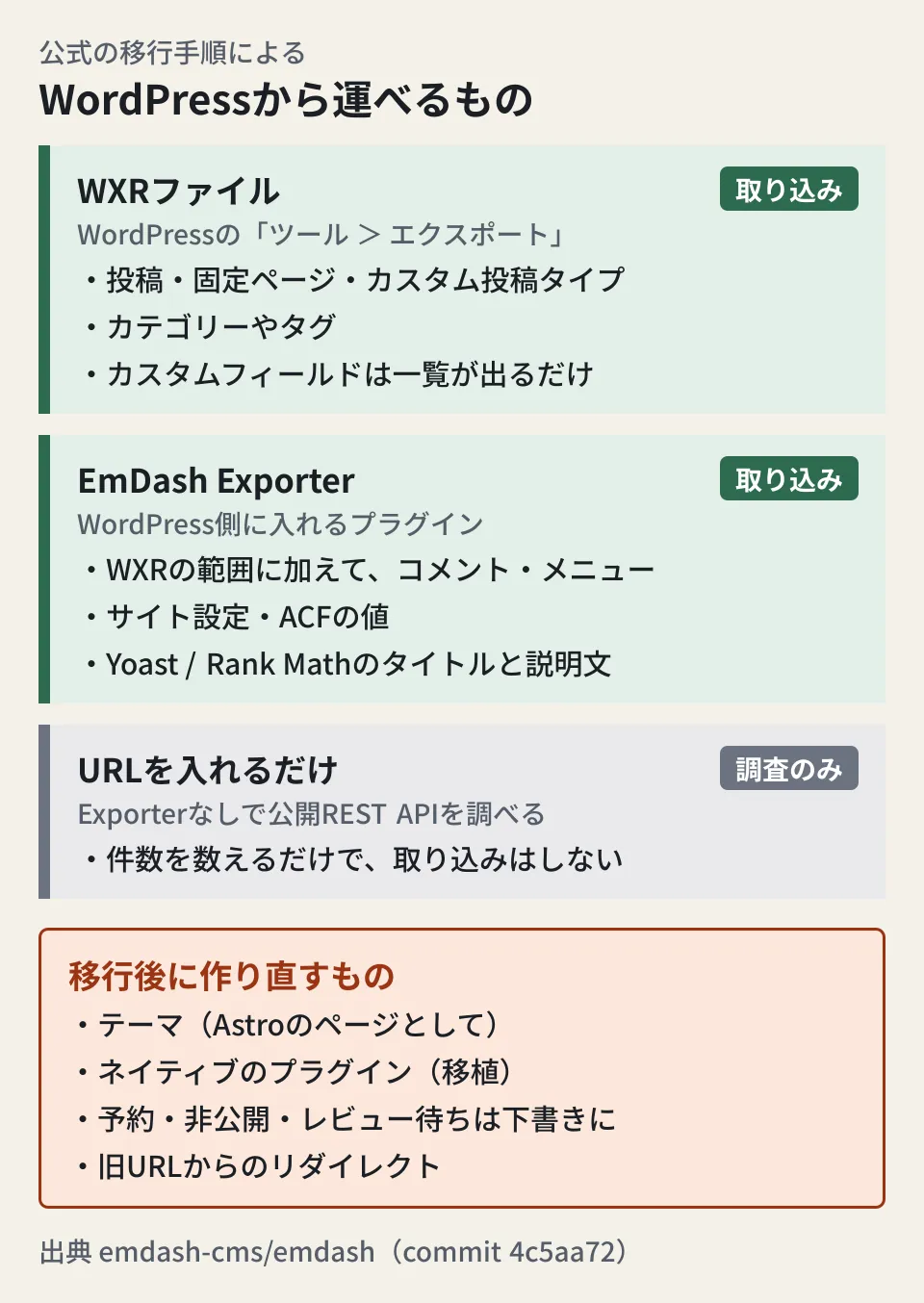
The official migration procedure (Migrate from WordPress) offers two ways to import content.
- WXR file. Upload the XML exported from WordPress's "Tools → Export" to EmDash's admin screen. Posts, pages, custom post types, and categories and tags are imported. However, custom fields only appear as a list in the analysis results; arbitrary keys are not imported
- EmDash Exporter plugin. Install the plugin on the WordPress side and issue a migration key. It can also carry over comments, menus, site settings, Advanced Custom Fields values, and titles and descriptions from Yoast SEO or Rank Math SEO
The README also lists importing from the "WordPress REST API." However, the migration procedure states that if you enter a URL without the Exporter, it only inspects the public REST API and counts items, and cannot import directly. The source code (wordpress-rest.ts) also contains the error "Direct REST API import not implemented. Please upload a WXR export file."
Some things must also be rebuilt after importing.
- Status. Published items become "published," but drafts, pending review, private and scheduled posts all become "draft." Scheduled dates and times are not restored
- Body formatting. Gutenberg blocks are converted to EmDash's format (Portable Text). Shortcodes, page builders and plugin-specific blocks need to be checked visually
- Themes and plugins. Themes are rebuilt as Astro pages. Plugins also need to be ported; there are instructions for agents (Agent Skills), but they are not migrated automatically
- URLs. The procedure asks you to crawl the old URLs and set up redirects for every one that changes
Sites for which switching is worth considering (editorial proposal)
The following is the editorial team's analysis based on the official information covered so far.
| Site situation | Editorial proposal |
|---|---|
| Mainly blog posts and announcements, with few plugins | Much of the content can be carried over with WXR or the Exporter. Worth trying as a candidate for your redesign |
| Relies on plugins for business functions such as memberships, e-commerce or bookings | First check whether equivalent features exist in the EmDash registry and how much porting would cost. If you cannot find them, wait |
| Tampering via plugins is the biggest concern | Getting the benefit of isolation requires Cloudflare's paid plan or a Node.js and workerd setup. Also confirm that native plugins are not isolated |
| Want to run it on in-house servers or AWS | It runs on Node.js. Check whether you can provide a persistent disk, an always-running process and Node.js 22.22.2 or later |
If you receive a proposal, asking the web agency the following four questions will make the decision easier: which environment it will run in and whether the sandbox runner will be configured; how your current plugins will be replaced; how scheduled posts, custom fields and redirects will be migrated; and who will apply 1.x updates, and when. For reviewing how you operate WordPress, how to answer when asked whether WordPress is secure is also a useful reference.
On October 4, 2026, we directly opened and cross-checked the changelog, README, documentation and source code of the emdash-cms/emdash repository (commit 4c5aa72) and the publication records in the npm registry. The build and startup of the Node.js blog template were tried once in the editorial team's test environment (Linux, Node v22.22.0, npm 10.9.4). We have not checked deployment to Cloudflare, the behavior of isolated plugins, importing real WordPress data, or performance. On October 5, we also checked the official blog's 1.0 announcement (dated September 28), the Node.js page of the official documentation (docs.emdashcms.com), and Cloudflare's Dynamic Workers pricing page.
For site redesigns that include switching CMSs, or for a checkup of your current WordPress site, GleamHub offers website development and redesign consultations. The right setup depends on the plugins you use and how updates are handled, so please reach out via Contact Us.
References
- emdash-cms/emdash — packages/core/CHANGELOG.md(1.0.1 / 1.0.1-rc.0 / 1.1.0 / 0.39.0)
- emdash-cms/emdash — README.md
- emdash-cms/emdash — Upgrade to EmDash 1.0(docs/upgrade-to-v1.mdx)
- emdash-cms/emdash — Configure the plugin sandbox(docs/deployment/plugin-sandbox.mdx)
- emdash-cms/emdash — Deploy to Node.js(docs/deployment/nodejs.mdx)
- emdash-cms/emdash — The plugin registry(docs/plugins/registry.mdx)
- emdash-cms/emdash — Plugins overview(docs/plugins/overview.mdx)
- emdash-cms/emdash — Migrate from WordPress(docs/migration/from-wordpress.mdx)
- emdash-cms/emdash — packages/core/src/import/sources/wordpress-rest.ts
- emdash-cms/templates — blog(chore: sync templates from emdash v1.0.1)
- EmDash Blog - EmDash 1.0: an open source CMS for Astro (September 28, 2026)
- Cloudflare Docs — Dynamic Workers pricing
- npm registry — emdash
- npm registry — @emdash-cms/registry-verification