Your internal AI apps use LiteLLM as a gateway that consolidates APIs for multiple models such as OpenAI, Anthropic and Gemini. Or LiteLLM is somewhere in the dependencies on developer machines or in CI. Such environments need to be checked for the impact of the tampered version distributed in late October.
According to LiteLLM's announcement, the tampered 1.107.0 was published on PyPI on October 21, 2026 for about 2 hours (11:39 to 13:23 UTC, 20:39 to 22:23 JST), and was also distributed in the official container images. Microsoft also published a detailed analysis on October 23 (US time). The troublesome part is that the malicious code runs simply when Python starts in that environment, even if the app does not load LiteLLM. Developer machines and CI runners that do not run the LiteLLM gateway are also in scope.
In this article, based on LiteLLM's announcement and Microsoft's report, we cover how it works, the affected distributions and time window, how to find affected environments, and the order of response if you find one.
What happened
According to the investigation findings LiteLLM published on October 23, the starting point was an admin key for an internal experimental service (LiteLLM Agent Platform) that was mistakenly committed to a public repository on May 27, 2026. This key had remained unrevoked. On October 10, the attacker used this key to get into the service and extracted the GitHub CLI token of the GitHub organization owner that was configured there. The attacker then used a CI workflow to steal the tokens of two other maintainers as well.
The attacker then used the owner's token to bypass branch protection and rewrite the release workflow so that it built from the similarly named Berri-AI/litellm instead of the legitimate BerriAI/litellm. Tokens of different maintainers were used to start and approve the release. LiteLLM says that approval restrictions had been temporarily relaxed that week to increase backport releases. Microsoft's report also cites the same sequence as described by the maintainers. However, it notes that Microsoft has not independently verified the initial intrusion vector.
Different versions of LiteLLM (1.82.7 and 1.82.8) were also tampered with in March 2026. We covered that incident in A roundup of 2026 supply chain attacks. This is a separate incident involving a different version and a different route.
Affected distributions and time window
The affected items listed in LiteLLM's announcement are as follows (all on October 21, UTC).
| Distribution channel | Target | Time distributed |
|---|---|---|
| PyPI | litellm==1.107.0 (all 7 wheels) | 11:39:51〜13:23 |
Docker Hub(litellm/litellm) | v1.107.0, latest, main-latest and main-stable tags | 11:46:56〜14:20 |
GHCR(ghcr.io/berriai/litellm・litellm-database・litellm-non_root) | The same 4 tags | 11:46:56〜13:51 |
The announcement covers cases where LiteLLM was installed with pip without pinning the version during this time, and cases where images with these tags were used during this time. Note that this includes images pulled with tags that do not specify a version, such as latest. The digest of the tampered image on Docker Hub and ghcr.io/berriai/litellm is sha256:1bbcb1443bc962e45f5aad53fe3d2c30600e0379715fb6c664cdd3ac126c339e (see the announcement for the values for litellm-database and litellm-non_root). Pulls from the private registry for Enterprise customers are said to be unaffected.
LiteLLM explains that the source for the v1.107.0 tag on GitHub does not contain the malicious files, and that what was tampered with were the distributions built from the attacker's repository. It also states that versions earlier than 1.107.0 are safe.
When the editorial team checked PyPI's public information (JSON API) on October 29, 2026, 1.107.0 was not in the list of released versions, and the latest stable release was 1.106.6, published on October 28. The 1.107.0 development and release candidate versions (1.107.0.dev1 to dev3, rc1 and rc2) remain in the list. A fresh reinstall will not install 1.107.0, but it may remain in environments where it was already installed, in caches, in internal mirrors and in already-built container images.
A mechanism that runs even without using LiteLLM
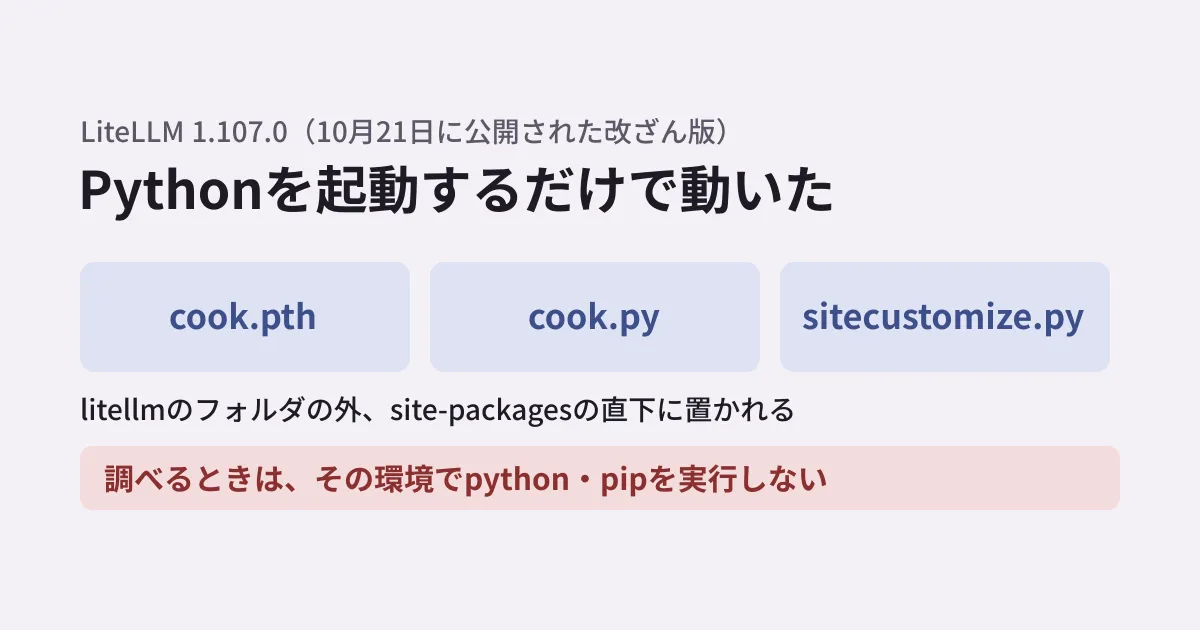
The tampered wheel contained three files: cook.pth, cook.py and sitecustomize.py. When installed, these are placed not in the LiteLLM folder but directly under the Python environment's library directory (site-packages).
During startup initialization, Python reads .pth files in site-packages and executes lines starting with import. It then loads a module named sitecustomize if one exists. The tampered version used both of these mechanisms.
- A single line in
cook.pth(import cook) loadscook.py, which runs a credential-harvesting program in the background sitecustomize.pycontains a mechanism that, in Unix-like environments, fetches and runs additional Python code from an external server (as of the report, fetching and execution had not been observed)
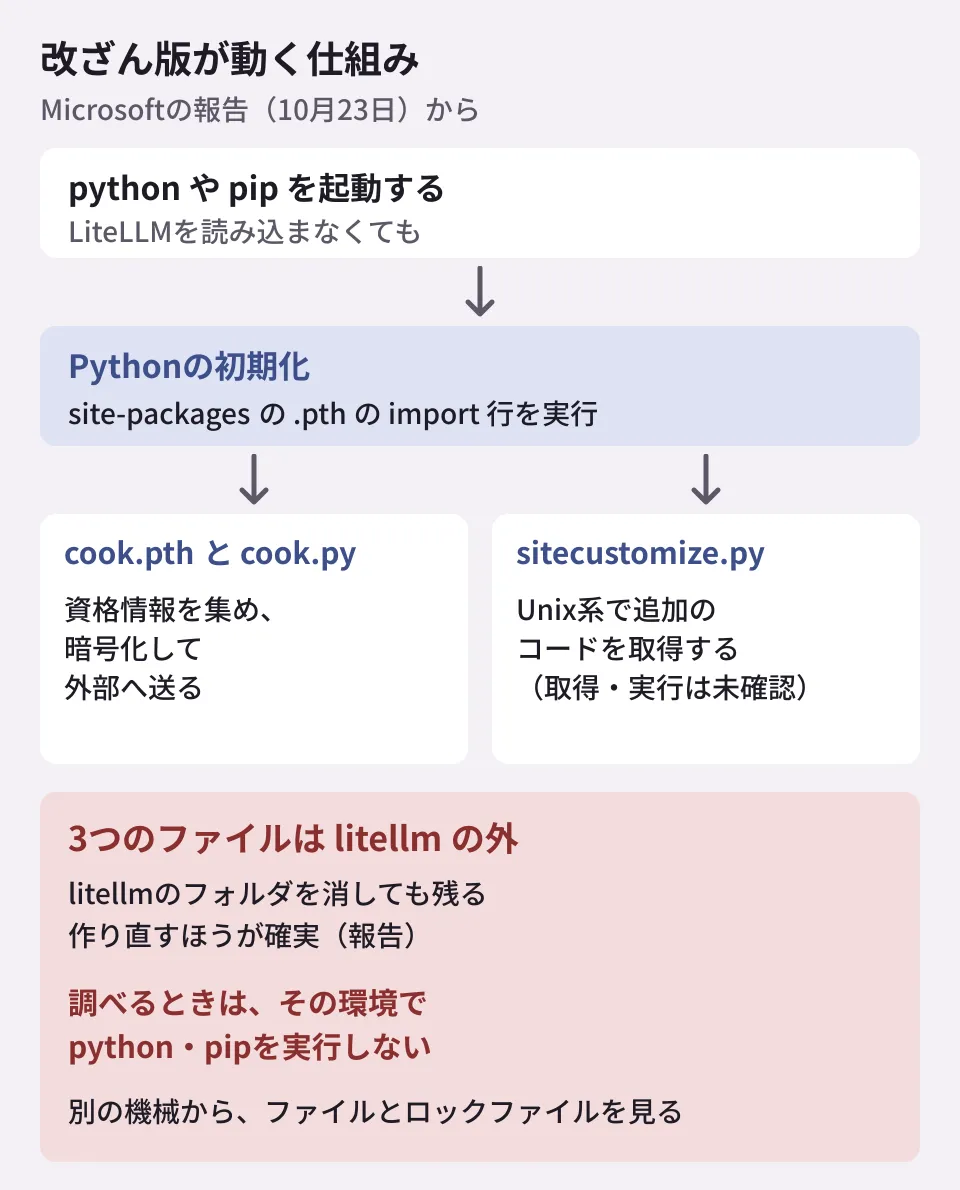
The report cites an example on Windows where the harvesting program ran just because Python was started to install an unrelated dependency. For that reason, it stresses that you must not run python or pip in a suspicious environment to check whether it was affected.
We verified the mechanism in the editorial team's environment
The editorial team verified this startup mechanism using harmless files. In the site-packages of a Python 3.11.17 virtual environment on Linux, we placed a demo.pth containing only the single line import demo_hook, a demo_hook.py that only records to a file that it was executed, and an empty package folder.
- With each of
python -c "pass",pip --versionandpython -c "import json", the record grew by one line. It ran without loading the package - Even after deleting the package folder, the record grew with
python -c "pass". The files directly under site-packages remain - With
python -S(which skips site initialization), the record did not grow
In addition, the site-packages of the same virtual environment contained a legitimate distutils-precedence.pth placed by setuptools, which also had a line starting with import. The mere presence of a .pth containing import is not evidence of compromise, and the report also asks that you not judge based solely on file names or whether a package is present.
Finding affected environments
The report asks organizations that installed LiteLLM 1.107.0, pulled it into a mirror or built it into images to find and contain every copy. The places it lists to search are installed environments, uv and pip caches, internal package mirrors, lockfiles, build artifacts and container images.
To search without starting Python in a suspicious environment, inspect the files and lockfiles from outside, for example as follows. Adjust the paths to your environment.
# site-packages の直下に、報告にある3つのファイル名や 1.107.0 の記録があるか(Python を起動しない)
find / -path '*site-packages/*' \
  \( -name 'cook.pth' -o -name 'cook.py' -o -name 'sitecustomize.py' \
     -o -name 'litellm-1.107.0.dist-info' \) 2>/dev/null

# requirements 系のファイルで 1.107.0 を固定していないか
grep -rnE 'litellm[^0-9]*1\.107\.0' --include='*.txt' --include='*.in' .

# uv.lock・poetry.lock では、名前の次の行に版がある
grep -rn -A1 'name = "litellm"' --include='uv.lock' --include='poetry.lock' .
The editorial team tried the three commands above on Linux with files created for testing (an empty cook.pth, and a requirements.txt and uv.lock with the version set to 1.107.0), and confirmed that each was found. The litellm-1.107.0.dist-info condition was added before publication, and we confirmed on macOS that it finds an empty folder we created. LiteLLM's announcement states that finding these files confirms you were affected, while not finding them does not prove you are safe. sitecustomize.py may also be present for legitimate purposes. Check any files you find against the SHA-256 values published in the report. For container images, the report asks you to identify them by their content-derived digest rather than by a mutable tag, and compare them with the values in the report.
LiteLLM's announcement also describes a way to check with pip show litellm. However, because just starting pip runs cook.pth, this article follows the recommendations of Microsoft and of the Upwind research team, which first reported the issue, and shows ways to investigate from outside the suspicious environment. If you use dependency auditing tools, 1.107.0 is included in the scope of the malicious package entry in the GitHub Advisory Database (GHSA-92x9-889m-jgmw).
What to do, in order, if you find it
Here are the responses the report describes, arranged so the order is clear.
- Isolate and stop Python: isolate developer machines, build agents, test environments, containers and AI gateway hosts, stop running Python processes and prevent them from restarting automatically. Even when collecting evidence, do not use python or pip in that environment; investigate from a separate, uncontaminated machine with trusted tools
- Rebuild from verified artifacts: confirm that the three files are gone from the library directory. The report says rebuilding is more reliable than assuming that deleting the litellm folder is enough. When rebuilding, specify and pin the version explicitly (see "Versions to use when rebuilding" below)
- Rotate any credentials the code could reach, from an uncontaminated machine: model API keys, cloud and workload credentials, CI/CD secrets, source control and registry tokens, SSH and GPG keys, AI coding tool tokens and browser sessions. On gateway hosts, also include stored model provider credentials and
DATABASE_URL. LiteLLM's announcement also lists the proxy master key and virtual keys. Do not just rotate keys; also revoke sessions - Correlate before deciding: judge by combining file hashes, Python process parent-child relationships, encryption in temporary folders whose names start with
.pc_e_, network destinations, workload identity information and subsequent use in cloud services or authentication. However, LiteLLM's announcement asks that if you ever installed 1.107.0 in an environment that can communicate externally, you treat the exfiltration as having succeeded
According to the report, the harvesting program targeted settings for AI assistants, IDEs, GitHub Copilot, VS Code and MCP integrations, Git credentials, .env files, AWS, Azure and Google Cloud credentials, Kubernetes service accounts, browser stored data, SSH keys and the environment variables of other processes on the same host (Linux), among others. It also attempted to read credentials and some model settings from the database used by the LiteLLM proxy. Because a gateway holds keys for multiple model providers in one place, the scope of rotation is broad.
Versions to use when rebuilding
As of October 21, LiteLLM advised explicitly pinning 1.106.2 or an earlier version. Later, on October 27, an advisory for a separate vulnerability (GHSA-w4c7-34wj-hqm8, severity critical) was published. It concerns proxies running under an Enterprise license, where local files could be read without authentication, potentially leaking the master key and other secrets; the fixed version is 1.106.5 (fixes were also included in 1.103.10, 1.104.8 and 1.105.6). The unlicensed open-source version is stated to be unaffected. If you use an Enterprise license, do not stop at 1.106.2; move to 1.106.5 or later (or the fixed version in each of the lines above).
Preparing for the next tampering
As future measures, the report lists hash-pinned lockfiles, verifying the provenance of packages and images, specifying images by digest rather than tag, admitting only vetted packages into internal mirrors, and restricting outbound traffic from developer machines, build agents and AI gateway hosts to the destinations they need.
We covered settings that avoid pulling in versions immediately after release (cooldowns) in Dependency cooldowns for pip. We also cover the benefits and caveats of a design that concentrates model keys in a gateway in Should you put a gateway in front of your internal AI?. If you deploy a gateway, preparing a list of the keys stored on that host and the rotation procedure in advance will help you avoid scrambling in an incident like this one.
Scope of verification
On October 28, 2026, we reviewed the Microsoft Security Blog report "Inside the LiteLLM 1.107.0 supply chain compromise" (October 23, 2026) and the list of LiteLLM's released versions via PyPI's JSON API (desk research). On October 29, 2026, before publication, we reviewed LiteLLM's announcements (the October 21 incident post and the October 23 post on how the attack unfolded), the maintainers' report in GitHub issue #47826, the GitHub Advisory Database entry and PyPI's list of released versions, and added the distributions and time window, the sequence of events and the versions to use when rebuilding. Because Microsoft's report could not be opened from the editorial team's environment on October 29 (HTTP 403), statements based on Microsoft's report reflect what we confirmed on October 28. We verified startup execution via
.pthusing harmless files in a Python 3.11.17 virtual environment on Linux (hands-on testing). We did not obtain or run the tampered version itself.
To review AI app dependencies or credential management, contact us through consultation on development, AI, and automation.
References
- Inside the LiteLLM 1.107.0 supply chain compromise: Credential theft through Python startup hooks(Microsoft Security Blog、2026-10-23)
- Contained: Oct 21, 2026 LiteLLM release v1.107.0 Compromised(LiteLLM、2026-10-21)
- The attack chain behind the v1.107.0 LiteLLM release(LiteLLM、2026-10-23)
- BerriAI/litellm issue #47826(GitHub)
- GHSA-92x9-889m-jgmw: Malicious code in litellm(GitHub Advisory Database)
- GHSA-w4c7-34wj-hqm8: Unauthenticated file read leaks master key on Enterprise proxy(BerriAI/litellm)
- litellm(PyPI)