For Microsoft 365 backup or monitoring, you grant an external service's integration app permission to read your organization's email and files. If that app itself is hijacked, attackers can get inside your organization with the permissions granted to the app, without having to break users' passwords or multi-factor authentication.
On October 16, 2026, ConnectWise announced unauthorized access to its Cloud Backup (formerly SkyKick) environment, and has since added investigation and verification steps, stating that the identity of an integration app had been misused. Microsoft also reported on October 21 (US time) that attackers had used the hijacked integration app to authenticate to customers' Microsoft 365 environments and perform additional actions. This serves as a model for how to verify not only for companies using ConnectWise's integration apps but for every organization that has installed highly privileged integration apps.
In this article, based on ConnectWise's announcement and Microsoft's report, we organize what happened and the order in which admins should check logs.
What happened
According to Microsoft's report, Microsoft assesses that Storm-0940, a threat actor believed to be affiliated with the Chinese state, was involved in this ConnectWise supply chain compromise. Storm-0940 used an open-source framework (ARTEX) that automates penetration testing with AI agents, carrying out reconnaissance, password brute-forcing (password spraying) and abuse of integration apps at machine speed. In its October 21 update, ConnectWise also explained, drawing in part on information shared by Microsoft, that a group affiliated with the Chinese state appears to have carried out the attack using a publicly available AI agent framework.
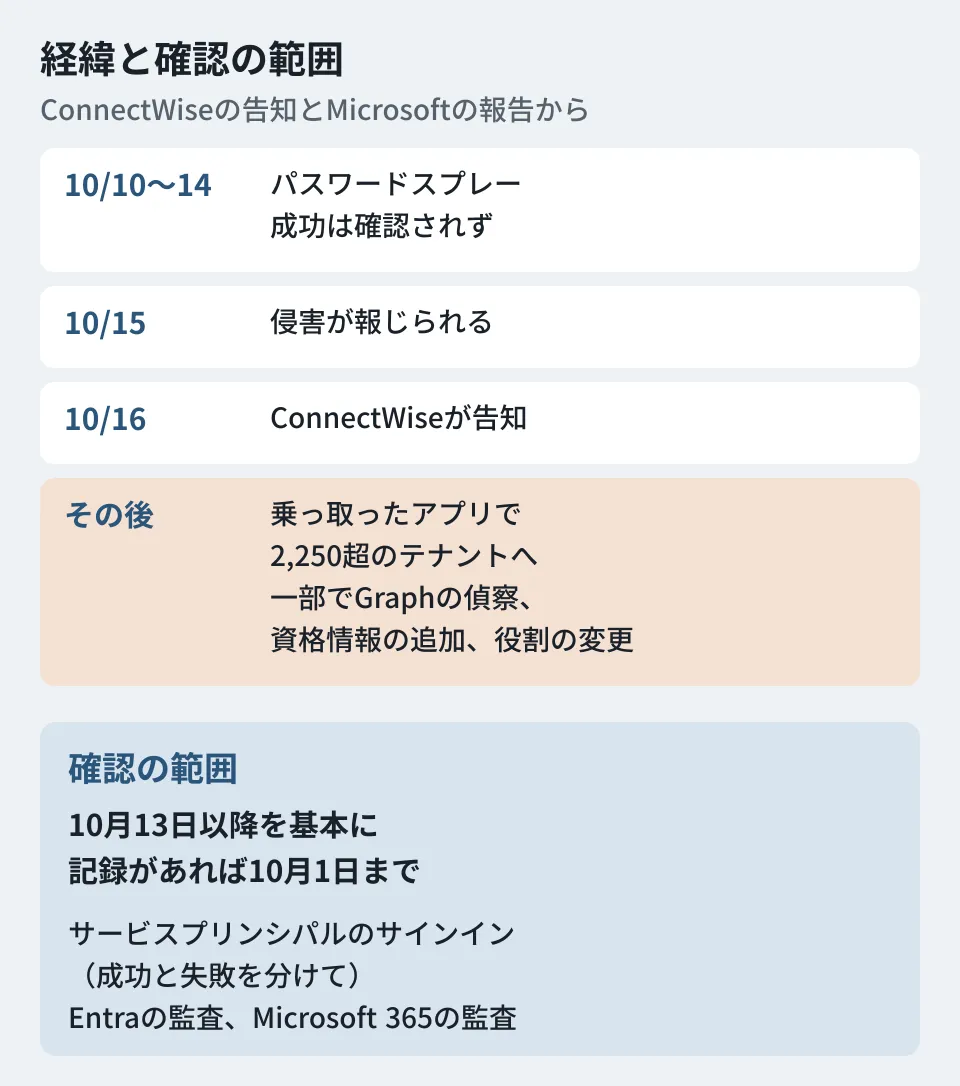
The sequence of events is as follows.
- October 10 to 14: according to Microsoft's report, password spraying from Storm-0940 infrastructure targeted 327 accounts at 8 organizations. Failed sign-ins exceeded 151,000, but no successful authentication or token issuance was observed
- October 14: ConnectWise discovered the issue and began internal and external investigation and response (FAQ in ConnectWise's announcement)
- October 15: according to Microsoft's report, the compromise of the cloud backup app began to be publicly reported. The reported indicators of compromise were in the same IP address range as the password spraying above
- October 16: ConnectWise published its first announcement (17:47 UTC)
- October 17: ConnectWise disabled the identities of the 7 affected apps, revoked the certificates used for the integration and shut down the cloud backup service (07:00 UTC). It also shut down the connected SaaS Security and Cloud Management as a precaution
- Afterward: according to Microsoft's report, the attacker used the hijacked ConnectWise app identities to attempt sign-ins to more than 2,250 tenants. In some environments, the attack progressed to reconnaissance via Microsoft Graph, changes to app credentials and changes to privileged roles
- October 28: ConnectWise began a phased recovery using a new app, "ConnectWise Cloud Backup for M365," restoring Microsoft 365 backup and restore first
Microsoft's report explains that because the app was already trusted by the organizations, it could operate without interactive user sign-in. In Azure environments, activity using the app's permissions to read large numbers of secrets from multiple Key Vaults was also observed.
On the other hand, both Microsoft's report and ConnectWise's announcement state that having an affected app, or the attacker successfully authenticating, does not by itself mean that data was read or exfiltrated. ConnectWise says there are no signs of compromise in its stored backup data (archives), while also stating that it cannot determine from its side whether individual customers' Microsoft 365 environments were affected. Microsoft states that this activity was not due to a vulnerability in Microsoft products or services.
Why highly privileged integration apps are targeted
This section is the editorial team's analysis. By the nature of their role, backup and monitoring services may request permission to read an organization's email, files and user information. Microsoft's report explains that the attacker authenticated with the hijacked app's identity and could operate without interactive user sign-in. The multi-factor authentication required for user sign-in was not required on this path. According to Microsoft Learn, Conditional Access for workload identities (app identities) also applies only to single-tenant apps registered in your own organization; multi-tenant apps from external SaaS are out of scope.
Another point Microsoft's report cautions about is that if the attacker made changes such as adding app credentials, these may remain as backdoors through other identities or services and could still be used even after the original app is fixed. ConnectWise also explains that disabling the app does not undo changes made within the tenant before that, and that access tokens already issued may remain usable until they expire. This is why stopping the original app alone is not enough.
Logs to check and in what order
Here are the measures listed in ConnectWise's investigation guide (published in the October 18 update) and Microsoft's report, arranged so the order of work is clear.
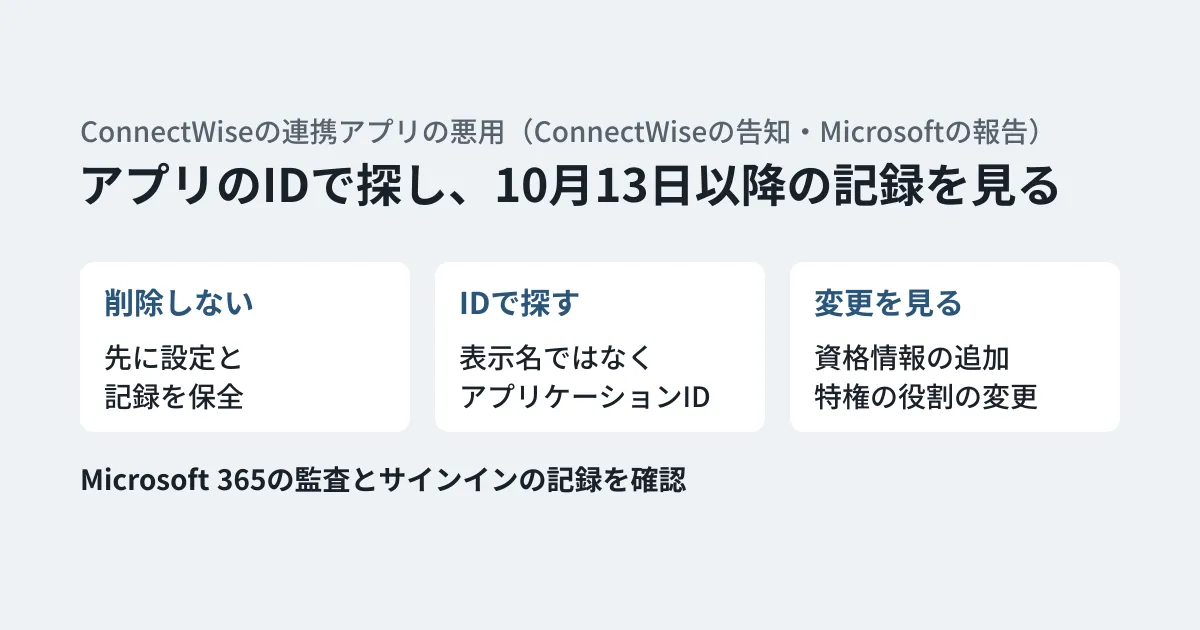
- Do not re-enable or delete the disabled apps: do not re-enable the apps ConnectWise disabled on October 17 unless instructed by ConnectWise. The recovery starting October 28 is a procedure in which each tenant re-consents to a new app, "ConnectWise Cloud Backup for M365." Do not delete the enterprise applications as a first response; preserve settings and evidence before making irreversible changes
- Search by app ID: search by the application IDs in the table below, not by display name. Check every tenant where the app is installed or was previously consented to, including ones no longer in use, and note the service principal object ID for each tenant. In older environments, the display name may still be SkyKick Cloud Manager
- Preserve records immediately: Preserve Microsoft Entra sign-in and audit logs, Microsoft Purview audit logs, and SIEM data. The default retention period for Entra sign-in and audit logs is 7 days on Microsoft Entra ID Free and 30 days on P1 and P2. Upgrading to a higher license later does not bring back records that have already been deleted. However, do not delay containment while waiting for exports
- Set a time window: ConnectWise's guidance asks you to review from October 13 to the present, and Microsoft's report asks you to review from at least October 15 onward. Start from the earlier date, October 13, and if records exist, go back as far as October 1. Also look at failed authentications and unusual volumes
- Check service principal sign-ins: Instead of the default "User sign-ins" tab, filter by each application ID under "Service principal sign-ins" and check successes and failures separately. Do not limit the search to the published IP addresses; look for sign-ins from anywhere other than the vendor's normal infrastructure
- Check Entra audit logs: Credentials added to apps or service principals; new apps, service principals, and owners; app role assignments and consent grants; privileged role assignments; and changes to users, groups, authentication methods, and Conditional Access
- Check Microsoft 365 audit logs: Directory or permission enumeration from unusual locations, unusual access to mail or files, downloads, forwarding, inbox or transport rules, and mailbox delegation
- Remove only confirmed malicious changes: After preserving evidence, an authorized person removes the credentials, consents, owners, role assignments, and identities confirmed to be malicious. Issuing new legitimate credentials does not remove credentials, roles, or consents added by the attacker
In its October 28 update, ConnectWise stresses that re-authorizing with the new app is no substitute for a per-tenant investigation. After re-authorizing, it also asks customers to confirm that a new backup (snapshot) has actually completed.
The seven apps ConnectWise disabled on October 17 are listed below (display names as given in ConnectWise's notice).
| Apps | Application ID |
|---|---|
| ConnectWise Cloud Backup | 506e08f9-6e9a-4da4-942b-a099a03644ae |
| ConnectWise Cloud Management | 2399d300-6fca-4e6a-a686-399fefe75b83 |
| Cloud Management - MS Teams | 24205314-2b89-4e07-a2a4-579e898a5640 |
| Cloud Management - Exchange Online | b78f6a77-d4e5-46fb-87e5-d1648bd02519 |
| Cloud Management - MS Graph | 0de14c77-b9b0-4137-9360-34878a929827 |
| Cloud Management - Partner Center | 412dcf96-176d-4b3a-a1b0-4981ad66971e |
| Cloud Management - SharePoint Online | b2b55f5b-7758-4719-8d8f-88ae172e6bdb |
The FAQ in ConnectWise's notice also recommends keeping a separate ConnectWise app (c921256f-04a7-44e8-9b2a-69c33929ba19) disabled until ConnectWise advises that it is safe, although no direct threat has been confirmed for it. As IP addresses to investigate, the FAQ lists 144.172.64[.]99, 144.172.64[.]60, and 144.172.64[.]128. Microsoft's report also includes example queries for Microsoft Defender XDR customers to check for impact by app ID.
What to review beyond this incident
From here on is the editorial team's own analysis. Beyond this incident, any organization that uses highly privileged integrated apps can act faster when a similar incident occurs if it checks the following points in normal times.
- Inventory: A list of integrated apps with organization-wide permissions (such as read and write access to mail, files, and the directory), along with their application IDs and the departments and people responsible for the contracts
- Scope of permissions: Whether the permissions are too broad for what the service is used for. Microsoft's report also calls for minimizing the permissions and consent granted to multi-tenant apps
- Monitoring: Whether alerts are set up for credentials added to apps and for privileged role assignments
- Log retention: Whether service principal sign-in and audit logs are retained long enough to look back at least several weeks. To keep them longer than Entra's default retention period (7 days on Free, 30 days on P1 and P2), you need to set up exports to a SIEM or similar in normal times
- Impact of stopping: How restore work would be affected while the backup integration is stopped
Microsoft's report also raises the last point, and in this case, while the backup app's integration was stopped, ConnectWise's backup and restore operations themselves were halted. You need to decide on alternative measures for while it is stopped. The difference between backups "being taken" and being "restorable" was covered in "Backups succeeded" does not mean you can restore. The approach of limiting the permissions granted to integrated apps to only what is necessary is laid out in Moving beyond all-or-nothing on integrated app permission requests.
Organizations using Google Workspace can review the permissions granted to external apps from the same perspective. Where integrated apps are managed on the Workspace side is touched on in Claude's Gmail and Drive integrations: approving sending and sharing.
Scope of verification
On October 28, 2026, we reviewed the Microsoft Security Blog report "AI-driven, large-scale nation-state campaign using ARTEX enables supply chain compromise" (October 21, 2026) (desk research). On October 29, 2026, we reviewed the ConnectWise Trust Center notice "Cloud Backup (formerly known as SkyKick) Service Interruption" (published October 16, updated October 28 at 16:00 UTC) and the Microsoft Learn pages on log retention periods and Conditional Access for workload identities. Because we could not reopen Microsoft's blog on October 29, the descriptions of Storm-0940, ARTEX, the number of password spray attempts, the more than 2,250 tenants, and Key Vault are based on what Microsoft's report stated when we reviewed it on October 28. We have not been able to confirm how what Microsoft's report calls "the four application IDs listed in the profile" correspond to the seven above. We did not perform any operations in the Microsoft 365 admin center or run any queries.
For an inventory of integrated app permissions or a review of administrator permission design, please contact us through our free IT and Google Workspace consultation.
References
- Cloud Backup (formerly known as SkyKick) Service Interruption (ConnectWise Trust Center, published 2026-10-16, updated 2026-10-28)
- AI-driven, large-scale nation-state campaign using ARTEX enables supply chain compromise(Microsoft Security Blog、2026-10-21)
- Microsoft Entra data retention(Microsoft Learn)
- Microsoft Entra Conditional Access for workload identities(Microsoft Learn)