Your company uses AOMEI Backupper to back up its PCs, or AnyViewer for remote support. A new report says such companies should not be too quick to assume they are safe because the vendor has fixed the problem. Google Threat Intelligence Group (GTIG) and Mandiant explain that AOMEI's update mechanism was used in an attack, and that each tampering was reverted within 5 to 10 minutes. Because the window was so short, anyone checking the vendor's servers afterwards finds only the legitimate files.
The report was published on the Google Cloud blog on October 15, 2026. Its central point is the following sentence.
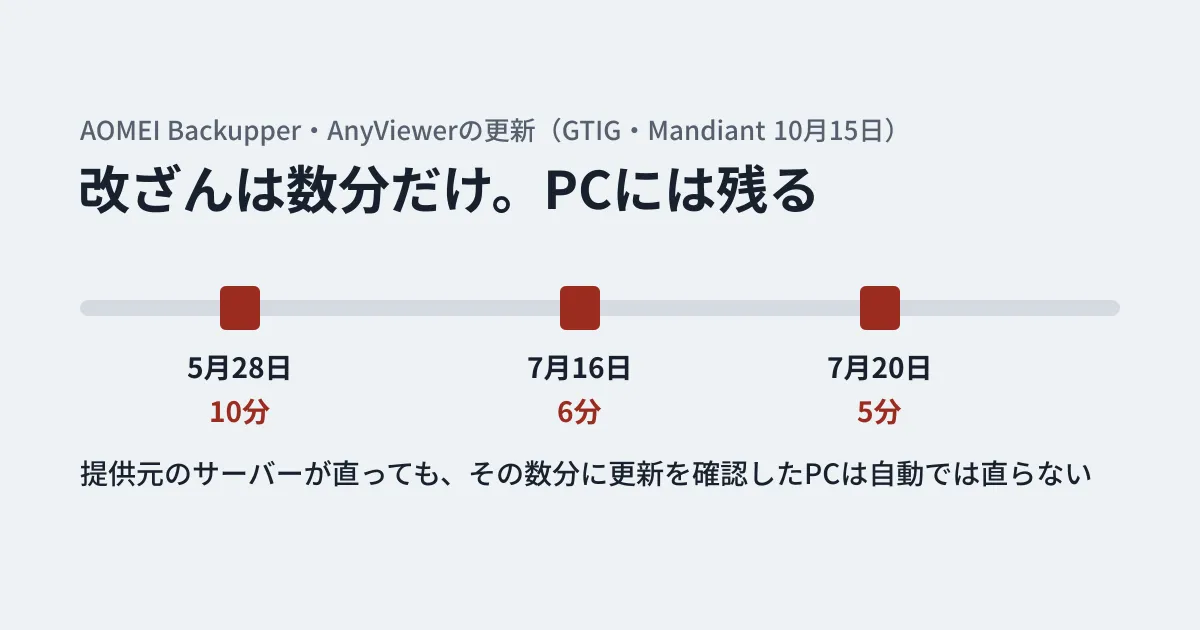
Each tampering window remained active for only five to ten minutes before reverting to authentic versions. This is the first time that we have encountered a software supply chain compromise that was implemented with these very short windows, effectively evading traditional point-in-time triage and automated file scanning.
This article organizes the report around what IT staff at companies using AOMEI products need to check.
What happened
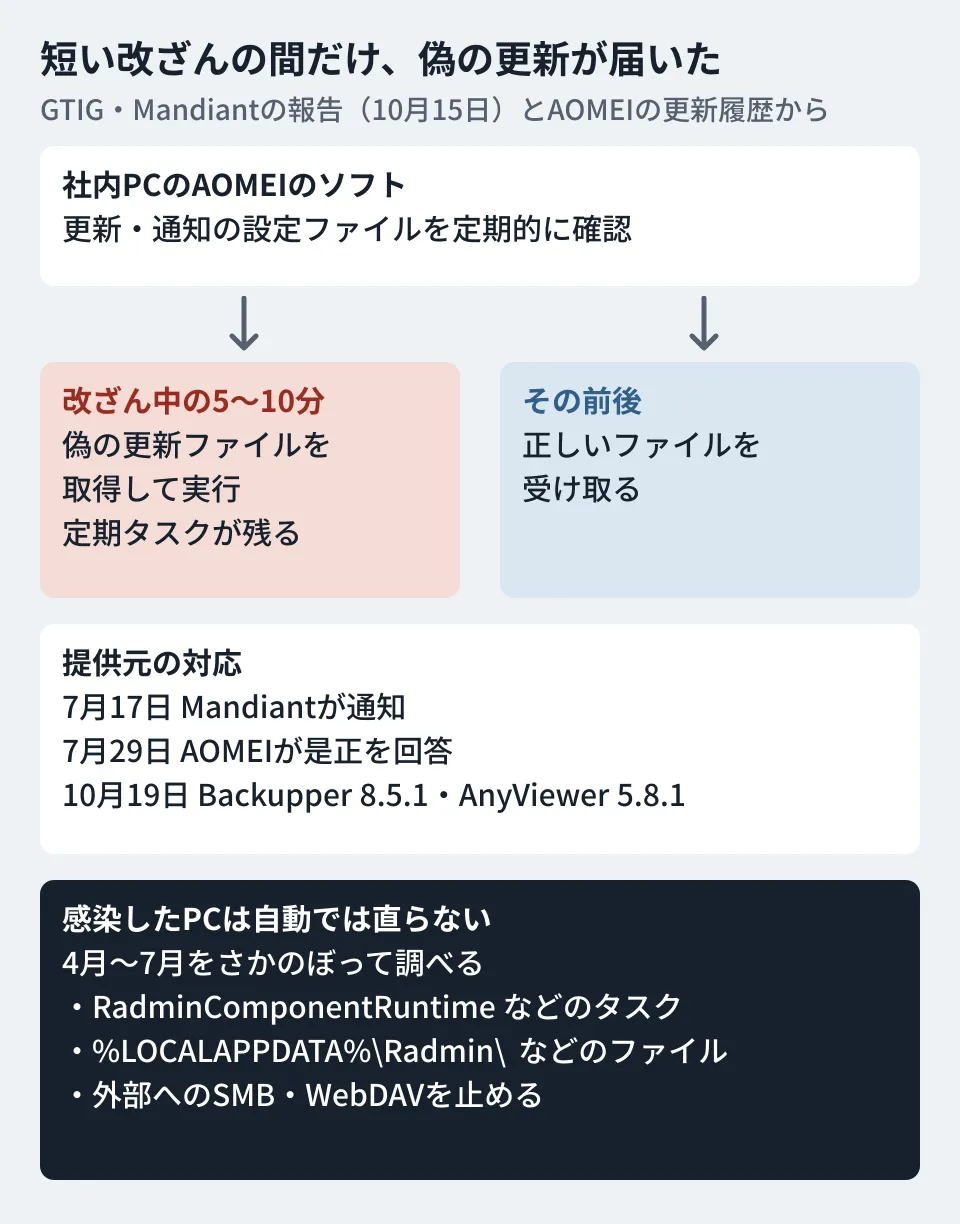
According to the report, AOMEI Backupper (software for backup, disk cloning and recovery) and AnyViewer (remote control software) periodically fetch two configuration files from AOMEI's servers in order to display update notices and ads.
- down_html.ini: a file containing the update version, the MD5 of the update file, and the URL from which to fetch the update file
- Notifycfg.ini: a file specifying what notifications display and which commands to run on the PC
The attacker (GTIG calls it "UNC7017") rewrote these two files on the server for only short periods. PCs that checked for updates during those windows fetched a fake update file from the attacker's server and ran it through the notification mechanism. PCs that checked before or after received the legitimate files.
The report directly confirmed the following three tampering windows (times in UTC).
- May 28: 10 minutes (05:40-05:50)
- July 16: 6 minutes (08:33-08:39)
- July 20: 5 minutes (10:35-10:40)
The report also notes that related malware has been found since late April, and that there were likely other tampering incidents that could not be confirmed. Affected organizations were in sectors such as IT services, telecommunications and higher education, and in countries such as Australia, Brazil, India and the United States. Japan is not listed, but the report says that "anyone could have been targeted depending on when they checked for updates" and that the impact is likely broader than what has been identified.
Even if the vendor fixes it, your PCs are not fixed
According to the report, Mandiant notified AOMEI on July 17, and AOMEI replied on July 29 that it had "taken remediation measures." ManageEngine's threat analysis team (METAL, part of Zoho), which first discovered this attack, has also published an analysis, stating that it notified AOMEI on June 7 and that the compromises it observed involved AOMEI Backupper version 8.3.0 and later. The important part is the following point in the report.
Crucially, server-side remediation does not clean endpoints that downloaded malicious updates during earlier tampering windows.
PCs that received the fake update during a tampering window have a periodically running "task" registered on them. Even after the vendor's servers have returned to the legitimate configuration files, that task keeps running. Furthermore, according to the report, the first program to run (GTIG calls it "CROSSROAD") rewrites the down_html.ini left on the PC back to its legitimate contents and deletes itself. It is built so that the trigger is hard to identify even when investigated later.
The report asks organizations using AOMEI products to look back over the April to July period and investigate their PCs and networks.
Fixed product versions are also available
After the report was published, AOMEI also released countermeasures on the product side. According to the AOMEI Backupper release notes, version 8.5.1, released on October 19, includes the following changes to address the distribution and notification risks identified in this tampering.
- Disabled in-app ad updates and the entry point for automatic software updates
- Added public-key (asymmetric) cryptographic protection to remote configuration files such as .ini files
- Stopped using the previous update domain (www2.aomeisoftware.com) in the update process
- Separated software updates from ad notification settings and download locations
- Restricted update file downloads to AOMEI's official website only
AnyViewer also released 5.8.1 on the same day, October 19, and its release notes say it "strengthened the security of software updates and ad updates."
If you continue to use AOMEI products, upgrade Backupper to 8.5.1 or later and AnyViewer to 5.8.1 or later. If the release notes are accurate, 8.5.1 and later have no in-app automatic update entry point, so future versions will likely need to be downloaded from the official website and installed manually (this is the editorial team's assumption; the editorial team has not tried downloading or installing them). However, upgrading to a new version does not fix PCs that have already received the fake update. Complete the checks in the next section before upgrading.
Where to check on company Windows PCs
From the indicators listed in the report, here are the ones IT staff can easily check on PCs.
Task Scheduler
\RadminComponentRuntime(with the description "Radmin Component runtime checkable."). According to the report, it runs%LOCALAPPDATA%\Radmin\FamItrfc.exe --runtimechkevery 3 hours\NitroRuntime(launches%LOCALAPPDATA%\Temp\NitroPromotion.exevia PowerShell without showing a window)
Folders
BlkScrDl.dll,csvc\RuntimeComponent.dll,config.zipormetadata.datexists in%LOCALAPPDATA%\Radmin\Eztwain4.dllorNitroPromotion.exeexists in%LOCALAPPDATA%\Nitro Pro\upgrade-now.ziporupgrade-now.exeexists inTmphtml\orhtml\in the AOMEI installation folder
The report cautions that FamItrfc.exe itself is legitimate signed software (Radmin from Famatech), so you should not judge it safe just because it is signed. The technique is to make a legitimate program load an unsigned BlkScrDl.dll.
To reduce the effort of checking, the editorial team prepared the following PowerShell script. It only looks at the task names and file locations listed in the report and changes nothing. The editorial team does not have a Windows test environment, so this script has not been run on actual Windows. Before using it, verify how it behaves on a test PC in your company.
# AOMEIの更新改ざん(GTIG、2026-10-15)の報告に載っているタスクとファイルの有無を表示する。何も変更しない
$tasks = Get-ScheduledTask -ErrorAction SilentlyContinue |
  Where-Object { $_.TaskName -in @('RadminComponentRuntime', 'NitroRuntime') }
if ($tasks) { $tasks | Select-Object TaskPath, TaskName, State } else { 'タスク: 該当なし' }

$paths = @(
  "$env:LOCALAPPDATA\Radmin\BlkScrDl.dll",
  "$env:LOCALAPPDATA\Radmin\csvc\RuntimeComponent.dll",
  "$env:LOCALAPPDATA\Nitro Pro\Eztwain4.dll",
  "$env:LOCALAPPDATA\Nitro Pro\NitroPromotion.exe",
  "$env:LOCALAPPDATA\Temp\NitroPromotion.exe"
)
foreach ($p in $paths) { '{0} : {1}' -f $p, (Test-Path $p) }

# AOMEIのインストール先にある更新用のファイル(報告ではProgram Files (x86)の下のTmphtml)
Get-ChildItem "${env:ProgramFiles(x86)}\AOMEI" -Recurse -Include upgrade-now.* -ErrorAction SilentlyContinue |
  Select-Object FullName, LastWriteTime
%LOCALAPPDATA% is a per-user folder. On PCs used by multiple people, check under each account, or look at each user's folder with administrator privileges. If you find anything, disconnect the PC from the network before deleting any files, and consult a dedicated security contact or your EDR vendor. Deleting files makes it impossible to investigate later what happened.
What to block on the network side
The report lists the following countermeasures for outbound traffic.
- Block traffic to the domain listed in the report (
storage-data.comand its subdomains) and the IP addresses (8.210.84.56,47.239.60.117and8.218.65.184) - Block SMB (TCP port 445) and WebDAV traffic to external IP addresses
- Check proxy logs for traffic with the User-Agent
Anyviewer-loader/1.0and for traffic toserv.oss-cn-hongkong.aliyuncs.com
The second item counters a different technique used in the July 20 tampering. It planted an invisible 1x1-pixel window in the notification settings that opened an external WebDAV location starting with file://, causing Windows login credentials (NetNTLMv2 hashes) to be sent to the attacker's server. Blocking outbound SMB and WebDAV helps prevent this type of technique in general.
Rethink the update-checking mechanism itself
This incident is an example of an attack targeting the update and ad delivery mechanism rather than the software's source code or build system. The report asks software vendors to verify the digital signatures of downloaded files, sign the configuration files themselves, pin update download locations to their own domains, prevent notification and ad windows from opening file://, and separate the update and ad mechanisms.
Companies on the user side can organize things as follows. From here on, these are the editorial team's suggestions.
- Keep a list of resident software on your PCs: some backup, remote control, PDF and compression software automatically checks for updates. Know what is installed and who installed it
- Remove software you do not use for work: remote control software left installed after a trial, for example, adds one more update path just by being there
- Do not judge EDR alerts by the "current distribution source": according to the report, opening the vendor's URL afterwards returns only the legitimate file, so alerts are easily dismissed as false positives. Look at the files left on the PC and the proxy logs from the time the alert fired
The overall picture of attacks targeting software update paths is covered in A roundup of 2026 supply chain attacks, and the steps for checking the certificates your PCs trust are covered in eMudhra's intermediate CA: checking the trust store on development machines.
Scope of verification
On October 25, 2026, we checked the Google Cloud blog post (Google Threat Intelligence Group and Mandiant) "Investigating Ephemeral Supply Chain Tampering" (dated October 15, 2026; as of October 27, the page displays October 16) (document research). On October 27, we rechecked the same blog post and checked the ManageEngine Threat Analysis Lab (METAL) analysis (October 16) and the official release notes for AOMEI Backupper and AnyViewer. We have not checked the original text of the reply AOMEI sent on July 29, nor downloaded, installed or tested 8.5.1 and 5.8.1. The PowerShell script in this article was written by the editorial team based on the indicators in the report, and its behavior on Windows has not been verified. The YARA rules and hash values in the report are not included in this article.
To take inventory of the software on your company's PCs or review how you run updates and backups, contact us through our Free IT & Google Workspace Consultation.
References
- Investigating Ephemeral Supply Chain Tampering(Google Cloud Blog、Google Threat Intelligence Group・Mandiant、2026-10-15)
- AOMEI Backupper supply-chain compromise: Investigation and analysis(ManageEngine Threat Analysis Lab、2026-10-16)
- AOMEI Backupper release notes (AOMEI; 8.5.1 released 2026-10-19)
- AnyViewer Upgrade History (AOMEI; 5.8.1 released 2026-10-19)