When a development team uses GitHub Copilot, the way models are chosen can vary from person to person. Some may use a top-tier model even for light fixes, while others may keep at a difficult bug with a fast model. Since pricing is determined by AI credit consumption, "who uses which model and how much" becomes a cost issue for team administrators.
On October 28, 2026, GitHub made "Copilot Fusion" generally available. Instead of choosing one model from the list, you let Fusion pick a model and an execution pattern for each task. The changelog describes it as combining Project HydraFusion's multi-model coordination with Copilot's automatic model selection. For Project HydraFusion, released as a research preview in September, we covered how to read the benchmark figures in our HydraFusion article. This article sets out the eligible plans and how billing works, as described in the general availability documentation.
What happens when you choose Fusion
You choose Fusion in the model selection screen (the model picker). However, this does not mean choosing a specific model. For each request, Fusion picks one of the following three execution patterns.
- Single: one model completes the work
- Cascade: an efficient model produces a draft, and a judge decides whether to accept it or escalate to a stronger model
- Critique: one model produces a draft, multiple models critique it in parallel, and it is rewritten based on their feedback
The pattern can change from request to request, even within the same conversation. Additional model calls are said to be made only when a task requires them, and Single behaves the same as a request to one model. Cascade and Critique take longer because they include calls for review. While work is in progress you can follow each stage and the models in use, but intermediate drafts may be rewritten or discarded, and only the final answer is displayed. Hovering over the effort level name below an answer shows a list of the models used.
It is available in VS Code, Copilot CLI, the GitHub Copilot app, and JetBrains IDEs. In environments where Fusion is available, it appears in the "Auto" position in the model picker. The changelog for JetBrains says it is still rolling out gradually to all users.
Standard, High, Max, and the plans that can use them
Fusion has effort levels that let you choose what to prioritize among quality, cost, and speed.
| Effort level | Documentation description | Available plans |
|---|---|---|
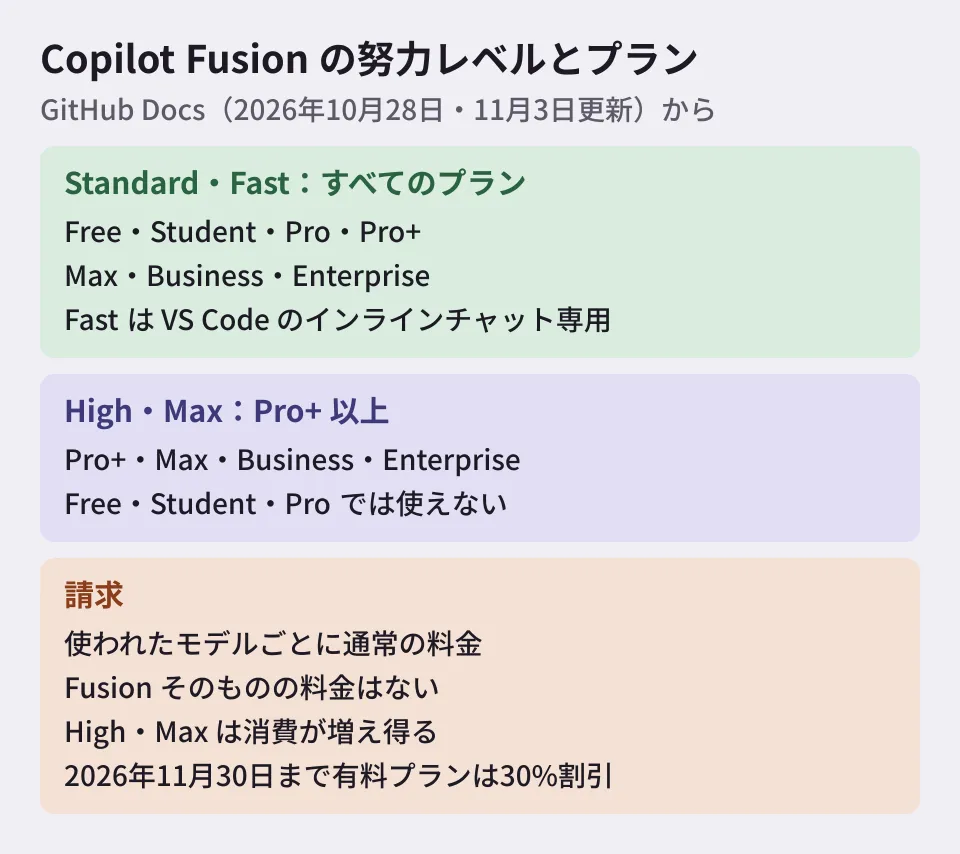
| Standard | A balance of cost, quality, and speed. Selects one model per task | All plans (Free, Student, Pro, Pro+, Max, Business, Enterprise) |
| High | For work worth the extra calls, such as changes spanning multiple files | Pro+、Max、Business、Enterprise |
| Max | For work that needs the deepest reasoning | Pro+、Max、Business、Enterprise |
| Fast | Only for situations that need a fast model. Users cannot select it; VS Code inline chat only | All plans |
High and Max are not available on the individual Pro plan. Max may also not appear in the model picker if any of the models it requires has been disabled.
How billing works
The documentation's description of billing is as follows.
- You are billed for each model Fusion used, at that model's regular rate
- There is no charge for Fusion itself
- High and Max may use multiple models on a single task and can consume more AI credits than Standard
- Through November 30, 2026, users on paid plans get a 30% discount on model costs when using Fusion
The discount end date is the one given in the documentation. The overall changelog says only "for a limited time", while the JetBrains changelog says "the first 30 days". The materials we opened say nothing about a discount from December onward. Per-model pricing is on the "Models and pricing" page, and 1 AI credit is 0.01 US dollars.
The documentation also says the main thread of a conversation is kept on the same model as far as possible, to take advantage of cached tokens. Auxiliary models (such as reviewers) receive only the context they need.
Apart from billing, the context window is something to be careful about when reading the display. Fusion itself has no context window; each stage runs within the limit of the model handling it. The displayed value is described as a conservative figure based on the smallest limit among the models in use.
How it relates to administrators' model restrictions
Fusion only chooses from models the user can access. The documentation says it excludes the following models.
- Models not available on the plan
- Models excluded by administrator policy
- Models excluded by policies that limit use to models compliant with data storage location or FedRAMP requirements
- Models excluded by policies that restrict evaluation models
If no models are available, Fusion does not appear in the model picker. In other words, if your organization prohibits a specific model, that model will not be used through Fusion either. Conversely, if you want people to be able to use Max, you need to allow the models Max requires.
Enterprise owners can separately configure the models Fusion uses ("Configure Copilot Fusion models"). The changelog explains that a model can be removed from Fusion alone, without disabling it for everyone. Enabling a model here does not mean it will be used for users whom other model policies do not allow. Disabling a model Max requires makes Max unavailable; the documentation says the top-tier models are commonly used, but the list of required models is not on the pages we opened.
There is one more limitation, related to undoing work. Even if Fusion discards a draft, the file changes that draft made in the workspace are not automatically reverted. The documentation says to review changes before committing. Fusion runs separately from subagents and does not launch them.
Editorial proposal: what to decide as a team
Based on the documentation, here are the points that Business and Enterprise organizations should decide.
- Default effort level: use Standard for everyday work, and decide the situations in which to use High and Max. The documentation's "Typical use" descriptions can serve as a starting point for those criteria. In Enterprise managed settings, you can set the defaults by setting
modelto"fusion"andfusionTierto"standard", for example. SpecifyingfusionTieras a string prevents users from changing the effort level. Recent versions of Copilot CLI, VS Code, and the GitHub Copilot app support this; JetBrains IDEs do not - A budget that anticipates the end of the discount: do not use consumption during the 30% discount period through November 30 as is for estimates from December onward
- Model allow list: if you use Max, check that the required models are allowed. If you exclude models you want to prohibit through policy, Fusion will not use them either
For what to decide when bringing AI code review into outsourced development, see also our article on what to check when adopting AI code review.
Scope of verification
On November 6, 2026, we opened the GitHub Docs pages on Copilot Fusion, model management, Enterprise managed settings, and billing, along with GitHub's changelog (the general availability announcement and the JetBrains announcement), and checked against the original text (desk research). The Fusion page was added on October 28, 2026, and a note on Max was added on November 3. We have not tested Fusion in use and have not measured actual AI credit consumption. The feature that uses local models (MAI Code 1.1 Flash, Qwen3.8 Flash Next) is described as a public preview in the documentation and as an experimental preview in the changelog, and is not covered in this article.
For bringing AI into development teams and designing for its costs, please contact us through development, AI, and automation consulting.
References
- About GitHub Copilot Fusion(GitHub Docs)
- About Copilot auto model selection(GitHub Docs)
- Managing availability of models in your enterprise(GitHub Docs)
- Enterprise managed settings(GitHub Docs)
- Models and pricing for GitHub Copilot(GitHub Docs)
- Route and orchestrate models with GitHub Copilot Fusion(GitHub Changelog)
- GitHub Copilot in JetBrains, Universe releases(GitHub Changelog)