An internal AI tool has a feature that reads URLs pasted by users. The IT staff ask to "stop it from reading external pages" or to "decide which sites it can read," while developers worry that "if it gets disabled, the feature will break." With web fetch in the Claude API (a tool that retrieves the content of a specified URL), this balance can now be handled through organization settings.
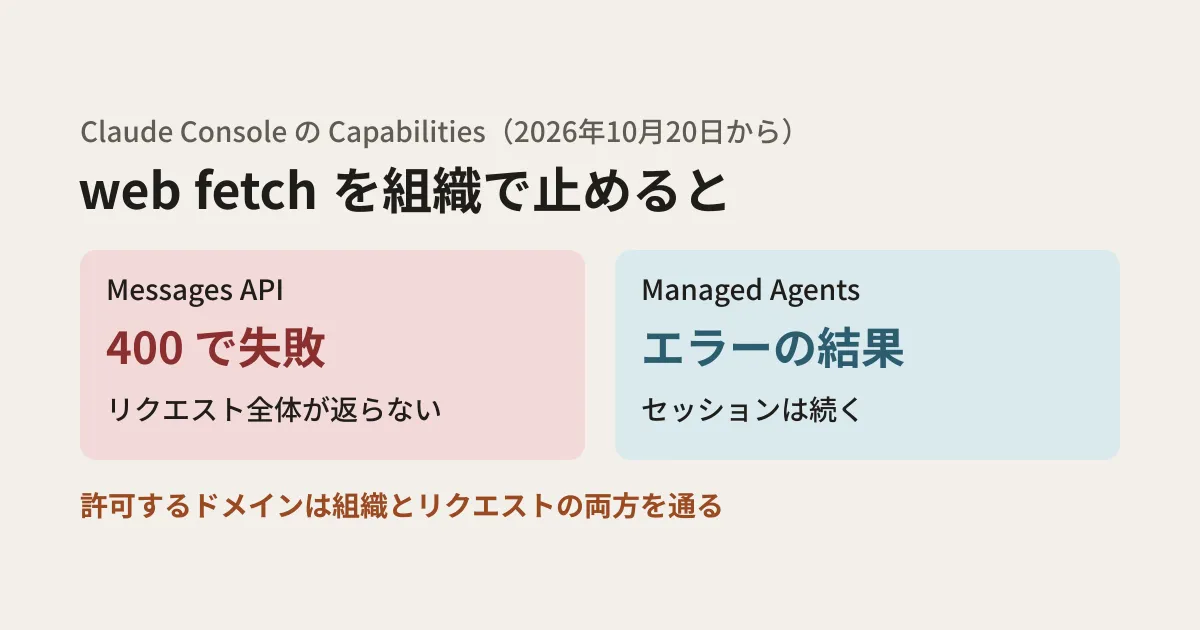
According to the Claude Platform release notes, since October 20, 2026, organization admins have been able to disable web fetch on the "Capabilities" page in the Claude Console. If web fetch stays enabled, the same page also lets them decide which domains are allowed or denied. Drawing on the official documentation, this article sorts out how the API behaves when web fetch is disabled and how the setting combines with the allowlists specified in requests.
Behavior when disabled differs by API type
The same "disable" setting produces different results depending on how you call the API.
| Calling method | When web fetch is disabled | When a URL is not allowed |
|---|---|---|
| Messages API | The entire request containing the web fetch tool fails with a 400 (invalid_request_error, with a message that web fetch is not enabled) | The tool result becomes a url_not_allowed error, and Claude continues generating |
| Managed Agents | The web_fetch call returns an error result, and the session continues | Likewise an error result. Redirect target URLs must also pass both the organization and agent lists |
The fact that "the entire request fails" in the Messages API is the difference with the greatest impact on integrators. If your design always attaches the web fetch tool to requests, then once an admin disables web fetch, every request fails, including questions that have no need to read a URL.
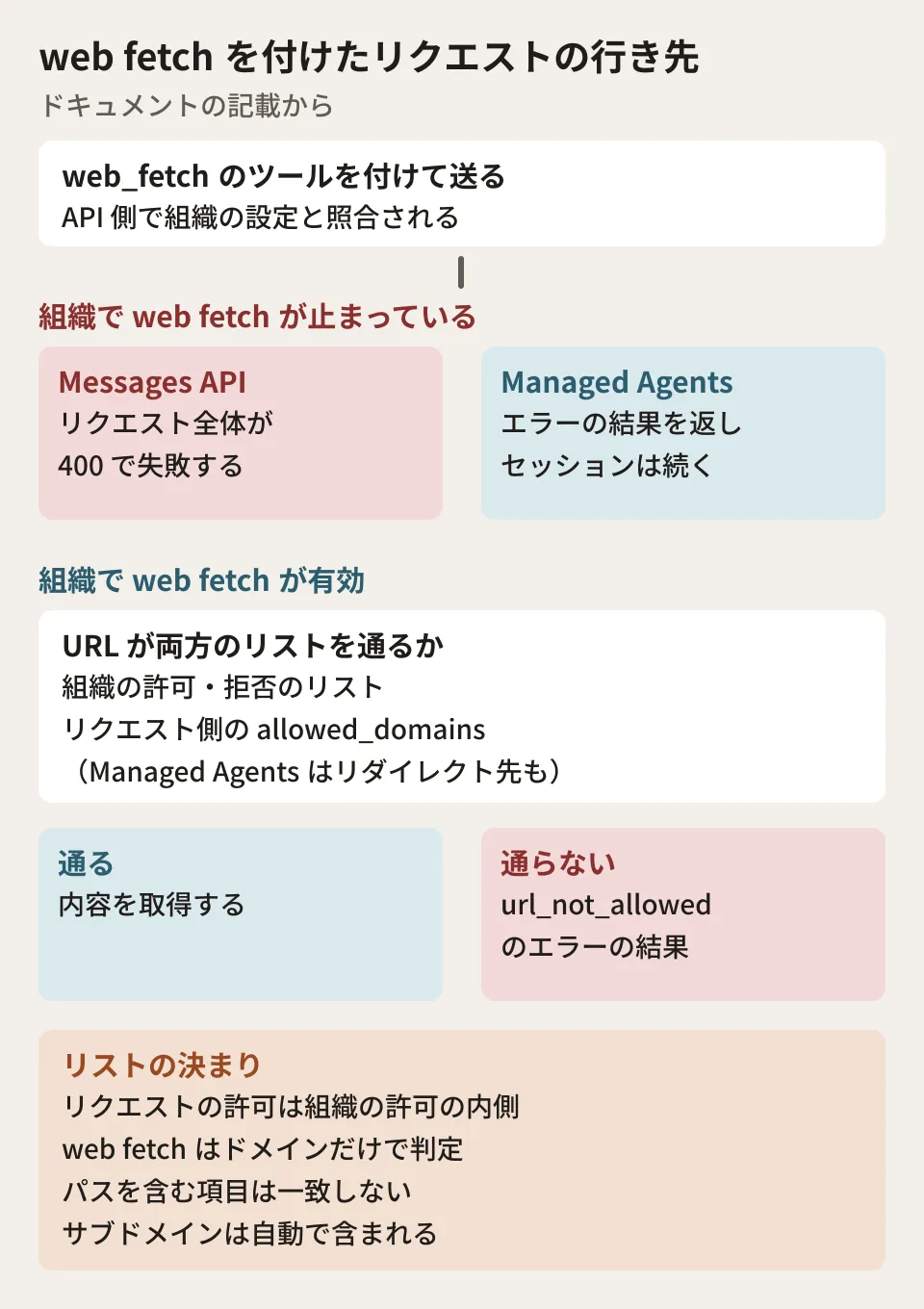
A URL must pass both the "organization" and "request" allowlists
The rules when an organization restricts domains while keeping web fetch enabled are as follows, excerpted from the "Domain filtering" section of the documentation.
- The
allowed_domainsspecified in a request must fall within the scope of the organization's allowlist. Any item outside that scope causes a validation error - If a request's allowlist includes a domain the organization denies, a 400 error occurs and the conflicting item is indicated
- Write domains without the scheme (
https://); subdomains are included automatically (example.comalso coversdocs.example.com) - Web fetch matches on the domain only, so entries containing a path do not match web fetch URLs
allowed_domainsandblocked_domainscannot be used together in a single request
Note that entries containing a path are handled differently from web search (the search tool). Search allows narrowing by path, as in example.com/blog, but the same entry written for web fetch does not match. If the person who decides the organization's allowlist and the developer who builds the requests are different people, make sure both are aware of this difference.
The documentation warns that filters could be bypassed with lookalike characters in internationalized domain names (for example, аmazon.com using the Cyrillic letter "а"), and recommends using ASCII domain names in allow and deny lists and checking existing entries for non-ASCII characters.
Why admins want to restrict web fetch
The web fetch documentation warns that enabling web fetch while having Claude handle untrusted input and sensitive data in the same environment carries a risk of data exfiltration. As a countermeasure, Claude cannot fetch URLs that appear only in its own output; it can fetch only URLs that have already appeared in the conversation (user messages, client-side tool results, and earlier search or fetch results). It also does not fetch URLs that appear to contain credentials such as API keys or passwords, unless those credentials are in the system prompt or a user message.
Stating that some risk still remains, the documentation lists measures such as disabling web fetch entirely, limiting the number of uses with max_uses, restricting it to safe domains with allowed_domains, and excluding client-side tool results from the URL sources with url_sources. The new organization setting lets admins apply two of these, "disabling" and "restricting domains," across the entire organization without relying on individual requests.
How web fetch in Managed Agents fetches only URLs that appeared in the conversation, and how to fix the resulting errors, are covered in web_fetch restrictions in Managed Agents and how to fix them. The same article also covers the point that, in environments with the limited network setting, allowed_hosts also applies to web fetch.
What integrators should have in place
From here on are the editorial team's suggestions. When an admin changes settings, users may see only symptoms such as "the AI doesn't answer" or "it can't read the URL." Preparing the following on the integration side makes it faster to isolate the cause.
- Don't attach the tool to requests that don't need web fetch: If you stop attaching web fetch to questions that contain no URL, disabling it at the organization level affects only the URL-reading feature
- Check the content of 400 responses to tell whether web fetch is the cause: When you receive a 400 saying web fetch is not enabled, handle it separately from other 400s, for example by removing the tool and resending, or by telling the user "This feature has been disabled by your organization's settings"
- Log
url_not_allowed: Errors in tool results arrive inside a 200 response, so you won't notice them if you look only at the HTTP status. According to the documentation, this code is returned not only for organization and request lists but also for Anthropic-side restrictions (private addresses,robots.txt, and URLs that appear to contain credentials you have not provided). Logging which URLs were rejected gives you a clue for telling whether the allowlist is missing an entry, the rejection was intended, or another restriction applied - Keep the request-side allowlist inside the organization's allowlist: When the organization's allowlist changes, domains written in requests may fall out of scope and cause validation errors. Give the person who changes the organization settings a list of the domains your system uses
If you are reviewing error handling along with API version or SDK updates, see also the article on Claude API 2026-10-21 and the new major SDK versions.
Scope of verification
On October 31, 2026, we directly opened and checked the Claude Platform release notes (the October 20, 2026 entry) and the documentation pages "Web fetch tool," "Server tools" (Domain filtering), and "Restrict web search and web fetch domains" (Managed Agents) on platform.claude.com (document research). On November 6, 2026, we rechecked the same materials and confirmed that they match the text of this article and that release notes after October 20 contain no changes to the organization settings for web fetch. We have not verified the Capabilities page screen in the Claude Console, which roles can change the setting, the actual wording of the 400 response, how long changes take to take effect, or whether the same setting applies on other offerings such as Claude Platform on AWS. The preparations for integrators are suggestions compiled by the editorial team from the documentation.
For the design of permissions and network access when building external web retrieval into internal AI tools, or for reviews of existing integrations, please contact us through consultation on development, AI, and automation.