Once you start running AI code reviews automatically, the cost is determined by the number and depth of reviews. If your settings run the most thorough review on every pull request, the bill at the end of the month will be larger than expected. Conversely, if even important pre-release changes get only a shallow review, there is little point in having introduced AI.
GitHub Copilot code review has a "review effort level" setting for choosing how thorough a review is. On October 28, 2026, GitHub announced the most thorough level, "Max", as a public preview in the GitHub Changelog. On the same day, GitHub's documentation added a description of Max and instructions for "Maximum review effort", which caps the levels that can be used. Until then, the documentation had described Max as "Coming soon". According to the changelog, it is available on the Copilot Pro, Pro+, Max, Business and Enterprise plans (the "Max" review level and the "Copilot Max" plan are different things). In this article, based on the changelog and documentation we checked on November 11, 2026, we explain how to choose a level and how to manage costs.
Three levels and the typical cost per review
The documentation describes them as follows.
- Lite: The standard review. Quickly flags common issues such as bugs, vulnerabilities and inconsistent style
- Balanced: Routes the review to a stronger reasoning model and takes more time to examine complex logic, security-sensitive code and changes that span multiple services. Default
- Max: The most thorough review. Uses multiple strong reasoning models. In public preview and subject to change
The changelog's description is a little more specific. It says Max runs independent reviews with multiple models from different providers, and a coordinating agent reconciles the results into a single review. For Balanced, the November 6 changelog says it "now reviews with three models, and another model consolidates the results". As of November 11, the documentation's description of Balanced (routing to a stronger reasoning model) had not been updated to reflect this change.
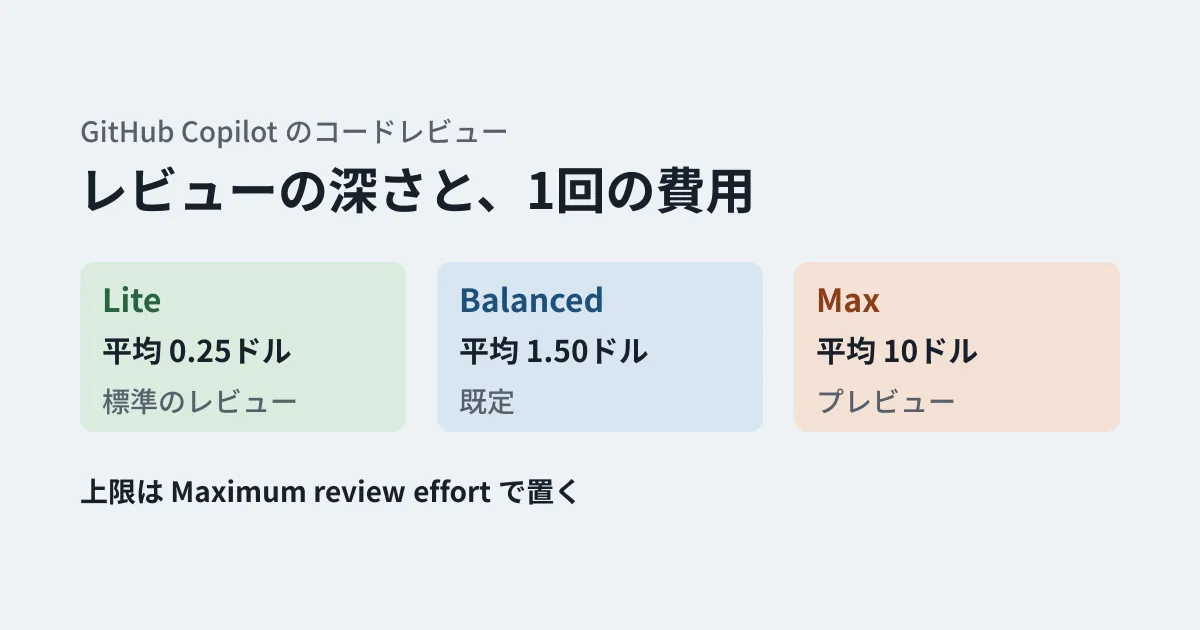
The documentation also provides a table of the typical AI credits (1 credit = US$0.01) consumed by a single review.
| Level | Typical range per review | Typical average per review |
|---|---|---|
| Lite | US$0.05 to US$1 | US$0.25 |
| Balanced | US$0.25 to US$5 | US$1.50 |
| Max | US$1.50 to US$25 | US$10 |
The documentation notes that these are estimates, and that costs increase with larger pull requests and with more repository custom instructions. It also says actual costs may fall outside these ranges and may change as models change. These figures do not include the GitHub Actions run time (minutes) used by reviews. Balanced and Max may also use slightly more run time than Lite.
Comparing typical averages, one Max review costs as much as 40 Lite reviews, or about 7 Balanced reviews.
How the level used is determined
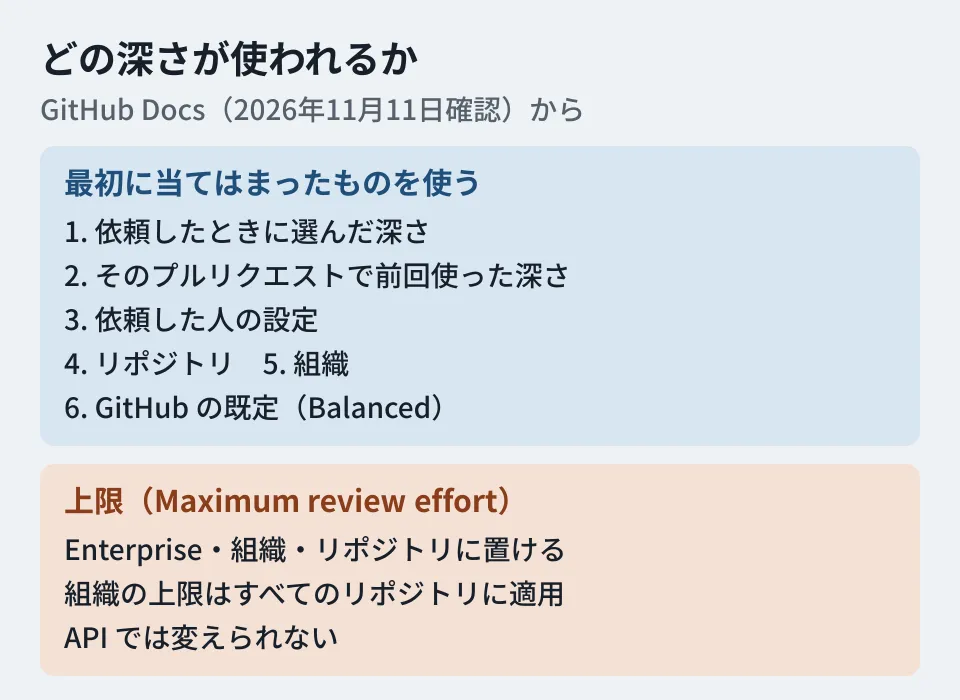
The level can be set for users, repositories, organizations and enterprises. According to the documentation, Copilot checks the following in order and uses the first one that applies.
- The level chosen when requesting the review
- The level used last time on that pull request
- The level the requester has chosen in their own settings (for a new pull request, the author; when a draft is marked "Ready for review", the person who did so)
- The level set for the repository
- The level set for the organization (for personal repositories, the owner's setting)
- GitHub's default (Balanced)
Even if the organization's default is Lite, pull requests created by someone who has chosen Max in their personal settings will use Max under the third rule. A default only determines "the level that is used"; it is not a cap. The enterprise default level is not part of this list. The setup instructions say that "organizations and repositories can override the enterprise default", but they do not say where in the list it is checked.
The level a review ran at is shown in the pull request overview comment after the review. According to the November 6 changelog, this information has been consolidated at the end (footer) of the overview comment.
The default became Balanced in a documentation update on October 2, 2026. Before that, the documentation said "The default is Lite. Some owners get Balanced." This is the date of the documentation update; we have not been able to confirm the date the default actually changed. Organizations that have not configured anything may have been running on Balanced since October.
Where caps can be set
To keep costs down, use a cap rather than a default. "Maximum review effort" lets you choose from No limit, Lite, Balanced and Max, and is available in the following three places.
- Repository: Copilot → Code review in the repository's Settings. The cap on the levels that can be used in that repository
- Organization: The organization's settings. The documentation says "this cap applies to all repositories in the organization. Repositories can choose the selected level or a lower one, but cannot exceed it"
- Enterprise: The enterprise policy. Organizations and repositories can choose levels at or below the cap
The changelog announcing Max also says that levels above the cap cannot be used within that enterprise, organization or repository. If you set the organization's cap to Balanced, Max cannot be used in that organization's repositories even by someone who has chosen Max in their personal settings. However, neither the changelog nor the documentation says which level is used instead when a personal setting or a level specified at request time exceeds the cap. We have not checked the actual behavior.
With the November 6, 2026 changelog and documentation update, code review settings can now be managed through the REST and GraphQL APIs. Enterprises can enable or disable code review; organizations can enable or disable it and set the default level and runner settings; repositories can set the level and whether to use custom instructions and MCP servers. On the other hand, the documentation says "Maximum review effort", billing settings and approval-related settings cannot be changed through the API. Even if you manage many repositories in bulk, you will need to set caps in the UI. Also, according to the changelog, the APIs for enterprise and organization settings do not support GitHub Apps or fine-grained personal access tokens.
Whose usage it counts toward
Along with caps, it is worth checking how usage is billed. The documentation says the following.
- By default, when a repository requests a review automatically, the usage is attributed to the pull request author. When someone else requests one manually, it is attributed to that person
- For pull requests created by Copilot cloud agent, usage is first attributed to the people involved in the change (co-authors). Pull requests created by other bots, and reviews requested by bots, are billed directly to the organization
- Usage by organization members with a paid Copilot license is drawn from that person's allowance by default. Organization or enterprise owners can also choose to bill it to the organization
- If you enable the setting (policy) that lets people without a Copilot license use reviews, their usage becomes additional paid usage for the organization or enterprise. It does not count against individual budgets. This setting is available to Copilot Business and Enterprise organizations
- On Copilot Business and Enterprise, reviews stop when the billed entity's budget is reached
The setting that opens reviews to unlicensed users could be used in repositories where external partner companies submit pull requests. In that case, the partners' usage is billed to the organization. We covered the overall pricing structure in our article on Copilot Fusion.
An example of how to decide (editorial suggestions)
The following are our editorial suggestions based on the changelog and documentation. We have not switched levels in a real organization to compare costs or review quality.
Decide the organization's cap first. In an organization that has not set a cap, check in the UI what value it currently has. Before trying Max, the safe order is to set the organization's cap to Balanced and handle only the repositories that will use Max individually. However, because the organization's cap takes precedence over repository settings, if some repositories need Max, you will have to set the organization's cap to Max and then put individual caps on the other repositories.
Choose Max at request time. The documentation recommends using Max for high-risk or release-related changes. Rather than setting the default or personal settings to Max, choosing it only when requesting reviews on important pull requests limits where it is used.
Make a monthly estimate. Multiplying the typical average by your monthly number of pull requests gives a rough sense of scale. For example, reviewing 200 pull requests a month, all at Balanced, comes to US$300 at the typical average (Actions run time is separate). Since costs vary with pull request size, compare this with your actual bills and revise it. According to the November 6 changelog, code review agent sessions now show the AI credits consumed by that review. This gives you material for comparing estimates with actual usage.
For agreements to make when having an external development company introduce AI reviews, see our article on checkpoints for introducing AI code review.
Scope of verification
On November 7, 2026, we reviewed the source of "GitHub Copilot code review" and "Configuring code review by GitHub Copilot" on main in GitHub's documentation repository (github/docs), along with the variables they use (
data/variables/copilot.yml,data/variables/product.yml) and the estimate table (data/reusables/copilot/code-review/estimated-consumption.md). We also read the diffs of commits 4073a4a (October 2, 2026, default changed to Balanced), 8e7396e (October 28, addition of Max and Maximum review effort) and 623260f (November 6, API description) (document research). On November 11, 2026, we confirmed that the two live pages on docs.github.com match the source, and reviewed two GitHub Changelog posts (the October 28 Max announcement and the November 6 update on the API and overview comments). We did not configure settings in a real organization, test how levels above the cap are handled, or check billing.
GleamHub helps with how to build AI reviews into your development process and manage their costs as part of our development, AI and automation consulting. What needs deciding depends on your team structure, so please reach out via our contact form.
References
- GitHub Changelog — Copilot code review: Merge with confidence with Max and approvals (October 28, 2026)
- GitHub Changelog — Copilot code review: API management and review overview updates (November 6, 2026)
- GitHub Docs — GitHub Copilot code review
- GitHub Docs — Configuring code review by GitHub Copilot
- github/docs — commit 8e7396e (GitHub Universe 2026 updates)
- github/docs — commit 4073a4a(Update Copilot code review default effort level to Balanced)
- github/docs — commit 623260f(Mention Copilot code review API support in CCR docs)