You compile internal procedures into a SKILL.md for a coding agent. It worked well when you tried it once in chat, so you shared it as is. But when someone else uses it, the skill does not get loaded, or it gets loaded and the results do not change. The more skills you add, the harder it becomes to tell which ones are working and which are merely crowding the context.
On November 3, 2026, Google Cloud published five principles for evaluating skills on its official blog, drawing on its experience measuring the skills in its own Google Cloud development plugin. In this article, we organize that content into a form that development teams maintaining internal skills can use. The plugin's contents are the subject of a separate announcement, so we do not cover them and focus on how to evaluate skills. We covered the skill collection Google has published in our article on Google's official Agent Skills repository.
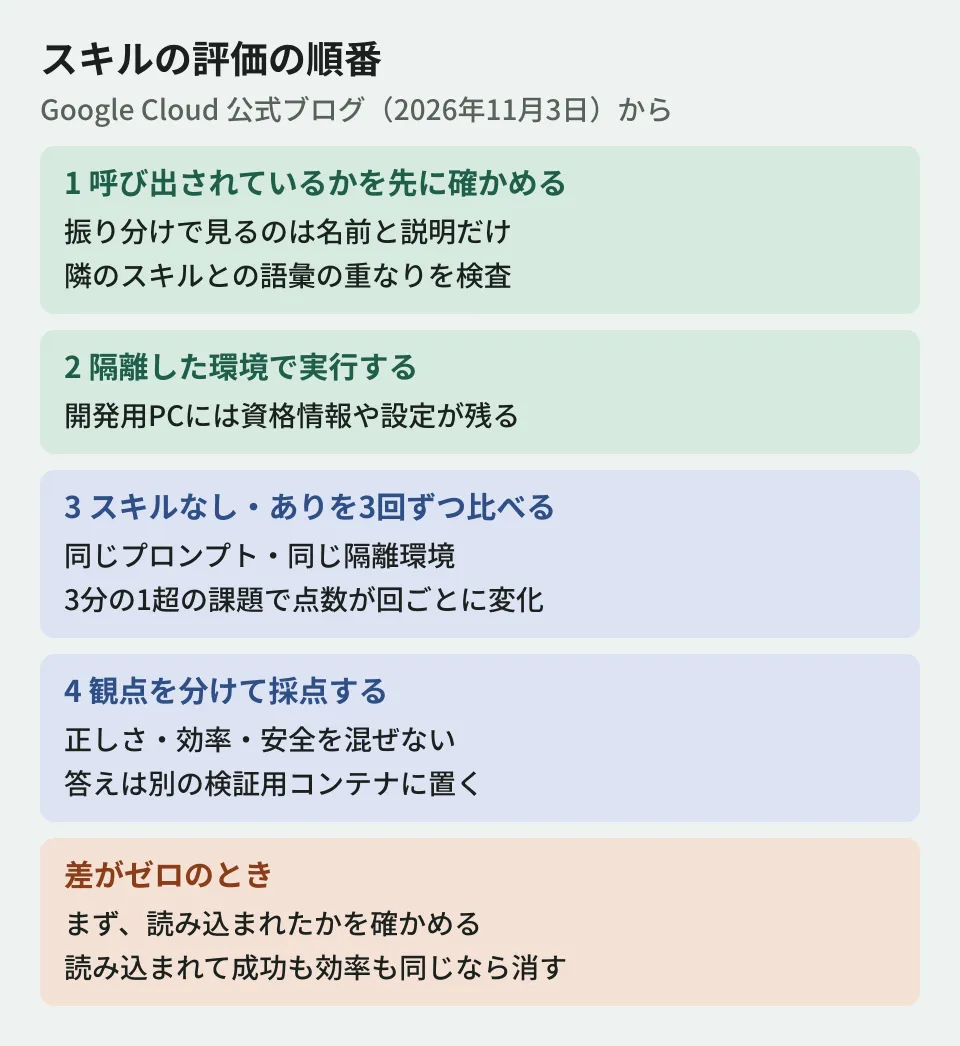
1. Before fixing the content, check whether the skill is being invoked
When the result is the same with or without the skill (a difference of zero), it is tempting to rewrite the body. The blog recommends first checking whether the agent loaded the skill at all.
The reason is that coding agents do not read the body of SKILL.md from the start. At the routing stage, they look only at the short name and description in the frontmatter. The Agent Skills specification likewise states that name and description are loaded at startup, and that the body is loaded when the skill is activated. The blog says that once you have more than a dozen or so skills, two failures compound.
- Under-invocation: the description describes the internal implementation rather than the user's intent
- Hijacking by a neighboring skill: a neighboring skill's broad description (for example, "helps with cloud deployment") picks up the request first
For this check, Google has released an open source tool called Skill Reach. According to the blog, it validates manifests, calculates vocabulary overlap with similar skills, and tests routing on multiple agents (Claude Code, Google Antigravity, OpenAI Codex). According to the repository README, reach lint checks offline for frontmatter defects and description length boundaries, and reach overlap analyzes vocabulary conflicts without calling a model.
The blog and the README also differ in places. The README as of November 6, 2026 lists Google Antigravity, Claude Code, Goose, and Pi as supported targets for tests that actually run a model. OpenAI Codex appears in the list of targets for static checks such as reach lint, but we could not find an implementation for Codex in the repository's src/reach/runtime. If you plan to try routing on Codex, first confirm support in the version you have. The README also states that it is not an officially supported Google product.
Stating that dangers embedded in Markdown text, such as prompt injection and data exfiltration, are not found by ordinary code checks, the blog also suggests using it alongside NVIDIA's scanner SkillSpector (which is also used within the SkillEvaluator evaluation framework).
A note on obtaining it: The blog and the project's documentation site show an example of installing it with uv tool install skill-reach, but when the editorial team checked PyPI on November 4 and November 6, 2026, no package named skill-reach was found (404). The README's procedure is to clone the GitHub repository and run uv sync, or to run uv tool install . in the cloned location. To avoid installing something else with the same name, it is safer to follow the README's procedure.
2. Do not measure on a development PC
The blog says that results measured on a developer's PC cannot be trusted, because the PC holds leftover state that contaminates the evaluation.
- Cached Google Cloud credentials
- Projects set in environment variables, and shell history
- Rules that apply to the whole environment
Even an agent without the skill can pass a deployment test by using a default project ID or token left in the shell. That hides the very failures the skill is supposed to solve. The blog also shows internal test results in which scores dropped when the same test was run on a PC under load. The blog itself runs its evaluations inside isolated containers.
3. Compare with and without the skill over multiple runs
The blog says that running something once and taking a screenshot of success is not evaluation, because agents that use tools branch on every command exit code and output. In the search investigation described in the blog, scores changed on more than one-third of the test tasks even when the same code and prompt were run back to back.
So, using the same prompts and isolated environment, you run without the skill (A) and with the skill (B) multiple times each and compare them. The blog shows an example that compares three runs each using the evaluation feature of Claude Code plugins (claude plugin eval). The following command follows the procedure in the official documentation (run it at the plugin root).
claude plugin eval init
claude plugin eval . --runs 3
The blog's example passes claude plugin eval init ./my-plugin and a path, but the official documentation's procedure is to run claude plugin eval init at the plugin root, and even with --help, the argument to init is [name], not a path. According to the official documentation, the default number of runs is three, runs without the plugin are also performed by default, and the scores for WITH and W/OUT are output along with Δ, the difference between them. Model calls come to roughly twice "number of cases × number of runs", and they are charged to your plan's usage allowance or API fees under your usual authentication.
Each run executes in a temporary home directory, and most of the user's settings and shell environment variables are not passed in. However, it still runs on the PC of the person who ran it. If you also want to avoid the effects of load, running it in an isolated environment such as CI is in line with principle 2 (editorial team's summary).
The blog describes the tendencies seen in this comparison as follows. Even without the skill, many runs succeeded in deploying, but they wasted time guessing outdated arguments and failing. Conversely, if neither success nor efficiency changes, the model already has that capability. In that case, the blog says, the skill is a "context tax" and can be deleted.
4. Prevent scoring cheats
When evaluation is connected to an automated optimization system, agents may cheat on the scoring. In the blog's experiment, correctness (0.95) and token efficiency (0.05) were mixed into a single score, so a candidate that read the answer file directly from disk gained an advantage over an honest candidate that took the trouble to search.
The blog lists three countermeasures.
- Place test data, scoring scripts, and answers in a separate verification container that receives the deliverables after the agent's container finishes
- Keep SkillEvaluator's five dimensions (correctness, discoverability, efficiency, effectiveness, and safety) independent, so that token savings do not offset failures or safety violations
- Fail any trial that reads a Kubernetes service account token or a cloud metadata API, and mask OAuth tokens in saved records
5. Write work habits instead of pasting reference material
The blog says that the difference between skills that raised scores and those that did not was their content. Skills that simply pasted public API documentation had almost no effect. The model has already learned public documentation, and long documents increase the time to first response and bury important constraints.
What raised the efficiency scores was short work habits.
- Before a command that changes state, check the arguments in that subcommand's help
- Instead of loading many skills at once, fetch only the procedures you need from a lightweight index
- Authenticate with Application Default Credentials rather than service account JSON keys
If you keep evaluations running in CI, you can redo the same comparison when you upgrade the model. The blog concludes that skills whose difference drops to zero on a new model should be deleted.
Editorial summary: applying this to internal skills
Here is an order in which teams that turn internal procedures into skills can start.
- List your skills' names and descriptions, and check whether they are written in users' language and do not overlap with neighboring skills
- Prepare an isolated environment with no credentials, and run without and with the skill three times each on the same tasks
- For skills that show no difference, confirm that they are being loaded, then delete them or merge them with similar skills
We cover standardizing the skill format in our article on the donation of Agent Skills to AAIF and SKILL.md validation, and how to set acceptance criteria for AI features in our article on LLM evaluation and acceptance criteria.
Scope of verification
On November 4 and November 6, 2026, we directly retrieved the Google Cloud official blog post "Five rules for evaluating agent skills before they bloat your context window" and checked the five principles, figures, and commands against the original text (document research). We took the publication date to be November 3, 2026, as given in the page's structured data and the RSS feed (the page itself displays November 4). For Skill Reach, we confirmed the installation method, supported targets, and the descriptions of
reach lintandreach overlapfrom the README and file list in the GitHub repository, and we checked whether the PyPI package exists using the pypi.org API. We confirmedclaude plugin evalfrom the official Claude Code documentation and--helpin version 2.1.288. We did not run Skill Reach, SkillSpector, or SkillEvaluator, and did not run comparisons withclaude plugin eval. The figures in the blog are results from Google's internal tests, not general values.
For the design of evaluations when bringing AI agents into your development workflow, please contact us through consultation on development, AI, and automation.