When answering an inquiry such as "Have you addressed CVE-2026-XXXX?", looking at a package's version number does not immediately tell you whether it is the fixed version. That is because Ubuntu releases versions that incorporate fixes (with a trailing number such as 10.42-4ubuntu2.2) while keeping the same upstream version number.
Ubuntu has a command for this check called pro fix. In this article, using the Ubuntu security notice USN-8974-1 (a PCRE2 vulnerability), published on November 3, 2026, as an example, we explain how to read the output and what to watch out for, based on the results of actually running pro fix in the editorial team's test container.
What pro fix tells you
pro fix is a feature included in Ubuntu Pro Client (the pro command). According to the pro fix --help description, it checks and resolves CVEs (common vulnerability identifiers) and USNs (Ubuntu security notices) on this machine. As the argument, you pass a number in one of the formats CVE-yyyy-nnnn, CVE-yyyy-nnnnnnn or USN-nnnn-dd.
The official documentation "How to check if a system is affected by a CVE/USN?" shows a procedure that starts with --dry-run, which checks the result without changing anything. The output lists, in order, the description of the CVE or USN, the affected packages, how to fix them, and finally whether the issue was resolved.
Results from actually running it
We checked this on November 6, 2026, in an Ubuntu 24.04.5 LTS container. The first stumbling block was that the pro command was not installed. The official documentation says Ubuntu Pro Client is pre-installed on all Ubuntu systems, but it was not present in the container we used for verification. We installed it with apt install ubuntu-pro-client, and the version is 38ubuntu0~24.04.
At installation time, the PCRE2 library (libpcre2-8-0) was 10.42-4ubuntu2.1. Checking USN-8974-1 with --dry-run produced the following.
USN-8974-1: PCRE2 vulnerabilities
Associated CVEs:
 - https://ubuntu.com/security/CVE-2026-89162
 - https://ubuntu.com/security/CVE-2026-103111
 (ほか6件)

Fixing requested USN-8974-1
1 affected source package is installed: pcre2
(1/1) pcre2:
A fix is available in Ubuntu standard updates.
{
  apt update && apt install --only-upgrade -y libpcre2-16-0 libpcre2-32-0 \
  libpcre2-8-0 libpcre2-dev libpcre2-posix3
}

✔ USN-8974-1 is resolved.
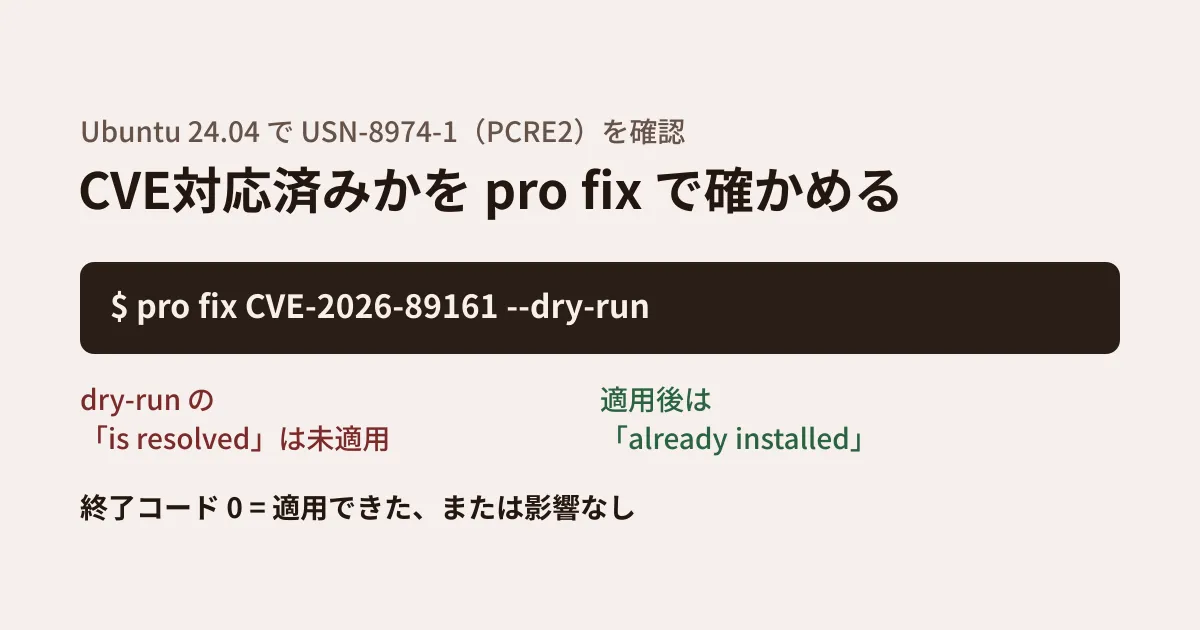
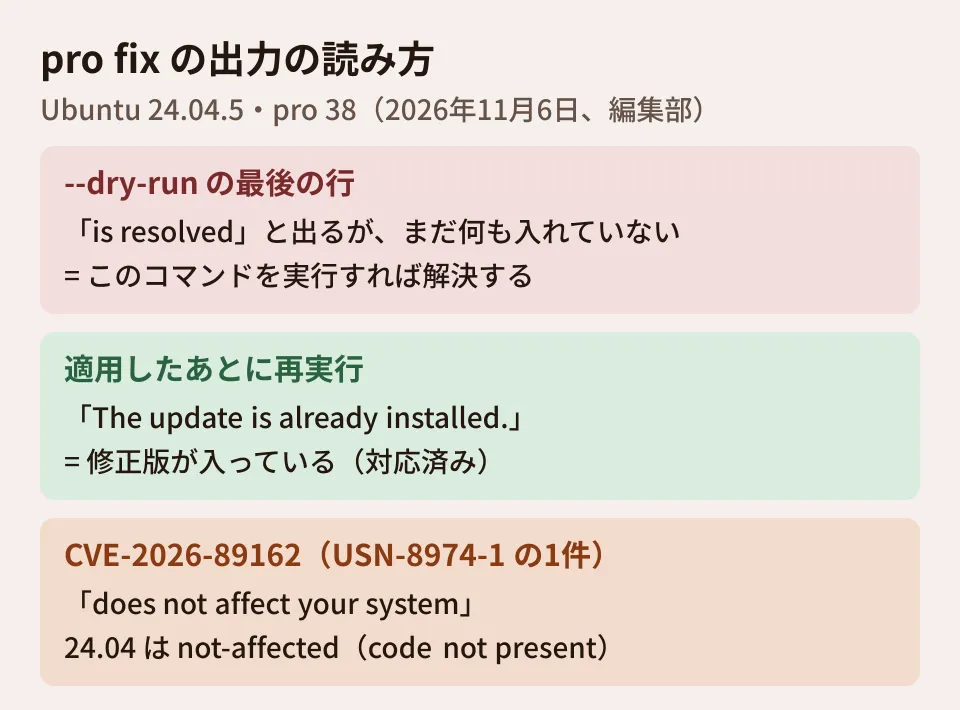
Despite --dry-run, the last line says "is resolved." This means "running this command would resolve it"; nothing has been installed yet. In the example in the official documentation as well, dry-run output likewise ends with "is resolved." When using this in a report, do not judge something as "addressed" from this line alone.
Next, when we ran one of the CVEs in this USN (CVE-2026-89161) without --dry-run, the library became 10.42-4ubuntu2.2. Running the same command again then showed "The update is already installed." Rechecking USN-8974-1 with --dry-run showed the same message. You can tell whether something has been addressed from this message.
The answer changes depending on whether you ask by CVE or by USN
USN-8974-1 lists eight CVEs. Checking one of them, CVE-2026-89162, with pro fix produced the following.
CVE-2026-89162: PCRE2 vulnerabilities
 - https://ubuntu.com/security/CVE-2026-89162

No affected source packages are installed.

✔ CVE-2026-89162 does not affect your system.
PCRE2 is installed, yet the result is "not affected." The reason can be found in Ubuntu's CVE data (https://ubuntu.com/security/cves/CVE-2026-89162.json). This CVE was judged "not-affected (code not present)" on Ubuntu 24.04 (noble) and 22.04 (jammy), meaning the vulnerable code is not included. Fixed versions have been released for 26.04 (resolute) and 26.10 (stonking). The other seven CVEs were fixed (released) on 24.04 as well, in 10.42-4ubuntu2.2.
A USN spans multiple Ubuntu versions and lists the related CVEs together. So not every "CVE listed in the USN" necessarily affects the version you run. When answering an inquiry, the reliable approach is to run pro fix --dry-run with the exact CVE number you were asked about (without --dry-run, the update is applied) and check the judgment for your version.
How to use it when checking multiple machines
Judge by the exit code. According to pro fix --help, there are three exit codes.
- 0: The fix was applied, or the system is not affected
- 1: The fix cannot be applied
- 2: The fix was applied, but a reboot is required for it to take effect
In our verification, the exit code was 0 both with --dry-run and in the not-affected case. Since 0 covers both "not affected" and "fixed (or fixable)," use the JSON output below if you want to report them separately.
Get the plan as JSON. The top of the pro security-status output advises using the pro api command or pro security-status --format json in scripts. We were able to get the fix plan as follows.
pro api u.pro.security.fix.cve.plan.v1 \
  --data '{"cves": ["CVE-2026-89161", "CVE-2026-89162"]}'
In the returned JSON, current_status was fixed for the already applied CVE-2026-89161, and it was not-affected for the unaffected CVE-2026-89162. According to the official description, current_status indicates the current state before the plan is run. In environments with many machines, collecting these values into a list gives you a record to back up your answers to inquiries.
After a library update, check whether the services using it need a restart (the editorial team's suggestion). With a shared library such as PCRE2, processes that are already running are thought to keep using the old library even after the update. In this verification, we did not go as far as checking which services need a restart. For web servers and other software that uses regular expressions, it is safer to plan a restart during a maintenance window. We also covered how to check this, using an nginx vulnerability as an example, in our article on nginx USN-8955-1. For plans to upgrade the Ubuntu version itself, see our article on upgrading from 24.04 to 26.04.1.
Scope of verification
On November 6, 2026, in an Ubuntu 24.04.5 LTS container (with administrator privileges), we installed ubuntu-pro-client 38ubuntu0~24.04 and ran
pro fix(--dry-run, actual application, and a rerun after application),pro security-statusandpro api u.pro.security.fix.cve.plan.v1(hands-on testing). In this container, the defaultpython3was a separately installed 3.13, so we launchedprowith the system Python 3.12. We did not attach the machine to Ubuntu Pro. We checked USN-8974-1 and the judgments for its eight CVEs in the JSON on ubuntu.com (notices.json, cves/*.json), and compared how to read the output against the official Ubuntu Pro Client documentation. We did not try fixes that require enabling Ubuntu Pro (ESM), fixes that require a reboot, behavior on other Ubuntu versions, or running and aggregating across multiple machines.
GleamHub's development, AI and automation consultations cover how to handle server vulnerabilities and how to set up maintenance arrangements. The approach varies with the number of servers and their configuration, so please get in touch through the contact form.
References
- Ubuntu — USN-8974-1: PCRE2 vulnerabilities
- Ubuntu — CVE-2026-89162
- Ubuntu — CVE-2026-89161
- Ubuntu Pro Client — How to check if a system is affected by a CVE/USN?
- Ubuntu Pro Client — Common scenarios when using pro fix to solve a CVE/USN
- Ubuntu Pro Client — The Ubuntu Pro API reference guide
- Ubuntu Pro Client — How to interpret the output of the fix plan API endpoint