"I have never touched a design tool, but I want to build presentation slides, service landing pages, or app screen mockups myself"—a tool has emerged that tackles this challenge head-on. That tool is Claude Design, released by Anthropic Labs on April 17, 2026.
Claude Design is a conversational AI design tool that allows you to create visual deliverables such as slides, landing pages (LPs), and UI prototypes simply by providing instructions via chat. Powered by Claude Opus 4.7, it is currently available as a research preview for Claude Pro, Max, Team, and Enterprise users.
This article provides a clear overview for beginners, covering everything from what Claude Design is to practical prompt examples, differences from existing tools like Figma, and pricing and getting started.
What is Claude Design? — Understanding it in three lines
In short, it is a tool where you "give instructions in plain words and refine designs through conversation." Claude renders generated results right on screen (the canvas), and you iterate on revisions through ongoing dialogue.
| Item | Details |
|---|---|
| Provider | Anthropic Labs |
| Release date | April 17, 2026 |
| Engine | Claude Opus 4.7 |
| Availability | Research preview (Pro / Max / Team / Enterprise) |
| Operation method | Natural language (text) conversation |
| Deliverables | Slides, LPs, UI prototypes, one-pagers, etc. |
| Strengths | Create on-brand deliverables in minutes even without design experience |
Claude originally featured Artifacts, which allows generated code and designs to be displayed and executed in a separate window. It is easiest to understand Claude Design as a "design-specialized edition" that evolves and optimizes Artifacts specifically for design creation.
Five types of deliverables you can create with Claude Design
Claude Design excels primarily at creating the following five types of outputs:
- Slides and presentation decks — Provide an outline, and it automatically generates slides complete with charts and diagrams. You can export them to PPTX or Canva.
- Landing pages (LPs) — Compare multiple proposals with varying structures and tones at once, such as "three landing page variations announcing a new feature release."
- UI prototypes — Turn static mockups into clickable, interactive prototypes. You can immediately share them internally or run user tests without code reviews or pull requests.
- One-page documents (one-pagers) — Consolidate sales proposals or service overviews into a single, on-brand page.
- Design system enforcement — Automatically apply colors, typography, and components conforming to your team's brand guidelines across all projects.
The concept of generating professional-grade UI from text is shared with Google's Stitch (an AI design tool that automatically generates UI from text). Claude Design distinguishes itself by bundling slides and LPs, automatic design system application, and handoff to implementation.
How to use it — The basic "4 steps"
The workflow is remarkably simple, coming down to the following four steps:
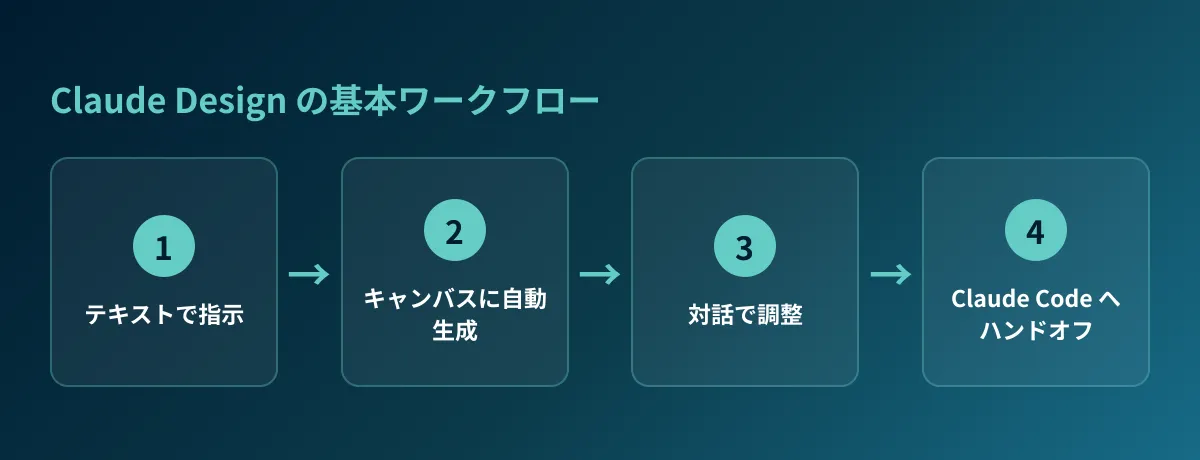
- Instruct — Tell it what you want to create in text. Beyond plain text, you can upload images, DOCX / PPTX / XLSX files, use web capture to pull in elements from your own website, or even have it reference a codebase.
- Receive the first draft — Claude renders the initial version onto the canvas.
- Refine through conversation — Request revisions conversationally, such as "make the button bigger" or "make the color palette more muted." You can also fine-tune using inline comments, direct editing, or custom sliders provided by Claude.
- Export or hand off — Once finished, choose between sharing via internal organizational URL, saving to folders, exporting to Canva, PDF, PPTX, or HTML, or handing off to Claude Code as described below.
The key is that after step 2, you can repeat step 3 as many times as you like. It is designed so you do not need to write perfect instructions from the start; you iteratively guide it toward your ideal output through conversation.
Seeing Claude Design in action — Three practical prompts
To answer the question "How should I actually write prompts?", here are three concrete prompt examples.
Example 1: Creating three variations of a new service landing page
BtoB 向けの勤怠管理 SaaS「TimeGleam」の新規リリース用 LP を 3 パターン作って。
ターゲットは中小企業の管理部門。
- ファーストビューに「打刻のストレスをゼロに」というコピー
- 料金・導入事例・FAQ のセクションを含める
- A 案は信頼感重視の青系、B 案はやわらかい緑系、C 案はモダンな黒×アクセント
スマホ表示も確認できるようにして。
By requesting three proposals with distinct tones together like this, you can compare them side by side and choose a direction. You can also make hybrid adjustments based on your preferred draft, such as "use option B's color palette with option A's layout."
Example 2: Creating internal presentation slides from an outline
来週の経営会議用に「2026 年上期マーケ施策の振り返り」スライドを 10 枚作って。
- 表紙 / サマリー / KPI 推移グラフ / 施策別の成果 / 課題 / 下期の提案 / まとめ
- KPI 推移は折れ線グラフ、施策別成果は棒グラフで図解
- 当社のブランドカラー(ネイビー×ターコイズ)で統一
最後に PPTX で書き出せるようにして。
When you specify both the outline and diagram types, a full set of slides with charts is generated. From there, you simply replace figures and refine wording—letting you get started vastly faster than building from scratch.
Example 3: Interactive prototypes of application screens
読書記録アプリのホーム画面のプロトタイプを作って。
- 上部に「今読んでいる本」のカード、下に「最近読んだ本」のリスト
- 本のカードをタップすると詳細画面に遷移する動きも入れて
- iOS の標準的なデザインに寄せて、ライト/ダークの両方
Rather than static images, Claude Design can generate prototypes you can actually interact with. Because transitions and interactions can be included, a major advantage is that they can be used directly for internal team reviews and user testing.
Differences from Figma, Canva, and v0
We have summarized the question "How does it ultimately differ from existing tools?" in a table.
| Dimension | Claude Design | Figma | Canva | v0(Vercel) |
|---|---|---|---|---|
| Operation method | Natural language text conversation | Manual drawing/layout | Templates + manual editing | Natural language text conversation |
| Primary strengths | Rapid 0→1 prototyping, slides, landing pages, UI | Precise UI/UX design | General design, social media graphics | React UI code generation |
| Design System | Automatic generation from codebase or existing assets | Manual creation and management | Brand kits | Built around shadcn/ui |
| Primary outputs | HTML/PPTX/PDF/Canva/Claude Code | Figma files, developer handoff | Images, PDFs, etc. | React / Next.js code |
| Learning curve | Low (natural language only) | High | Medium | Medium |
Crucially, Claude Design is not meant to replace Figma. While Figma and Canva are professional tools for "crafting every detail," Claude Design is a tool that drastically accelerates "0→1" and "1→7" phases. A pragmatic division of roles is to rapidly build drafts in Claude Design and execute final polish in Figma. A designer's role is shifting from "drawing from scratch" to "refining generated output."
From design to implementation — Handoff to Claude Code
What sets Claude Design apart from other design tools is its bridge to implementation. Once a design is finalized, Claude bundles colors, typography, components, and other assets into a handoff bundle, which can be handed off to Claude Code with a single prompt.
A workflow that previously took at least a week—requesting a designer (3–5 days), then handing off to a frontend developer (3–5 days)—can now materialize in as little as one day through the pipeline of designing screens in Claude Design → implementing via Claude Code. The distance from idea to functional deliverable shrinks dramatically.
For engineers and PMs who have already integrated Claude Code into their development workflows, please also consult the Claude Design and Claude Code Integration Guide, which details the contents of the handoff bundle and the step-by-step collaboration procedure.
If you are looking to launch websites by combining this with no-code automatic site builders, please also check our Comparison of AI Website Generators.
Pricing and how to get started
Claude Design is available as a research preview to subscribers of Claude's paid plans (Pro, Max, Team, and Enterprise). Because it cannot be accessed on the free tier, upgrading to a paid plan is required for serious use.
Getting started is simple:
- Log in to an eligible Claude paid plan.
- Open the Claude Design feature in Anthropic Labs.
- During initial onboarding, import your codebase or existing design files to build your team's design system.
- Simply write prompts and design iteratively through dialogue.
Once created, the design system is automatically applied to all subsequent projects, meaning consistency and efficiency increase the more your team uses it.
Three tips and cautions for mastering it
Finally, here are key tips and considerations for practical usage:
- Be specific with instructions: Rather than saying "make it look nice," explicitly describing elements, colors, and tones—such as "add a gradient background and give the buttons a drop shadow for depth"—drastically improves output accuracy.
- Do not demand perfection on the first try: The initial draft is merely a starting point. Starting rough with the expectation of refining via dialogue is ultimately the fastest approach.
- Set up your design system first: Importing brand colors, logos, and your existing website before creating deliverables significantly reduces inconsistencies in output.
As a caveat, it is currently a research preview, so specifications and availability may change. Furthermore, outputs should be treated as rough drafts or intermediate deliverables; final designs for customer-facing decks or production applications must be reviewed and refined by human eyes.
Conclusion
Claude Design is a conversational AI design tool where "simply communicating in words turns ideas into on-brand slides, landing pages, and UI." To recap the main points:
- Released by Anthropic Labs on April 17, 2026; powered by Claude Opus 4.7
- Generates slides, landing pages, UI prototypes, and one-pagers through conversational text
- Not a replacement for Figma, but a partner that accelerates the 0→1 phase
- Handoff to Claude Code brings design to implementation in as little as one day
- Requires a paid Claude plan (available as a research preview)
For anyone who previously found design intimidating, this tool lowers the barrier to taking the first step. Start by trying the conversational design workflow on a single slide deck for a proposal.
GleamHub, the operator of GH Media, offers consulting and development services for AI-driven website creation and workflow efficiency. If you are looking to incorporate AI into your site redesign or modernize your production workflows, please feel free to reach out via our contact form.
Sources
- Introducing Claude Design by Anthropic Labs(Anthropic)
- Anthropic launches Claude Design, a new product for creating quick visuals(TechCrunch 2026-04-17)
- Anthropic just launched Claude Design, an AI tool that turns prompts into prototypes(VentureBeat)
- What Is Claude Design? Comprehensive Guide to Usage, Differences from Figma, and Practical Applications (AIsmiley)
- Complete Guide to Google "Stitch" (GH Media)
- Claude Code 2026 Latest Feature Summary (GH Media)