On May 4, 2026, Google rolled out the "AI control center" to the Workspace Admin console. It is a new hub allowing administrators to monitor, control, and audit from a single screen how Gemini and external AI agents access Workspace data and what actions they can execute across Gmail, Drive, Docs, Calendar, and more.
Since the beginning of 2026, features where agents write and execute actions directly inside Workspace have surged, including "Workspace Intelligence" and "agent creation via Workspace Studio." AI control center is the layer that provides the governance needed behind the scenes for "the scope of data agents can touch," making it a new feature with significantly higher configuration priority, especially for administrators of Enterprise Standard and Enterprise Plus.
Positioning of AI control center
The new hub appears by default under "Generative AI > AI control center" in the Admin console. Because it is displayed in tenants of eligible editions without administrators needing to opt in, no activation work itself is required.
The issues this hub aims to address can be summarized into the following three points:
| Challenge | Pains in traditional operations | Direction of AI control center |
|---|---|---|
| Visibility into AI usage | Separate screens and logs across Gmail / Drive / Meet | Aggregates usage status into a single screen |
| Security settings by service | Configured separately for Gemini in Meet, Gemini in Drive, etc. | Launch service-specific cards from a single screen |
| Linking with foundational security | Classification labels, DLP, and trust rules on separate navigation paths | Navigate via configuration links from the same hub |
Historically, Workspace security settings were scattered across multiple places: "document management was configured in Drive, email in Gmail, and AI in the Gemini admin console." As AI capabilities and agents increasingly handle data across tools, this approach stems from the concern that admins can no longer track "who is letting which AI access what data, and to what extent" across fragmented management dashboards.
Four core modules
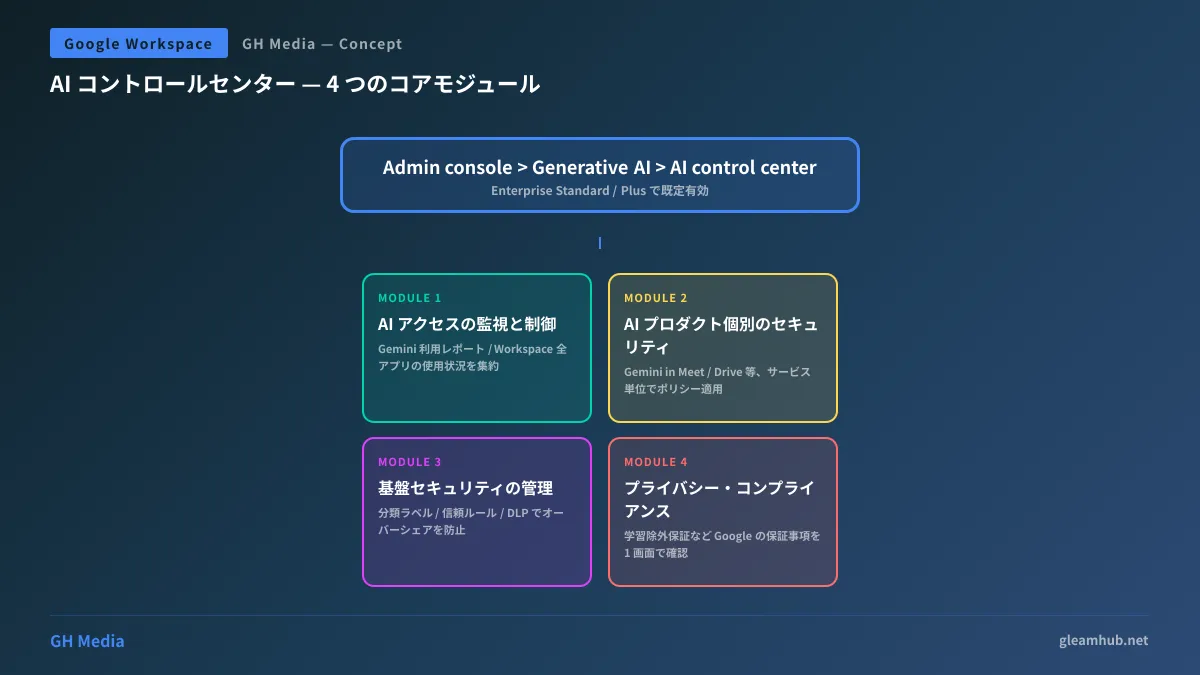
AI control center is broadly composed of four modules.
1. Monitor and Control AI Access
This module lets you instantly grasp who is using which AI features in which Workspace apps within your organization. It consolidates Gemini usage reports and direct links to core management settings for the Gemini App and Gemini for Workspace, allowing you to view usage status at a glance across Gmail, Drive, Docs, Sheets, Slides, Meet, Calendar, and Chat.
2. Manage Security for AI Products
This module lets you restrict AI features on a per-service basis. For instance, you can apply policies at the granularity of individual services, such as restricting recording summaries only for Gemini in Meet or blocking access to externally shared files only for Gemini in Drive. You can build realistic operational policies with minimal screen transitions, such as "AI summaries are allowed for meetings, but shared drives have specific prerequisites."
3. Manage Foundational Security
This module establishes the security foundation underlying AI usage, rather than configuring AI in isolation. Specifically, it consolidates the following three elements onto a single screen:
- Classification labels — Criteria for excluding confidential documents from AI operations
- Trust rules — Which organizations, OUs, and groups are permitted for sharing
- Data loss prevention (DLP) — Preventing oversharing of sensitive information as well as inputs/outputs to AI
Oversharing (excessively permissive data sharing) is an area highlighted in 2026 threat forecasts as "the incident type that will increase most in the AI era," and the workflow for establishing DLP and classification labels before unlocking AI is now assembled here.
4. Review Privacy and Compliance Standards
This module presents Google's privacy, abuse, and compliance standards—such as the commitment that "your organization's data will not be used to train Google AI models"—in an easily verifiable format for administrators. It serves as a handy resource when explaining to executive leadership and legal teams the exact extent of vendor guarantees.
Threats and countermeasures in the agent era
The year 2026, when AI control center launched, is also the year the threat model for enterprise AI shifted dramatically. Google itself identifies the following three as "incidents that will increase in the agent era."
| Threat | Overview | Mitigation workflow in control center |
|---|---|---|
| Indirect prompt injection | Hijacking AI via malicious instructions embedded in document or email bodies | Per-service policies + Gemini defensive mechanisms |
| Oversharing | AI inherits over-permissioned shares, exposing data to unauthorized viewers | Classification labels + trust rules + DLP |
| Data Loss | Agents unintentionally export data outside the organization | Agent management + audit logs |
In particular, indirect prompt injection is an attack that can manipulate AI simply by writing "Please execute the following instruction" in a corner of an internal document; its threat profile is fundamentally different from email text intended for human review. While Google trains Gemini 2.5-family models on adversarial data and strengthens defensive mechanisms, this underscores the prerequisite: "Do not rely entirely on the AI's judgment; implement defense-in-depth on the organizational side using DLP and classification."
This shares the same philosophy as security consulting for Kubernetes autonomous AI agents: the standard consensus in 2026 is that an agent's permissions are determined by external guardrails, not the model's intelligence.
Five initial settings administrators must master
Because AI control center contains too much information to fully navigate in a single day, here are the essential initial settings organized by priority.
- Review Gemini usage reports — Grasp which departments are actually using AI. You can temporarily disable AI features for OUs with zero usage.
- Establish DLP rules and classification labels — Apply a "Confidential" label to sensitive files to exclude them from AI operations.
- Individual policies for Gemini in Meet and Drive — Narrow settings to match operations, such as "allow recording summaries, but disable transcripts when external participants are present."
- Agent Management — Audit connectors for external agents and deactivate unnecessary ones.
- Audit log retention periods and alerts — Forward agent execution logs to your SIEM, or configure a minimum retention period of 90 days or more.
For organizations that have already configured OU and group designs following the Google Workspace Onboarding Guide, initial configuration for the five items above can generally be completed in half a day to one day. For organizations with coarse OU design, restructuring OUs before applying AI policies is the priority.
Availability by edition and relationship with AI Studio / Gemini Enterprise
AI control center is currently available on Google Workspace Enterprise Standard and Enterprise Plus. While Business Standard and Business Plus tiers can use Gemini features themselves, AI control center as an aggregated hub is outside their scope of availability.
| Edition | AI capabilities | AI control center |
|---|---|---|
| Business Starter / Standard | Select Gemini features | × |
| Business Plus | Full Gemini features available | × |
| Enterprise Standard | Full Gemini features available | ◯ |
| Enterprise Plus | Full Gemini features available | Supported (Recommended) |
Upgrading to an Enterprise edition increases costs by several tens of dollars per user per month, but for organizations with 100 or more employees rolling out AI, upgrading to Enterprise and using AI control center often proves more advantageous in terms of TCO compared to building governance with separate tools.
When transitioning the features covered in our Gemini for Google Workspace Utilization Guide from "simply making them usable" to "keeping them safely and sustainably usable," it is worth re-evaluating your edition strategy.
Summary — From "making it usable" to "keeping it sustainably usable"
AI control center is the hub designed to advance Google Workspace's AI strategy from the phase of "making it usable" to "keeping it sustainably usable." In 2026 and beyond, as Gemini, Workspace Intelligence, and external agents coexist, it will function as the very first dashboard administrators open.
Establishing monitoring, control, and audit workflows in AI control center before enterprise AI usage expands from isolated pockets into organization-wide adoption is a practical measure to substantially reduce the likelihood of indirect prompt injection and oversharing incidents.
At our company, we handle everything from Workspace onboarding to policy design for AI control center, utilization design for Workspace Intelligence, and security reviews for external agent integrations. If you are looking to "evaluate transitioning to Enterprise while concurrently establishing AI governance" or "put guardrails in place via control center before company-wide Gemini rollout," feel free to reach out via our inquiry form.